Claw-Empire

Claw-Empire

Command Your AI Agent Empire from the CEO Desk
A local-first AI agent office simulator that orchestrates CLI, OAuth, and API-connected providers (including Claude Code, Codex CLI, Gemini CLI, OpenCode, Kimi Code, GitHub Copilot, and Antigravity) as a virtual company of autonomous agents.

Releases CI Node.js 22+ License Platform AI Agents

Quick Start · AI Install Guide · Release Notes · OpenClaw · Direct Messenger · $ Command · Features · Screenshots · Tech Stack · Providers · Docker Deploy · Security
English | 한국어 | 日本語 | 中文

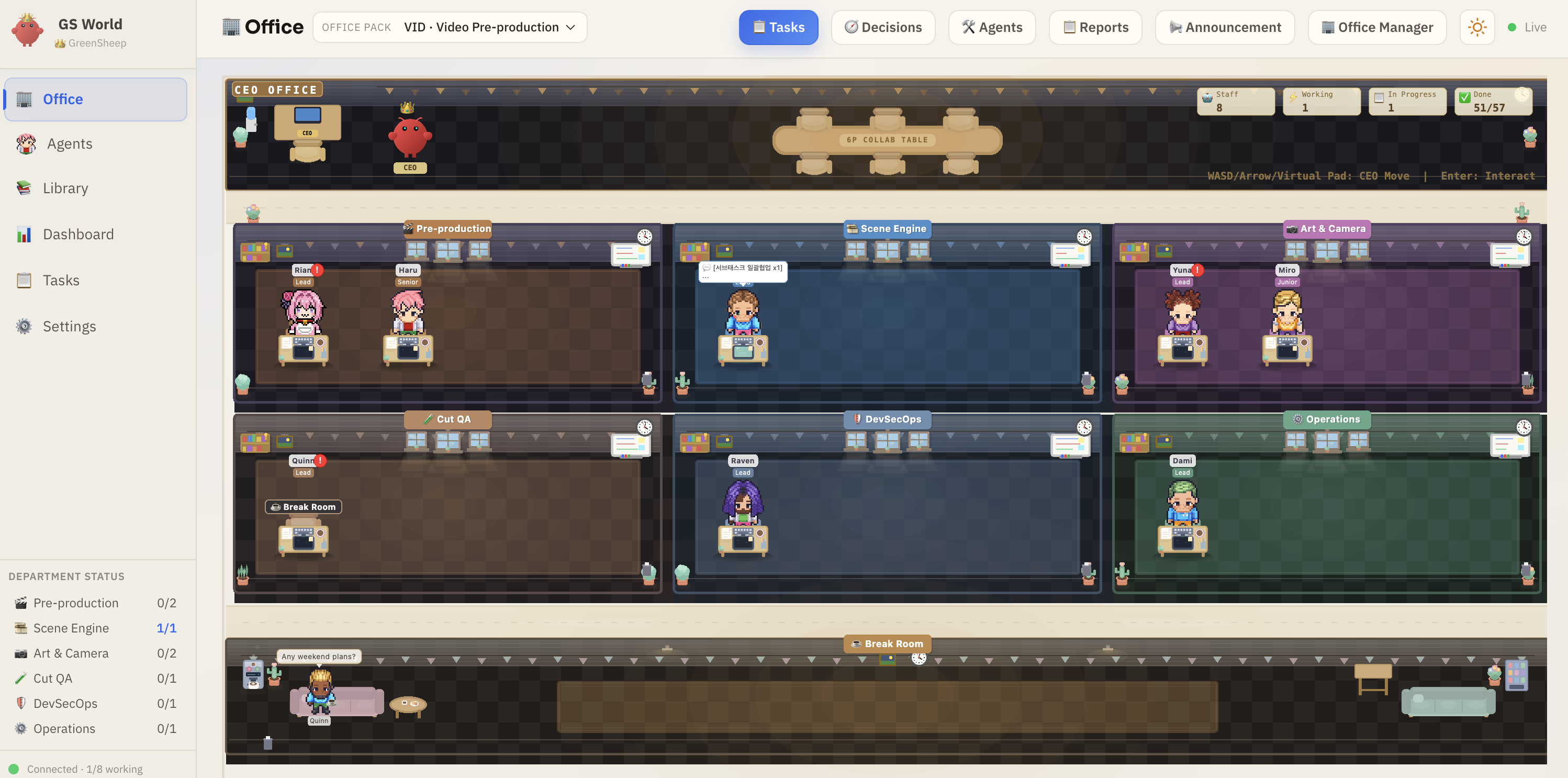
Office View

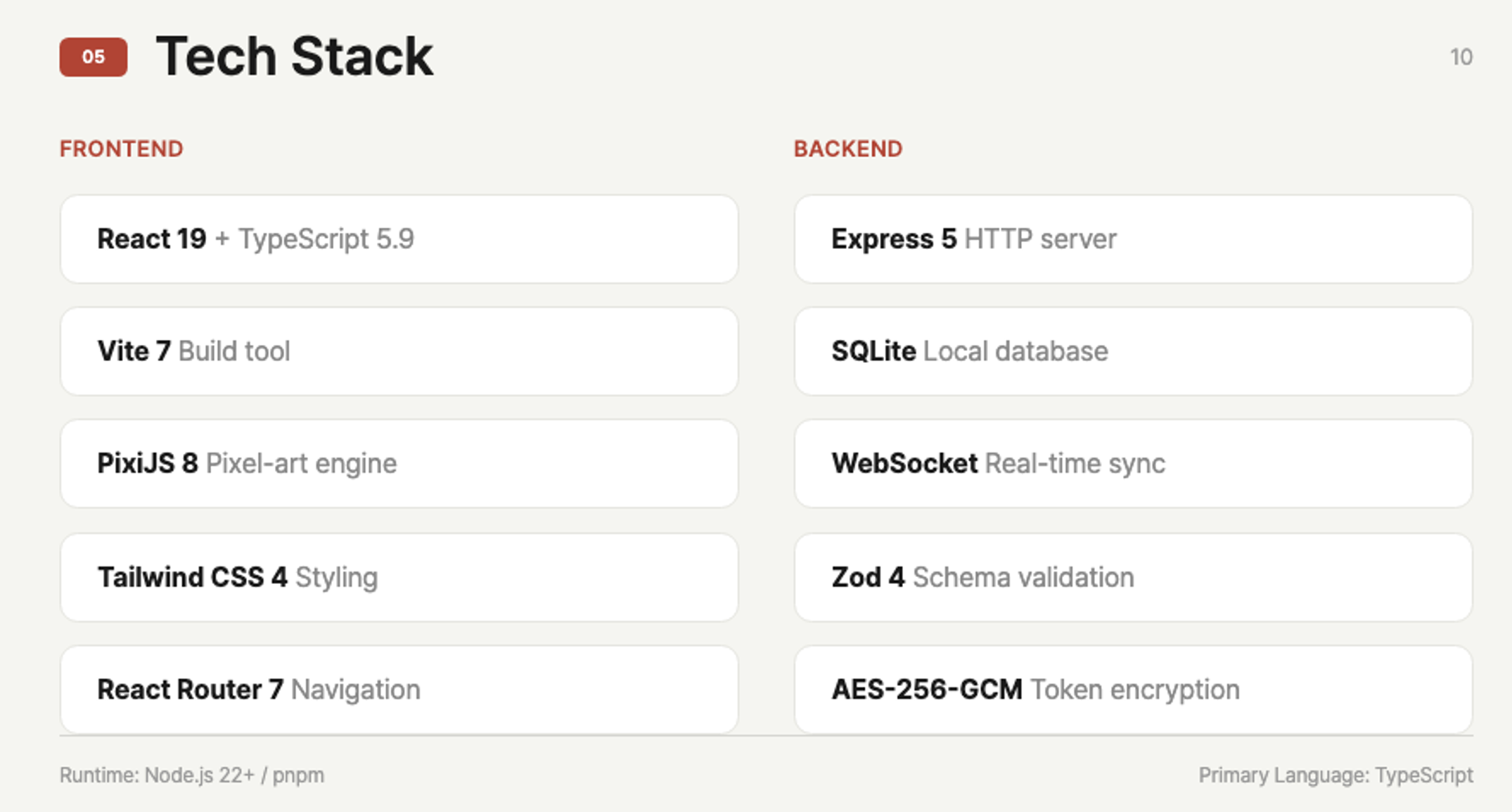
--- ## What is Claw-Empire? Claw-Empire transforms your AI coding assistants — connected via **CLI**, **OAuth**, or **direct API keys** — into a fully simulated **virtual software company**. You are the CEO. Your AI agents are the employees. Watch them collaborate across departments, hold meetings, deliver tasks, and level up — all visualized through a charming pixel-art office interface. ### Why Claw-Empire? - **One interface, many AI agents** — Manage CLI, OAuth, and API-backed agents from a single dashboard - **Local-first & private** — All data stays on your machine. SQLite database, no cloud dependency - **Visual & intuitive** — Pixel-art office view makes AI orchestration fun and transparent - **Real autonomous collaboration** — Agents work in isolated git worktrees, attend meetings, and produce deliverables --- ## Install with AI > **Just paste this to your AI coding agent (Claude Code, Codex, Gemini CLI, etc.):** > > ``` > Install Claw-Empire following the guide at: > https://github.com/GreenSheep01201/claw-empire > ``` > > The AI will read this README and handle everything automatically. --- ## Latest Release (v2.0.4) - **Docker deployment is now an officially documented path** - the repo now ships a production-oriented `Dockerfile`, `docker-compose.yml`, `.dockerignore`, and container-aware runtime path handling. - **Stale `working` agents recover automatically after interrupted runs** - lifecycle startup and interval sweeps now reset agents that are still marked `working` without a live `in_progress` task. - **Settings > API now supports official direct-API presets** - OpenCode Go and Bailian Coding Plan presets lock the expected Base URL, seed fallback models immediately, and keep refresh/retry behavior explicit. - **Kimi Code is now supported end to end** - Kimi is wired through CLI execution, provider labels, skills learn/unlearn flow, prompt-skill rendering, video-preprod bootstrap, and provider-aware schema/runtime checks. - **API model assignment now starts from the development pack and expands to initialized office packs** - `development` remains the default baseline, and office packs that have already been hydrated through initial setup also appear as assign targets. - **Local E2E validation is safer and cleaner** - `pnpm run test:e2e` now resets the isolated runtime before and after Playwright runs, and existing `8810` servers are no longer reused unless you explicitly opt in. - Full notes: [`docs/releases/v2.0.4.md`](docs/releases/v2.0.4.md) - API docs: [`docs/api.md`](docs/api.md), [`docs/openapi.json`](docs/openapi.json) - Security policy: [`SECURITY.md`](SECURITY.md) ## Office Pack Profiles (v2.0.1) Each office pack applies a different collaboration topology, naming seed, and workflow bias. | Pack | Core Focus | Representative Structure | | ----------------------------- | -------------------------------------------------------------- | ---------------------------------------------------------------- | | `development` (`DEV`) | Default engineering baseline with backward-compatible behavior | Planning / Development / Design / QA-QC / DevSecOps / Operations | | `report` (`RPT`) | Structured report and document production | Editorial Planning, Research Engine, Doc Design, Review Desk | | `web_research_report` (`WEB`) | Source collection and citation-first fact validation | Research Strategy, Crawler Team, Fact Check | | `novel` (`NOV`) | Worldbuilding, narrative flow, and tone consistency | Worldbuilding, Narrative Engine, Character Art, Tone QA | | `video_preprod` (`VID`) | Concept/script/shot-list/editing-note pre-production | Pre-production, Scene Engine, Art & Camera, Cut QA | | `roleplay` (`RPG`) | In-character dialogue immersion and role consistency | Character Planning, Dialogue Engine, Stage Art, Character QA | ## Screenshots
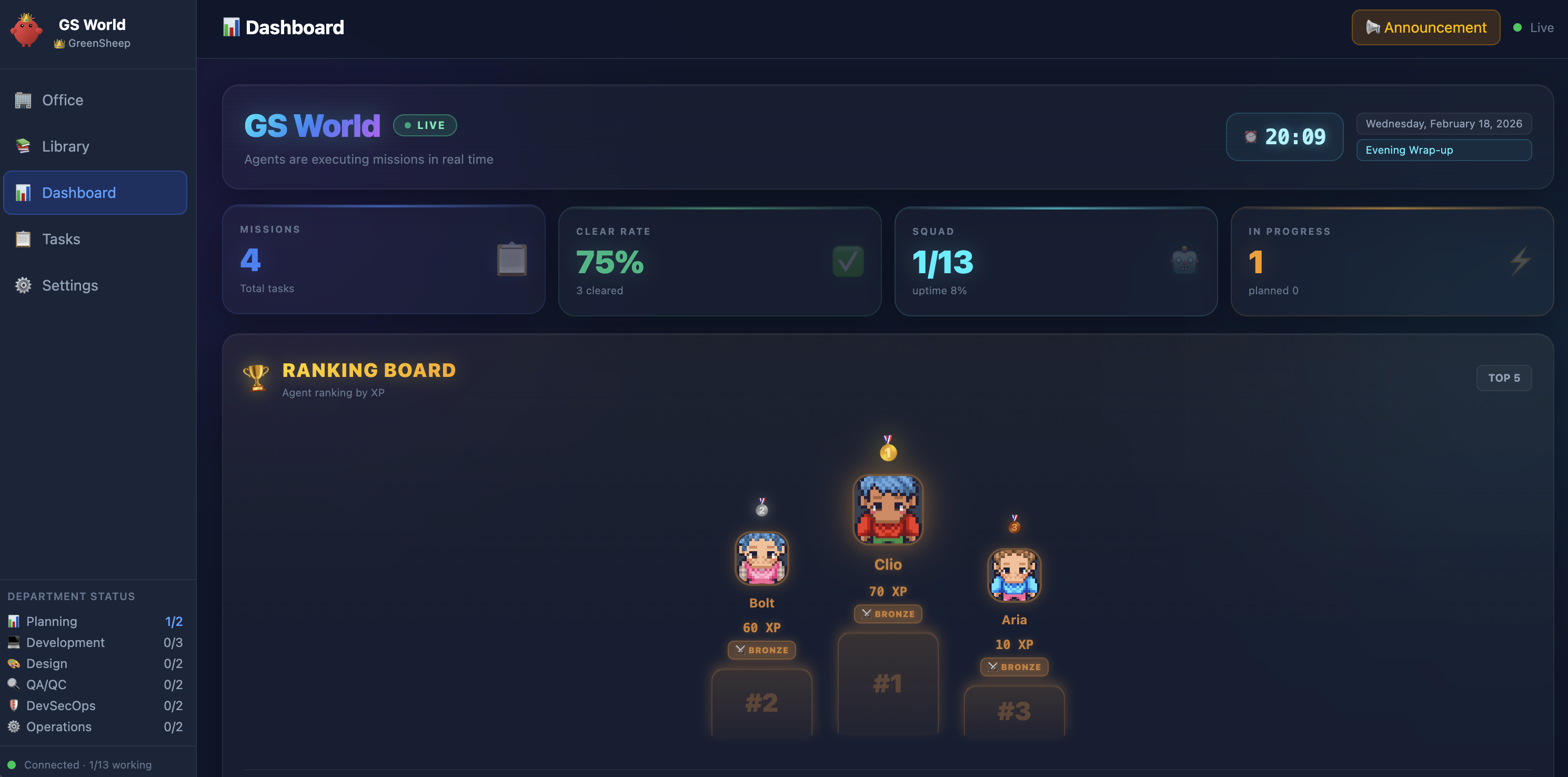
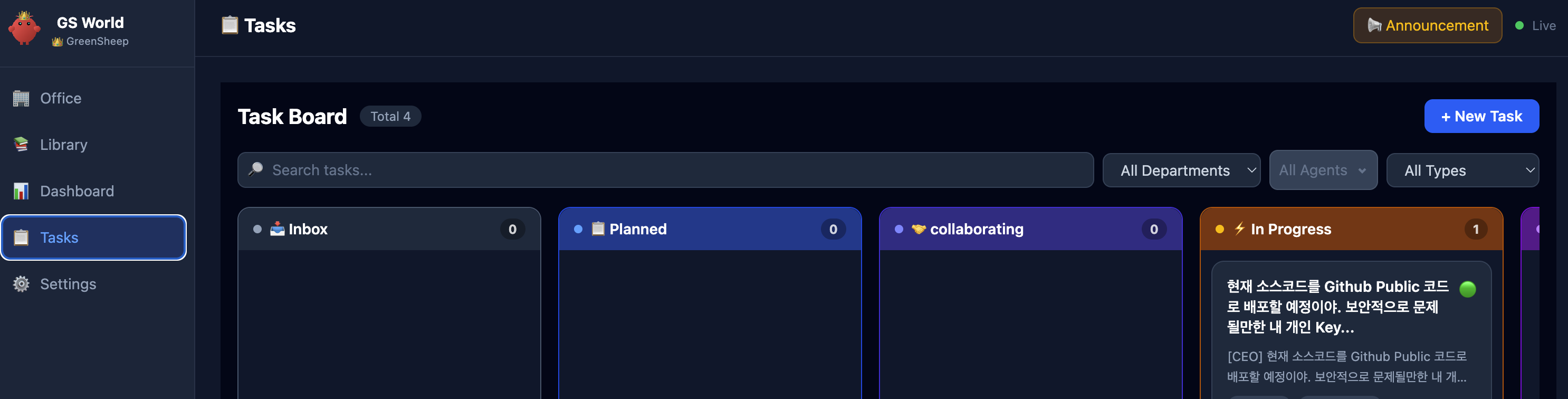
**Dashboard** — Real-time KPI metrics, agent rankings, and department status at a glance Dashboard **Kanban Board** — Drag-and-drop task management with department and agent filters Kanban Board
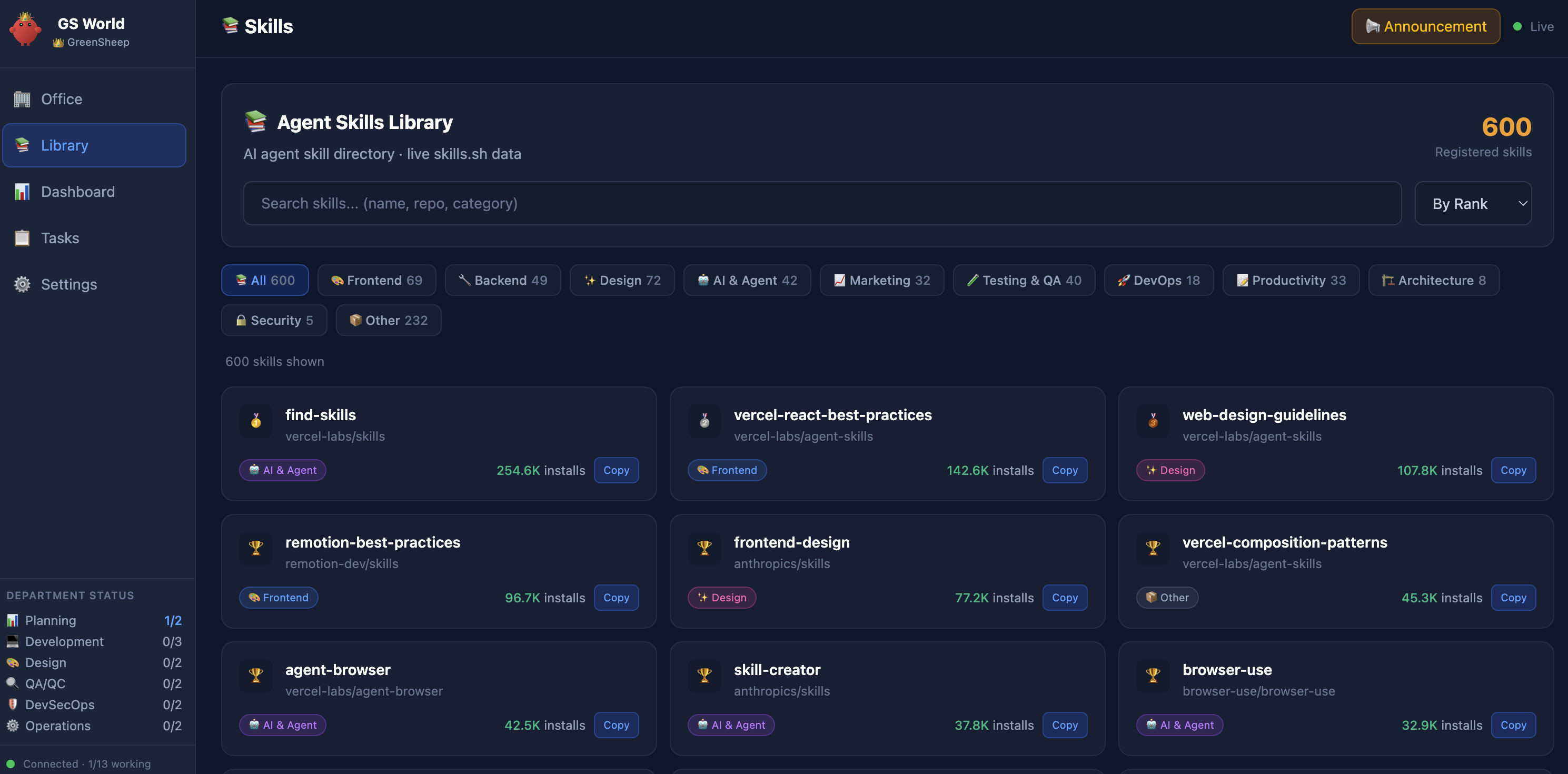
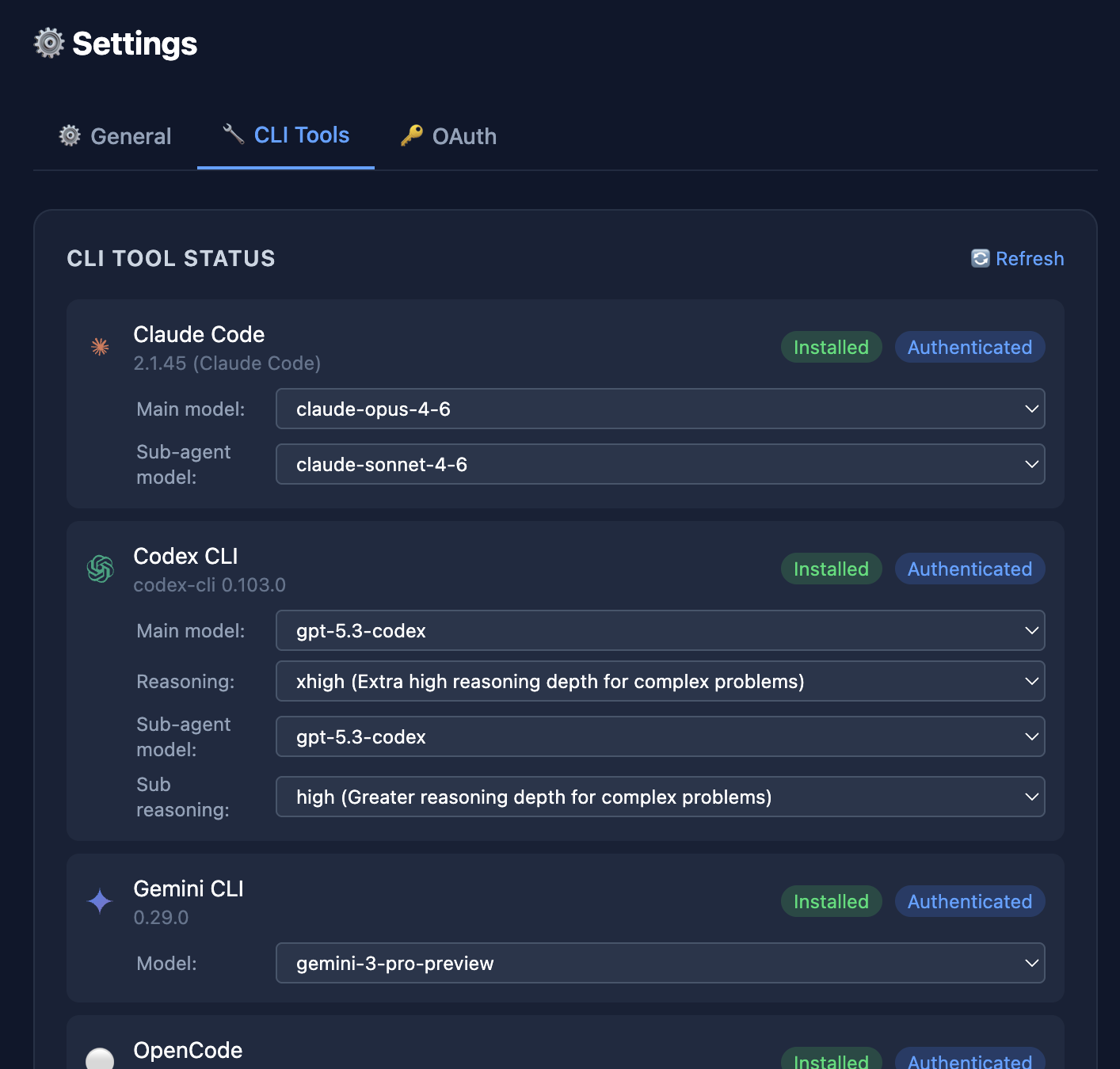
**Skills Library** — Browse and assign 600+ agent skills across categories Skills Library **Multi-Provider CLI** — Configure Claude Code, Codex, Gemini CLI, OpenCode, and Kimi Code with model selection CLI Tools Settings
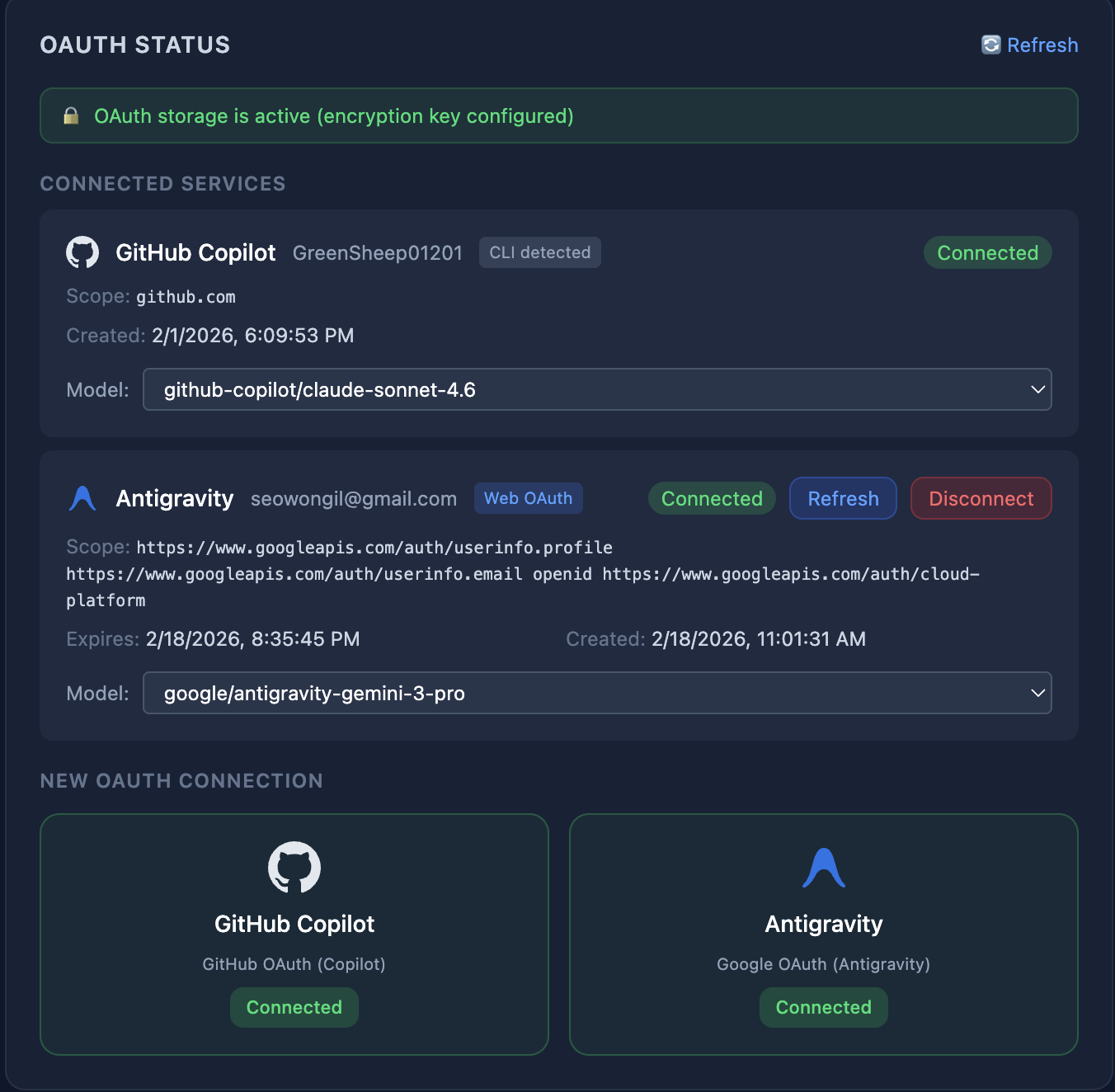
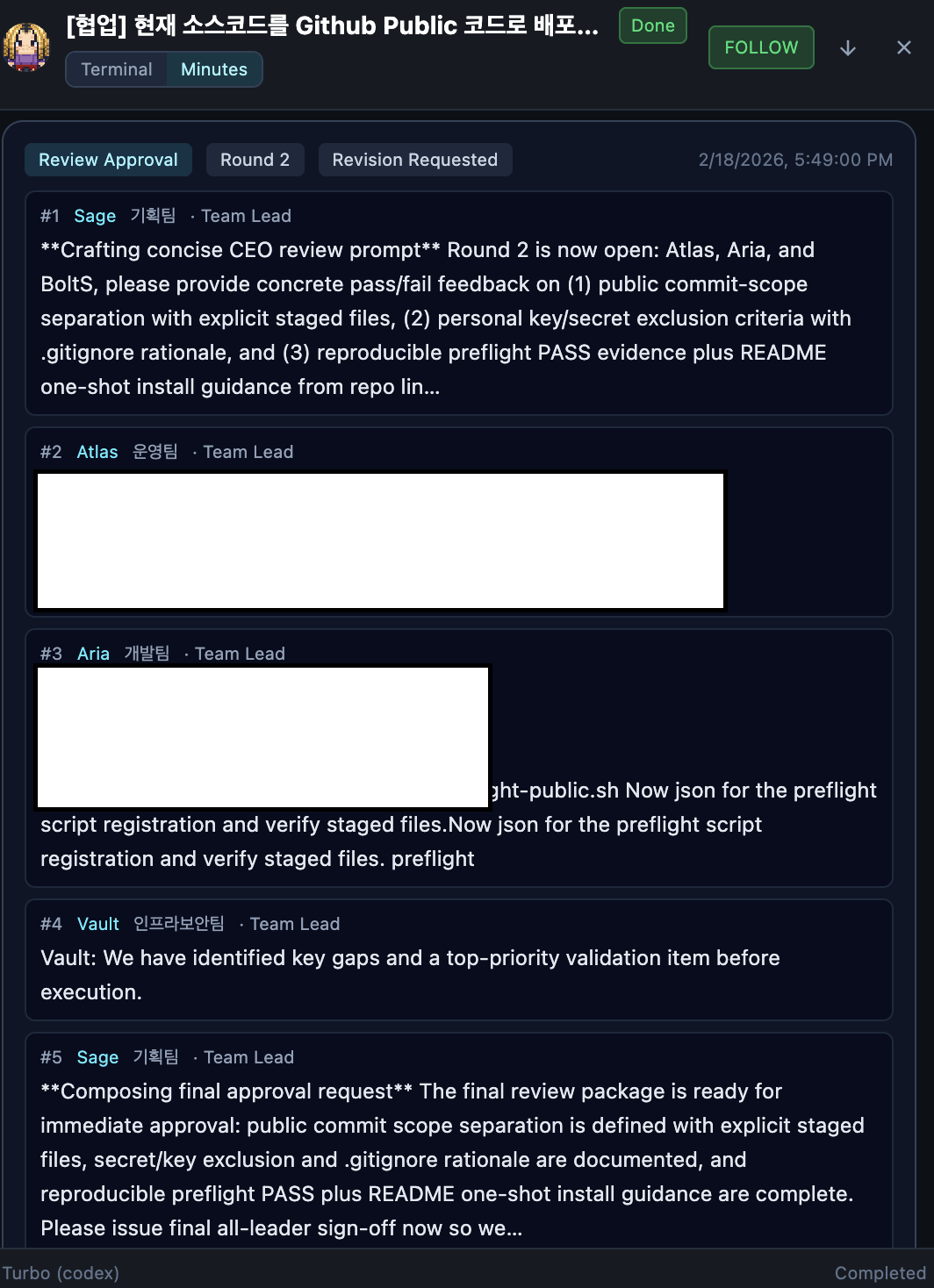
**OAuth Integration** — Secure GitHub & Google OAuth with encrypted token storage OAuth Settings **Meeting Minutes** — AI-generated meeting summaries with multi-round review approval Meeting Minutes
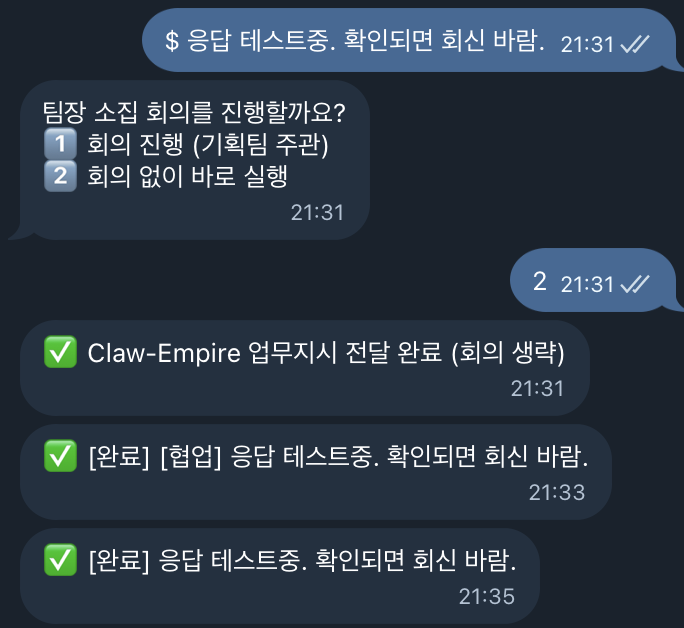
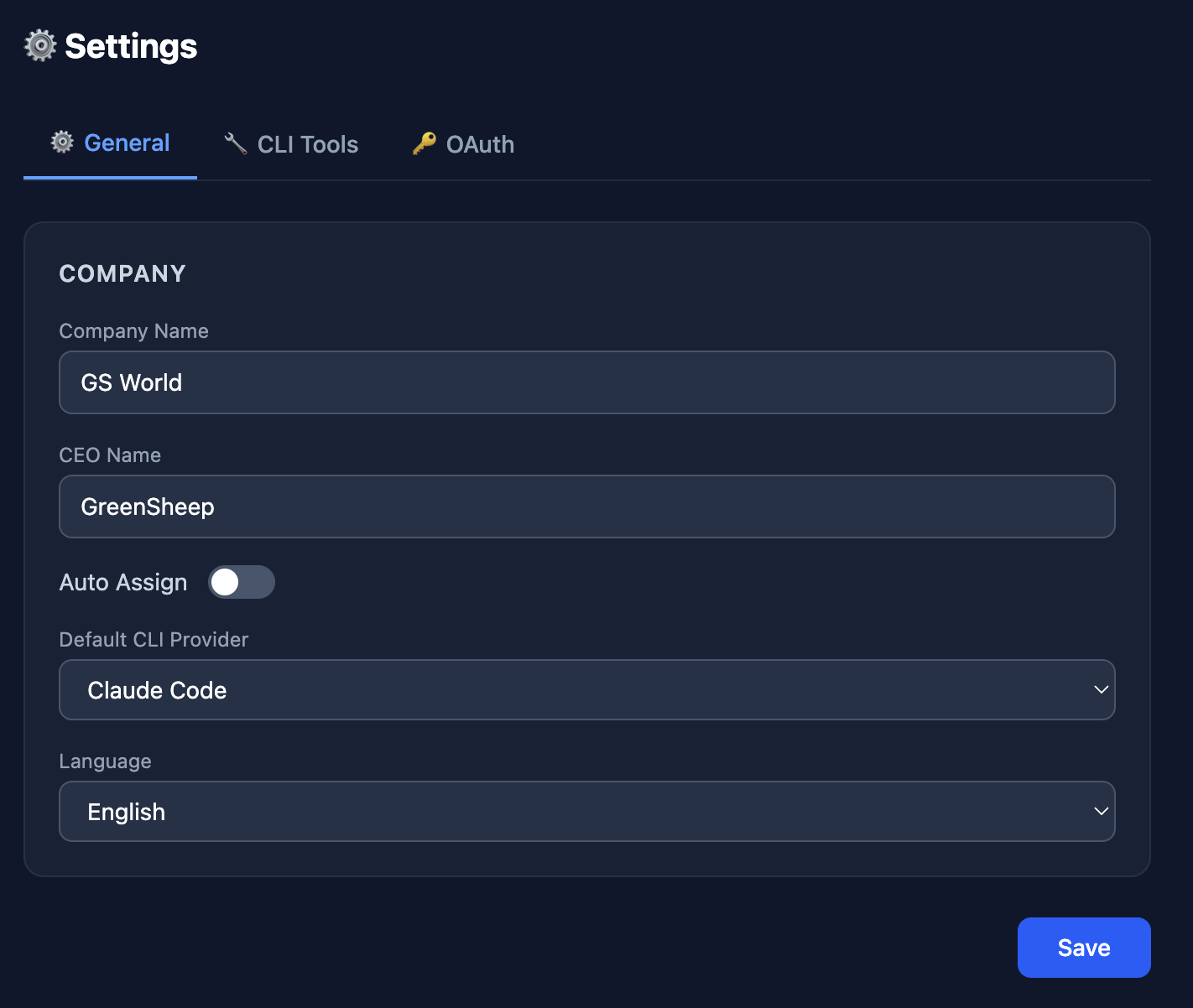
**Messenger Integration** — Configure Telegram, WhatsApp, Discord, Google Chat, Slack, Signal, iMessage sessions and send `$` CEO directives Telegram Integration **Settings** — Configure company name, CEO name, default provider preferences (CLI/OAuth/API), and language preferences Settings
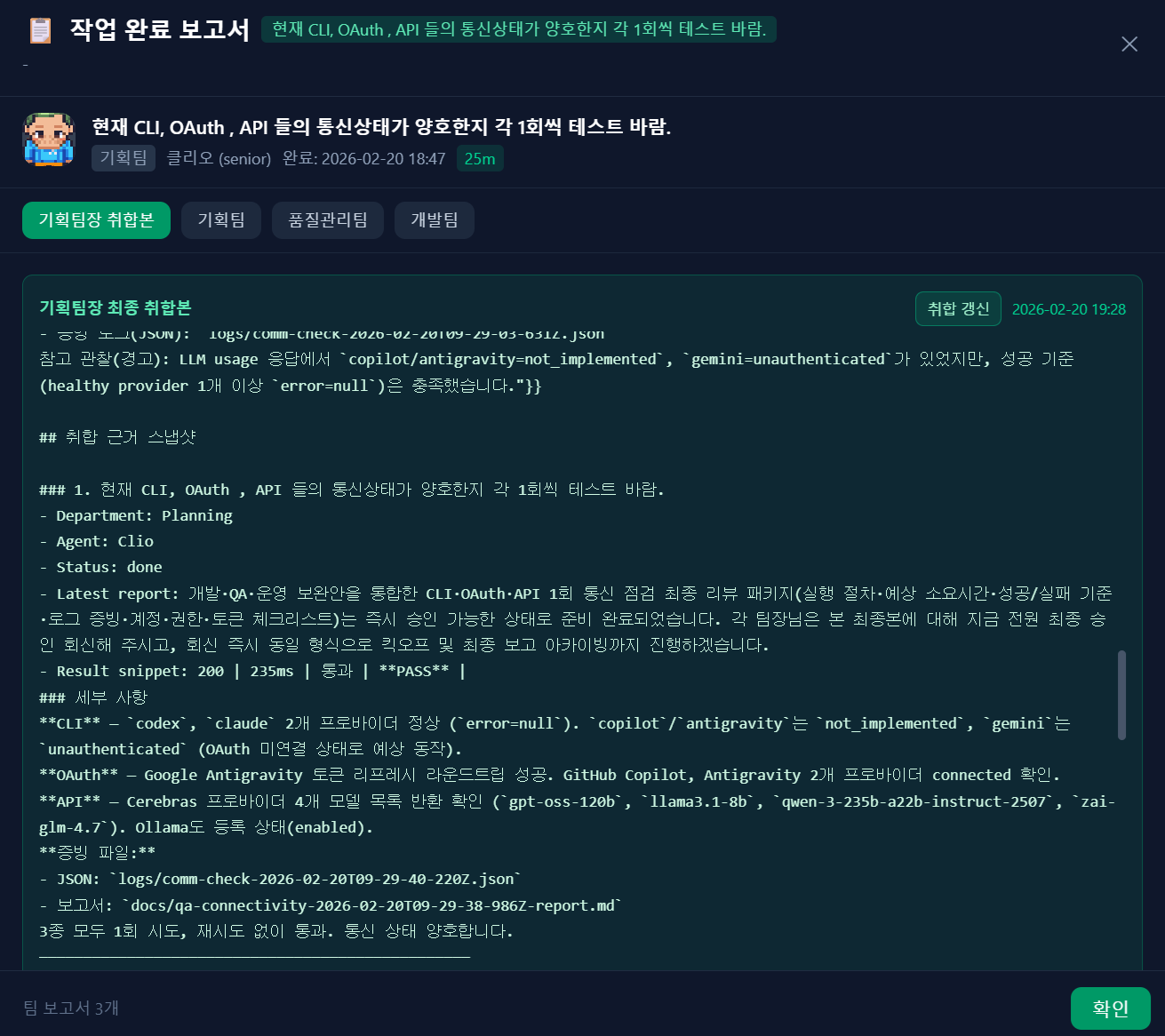
**Detailed Report** — Example of completion report popup, report history, and detailed report view for a request Detailed Report **PPT Generation** — Example captures of PPT generation output for a report request
PPT Generation Example 0 PPT Generation Example 1

### Video Output Sample Preview sample intro video output:

- Direct file: [`Sample_Img/claw-empire-intro.mp4`](Sample_Img/claw-empire-intro.mp4) ### PPT Sample Sources Use the sample sources below when reviewing or extending report-to-PPT generation: Usage path: **Chat window > Report Request button**, then enter your request. - Folder: [`docs/reports/Sample_Slides`](docs/reports/Sample_Slides) - Sample deck (`.pptx`): [`docs/reports/PPT_Sample.pptx`](docs/reports/PPT_Sample.pptx) - HTML slides: [`slide-01.html`](docs/reports/Sample_Slides/slide-01.html), [`slide-02.html`](docs/reports/Sample_Slides/slide-02.html), [`slide-03.html`](docs/reports/Sample_Slides/slide-03.html), [`slide-04.html`](docs/reports/Sample_Slides/slide-04.html), [`slide-05.html`](docs/reports/Sample_Slides/slide-05.html), [`slide-06.html`](docs/reports/Sample_Slides/slide-06.html), [`slide-07.html`](docs/reports/Sample_Slides/slide-07.html), [`slide-08.html`](docs/reports/Sample_Slides/slide-08.html), [`slide-09.html`](docs/reports/Sample_Slides/slide-09.html) - Build scripts: [`build-pptx.mjs`](docs/reports/Sample_Slides/build-pptx.mjs), [`build-pptx.cjs`](docs/reports/Sample_Slides/build-pptx.cjs), [`html2pptx.cjs`](docs/reports/Sample_Slides/html2pptx.cjs) --- ## Features | Feature | Description | | ------------------------------ | ----------------------------------------------------------------------------------------------------------------------------------------------------------------------------------------------------------- | | **Pixel-Art Office** | Animated office view with agents walking, working, and attending meetings across 6 departments | | **Workflow Pack Profiles** | Six built-in workflow packs (`development`, `report`, `web_research_report`, `novel`, `video_preprod`, `roleplay`) provide pack-specific routing schema, QA rules, and output templates | | **Office Pack Profiles** | Pack-scoped office profiles apply dedicated department topology, naming/theme presets, and isolated agent/department data per pack (except DB-backed development baseline) | | **Kanban Task Board** | Full task lifecycle — Inbox, Planned, Collaborating, In Progress, Review, Done — with drag-and-drop | | **CEO Chat & Directives** | Direct communication with team leaders; `$` directives support meeting choice plus project path/context routing (`project_path`, `project_context`) | | **Multi-Provider Support** | Claude Code, Codex CLI, Gemini CLI, OpenCode, Kimi Code, Antigravity — all from one dashboard | | **External API Providers** | Connect agents to external LLM APIs (OpenAI, Anthropic, Google, Ollama, OpenRouter, Together, Groq, Cerebras, custom) via Settings > API tab, with official presets for OpenCode Go and Bailian Coding Plan | | **OAuth Integration** | GitHub & Google OAuth with AES-encrypted token storage in local SQLite | | **Real-time WebSocket** | Live status updates, activity feed, and agent state synchronization | | **Active Agent Control** | Active-agent monitor with process/activity/idle metadata and direct kill action for stuck tasks | | **Task Report System** | Completion popup, report history, team report drilldown, and planning-lead consolidated archive | | **Agent Management** | Hire, edit, and delete agents with multilingual names, role/department/provider selection, and personality fields | | **Agent Ranking & XP** | Agents earn XP for completed tasks; ranking board tracks top performers | | **Skills Library** | 600+ categorized skills (Frontend, Backend, Design, AI, DevOps, Security, etc.) with custom skill upload support | | **Meeting System** | Planned and ad-hoc meetings with AI-generated minutes and multi-round review | | **Git Worktree Isolation** | Each agent works in isolated git branches, merged only on CEO approval | | **Multi-Language UI** | English, Korean, Japanese, Chinese — auto-detected or manually set | | **Messenger Integration** | Telegram, Discord, Slack and more — send `$` CEO directives and receive updates through built-in direct channel sessions (OpenClaw optional) | | **PowerPoint Export** | Generate presentation slides from meeting minutes and reports | | **Connectivity QA Scripts** | Built-in `test:comm:*` scripts for CLI/OAuth/API communication validation with retry and evidence logs | | **In-App Update Notice** | Checks GitHub latest release and shows a top banner with OS-specific `git pull` guidance when a newer version is available | | **Department Management** | Planning, Development, Design, QA/QC, DevSecOps, Operations — with dedicated management tab for arrow/drag-and-drop sort order editing | | **Manual Agent Assignment** | Assign specific agents to projects; meetings/delegation respect manual selection, with pre-save safeguards for no-agent or leader-only selections | | **Sprite Registration Safety** | Prevents duplicate sprite-number file overwrite by rejecting conflicting uploads with explicit `409 sprite_number_exists` responses | | **Custom Skill Upload** | Upload `.md` skill files through the UI to train CLI representatives with custom skills, complete with classroom training animation and management interface | --- ## Tech Stack | Layer | Technology | | -------------------- | --------------------------------------------------- | | **Frontend** | React 19 + Vite 7 + Tailwind CSS 4 + TypeScript 5.9 | | **Pixel Art Engine** | PixiJS 8 | | **Backend** | Express 5 + SQLite (zero-config embedded DB) | | **Real-time** | WebSocket (ws) | | **Validation** | Zod 4 | | **Icons** | Lucide React | | **Routing** | React Router 7 | | **Export** | PptxGenJS (PowerPoint generation) | ## AI Installation Guide > This section is for AI coding agents. Execute each step and run verification commands before moving to the next step. ### Step 0: Verify prerequisites ```bash # Node.js 22+ node -v # pnpm (or enable corepack) pnpm -v || corepack enable # git git --version ``` ### Step 1: Clone and run one-click setup ```bash git clone https://github.com/GreenSheep01201/claw-empire.git cd claw-empire git submodule update --init --recursive bash install.sh ``` Windows PowerShell: ```powershell git clone https://github.com/GreenSheep01201/claw-empire.git cd claw-empire git submodule update --init --recursive powershell -ExecutionPolicy Bypass -File .\install.ps1 ``` ### Step 2: Verify setup output macOS/Linux: ```bash # Required files after setup [ -f .env ] && [ -f scripts/setup.mjs ] && echo "setup files ok" # AGENTS orchestration rules installed grep -R "BEGIN claw-empire orchestration rules" ~/.openclaw/workspace/AGENTS.md AGENTS.md 2>/dev/null || true grep -R "INBOX_SECRET_DISCOVERY_V2" ~/.openclaw/workspace/AGENTS.md AGENTS.md 2>/dev/null || true # OpenClaw inbox requirements in .env grep -E '^(INBOX_WEBHOOK_SECRET|OPENCLAW_CONFIG)=' .env || true ``` Windows PowerShell: ```powershell if ((Test-Path .\.env) -and (Test-Path .\scripts\setup.mjs)) { "setup files ok" } $agentCandidates = @("$env:USERPROFILE\.openclaw\workspace\AGENTS.md", ".\AGENTS.md") $agentCandidates | ForEach-Object { if (Test-Path $_) { Select-String -Path $_ -Pattern "BEGIN claw-empire orchestration rules" } } $agentCandidates | ForEach-Object { if (Test-Path $_) { Select-String -Path $_ -Pattern "INBOX_SECRET_DISCOVERY_V2" } } # OpenClaw inbox requirements in .env Get-Content .\.env | Select-String -Pattern '^(INBOX_WEBHOOK_SECRET|OPENCLAW_CONFIG)=' ``` ### Step 3: Start and health-check ```bash pnpm dev:local ``` In another terminal: ```bash curl -s http://127.0.0.1:8790/healthz ``` Expected: `{"ok":true,...}` Messenger channels are configured in Settings UI and persisted to SQLite (`settings.messengerChannels`). `.env` messenger token/channel variables are no longer used. ### Step 4: Optional messenger + inbox verification ```bash curl -s http://127.0.0.1:8790/api/messenger/sessions ``` This returns messenger sessions saved in Settings. ```bash curl -X POST http://127.0.0.1:8790/api/inbox \ -H "content-type: application/json" \ -H "x-inbox-secret: $INBOX_WEBHOOK_SECRET" \ -d '{"source":"telegram","author":"ceo","text":"$README v1.1.6 inbox smoke test","skipPlannedMeeting":true}' ``` Expected: - `200` when `INBOX_WEBHOOK_SECRET` is configured and `x-inbox-secret` matches. - `401` when the header is missing/mismatched. - `503` when `INBOX_WEBHOOK_SECRET` is not configured on the server. ### Step 5: Direct messenger setup (no OpenClaw required) You can run messenger channels directly from Claw-Empire without OpenClaw. 1. Open `Settings > Channel Messages`. 2. Click `Add Chat`. 3. Select a messenger (`telegram`, `whatsapp`, `discord`, `googlechat`, `slack`, `signal`, `imessage`). 4. Fill in session fields: - `Name` (session label) - messenger token/credential - `Channel/Chat ID` (target) - mapped conversation `Agent` 5. Click `Confirm` to save immediately (no extra global save step required). 6. Enable the session, then test: - normal message -> direct agent chat - `$ ...` -> directive flow Notes: - Messenger sessions are persisted in SQLite (`settings.messengerChannels`). - Messenger tokens are encrypted at rest (AES-256-GCM) using `OAUTH_ENCRYPTION_SECRET` (fallback: `SESSION_SECRET`) and decrypted only at runtime. - `.env` messenger variables (`TELEGRAM_BOT_TOKEN`, `DISCORD_BOT_TOKEN`, `SLACK_BOT_TOKEN`, etc.) are not used. - `/api/inbox` + `INBOX_WEBHOOK_SECRET` is only needed for webhook/inbox flows (including OpenClaw bridge). --- ## Quick Start ## Docker Deployment (Quick Start) This repo now ships production-oriented Docker defaults: - Runs as **non-root** user (`app`, uid/gid `10001`) - Includes required CLI/runtime tools (`git`, `bash`, `openssh-client`) - Uses `docker-compose.yml` + `Dockerfile` - Persists runtime data in `./data` (already gitignored) ### 1) Prepare environment files ```bash cp .env.example .env.docker ``` Create `.env.docker.private` for sensitive runtime secrets (keep this file local only): ```bash cat > .env.docker.private <<'EOF' # Claude Code via compatible endpoint ANTHROPIC_BASE_URL=https://api.minimaxi.com/anthropic ANTHROPIC_API_KEY=YOUR_ANTHROPIC_API_KEY EOF chmod 600 .env.docker.private ``` > `.env.docker*` is ignored by git (`.env.*`), so tokens are not committed by default. ### 2) Start ```bash docker compose up -d --build ``` ### 3) Verify ```bash docker ps --filter name=claw-empire docker logs -f claw-empire ``` Open: `http://127.0.0.1:8790` ### Optional: publish image to GHCR ```bash # requires token with package write scope echo "" | docker login ghcr.io -u --password-stdin docker tag claw-empire-claw-empire:latest ghcr.io//claw-empire:latest docker push ghcr.io//claw-empire:latest ``` ### Prerequisites | Tool | Version | Install | | ----------- | ------- | -------------------------------------- | | **Node.js** | >= 22 | [nodejs.org](https://nodejs.org/) | | **pnpm** | latest | `corepack enable` (built into Node.js) | | **Git** | any | [git-scm.com](https://git-scm.com/) | ### One-Click Setup (Recommended) | Platform | Command | | ------------------------ | -------------------------------------------------------------------------------------------------------------------------------------- | | **macOS / Linux** | `git clone https://github.com/GreenSheep01201/claw-empire.git && cd claw-empire && bash install.sh` | | **Windows (PowerShell)** | `git clone https://github.com/GreenSheep01201/claw-empire.git; cd claw-empire; powershell -ExecutionPolicy Bypass -File .\install.ps1` | If the repo is already cloned: | Platform | Command | | ------------------------ | ---------------------------------------------------------------------------------------------------------------- | | **macOS / Linux** | `git submodule update --init --recursive && bash scripts/openclaw-setup.sh` | | **Windows (PowerShell)** | `git submodule update --init --recursive; powershell -ExecutionPolicy Bypass -File .\scripts\openclaw-setup.ps1` | ### OpenClaw `.env` Requirements (for `/api/inbox`) Set both values in `.env` before sending chat webhooks: - `INBOX_WEBHOOK_SECRET=` - `OPENCLAW_CONFIG=` (unquoted preferred) `scripts/openclaw-setup.sh` / `scripts/openclaw-setup.ps1` now auto-generate `INBOX_WEBHOOK_SECRET` when it is missing. Initial install via `bash install.sh` / `install.ps1` already goes through these setup scripts, so this is applied from day one. For existing clones that only run `git pull`, `pnpm dev*` / `pnpm start*` now auto-apply this once when needed and then persist `CLAW_MIGRATION_V1_0_5_DONE=1` to prevent repeated execution. `/api/inbox` requires server-side `INBOX_WEBHOOK_SECRET` plus an `x-inbox-secret` header that exactly matches it. - Missing/mismatched header -> `401` - Missing server config (`INBOX_WEBHOOK_SECRET`) -> `503` ### Manual Setup (Fallback)
macOS / Linux ```bash # 1. Clone the repository git clone https://github.com/GreenSheep01201/claw-empire.git cd claw-empire # 2. Enable pnpm via corepack corepack enable # 3. Install dependencies pnpm install # 4. Create your local environment file cp .env.example .env # 5. Generate a random encryption secret node -e " const fs = require('fs'); const crypto = require('crypto'); const p = '.env'; const content = fs.readFileSync(p, 'utf8'); fs.writeFileSync(p, content.replace('__CHANGE_ME__', crypto.randomBytes(32).toString('hex'))); " # 6. Setup AGENTS.md orchestration rules (teaches your AI agent to be a Claw-Empire project manager) pnpm setup -- --port 8790 # 7. Start the development server pnpm dev:local ```
Windows (PowerShell) ```powershell # 1. Clone the repository git clone https://github.com/GreenSheep01201/claw-empire.git cd claw-empire # 2. Enable pnpm via corepack corepack enable # 3. Install dependencies pnpm install # 4. Create your local environment file Copy-Item .env.example .env # 5. Generate a random encryption secret node -e "const fs=require('fs');const crypto=require('crypto');const p='.env';const c=fs.readFileSync(p,'utf8');fs.writeFileSync(p,c.replace('__CHANGE_ME__',crypto.randomBytes(32).toString('hex')))" # 6. Setup AGENTS.md orchestration rules (teaches your AI agent to be a Claw-Empire project manager) pnpm setup -- --port 8790 # 7. Start the development server pnpm dev:local ```
Open your browser: | URL | Description | | ------------------------------- | -------------------------- | | `http://127.0.0.1:8800` | Frontend (Vite dev server) | | `http://127.0.0.1:8790/healthz` | API health check | ### AGENTS.md Setup The `pnpm setup` command injects **CEO directive orchestration rules** into your AI agent's `AGENTS.md` file. This teaches your AI coding agent (Claude Code, Codex, etc.) how to: - Interpret `$` prefix **CEO directives** for priority task delegation - Call the Claw-Empire REST API to create tasks, assign agents, and report status - Work within isolated git worktrees for safe parallel development ```bash # Default: auto-detects AGENTS.md location pnpm setup # Custom path pnpm setup -- --agents-path /path/to/your/AGENTS.md # Custom port pnpm setup -- --port 8790 ``` ### OpenClaw Integration Setup (Telegram/WhatsApp/Discord/Google Chat/Slack/Signal/iMessage) `install.sh` / `install.ps1` (or `scripts/openclaw-setup.*`) will auto-detect and write `OPENCLAW_CONFIG` when possible. Recommended `.env` format: absolute path for `OPENCLAW_CONFIG` (unquoted preferred). `v1.0.5` also normalizes surrounding quotes and leading `~` at runtime for compatibility. Default config paths: | OS | Path | | ----------------- | --------------------------------------- | | **macOS / Linux** | `~/.openclaw/openclaw.json` | | **Windows** | `%USERPROFILE%\.openclaw\openclaw.json` | Manual commands: ```bash # macOS / Linux bash scripts/openclaw-setup.sh --openclaw-config ~/.openclaw/openclaw.json ``` ```powershell # Windows PowerShell powershell -ExecutionPolicy Bypass -File .\scripts\openclaw-setup.ps1 -OpenClawConfig "$env:USERPROFILE\.openclaw\openclaw.json" ``` Verify messenger sessions: ```bash curl -s http://127.0.0.1:8790/api/gateway/targets ``` ### `$` Command -> OpenClaw Chat Delegation Logic When a chat message starts with `$`, Claw-Empire handles it as a CEO directive: 1. Orchestrator asks whether to hold a team-leader meeting first. 2. Orchestrator asks for project path/context (`project_path` or `project_context`). 3. It sends the directive to `POST /api/inbox` with the `$` prefix and `x-inbox-secret` header. 4. If meeting is skipped, include `"skipPlannedMeeting": true`. 5. Server stores it as `directive`, broadcasts company-wide, then delegates to Planning (and mentioned departments when included). If `x-inbox-secret` is missing/mismatched, the request is rejected with `401`. If `INBOX_WEBHOOK_SECRET` is not configured on the server, the request is rejected with `503`. With meeting: ```bash curl -X POST http://127.0.0.1:8790/api/inbox \ -H "content-type: application/json" \ -H "x-inbox-secret: $INBOX_WEBHOOK_SECRET" \ -d '{"source":"telegram","author":"ceo","text":"$Release v0.2 by Friday with QA sign-off","project_path":"/workspace/my-project"}' ``` Without meeting: ```bash curl -X POST http://127.0.0.1:8790/api/inbox \ -H "content-type: application/json" \ -H "x-inbox-secret: $INBOX_WEBHOOK_SECRET" \ -d '{"source":"telegram","author":"ceo","text":"$Hotfix production login bug immediately","skipPlannedMeeting":true,"project_context":"existing climpire project"}' ``` --- ## Environment Variables Copy `.env.example` to `.env`. All secrets stay local — never commit `.env`. | Variable | Required | Description | | -------------------------------------- | ------------------------ | -------------------------------------------------------------------------------------------------------------------------------------------- | | `OAUTH_ENCRYPTION_SECRET` | **Yes** | Encrypts OAuth tokens and messenger channel tokens in SQLite (AES-256-GCM) | | `SESSION_SECRET` | Fallback | Legacy fallback key used only when `OAUTH_ENCRYPTION_SECRET` is not set | | `PORT` | No | Server port (default: `8790`) | | `HOST` | No | Bind address (default: `127.0.0.1`) | | `API_AUTH_TOKEN` | Recommended | Bearer token for non-loopback API/WebSocket access | | `INBOX_WEBHOOK_SECRET` | **Yes for `/api/inbox`** | Shared secret required in `x-inbox-secret` header | | `OPENCLAW_CONFIG` | Recommended for OpenClaw | Absolute path to `openclaw.json` used for gateway target discovery/chat relay | | `DB_PATH` | No | SQLite database path (default: `./claw-empire.sqlite`) | | `LOGS_DIR` | No | Log directory (default: `./logs`) | | `OAUTH_GITHUB_CLIENT_ID` | No | GitHub OAuth App client ID | | `OAUTH_GITHUB_CLIENT_SECRET` | No | GitHub OAuth App client secret | | `OAUTH_GOOGLE_CLIENT_ID` | No | Google OAuth client ID | | `OAUTH_GOOGLE_CLIENT_SECRET` | No | Google OAuth client secret | | `OPENAI_API_KEY` | No | OpenAI API key (for Codex) | | `REVIEW_MEETING_ONESHOT_TIMEOUT_MS` | No | One-shot meeting timeout in milliseconds (default `65000`; backward-compatible: values `<= 600` are treated as seconds) | | `UPDATE_CHECK_ENABLED` | No | Enable in-app update check banner (`1` default, set `0` to disable) | | `UPDATE_CHECK_REPO` | No | GitHub repo slug used for update checks (default: `GreenSheep01201/claw-empire`) | | `UPDATE_CHECK_TTL_MS` | No | Update-check cache TTL in milliseconds (default: `1800000`) | | `UPDATE_CHECK_TIMEOUT_MS` | No | GitHub request timeout in milliseconds (default: `4000`) | | `AUTO_UPDATE_ENABLED` | No | Default auto-update value when `settings.autoUpdateEnabled` is missing (`0` default) | | `AUTO_UPDATE_CHANNEL` | No | Allowed update channel: `patch` (default), `minor`, `all` | | `AUTO_UPDATE_IDLE_ONLY` | No | Apply only when no `in_progress` tasks/active CLI processes (`1` default) | | `AUTO_UPDATE_CHECK_INTERVAL_MS` | No | Auto-update check interval in milliseconds (default follows `UPDATE_CHECK_TTL_MS`) | | `AUTO_UPDATE_INITIAL_DELAY_MS` | No | Delay before first auto-update check after startup (default `60000`, min `60000`) | | `AUTO_UPDATE_TARGET_BRANCH` | No | Branch name used for branch guard and `git fetch/pull` target (default `main`) | | `AUTO_UPDATE_GIT_FETCH_TIMEOUT_MS` | No | Timeout for `git fetch` during update apply (default `120000`) | | `AUTO_UPDATE_GIT_PULL_TIMEOUT_MS` | No | Timeout for `git pull --ff-only` during update apply (default `180000`) | | `AUTO_UPDATE_INSTALL_TIMEOUT_MS` | No | Timeout for `pnpm install --frozen-lockfile` during update apply (default `300000`) | | `AUTO_UPDATE_COMMAND_OUTPUT_MAX_CHARS` | No | Max in-memory capture size per stdout/stderr stream before tail-trimming (default `200000`) | | `AUTO_UPDATE_TOTAL_TIMEOUT_MS` | No | Global timeout cap for one apply run (default `900000`) | | `AUTO_UPDATE_RESTART_MODE` | No | Restart policy after auto-apply: `notify` (default), `exit`, `command` | | `AUTO_UPDATE_EXIT_DELAY_MS` | No | Delay before process exit in `exit` mode (default `10000`, min `1200`) | | `AUTO_UPDATE_RESTART_COMMAND` | No | Executable + args used when restart mode is `command` (shell metacharacters + direct shell launchers rejected; runs with server permissions) | When `API_AUTH_TOKEN` is enabled, remote browser clients enter it at runtime. The token is stored only in `sessionStorage` and is not embedded in Vite build artifacts. For `OPENCLAW_CONFIG`, absolute path is recommended. In `v1.0.5`, quoted values and leading `~` are normalized automatically. --- ## Run Modes ```bash # Development (local-only, recommended) pnpm dev:local # binds to 127.0.0.1 # Development (network-accessible) pnpm dev # binds to 0.0.0.0 # Production build pnpm build # TypeScript check + Vite build pnpm start # start API/backend server (serves dist in production mode) # Health check curl -fsS http://127.0.0.1:8790/healthz ``` ### CI Verification (Current PR Pipeline) On every pull request, `.github/workflows/ci.yml` runs: 1. Hidden/bidi Unicode guard for workflow files 2. `pnpm install --frozen-lockfile` 3. `pnpm run format:check` 4. `pnpm run lint` 5. `pnpm exec playwright install --with-deps` 6. `pnpm run test:ci` (`test:web --coverage` + `test:api --coverage` + `test:e2e`) Note: `pnpm run test:e2e` now boots an isolated `.tmp/e2e-runtime` database and clears it again after the run. Set `PW_REUSE_EXISTING_SERVER=1` only when you intentionally want to reuse an already-running local server on `8810`. Recommended local pre-PR check: ```bash pnpm run format:check pnpm run lint pnpm run build pnpm run test:ci ``` ### Communication QA Checks (v1.1.6) ```bash # Individual checks pnpm run test:comm:llm pnpm run test:comm:oauth pnpm run test:comm:api # Integrated suite (also available via legacy entrypoint) pnpm run test:comm:suite pnpm run test:comm-status ``` `test:comm:suite` writes machine-readable evidence to `logs/` and a markdown report to `docs/`. ### Project Path QA Smoke (v1.1.6) ```bash # Requires API auth token QA_API_AUTH_TOKEN="" pnpm run test:qa:project-path ``` `test:qa:project-path` validates path helper endpoints, project create flow, duplicate `project_path` conflict response, and cleanup behavior. ### In-App Update Banner When a newer release is published on GitHub, Claw-Empire shows a top banner in the UI with pull instructions and a release-note link. - Windows PowerShell: `git pull; pnpm install` - macOS/Linux shell: `git pull && pnpm install` - After pull/install, restart the server. ### Auto Update (Safe Mode, opt-in) You can enable conservative auto-update behavior for release sync. - `GET /api/update-auto-status` — current auto-update runtime/config state (**auth required**) - `POST /api/update-auto-config` — update runtime auto-update toggle (`enabled`) without restart (**auth required**) - `POST /api/update-apply` — apply update pipeline on demand (`dry_run` / `force` / `force_confirm` supported, **auth required**) - `force=true` bypasses most safety guards and therefore requires `force_confirm=true` - `dirty_worktree` and `channel_check_unavailable` guards are non-overridable (still block apply) - Restart mode (`notify|exit|command`) is applied for both auto and manual update runs - In `notify` mode, successful apply includes `manual_restart_required` reason Default behavior remains unchanged (**OFF**). When enabled, safe-mode guards skip updates if the server is busy or the repository is not in a clean fast-forward state. If `AUTO_UPDATE_CHANNEL` has an invalid value, the server logs a warning and falls back to `patch`. #### Troubleshooting: `git_pull_failed` / diverged local branch If an apply result returns `error: "git_pull_failed"` (or `git_fetch_failed`) with `manual_recovery_may_be_required` in `result.reasons`, the repository likely needs operator intervention. 1. Inspect the latest apply result via `GET /api/update-auto-status` (`runtime.last_result`, `runtime.last_error`). 2. In the server repo, check divergence: - `git fetch origin main` - `git status` - `git log --oneline --decorate --graph --max-count 20 --all` 3. Resolve to a clean fast-forwardable state (for example, rebase local commits or reset to `origin/main` based on your policy). 4. Re-run `POST /api/update-apply` (optionally `{"dry_run": true}` first). The auto-update loop keeps running on its configured interval and will retry on future cycles after the repository returns to a safe state. ⚠️ `AUTO_UPDATE_RESTART_COMMAND` runs with server permissions and is a privileged operation. The command parser rejects shell metacharacters (`;`, `|`, `&`, `` ` ``, `$`, `<`, `>`) and blocks direct shell launchers (for example `sh`, `bash`, `zsh`, `cmd`, `powershell`, `pwsh`). Use only a plain executable + fixed args format (no shell/interpreter wrappers, no dynamically constructed input). --- ## Provider Setup (CLI / OAuth / API) ### Official API presets The **Settings > API** tab now includes four official direct-API presets: - `OpenCode Go (OpenAI)` -> `https://opencode.ai/zen/go/v1` - `OpenCode Go (Anthropic)` -> `https://opencode.ai/zen/go/v1` - `Bailian Coding Plan (OpenAI)` -> `https://coding-intl.dashscope.aliyuncs.com/v1` - `Bailian Coding Plan (Anthropic)` -> `https://coding-intl.dashscope.aliyuncs.com/apps/anthropic` Notes: - Bailian Coding Plan API keys must start with `sk-sp-`. - These presets seed fallback model lists immediately so agents can be assigned even when live `/models` discovery is unavailable or incomplete. - The assignment modal uses `development` as the default baseline and also includes office packs that have already completed initial setup and been hydrated into runtime state. - Direct API presets use the provider endpoint model IDs such as `glm-5`, `kimi-k2.5`, and `minimax-m2.5`. They do **not** use OpenCode CLI model IDs like `opencode-go/`. - Bailian Coding Plan keys are intended for the interactive coding tool flow. Review the provider documentation before reusing those keys in other environments. Claw-Empire supports three provider paths: - **CLI tools** — install local coding CLIs and run tasks through local processes - **OAuth accounts** — connect supported providers (for example GitHub/Google-backed flows) via secure token exchange - **Direct API keys** — bind agents to external LLM APIs from **Settings > API** For CLI mode, install at least one: | Provider | Install | Auth | | ------------------------------------------------------------- | ---------------------------------------- | ------------------------------ | | [Claude Code](https://docs.anthropic.com/en/docs/claude-code) | `npm i -g @anthropic-ai/claude-code` | `claude` (follow prompts) | | [Codex CLI](https://github.com/openai/codex) | `npm i -g @openai/codex` | Set `OPENAI_API_KEY` in `.env` | | [Gemini CLI](https://github.com/google-gemini/gemini-cli) | `npm i -g @google/gemini-cli` | OAuth via Settings panel | | [OpenCode](https://github.com/opencode-ai/opencode) | `npm i -g opencode` | Provider-specific | | [Kimi Code](https://github.com/MoonshotAI/kimi-cli) | `uv tool install --python 3.13 kimi-cli` | `kimi auth login` | Configure providers and models in the **Settings > CLI Tools** panel within the app. Alternatively, connect agents to external LLM APIs (no CLI installation required) via the **Settings > API** tab. API keys are stored encrypted (AES-256-GCM) in the local SQLite database — not in `.env` or source code. Skills learn/unlearn automation is currently designed for CLI-capable providers. --- ## Project Structure ``` claw-empire/ ├── .github/ │ └── workflows/ │ └── ci.yml # PR CI (Unicode guard, format, lint, tests) ├── server/ │ ├── index.ts # backend entrypoint │ ├── server-main.ts # runtime wiring/bootstrap │ ├── modules/ # routes/workflow/bootstrap lifecycle │ ├── test/ # backend test setup/helpers │ └── vitest.config.ts # backend unit test config ├── src/ │ ├── app/ # app shell, layout, state orchestration │ ├── api/ # frontend API modules │ ├── components/ # UI (office/taskboard/chat/settings) │ ├── hooks/ # polling/websocket hooks │ ├── test/ # frontend test setup │ ├── types/ # frontend type definitions │ ├── App.tsx │ ├── api.ts │ └── i18n.ts ├── tests/ │ └── e2e/ # Playwright E2E scenarios ├── public/sprites/ # pixel-art agent sprites ├── scripts/ │ ├── setup.mjs # environment/bootstrap setup │ ├── auto-apply-v1.0.5.mjs # startup migration helper │ ├── openclaw-setup.sh # one-click setup (macOS/Linux) │ ├── openclaw-setup.ps1 # one-click setup (Windows PowerShell) │ ├── prepare-e2e-runtime.mjs │ ├── preflight-public.sh # pre-release security checks │ └── generate-architecture-report.mjs ├── install.sh # wrapper for scripts/openclaw-setup.sh ├── install.ps1 # wrapper for scripts/openclaw-setup.ps1 ├── docs/ # design & architecture docs ├── AGENTS.md # local agent/orchestration rules ├── CONTRIBUTING.md # branch/PR/review policy ├── eslint.config.mjs # flat ESLint config ├── .env.example # environment variable template └── package.json ``` --- ## Security Claw-Empire is designed with security in mind: - **Local-first architecture** — All data stored locally in SQLite; no external cloud services required - **Encrypted OAuth + messenger tokens** — User-specific OAuth tokens and direct messenger channel tokens are stored **server-side only** in SQLite, encrypted at rest using AES-256-GCM with `OAUTH_ENCRYPTION_SECRET` (`SESSION_SECRET` fallback). The browser never receives refresh tokens - **Built-in OAuth Client IDs** — The GitHub and Google OAuth client IDs/secrets embedded in the source code are **public OAuth app credentials**, not user secrets. Per [Google's documentation](https://developers.google.com/identity/protocols/oauth2/native-app), client secrets for installed/desktop apps are "not treated as a secret." This is standard practice for open-source apps (VS Code, Thunderbird, GitHub CLI, etc.). These credentials only identify the app itself — your personal tokens are always encrypted separately - **No personal credentials in source** — All user-specific tokens (GitHub, Google OAuth) are stored encrypted in the local SQLite database, never in source code - **No secrets in repo** — Comprehensive `.gitignore` blocks `.env`, `*.pem`, `*.key`, `credentials.json`, etc. - **Preflight security checks** — Run `pnpm run preflight:public` before any public release to scan for leaked secrets in both working tree and git history - **Localhost by default** — Development server binds to `127.0.0.1`, not exposed to network ## API Docs & Security Quick Links - **API documentation** — Use [`docs/api.md`](docs/api.md) for endpoint overview and usage notes, and [`docs/openapi.json`](docs/openapi.json) for schema/tooling integration. - **Security policy** — Review disclosure and policy details in [`SECURITY.md`](SECURITY.md), and run `pnpm run preflight:public` before public releases. --- ## Contributing Contributions are welcome! Please: 1. Fork the repository 2. Create a feature branch from `dev` (`git checkout -b feature/amazing-feature`) 3. Commit your changes (`git commit -m 'Add amazing feature'`) 4. Run local checks before PR: - `pnpm run format:check` - `pnpm run lint` - `pnpm run build` - `pnpm run test:ci` 5. Push your branch (`git push origin feature/amazing-feature`) 6. Open a Pull Request to `dev` (default integration branch for contributors) 7. Use `main` only for maintainer-approved emergency hotfixes, then back-merge `main -> dev` Full policy: [`CONTRIBUTING.md`](CONTRIBUTING.md) --- ## License [Apache 2.0](LICENSE) — Free for personal and commercial use. ---
**Built with pixels and passion.** _Claw-Empire — Where AI agents come to work._