# [WWW'26 Oral] ColorBench: Benchmarking Mobile Agents with Graph-Structured Framework for Complex Long-Horizon Tasks
English | 简体中文
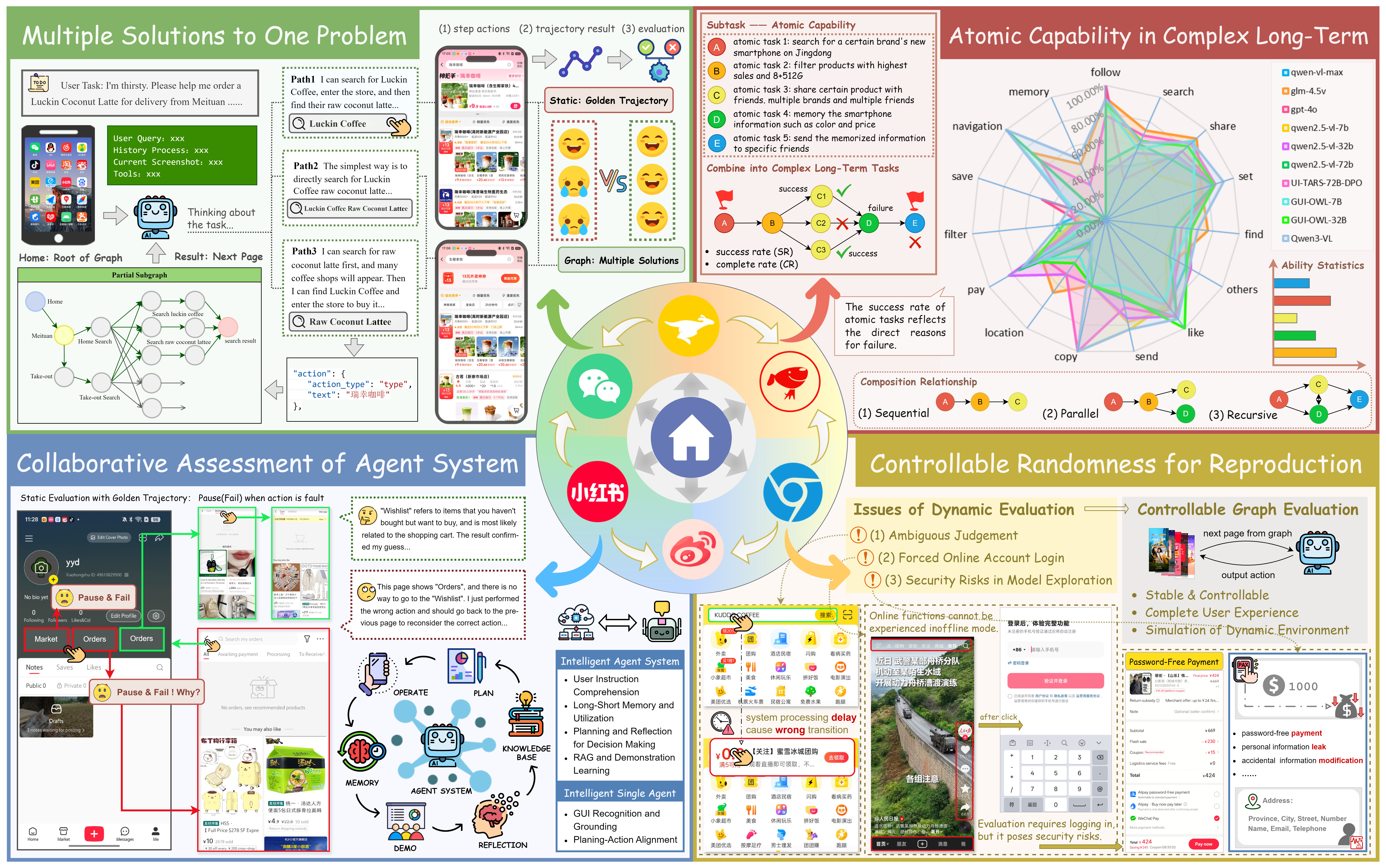
👋 Welcome to the **ColorBench** repository — a **graph-structured benchmark** designed to evaluate mobile GUI agents on complex, long-horizon tasks composed of multiple atomic operations. This project provides:
- A **graph-based benchmark construction methodology** to expand or reconstruct environments.
- A **plug-and-play evaluation framework** for safe, reproducible testing.
 ---
## 📢 News
- **[2 Dec '25]** Released the core code and dataset (including evaluation environment and benchmark graphs).
- **[16 Oct '25]** Our paper [*ColorBench: Benchmarking Mobile Agents with Graph Structured Framework for Complex Long-Horizon Task*](https://arxiv.org/abs/2510.14621) is now available on arXiv!
---
## 🧭 Overview
---
## 📢 News
- **[2 Dec '25]** Released the core code and dataset (including evaluation environment and benchmark graphs).
- **[16 Oct '25]** Our paper [*ColorBench: Benchmarking Mobile Agents with Graph Structured Framework for Complex Long-Horizon Task*](https://arxiv.org/abs/2510.14621) is now available on arXiv!
---
## 🧭 Overview
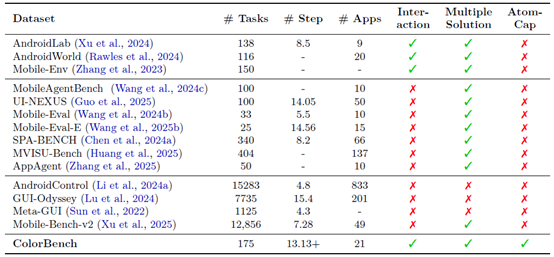
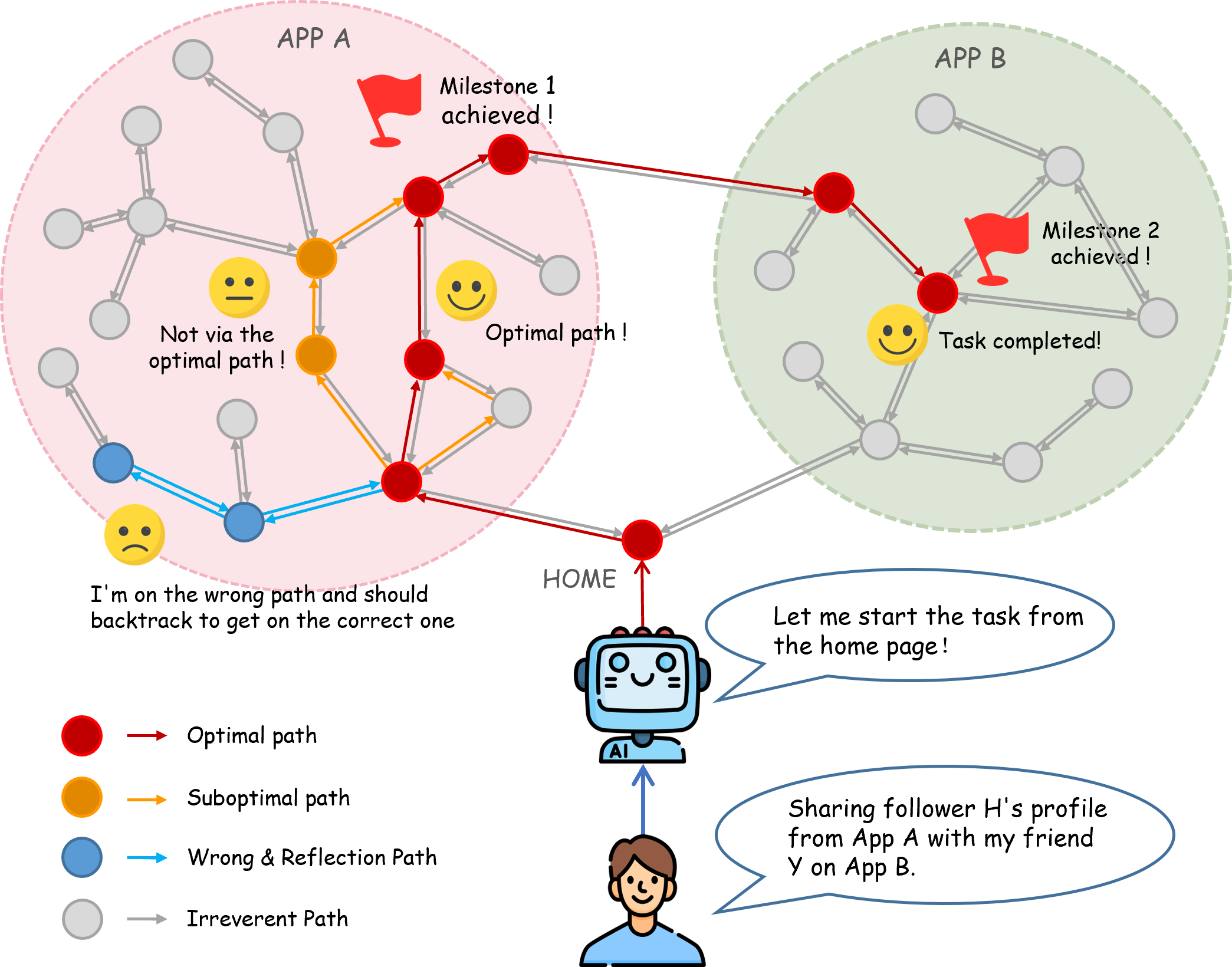 ### 📦 175 Complex Long-Horizon Tasks
- 🌐 Covering **21 major apps** – WeChat, Meituan, JD, Xiaohongshu, etc.
- 🔄 **101 cross-app** and **74 single-app** tasks
- 🧭 Average optimal path length >13 steps
### 🎨 Graph-Based Design & Multi-Path Evaluation
- 🔀 Multiple correct and error paths supported
- 🔁 Enables **reflection**, **replanning**, and **backtracking** behaviors
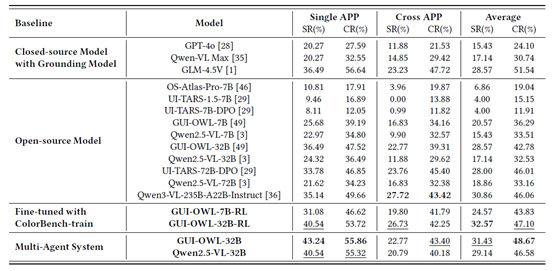
### 📊 Comprehensive Evaluation Metrics
- ✅ 3 Core Indicators: **Success Rate (SR)**, **Completion Rate (CR)**, **Atomic Capability (AC)**
- 🧩 15 Atomic Capabilities – e.g., Search, Filter, Save, Share, Memory
- 🎯 Fine-grained diagnostics for weak atomic capabilities
### 🤖 Plug-and-Play Evaluation Framework
- 📱 Static but interactive graph environment
- 📐 Safe and repeatable testing without real devices or accounts
- 🧰 Fully automated evaluation – no human verification required
---
## 📂 Repository Structure
```plaintext
ColorBench/
├── config/
│ ├── default.yaml # Config for evaluating agents
│ └── customized_config...
├── data/
│ ├── graph.json # Graph structure
│ ├── task.json # Task details
│ ├── graph_image/ # Screenshots
│ │ ├── Screenshot0.png
│ │ ├── Screenshot1.jpg
│ └── ...
├── HammerEnv/ # BFS-based trajectory collection
├── src/
│ ├── agent/ # Evaluation agents
│ ├── graph_construction/ # Graph construction utilities
│ ├── test/ # Evaluation scripts
│ └── utils.py
├── construct_graph.py
├── run_colorbench_multi_agent.py
├── run_colorbench.py
└── README.md
```
---
## 🚀 Quick Start
### 🛠️ Installation
```bash
git clone https://github.com/MadeAgents/ColorBench
cd ColorBench
pip install -r requirements.txt
```
### 🧪 Evaluation
```bash
python3 run_colorbench.py --config configs/default.yaml --model your_model_name
```
Alternatively, use the provided script:
```bash
bash run_colorbench.sh
```
#### Customize Your Agent
Define your agent in `src/agent/agent_base.py` by inheriting from **AgentBase** and implementing the `agent_step` function (responsible for executing actions and logging). Then, add your agent to `run_colorbench.py` and create a new config file under `./config/`.
Evaluation results are saved under `./checkpoints/`.
### 🧩 Graph-Structured Benchmark Construction
#### Breadth-First Search (BFS) Application Exploration
We use our self-developed Android device interaction environment **HammerEnv** for breadth-first application exploration. HammerEnv is a comprehensive Android device interaction environment that enables dynamic exploration and automated operations of mobile applications.
#### Installation Steps
1. **Download and install android_env and android_world open-source projects**:
https://github.com/google-deepmind/android_env
https://github.com/google-research/android_world
Note: When installing via pip, you need to use the editable mode with the command: pip install -e .
2. **Configure ADB connection**:
Refer to https://developer.android.com/tools
3. **Set environment variables**:
```bash
export OPENAI_API_KEY="EMPTY"
export OPENAI_BASE_URL="http://xxx.xxx.xxx.xxx/v1"
```
4. **Start interaction environment server**:
```bash
python HammerEnv/src/server/gradio_web_server_physical_device.py
```
5. **Run BFS application explorer**:
```bash
python HammerEnv/examples/bfs_app_explorer_fixed.py
```
#### Configuration
##### Exploration Configuration Parameters
| Parameter | Description | Default Value |
|-----------|-------------|---------------|
| `max_depth` | Maximum exploration depth | 3 |
| `max_trajectories` | Maximum number of trajectories to generate | 50 |
| `app_name` | Target application name | "小红书" |
| `output_dir` | Trajectory output directory | "trajectories" |
| `delay_between_actions` | Delay between actions (seconds) | 2.0 |
| `model_name` | AI model name for analysis | "Qwen2.5-VL-72B-Instruct" |
| `reset_environment_per_task` | Reset environment after each task | True |
| `reset_delay` | Environment reset delay (seconds) | 1.0 |
##### Command Line Parameters
```bash
python examples/bfs_app_explorer_fixed.py \
--server-name "http://localhost:7880/" \
--model-name "xxx" \
--app-name "小红书" \
--max-depth 3 \
--max-trajectories 20 \
--output-dir "trajectories" \
--delay 2.0
```
#### Depth-First Search (DFS) Application Exploration
To capture user long-horizon tasks, we manually capture sequences of mobile operation screenshots using a depth-first approach, then generate structured trajectory data through AI model analysis.
##### Workflow
1. **Screenshot Collection**: Manually capture application operation screenshots in order
2. **Trajectory Analysis**: Use large models to analyze adjacent screenshot pairs
3. **Action Recognition**: Extract precise click coordinates, input text, and other operations
4. **Trajectory Generation**: Build trajectory files based on trajectory data
##### Usage
```bash
# Run depth-first trajectory generation
python src/graph_construction/pic2trajectory.py
```
##### Input Requirements
- **Directory Structure**: `dfs/pic/trajectory1/`
- **Required Files**: `query.txt` (task description) + `Screenshot_step_*_raw.{png|jpg}`
- **Naming Convention**: Screenshot files numbered in operation order (trajectory1 represents the first trajectory)
##### Output Results
- **Trajectory File**: `dfs/trajectory/trajectory1/trajectory_v0.txt`
- **Adjacency Matrix**: `dfs/trajectory/trajectory1/{query}.csv`
#### Output Structure
The system generates well-organized trajectory data with the following structure:
```plaintext
trajectories/
├── 小红书/
│ ├── 小红书.json
│ ├── Screenshot_2025-01-10-20-10-21_0.jpg
│ ├── Screenshot_2025-01-10-20-10-21_1.jpg
│ └── Screenshot_2025-01-10-20-10-21_2.jpg
└── 搜索/
├── 搜索.json
├── Screenshot_2025-01-10-20-15-30_0.jpg
└── Screenshot_2025-01-10-20-15-30_1.jpg
```
#### Graph Construction
To merge multiple trajectory files into a unified task graph, run:
```bash
python construct_graph.py --input_folder --output_file
```
During merging, we use the following default models:
- models--BAAI--bge-large-zh-v1.5 for text feature embedding
- Qwen2.5-VL-72B for visual-language understanding
You can modify these in ./src/graph_construction/graph.py according to your setup.
The generated graph.json records all node and edge information in the following format:
```json
{
"node_id": ,
"screenlists": [
{
"screenshot_path": "",
"node_description": ""
}
],
"ui_element_edge_list": [
{
"source_node": ,
"target_node": ,
"action_type": "",
"action_parameter": {}
}
]
}
```
#### Frontend Inspection Tool
After graph merging, you can manually inspect and adjust graph data using the frontend visualization tool. Convert the merged graph.json into a CSV file:
- In ./src/graph_construction/parse_json_to_cvs.py, set
json_file (path to graph JSON) and save_file (output CSV path).
- In ./src/graph_construction/matrix_analyzer.py, set BASE_RECORD_PATH to your image directory.
Run the following commands:
```bash
python src/graph_construction/parse_json_to_cvs.py
python src/graph_construction/matrix_analyzer.py
```
After manual corrections, convert the updated CSV file back into the JSON format for evaluation.
```bash
python src/graph_construction/matrix_to_json.py
```
#### Bounding Box Annotation
Used for automatically generating bounding boxes for interface elements.
- In src/graph_construction/image_jump_parser.py, modify the input paths in the main function: Path to the graph dataset JSON file;Path to the corresponding image folder
- Set your model service API key;
Run the following command:
```bash
python src/graph_construction/image_jump_parser.py
```
---
## 🤝 Contributing & Citation
Contributions via **Issues** or **Pull Requests** are welcome!
If you use this project, please consider citing our paper:
> [**ColorBench: Benchmarking Mobile Agents with Graph Structured Framework for Complex Long-Horizon Task**](https://arxiv.org/abs/2510.14621)
📚 Dataset available at:
> [**HuggingFace Dataset**](https://huggingface.co/datasets/Norsheep/ColorBench)
---
### 📦 175 Complex Long-Horizon Tasks
- 🌐 Covering **21 major apps** – WeChat, Meituan, JD, Xiaohongshu, etc.
- 🔄 **101 cross-app** and **74 single-app** tasks
- 🧭 Average optimal path length >13 steps
### 🎨 Graph-Based Design & Multi-Path Evaluation
- 🔀 Multiple correct and error paths supported
- 🔁 Enables **reflection**, **replanning**, and **backtracking** behaviors
### 📊 Comprehensive Evaluation Metrics
- ✅ 3 Core Indicators: **Success Rate (SR)**, **Completion Rate (CR)**, **Atomic Capability (AC)**
- 🧩 15 Atomic Capabilities – e.g., Search, Filter, Save, Share, Memory
- 🎯 Fine-grained diagnostics for weak atomic capabilities
### 🤖 Plug-and-Play Evaluation Framework
- 📱 Static but interactive graph environment
- 📐 Safe and repeatable testing without real devices or accounts
- 🧰 Fully automated evaluation – no human verification required


---
## 📂 Repository Structure
```plaintext
ColorBench/
├── config/
│ ├── default.yaml # Config for evaluating agents
│ └── customized_config...
├── data/
│ ├── graph.json # Graph structure
│ ├── task.json # Task details
│ ├── graph_image/ # Screenshots
│ │ ├── Screenshot0.png
│ │ ├── Screenshot1.jpg
│ └── ...
├── HammerEnv/ # BFS-based trajectory collection
├── src/
│ ├── agent/ # Evaluation agents
│ ├── graph_construction/ # Graph construction utilities
│ ├── test/ # Evaluation scripts
│ └── utils.py
├── construct_graph.py
├── run_colorbench_multi_agent.py
├── run_colorbench.py
└── README.md
```
---
## 🚀 Quick Start
### 🛠️ Installation
```bash
git clone https://github.com/MadeAgents/ColorBench
cd ColorBench
pip install -r requirements.txt
```
### 🧪 Evaluation
```bash
python3 run_colorbench.py --config configs/default.yaml --model your_model_name
```
Alternatively, use the provided script:
```bash
bash run_colorbench.sh
```
#### Customize Your Agent
Define your agent in `src/agent/agent_base.py` by inheriting from **AgentBase** and implementing the `agent_step` function (responsible for executing actions and logging). Then, add your agent to `run_colorbench.py` and create a new config file under `./config/`.
Evaluation results are saved under `./checkpoints/`.
### 🧩 Graph-Structured Benchmark Construction
#### Breadth-First Search (BFS) Application Exploration
We use our self-developed Android device interaction environment **HammerEnv** for breadth-first application exploration. HammerEnv is a comprehensive Android device interaction environment that enables dynamic exploration and automated operations of mobile applications.
#### Installation Steps
1. **Download and install android_env and android_world open-source projects**:
https://github.com/google-deepmind/android_env
https://github.com/google-research/android_world
Note: When installing via pip, you need to use the editable mode with the command: pip install -e .
2. **Configure ADB connection**:
Refer to https://developer.android.com/tools
3. **Set environment variables**:
```bash
export OPENAI_API_KEY="EMPTY"
export OPENAI_BASE_URL="http://xxx.xxx.xxx.xxx/v1"
```
4. **Start interaction environment server**:
```bash
python HammerEnv/src/server/gradio_web_server_physical_device.py
```
5. **Run BFS application explorer**:
```bash
python HammerEnv/examples/bfs_app_explorer_fixed.py
```
#### Configuration
##### Exploration Configuration Parameters
| Parameter | Description | Default Value |
|-----------|-------------|---------------|
| `max_depth` | Maximum exploration depth | 3 |
| `max_trajectories` | Maximum number of trajectories to generate | 50 |
| `app_name` | Target application name | "小红书" |
| `output_dir` | Trajectory output directory | "trajectories" |
| `delay_between_actions` | Delay between actions (seconds) | 2.0 |
| `model_name` | AI model name for analysis | "Qwen2.5-VL-72B-Instruct" |
| `reset_environment_per_task` | Reset environment after each task | True |
| `reset_delay` | Environment reset delay (seconds) | 1.0 |
##### Command Line Parameters
```bash
python examples/bfs_app_explorer_fixed.py \
--server-name "http://localhost:7880/" \
--model-name "xxx" \
--app-name "小红书" \
--max-depth 3 \
--max-trajectories 20 \
--output-dir "trajectories" \
--delay 2.0
```
#### Depth-First Search (DFS) Application Exploration
To capture user long-horizon tasks, we manually capture sequences of mobile operation screenshots using a depth-first approach, then generate structured trajectory data through AI model analysis.
##### Workflow
1. **Screenshot Collection**: Manually capture application operation screenshots in order
2. **Trajectory Analysis**: Use large models to analyze adjacent screenshot pairs
3. **Action Recognition**: Extract precise click coordinates, input text, and other operations
4. **Trajectory Generation**: Build trajectory files based on trajectory data
##### Usage
```bash
# Run depth-first trajectory generation
python src/graph_construction/pic2trajectory.py
```
##### Input Requirements
- **Directory Structure**: `dfs/pic/trajectory1/`
- **Required Files**: `query.txt` (task description) + `Screenshot_step_*_raw.{png|jpg}`
- **Naming Convention**: Screenshot files numbered in operation order (trajectory1 represents the first trajectory)
##### Output Results
- **Trajectory File**: `dfs/trajectory/trajectory1/trajectory_v0.txt`
- **Adjacency Matrix**: `dfs/trajectory/trajectory1/{query}.csv`
#### Output Structure
The system generates well-organized trajectory data with the following structure:
```plaintext
trajectories/
├── 小红书/
│ ├── 小红书.json
│ ├── Screenshot_2025-01-10-20-10-21_0.jpg
│ ├── Screenshot_2025-01-10-20-10-21_1.jpg
│ └── Screenshot_2025-01-10-20-10-21_2.jpg
└── 搜索/
├── 搜索.json
├── Screenshot_2025-01-10-20-15-30_0.jpg
└── Screenshot_2025-01-10-20-15-30_1.jpg
```
#### Graph Construction
To merge multiple trajectory files into a unified task graph, run:
```bash
python construct_graph.py --input_folder --output_file
```
During merging, we use the following default models:
- models--BAAI--bge-large-zh-v1.5 for text feature embedding
- Qwen2.5-VL-72B for visual-language understanding
You can modify these in ./src/graph_construction/graph.py according to your setup.
The generated graph.json records all node and edge information in the following format:
```json
{
"node_id": ,
"screenlists": [
{
"screenshot_path": "",
"node_description": ""
}
],
"ui_element_edge_list": [
{
"source_node": ,
"target_node": ,
"action_type": "",
"action_parameter": {}
}
]
}
```
#### Frontend Inspection Tool
After graph merging, you can manually inspect and adjust graph data using the frontend visualization tool. Convert the merged graph.json into a CSV file:
- In ./src/graph_construction/parse_json_to_cvs.py, set
json_file (path to graph JSON) and save_file (output CSV path).
- In ./src/graph_construction/matrix_analyzer.py, set BASE_RECORD_PATH to your image directory.
Run the following commands:
```bash
python src/graph_construction/parse_json_to_cvs.py
python src/graph_construction/matrix_analyzer.py
```
After manual corrections, convert the updated CSV file back into the JSON format for evaluation.
```bash
python src/graph_construction/matrix_to_json.py
```
#### Bounding Box Annotation
Used for automatically generating bounding boxes for interface elements.
- In src/graph_construction/image_jump_parser.py, modify the input paths in the main function: Path to the graph dataset JSON file;Path to the corresponding image folder
- Set your model service API key;
Run the following command:
```bash
python src/graph_construction/image_jump_parser.py
```
---
## 🤝 Contributing & Citation
Contributions via **Issues** or **Pull Requests** are welcome!
If you use this project, please consider citing our paper:
> [**ColorBench: Benchmarking Mobile Agents with Graph Structured Framework for Complex Long-Horizon Task**](https://arxiv.org/abs/2510.14621)
📚 Dataset available at:
> [**HuggingFace Dataset**](https://huggingface.co/datasets/Norsheep/ColorBench)
---