
# CogitoAgent
> **Think Continuously · Act Autonomously · Stay Private**
>
> _A local-first autonomous AI agent — your workspace, your data, your rules._
[](https://www.typescriptlang.org/)
[](https://www.electronjs.org/)
[](https://nodejs.org/)
English · 中文 ·
Roadmap ·
Changelog ·
Contributing ·
Security ·
Code of Conduct
---
## 📋 Table of Contents
- [Why CogitoAgent?](#-why-cogitoagent)
- [Core Features](#-core-features)
- [Use Cases](#-use-cases)
- [Quick Start](#-quick-start)
- [Tool System](#-tool-system)
- [Architecture](#-architecture)
- [Security](#-security)
- [Configuration](#-configuration)
- [Command Reference](#-command-reference)
- [Docker Deployment](#-docker-deployment)
- [Project Structure](#-project-structure)
- [Testing & Quality](#-testing--quality)
- [Roadmap](#-roadmap)
- [Community & Support](#-community--support)
- [Contributing](#-contributing)
- [License](#-license)
---
## 💡 Why CogitoAgent?
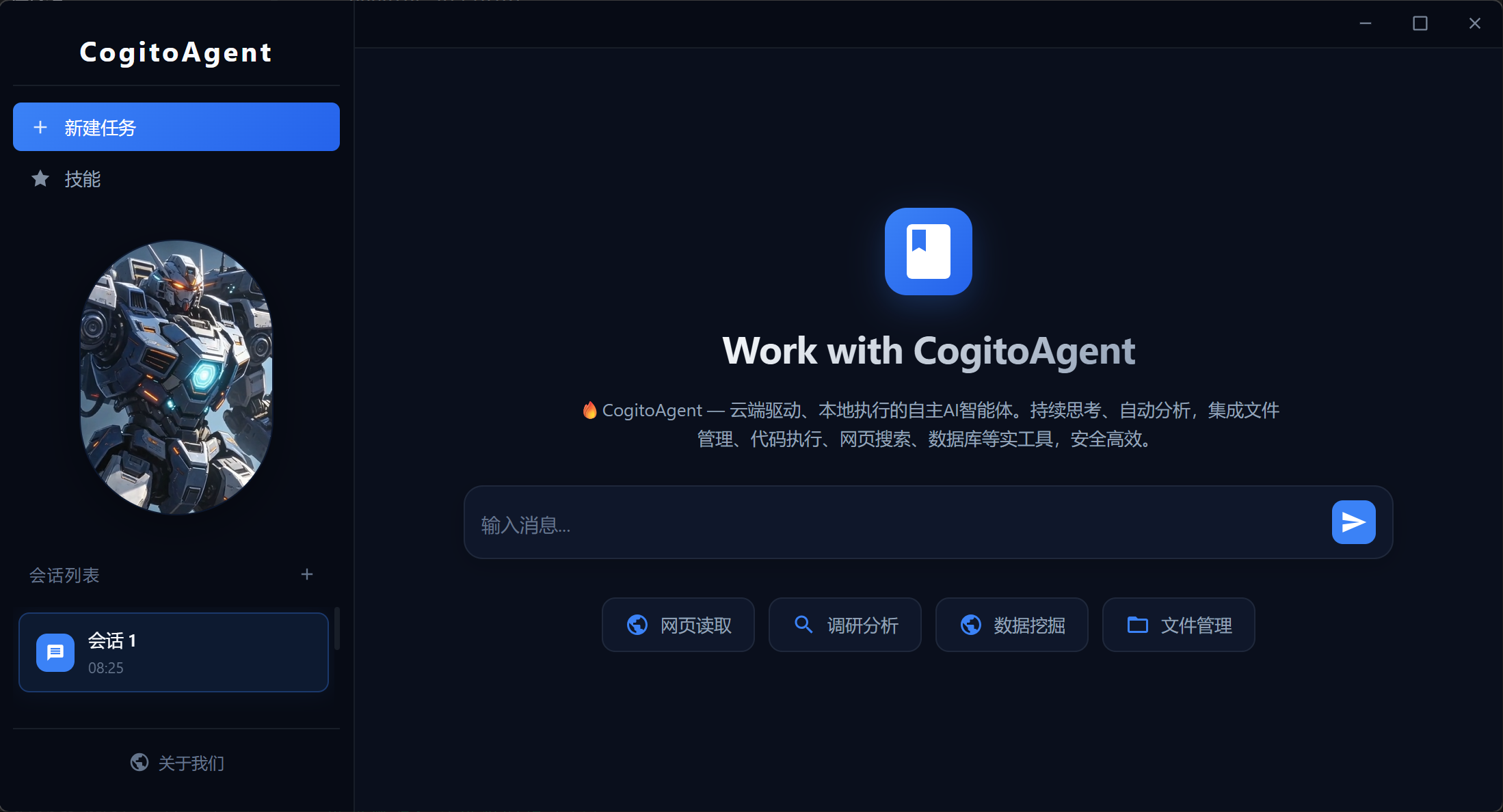
Cloud-based AI assistants send your files, code, and conversations to third-party servers. **CogitoAgent takes a different approach**: it is an autonomous agent that runs directly in your local workspace, driven by the LLM API of your choice — while your data never leaves your machine.
Cogito, ergo sum — _I think, therefore I am._ CogitoAgent isn't a chat window; it's a **continuously thinking agent** that:
- **Thinks continuously** — automatically reflects and acts on your workspace even while you're away
- **Explores autonomously** — discovers, organizes, and processes your local assets proactively
- **Executes 120+ built-in tools** — from file operations and code execution to web research, databases, OCR, and multi-agent orchestration, plus scientific plugins (chemistry / bioinformatics / literature)
- **Stays private** — only the conversation context is sent to the LLM API you specify. Your files never leave your workspace.
---
## ✨ Core Features
| Feature | Description |
| ------------------------------- | ------------------------------------------------------------------------------------------------------------- |
| **Local-First Privacy** | Workspace files stay on your machine; only the minimal conversation context goes to the LLM API you configure |
| **Continuous Thinking** | Event-driven thinking loop — progresses immediately on user messages and tool results, no polling interval |
| **120+ Tools / 23 Categories** | File ops, code execution, Git, databases, OCR, Office documents, image generation, bioinformatics and more |
| **TypeScript Core** | Full type safety, strict mode, and compile-time error detection across the entire codebase |
| **Security Sandbox** | `isolated-vm` process-level isolation for JavaScript; sanitized environment for Python subprocesses |
| **Multi-Session Management** | Independent conversation contexts with persistent storage and automatic context compression |
| **Agent Cluster** | Spawn sub-agents, delegate tasks, parallel execution, panel discussion & voting — multi-agent collaboration |
| **Electron Desktop** | Transparent overlay window, full-screen dashboard, and a dedicated monitor panel for live telemetry |
| **Plugin System** | Dynamically load custom tool plugins at runtime with a 15s import timeout and permission gates |
| **Thought-Chain Visualization** | Real-time stream of reasoning, tool calls, and results — full observability of every step |
| **WeChat Integration** | QR-code login, message send/receive, dedicated session and tool-bubble display |
| **Image Generation** | Text-to-image / image-to-image via configurable image models (e.g. `qwen-image-2.0-pro`) |
| **Observability** | Per-category tool usage statistics, token/cost tracking, and lightweight event tracing |
> **Privacy note**: CogitoAgent never uploads your files to any cloud. Only conversation context is sent to the LLM API you specify. Your workspace stays yours.
---
## 🎯 Use Cases
| Scenario | How CogitoAgent Helps |
| --------------------------------- | ----------------------------------------------------------------------------------------------------------- |
| **Personal Knowledge Management** | Continuously scans your workspace, organizes files, and answers questions from your local data |
| **Automated Research & Drafting** | Searches the web, browses pages, and drafts documents directly into your workspace |
| **Code & DevOps Assistance** | Executes code (JS/Python), manages Git repositories, runs SQL, and automates routine tasks |
| **Office Document Processing** | Creates PowerPoint, Word, and Excel files; OCR for scanned images; vision analysis |
| **Data Analysis Pipeline** | Reads CSVs/JSONs, queries SQLite, and produces structured reports |
| **Multi-Agent Collaboration** | Delegates subtasks to specialized persona sub-agents (Critic, Programmer, Analyst…) with cluster monitoring |
| **Headless Server Deployment** | Runs as a pure CLI/WebSocket service in Docker for always-on agent operations |
---
## 🚀 Quick Start
### Requirements
| Dependency | Version | Notes |
| ----------- | ------- | ------------------------------------------- |
| **Node.js** | ≥ 20 | LTS recommended |
| **npm** | ≥ 10 | or yarn/pnpm |
| **Python** | 3.x | _Optional_ — only for Python code execution |
> **Users in China**: if `npm install` fails downloading the Electron binary:
>
> ```bash
> # Windows (PowerShell)
> $env:ELECTRON_MIRROR = "https://npmmirror.com/mirrors/electron/"
> npm install
>
> # macOS / Linux
> export ELECTRON_MIRROR="https://npmmirror.com/mirrors/electron/"
> npm install
> ```
### Installation
```bash
git clone https://github.com/SnowLeopard-io/CogitoAgent.git
cd cogito-agent
npm install
npm start
```
> China mirror: `git clone https://gitee.com/cnt-code/cogito-agent.git`
### First-Time Setup
The setup wizard will guide you through:
1. **API Base URL** — any OpenAI-compatible endpoint
2. **API Key** — your LLM provider key
3. **Model Name** — e.g. `gpt-4o`, `claude-3-sonnet`, `deepseek-chat`
4. **Workspace Path** — the directory the agent is allowed to access
5. **Persona** — choose an agent personality preset
### Usage Modes
| Command | Mode | Description |
| ---------------------------- | ------------------- | ---------------------------------------------------------------------------------- |
| `npm start` | Desktop (Dashboard) | Launch Electron in dashboard mode (opens the setup wizard when not yet configured) |
| `npm run electron:desktop` | Desktop | Transparent overlay window + terminal agent over WebSocket |
| `npm run electron:dashboard` | Dashboard | Full-window dashboard with sessions, tools & live charts |
| `npm run cli` | CLI | Terminal-only agent (headless / server environments) |
---
## 🛠 Tool System
All tools are managed by a central registry (`registry.ts`) with JSON Schema (`tool-schema.ts`) and invoked via **native function calling** — streaming `tool_calls`, not fragile text markers.
```mermaid
%%{init: {"theme": "dark", "themeVariables": {"bgColor": "#0b0e14", "primaryColor": "#5eead4", "primaryTextColor": "#5eead4", "primaryBorderColor": "#5eead4", "lineColor": "#1e293b", "textColor": "#94a3b8", "fontFamily": "JetBrains Mono, monospace", "fontSize": "10", "secondaryColor": "#161b28", "tertiaryColor": "#1c2230"}}}%%
flowchart LR
subgraph INVOCATION["Invocation Layer"]
LLM["LLM Response
tool_calls (JSON)"]
SCHEMA["tool-schema.ts
buildOpenAITools()"]
PARSER["tool-schema.ts
validateToolArgs()"]
EXECUTOR["Agent.ts
executeNativeToolCallsServer()"]
end
subgraph REGISTRY["Registry"]
REG["TOOL_REGISTRY
Record"]
STATS["stats.ts
recordToolCall()"]
TRACE["tracing.ts
tool_exec event"]
end
subgraph MODULES["Tool Modules (23 Categories)"]
direction LR
CORE1["file
web
code
system
browser"]
CORE2["git
data
db
path"]
AI["memory
ocr
vision
image"]
COMM["wechat
email
cluster"]
AUTO["task
scheduler
monitor
office"]
end
subgraph EXTENSION["Extension"]
PLUGIN["plugin.ts
Dynamic Load"]
DANGER["DANGEROUS_OPERATIONS
User Confirmation"]
end
LLM --> PARSER
PARSER --> EXECUTOR
EXECUTOR --> REG
REG --> MODULES
EXECUTOR --> STATS
EXECUTOR --> TRACE
EXECUTOR --> DANGER
PLUGIN --> REG
classDef invocation fill:#161b28,stroke:#5eead4,color:#5eead4;
classDef registry fill:#161b28,stroke:#fbbf24,color:#fbbf24;
classDef modules fill:#161b28,stroke:#38bdf8,color:#38bdf8;
classDef extension fill:#161b28,stroke:#a78bfa,color:#a78bfa;
class LLM,PARSER,EXECUTOR invocation;
class REG,STATS,TRACE registry;
class CORE1,CORE2,AI,COMM,AUTO modules;
class PLUGIN,DANGER extension;
```
| Category | Module | Highlights |
| ------------------ | -------------- | -------------------------------------------------------------------------------------------------- |
| File Operations | `file.ts` | `ls`, `read`, `copy`, `mkdir`, `create` |
| Path Utilities | `path.ts` | `getBasePath`, `resolveInWorkspace`, `realPathClosest` (internal) |
| Web Tools | `web.ts` | `search`, `browse`, `fetchPage` |
| Browser Automation | `browser.ts` | `initBrowser`, `clickElement`, `fillField`, `takeScreenshot`, `downloadFile` |
| System Operations | `system.ts` | `listApps`, `openApp`, `closeApp` |
| Code Execution | `code.ts` | `executeCode`, `executeFile`, `runJavaScript`, `runPython`, `formatCode` |
| Security Sandbox | `sandbox.ts` | `createJavaScriptSandbox`, `runPythonSandbox`, `executeCodeSandbox` |
| Git | `git.ts` | 20+ commands: `init`, `clone`, `add`, `commit`, `push`, `pull`, `branch`, `merge`, `diff`, `stash` |
| Task Management | `task.ts` | `createTask`, `splitTask`, `getTaskStats`, `clearTasks` |
| Memory System | `memory.ts` | `addMemory`, `searchMemory`, `getRelatedMemories`, `clearMemory` |
| Data Processing | `data.ts` | `readCSV`, `writeCSV`, `queryData`, `analyzeData`, `sortData`, `filterData`, `groupData` |
| Database | `db.ts` | `executeSQL`, `query`, `insert`, `update`, `createTable`, `executeTransaction` |
| Email | `email.ts` | `sendEmail`, `sendTextEmail`, `sendHtmlEmail`, `sendTemplateEmail` |
| System Monitoring | `monitor.ts` | `getCPUInfo`, `getMemoryInfo`, `getDiskInfo`, `getProcesses`, `monitorSystem` |
| Scheduled Tasks | `scheduler.ts` | `addScheduleTask`, `getScheduleTasks`, `startScheduler`, `stopScheduler` |
| Image Recognition | `ocr.ts` | `ocr`, `ocrBatch` |
| Vision Analysis | `vision.ts` | `vision`, `visionFromUrl` |
| Office Documents | `office.ts` | `createPpt`, `createWord`, `createExcel`, `readExcel`, `readWord`, `readPpt` |
| Image Generation | `image-gen.ts` | `generateImage` |
| Agent Cluster | `cluster.ts` | `spawnAgent`, `delegateTask`, `parallelExecute`, `panelDiscussion`, `pipeline`, `voting` |
| WeChat | `wechat.ts` | `loginWechat`, `sendWechatMessage`, `sendWechatImage`, `generateWechatQRCode` |
> 📚 Detailed tool documentation (registration, usage, best practices): [introduction/tools.md](introduction/tools.md)
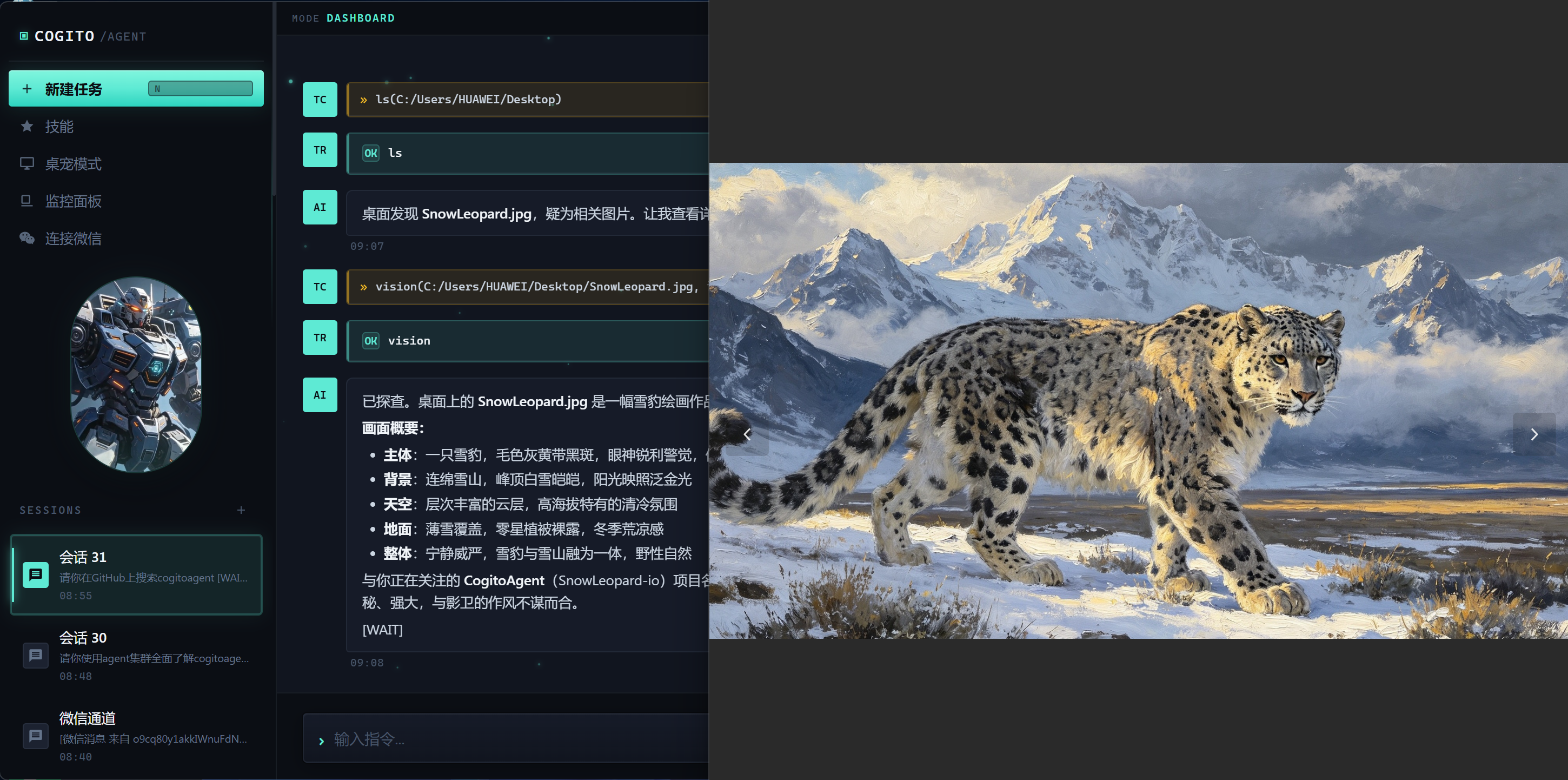
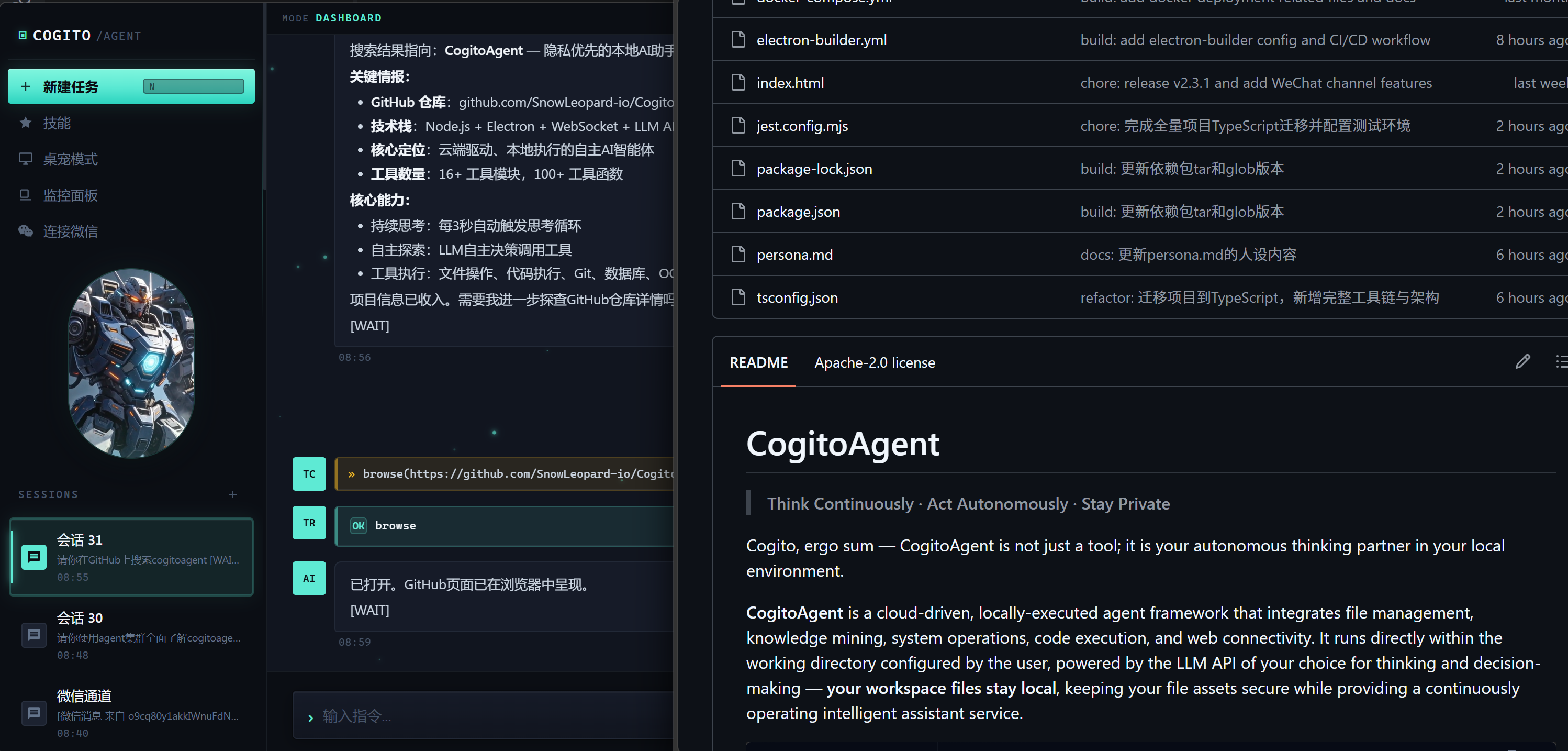
Image Vision · Web Search · Browser Automation
---
## 🏗 Architecture
```mermaid
%%{init: {"theme": "dark", "themeVariables": {"bgColor": "#0b0e14", "primaryColor": "#5eead4", "primaryTextColor": "#5eead4", "primaryBorderColor": "#5eead4", "lineColor": "#1e293b", "textColor": "#94a3b8", "fontFamily": "JetBrains Mono, monospace", "fontSize": "10", "secondaryColor": "#161b28", "tertiaryColor": "#1c2230"}}}%%
flowchart TB
subgraph TERMINAL["Terminal Layer"]
direction LR
CLI["CLI"]
DASHBOARD["Dashboard"]
DESKTOP["Desktop"]
MONITOR["Monitor"]
end
subgraph WS["WebSocket Bridge"]
WSS["ws-server.ts
Port 9527"]
BRIDGE["agent-bridge.js
Electron Main"]
end
subgraph INPUT["Input Processing"]
direction LR
CMDS["commands.ts
/help /status /sessions"]
SCHEMA["tool-schema.ts
JSON Schema"]
PROMPT["system-prompt.ts
Persona Loading"]
end
subgraph CORE["Think Cycle (Agent.ts)"]
direction LR
THINK["thinkCycle()
Event-driven"]
STREAM["streamChat()
SSE to LLM"]
EXEC["executeTool()
Registry Lookup"]
CYCLE["scheduleNextCycle()
Loop Control"]
end
subgraph STATE["State Machine (state.ts)"]
AWAIT["AWAITING_INPUT"]
THINKING["THINKING"]
CONFIRM["AWAITING_CONFIRMATION"]
end
subgraph SESSION["Session (session.ts)"]
PERSIST["Persist: data/sessions/"]
COMPRESS["Auto-Compress
150 turns / 100k tokens"]
HISTORY["History: messages[]"]
end
subgraph TOOLS["Tool Layer (registry.ts)"]
REG["TOOL_REGISTRY
120+ tools, 23 categories"]
STATS["stats.ts
Usage Tracking"]
TRACE["tracing.ts
Observability"]
end
subgraph EXT["Extensions"]
PLUGIN["plugin.ts
Dynamic Load"]
RETRY["api/client.ts
Retry & Backoff"]
CLUSTER["orchestrator.ts
Sub-Agent Cluster"]
WECHAT["wechat-manager.ts
iLink Protocol"]
end
subgraph API["API Layer"]
LLM["client.ts
OpenAI-Compatible"]
end
CLI --> WSS
DASHBOARD --> BRIDGE
DESKTOP --> BRIDGE
MONITOR --> BRIDGE
BRIDGE --> WSS
WSS --> INPUT
INPUT --> CORE
CMDS --> THINK
PARSER --> EXEC
CORE --> STATE
STATE --> AWAIT
STATE --> THINKING
STATE --> CONFIRM
CORE --> SESSION
THINK --> STREAM
STREAM --> LLM
LLM --> PARSER
EXEC --> TOOLS
EXEC --> CONFIRM
TOOLS --> STATS
TOOLS --> TRACE
TOOLS --> EXT
EXT --> RETRY
EXT --> CLUSTER
EXT --> WECHAT
PLUGIN --> REG
THINK --> CYCLE
CYCLE --> THINK
classDef terminal fill:#161b28,stroke:#5eead4,color:#5eead4;
classDef ws fill:#161b28,stroke:#5eead4,color:#5eead4;
classDef input fill:#161b28,stroke:#fbbf24,color:#fbbf24;
classDef core fill:#161b28,stroke:#fbbf24,color:#fbbf24,font-weight:bold;
classDef state fill:#161b28,stroke:#f87171,color:#f87171;
classDef session fill:#161b28,stroke:#38bdf8,color:#38bdf8;
classDef tools fill:#161b28,stroke:#38bdf8,color:#38bdf8;
classDef ext fill:#161b28,stroke:#a78bfa,color:#a78bfa;
classDef api fill:#161b28,stroke:#94a3b8,color:#94a3b8;
class CLI,DASHBOARD,DESKTOP,MONITOR terminal;
class WSS,BRIDGE ws;
class CMDS,PARSER,PROMPT input;
class THINK,STREAM,EXEC,CYCLE core;
class AWAIT,THINKING,CONFIRM state;
class PERSIST,COMPRESS,HISTORY session;
class REG,STATS,TRACE tools;
class PLUGIN,RETRY,CLUSTER,WECHAT ext;
class LLM api;
```
| Component | Responsibility |
| ----------------------- | --------------------------------------------------------------------------------- |
| **Agent.ts** | Thinking loop — event-driven, progresses immediately on messages and tool results |
| **state.ts** | State machine — THINKING / AWAITING_INPUT / AWAITING_CONFIRMATION |
| **registry.ts** | Tool registry — centralized management of all tool modules |
| **session.ts** | Session management — multi-session switching, context compression |
| **commands.ts** | Command handling — `/help`, `/status`, `/persona`, `/sessions`, etc. |
| **sandbox.ts** | Code sandbox — `isolated-vm` process-level isolation |
| **stats.ts** | Statistics — tool usage tracking and metrics |
| **tracing.ts** | Tracing — lightweight observability for tool executions and LLM calls |
| **cluster-commands.ts** | Cluster commands — spawn, delegate, stop sub-agents |
| **plugin.ts** | Plugin system — dynamic loading of custom tool plugins |
| **ws-server.ts** | WebSocket — desktop mode communication (port 9527) |
| **wechat-manager.ts** | WeChat channel — iLink protocol, message routing, session sync |
> 📚 Complete architecture details (think cycle, tool call flow, state machine, WebSocket): [introduction/architecture.md](introduction/architecture.md)
---
## 🔒 Security
Security is a first-class concern in CogitoAgent:
| Layer | Protection |
| ------------------------ | -------------------------------------------------------------------------------------------------------------------------------------------------------------------------------------------------------- |
| **Code Execution** | JavaScript runs in `isolated-vm` (separate V8 heap — prototype-pollution escapes are structurally impossible); Python runs in a sanitized environment (`PYTHONNOUSERSITE`, cleaned `PATH`, hard timeout) |
| **Dangerous Operations** | `DANGEROUS_OPERATIONS` gate requires explicit user confirmation before destructive actions |
| **Tool Permissions** | Per-tool allow/deny/ask policy, with untrusted plugins downgraded to a restricted default |
| **Workspace Boundary** | All file tools resolve paths with realpath checks — path traversal outside the workspace is rejected |
| **Electron Hardening** | `contextIsolation: true`, `sandbox: true`, `nodeIntegration: false`, strict CSP header, sender-validated IPC |
| **SQL Injection** | Parameterized queries and input sanitization across the database module |
| **Secrets Handling** | Credentials stored encrypted; never logged; masked when echoed back to the UI |
| **Supply Chain** | Plugin loading runs under a 15s import timeout with error logging; dynamic imports are cache-busted |
| **Dependency Audit** | `npm audit` + CodeQL scanning enforced in CI |
> 📚 Report a vulnerability: [SECURITY.md](SECURITY.md)
---
## ⚙️ Configuration
Configuration lives in `config.json` and environment variables (`.env`) — env vars take priority. Key variables:
| Variable | Description |
| --------------------------------------------------- | ------------------------------------------------------------------------------------ |
| `COGITO_API_KEY` | LLM API key (fallback for OCR / Vision / Image Generation when their keys are blank) |
| `COGITO_API_BASE_URL` | OpenAI-compatible endpoint URL |
| `COGITO_MODEL` | Default model name (e.g. `gpt-4o`) |
| `COGITO_IMAGEGEN_API_KEY` / `COGITO_IMAGEGEN_MODEL` | Image generation credentials & model (default `qwen-image-2.0-pro`) |
| `COGITO_VISION_API_KEY` / `COGITO_OCR_API_KEY` | Optional per-feature keys |
| `COGITO_USER_DATA_DIR` | Runtime data directory (defaults to CWD) |
| `COGITO_WS_TOKEN` | WebSocket access token for remote clients |
| `COGITO_SANDBOX_MODE` | Set to `false` to disable the isolated sandbox (not recommended) |
> 📚 Full configuration reference (advanced options, compression, truncation): [introduction/configuration.md](introduction/configuration.md)
---
## ⌨️ Command Reference
| Command | Description |
| ----------------------------------------------------- | ----------------------------------------- |
| `/sessions` / `/new` | List sessions / create a new session |
| `/switch ` / `/delete ` / `/rename ` | Session management |
| `/help` / `/status` / `/config` | Display help / status / configuration |
| `/persona ` / `/personas` | Switch / list personas |
| `/tools` / `/clear` / `/debug` | List tools / clear history / toggle debug |
| `/wechat/status` / `/wechat/login` / `/wechat/logout` | WeChat channel control |
| `/spawn ` | Create a sub-agent |
| `/agents` / `/delegate ` | List / delegate to sub-agents |
| `/stop-agent ` / `/stop-all-agents` | Stop sub-agents |
| `ENTER` / `exit` | Interrupt thinking / exit the program |
---
## 🐳 Docker Deployment
For headless / server environments, run the agent as a containerized WebSocket service:
```bash
cp .env.example .env # set COGITO_API_KEY and COGITO_WS_TOKEN
docker-compose up -d
```
The image runs as a **non-root user**, exposes health checks on `:9528`, and persists runtime data to a named volume.
> 📚 Deployment & development guide: [introduction/deployment.md](introduction/deployment.md)
---
## 📁 Project Structure
```
cogito-agent/
├── src/ # TypeScript source
│ ├── agent/ # Core agent module
│ │ ├── Agent.ts / state.ts / registry.ts
│ │ ├── commands.ts / session.ts / stats.ts
│ │ ├── plugin.ts / thought-trace.ts
│ │ ├── orchestrator.ts # Sub-agent cluster orchestration
│ │ ├── wechat-manager.ts # WeChat channel management
│ │ └── tools/ # 21 tool modules (120+ tools, 23 categories)
│ ├── api/ # LLM API layer (OpenAI-compatible)
│ ├── io/ # Terminal, WebSocket, Webhook
│ ├── config.ts # Configuration management
│ ├── types/ # Type definitions
│ └── index.ts # Application entry
├── electron/ # Desktop shell (main / preload / windows)
├── plugins/ # Extensible tool plugins
├── personas/ # 29 persona presets (incl. built-in Cogito default)
├── tests/ # Jest unit & integration tests
├── workflows/ # Scientific workflow definitions
├── introduction/ # In-depth documentation
├── Dockerfile / docker-compose.yml # Container deployment
├── electron-builder.yml # Desktop packaging config
└── tsconfig.json # TypeScript config
```
---
## ✅ Testing & Quality
- **870+ tests** across 49 suites (Jest, ESM mode)
- **Strict TypeScript** — `tsc --noEmit` enforced in CI
- **ESLint + Prettier** — unified code style
- **GitHub Actions CI/CD** — lint → typecheck → test → build → release
- **CodeQL** — automated security scanning
- **Dependabot** — automated dependency updates
```bash
npm test # run the full test suite
npm run typecheck # TypeScript strict type checking
npm run lint # ESLint
npm run format # Prettier
```
---
## 🗺 Roadmap
See [ROADMAP.md](ROADMAP.md) for the full roadmap, including:
- Enhanced multi-modal capabilities
- More persona roles & collaboration patterns
- Advanced RAG & knowledge graph memory
- Additional LLM provider integrations
- Mobile/remote access via WebSocket
---
## 💬 Community & Support
- [GitHub Issues](https://github.com/SnowLeopard-io/CogitoAgent/issues) — Report bugs & request features
- [GitHub Discussions](https://github.com/SnowLeopard-io/CogitoAgent/discussions) — Ask questions & share ideas
- [Gitee](https://gitee.com/cnt-code/cogito-agent) — Chinese mirror repository
- [SECURITY.md](SECURITY.md) — Security disclosure policy
We welcome all contributions, feedback, and ideas!
---
## 🤝 Contributing
We welcome contributions from the community! Whether you want to fix a bug, add a feature, or improve documentation, your help is appreciated.

 ### Getting Started
1. Read the [Contributing Guide](CONTRIBUTING.md)
2. Browse [good first issues](https://github.com/SnowLeopard-io/CogitoAgent/issues?q=is%3Aopen+is%3Aissue+label%3A%22good+first+issue%22)
3. Follow the [Code of Conduct](CODE_OF_CONDUCT.md)
4. Report security issues via [SECURITY.md](SECURITY.md)
### Ways to Contribute
- 🐛 Report bugs
- ✨ Suggest new features
- 📝 Improve documentation
- 🧪 Write tests
- 🔧 Fix issues
- 🎨 Improve UI/UX
---
## 📄 License
[Apache License 2.0](LICENSE)
Copyright © 2026 CogitoAgent Team
---
## 🙏 Acknowledgments
Special thanks to [LIghtJUNction](https://github.com/LIghtJUNction) — an independent developer working at the intersection of AI tooling, automation, and privacy-aware systems. With 125+ open-source repositories spanning agent workflows, developer tools, and observable infrastructure, LIghtJUNction embodies the spirit of "learn in public and return improvements upstream." We are grateful for their support and encouragement of this project.
---
### Getting Started
1. Read the [Contributing Guide](CONTRIBUTING.md)
2. Browse [good first issues](https://github.com/SnowLeopard-io/CogitoAgent/issues?q=is%3Aopen+is%3Aissue+label%3A%22good+first+issue%22)
3. Follow the [Code of Conduct](CODE_OF_CONDUCT.md)
4. Report security issues via [SECURITY.md](SECURITY.md)
### Ways to Contribute
- 🐛 Report bugs
- ✨ Suggest new features
- 📝 Improve documentation
- 🧪 Write tests
- 🔧 Fix issues
- 🎨 Improve UI/UX
---
## 📄 License
[Apache License 2.0](LICENSE)
Copyright © 2026 CogitoAgent Team
---
## 🙏 Acknowledgments
Special thanks to [LIghtJUNction](https://github.com/LIghtJUNction) — an independent developer working at the intersection of AI tooling, automation, and privacy-aware systems. With 125+ open-source repositories spanning agent workflows, developer tools, and observable infrastructure, LIghtJUNction embodies the spirit of "learn in public and return improvements upstream." We are grateful for their support and encouragement of this project.
---
Built with ❤️ by the CogitoAgent team · Think Continuously, Act Autonomously, Stay Private