


---
## 設定
### パッケージをインストール
```bash
python3 -m pip install EdgeGPT --upgrade
```
### 要件
- python 3.8+
- に早期アクセスできる Microsoft アカウント(必須)
- New Bing のサポート国で必要(中国本土のVPNは必須)
### アクセスの確認 (必須)
- Microsoft Edge の最新バージョンをインストール
- また、任意のブラウザを使用し、ユーザーエージェントを Edge を使用しているように設定することもできます(例:`Mozilla/5.0 (Windows NT 10.0; Win64; x64) AppleWebKit/537.36 (KHTML, like Gecko) Chrome/111.0.0 Safari/537.36 Edg/111.0.1661.51`)。[Chrome](https://chrome.google.com/webstore/detail/user-agent-switcher-and-m/bhchdcejhohfmigjafbampogmaanbfkg) や [Firefox](https://addons.mozilla.org/en-US/firefox/addon/user-agent-string-switcher/) の"User-Agent Switcher and Manager"のような拡張機能を使えば、簡単に行えます。
- [bing.com/chat](https://bing.com/chat) を開く
- チャット機能が表示されたら、準備完了
### 認証の取得 (必須)
- [Chrome](https://chrome.google.com/webstore/detail/cookie-editor/hlkenndednhfkekhgcdicdfddnkalmdm) または [Firefox](https://addons.mozilla.org/en-US/firefox/addon/cookie-editor/) の Cookie エディター拡張機能をインストール
- `bing.com` へ移動
- 拡張機能を開く
- 右下の"エクスポート"から"JSONとしてエクスポート"をクリック(これで Cookie がクリップボードに保存されます)
- クッキーをファイル `cookies.json` に貼り付け
## チャットボット
## 使用方法
### クイックスタート
```
$ python3 -m EdgeGPT.EdgeGPT -h
EdgeGPT - A demo of reverse engineering the Bing GPT chatbot
Repo: github.com/acheong08/EdgeGPT
By: Antonio Cheong
!help for help
Type !exit to exit
Enter twice to send message or set --enter-once to send one line message
usage: EdgeGPT.py [-h] [--enter-once] [--no-stream] [--rich] [--proxy PROXY] [--wss-link WSS_LINK] [--style {creative,balanced,precise}]
[--cookie-file COOKIE_FILE]
options:
-h, --help show this help message and exit
--enter-once
--no-stream
--rich
--proxy PROXY Proxy URL (e.g. socks5://127.0.0.1:1080)
--wss-link WSS_LINK WSS URL(e.g. wss://sydney.bing.com/sydney/ChatHub)
--style {creative,balanced,precise}
--cookie-file COOKIE_FILE
needed if environment variable COOKIE_FILE is not set
```
---
## Docker での実行
これは、現在の作業ディレクトリに cookies.json ファイルがあることを前提としています
``` bash
docker run --rm -it -v $(pwd)/cookies.json:/cookies.json:ro -e COOKIE_FILE='/cookies.json' ghcr.io/acheong08/edgegpt
```
次のように追加のフラグを追加できます
``` bash
docker run --rm -it -v $(pwd)/cookies.json:/cookies.json:ro -e COOKIE_FILE='/cookies.json' ghcr.io/acheong08/edgegpt --rich --style creative
```
### 開発者デモ
Cookie を渡す 3 つの方法:
- 環境変数: `export COOKIE_FILE=/path/to/cookies.json` 。
- 引数 `cookie_path` には、次のように `cookies.json` へのパスを指定する:
```python
bot = Chatbot(cookie_path='./cookies.json')
```
- 次のように、引数 `cookies` で直接クッキーを渡します:
```python
with open('./cookies.json', 'r') as f:
cookies = json.load(f)
bot = Chatbot(cookies=cookies)
```
最高のエクスペリエンスを得るには Async を使用してください
より高度な使用例の参照コード:
```python
import asyncio
from EdgeGPT.EdgeGPT import Chatbot, ConversationStyle
async def main():
bot = await Chatbot.create()
print(await bot.ask(prompt="Hello world", conversation_style=ConversationStyle.creative, wss_link="wss://sydney.bing.com/sydney/ChatHub"))
await bot.close()
if __name__ == "__main__":
asyncio.run(main())
```
## 画像ジェネレーター
```bash
$ python3 -m ImageGen.ImageGen -h
usage: ImageGen.py [-h] [-U U] [--cookie-file COOKIE_FILE] --prompt PROMPT [--output-dir OUTPUT_DIR] [--quiet] [--asyncio]
optional arguments:
-h, --help show this help message and exit
-U U Auth cookie from browser
--cookie-file COOKIE_FILE
File containing auth cookie
--prompt PROMPT Prompt to generate images for
--output-dir OUTPUT_DIR
Output directory
--quiet Disable pipeline messages
--asyncio Run ImageGen using asyncio
```
### 開発者デモ
```python
from EdgeGPT.ImageGen import ImageGen
import argparse
import json
async def async_image_gen(args) -> None:
async with ImageGenAsync(args.U, args.quiet) as image_generator:
images = await image_generator.get_images(args.prompt)
await image_generator.save_images(images, output_dir=args.output_dir)
if __name__ == "__main__":
parser = argparse.ArgumentParser()
parser.add_argument("-U", help="Auth cookie from browser", type=str)
parser.add_argument("--cookie-file", help="File containing auth cookie", type=str)
parser.add_argument(
"--prompt",
help="Prompt to generate images for",
type=str,
required=True,
)
parser.add_argument(
"--output-dir",
help="Output directory",
type=str,
default="./output",
)
parser.add_argument(
"--quiet", help="Disable pipeline messages", action="store_true"
)
parser.add_argument(
"--asyncio", help="Run ImageGen using asyncio", action="store_true"
)
args = parser.parse_args()
# 認証クッキーを読み込む
with open(args.cookie_file, encoding="utf-8") as file:
cookie_json = json.load(file)
for cookie in cookie_json:
if cookie.get("name") == "_U":
args.U = cookie.get("value")
break
if args.U is None:
raise Exception("Could not find auth cookie")
if not args.asyncio:
# 画像ジェネレーターの作成
image_generator = ImageGen(args.U, args.quiet)
image_generator.save_images(
image_generator.get_images(args.prompt),
output_dir=args.output_dir,
)
else:
asyncio.run(async_image_gen(args))
```
## Star ヒストリー
[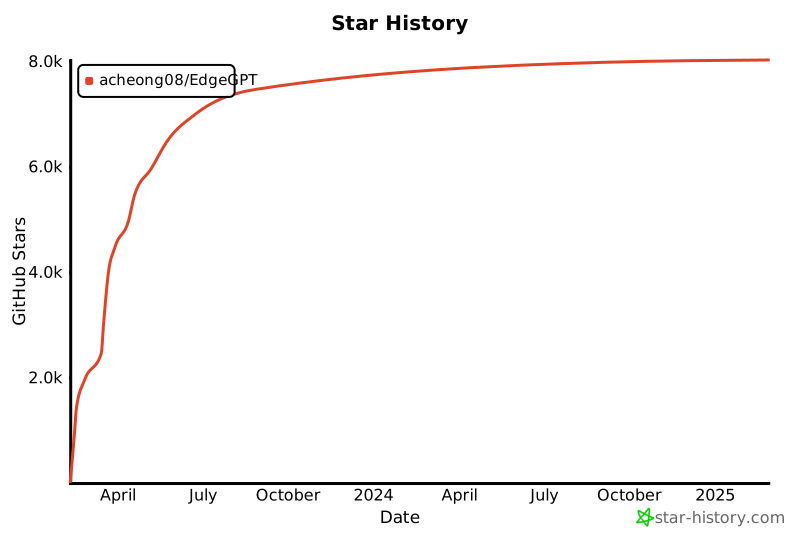](https://star-history.com/#acheong08/EdgeGPT&Date)
## コントリビューター
このプロジェクトが存在するのはコントリビュートしてくださるすべての方々のおかげです。
 # Edge GPT
_Bing の新バージョンのチャット機能のリバースエンジニアリング_
English -
简体中文 -
繁體中文 -
Español -
日本語
# Edge GPT
_Bing の新バージョンのチャット機能のリバースエンジニアリング_
English -
简体中文 -
繁體中文 -
Español -
日本語