Olares
Your AI Agent. Your Data. Your Hardware.
Install Olares ·
Manage Olares with AI ·
Contribute
**Olares is an open-source personal cloud OS you operate in plain language, built to run AI agents and LLMs on hardware you own.**
Powered by Kubernetes, it turns your machines into a self-hosted AI platform accessible from any browser, giving everyone from individual users to small teams a unified place for compute, storage, networking, and apps.
https://github.com/user-attachments/assets/01490c33-41ce-46fe-8450-6939b40db98e
> 🌟 *If Olares is useful to you, consider giving the project a star. Your support encourages us to keep improving it.*
## Why Olares
Great AI needs to know you. That requires access to your files, messages, and history. Many cloud AI services store this sensitive data on third-party servers and charge based on usage.
Olares brings AI home, so you can run agents like [OpenClaw](https://www.olares.com/docs/use-cases/openclaw) with local LLMs on hardware you own while still enjoying the access and convenience of the cloud.
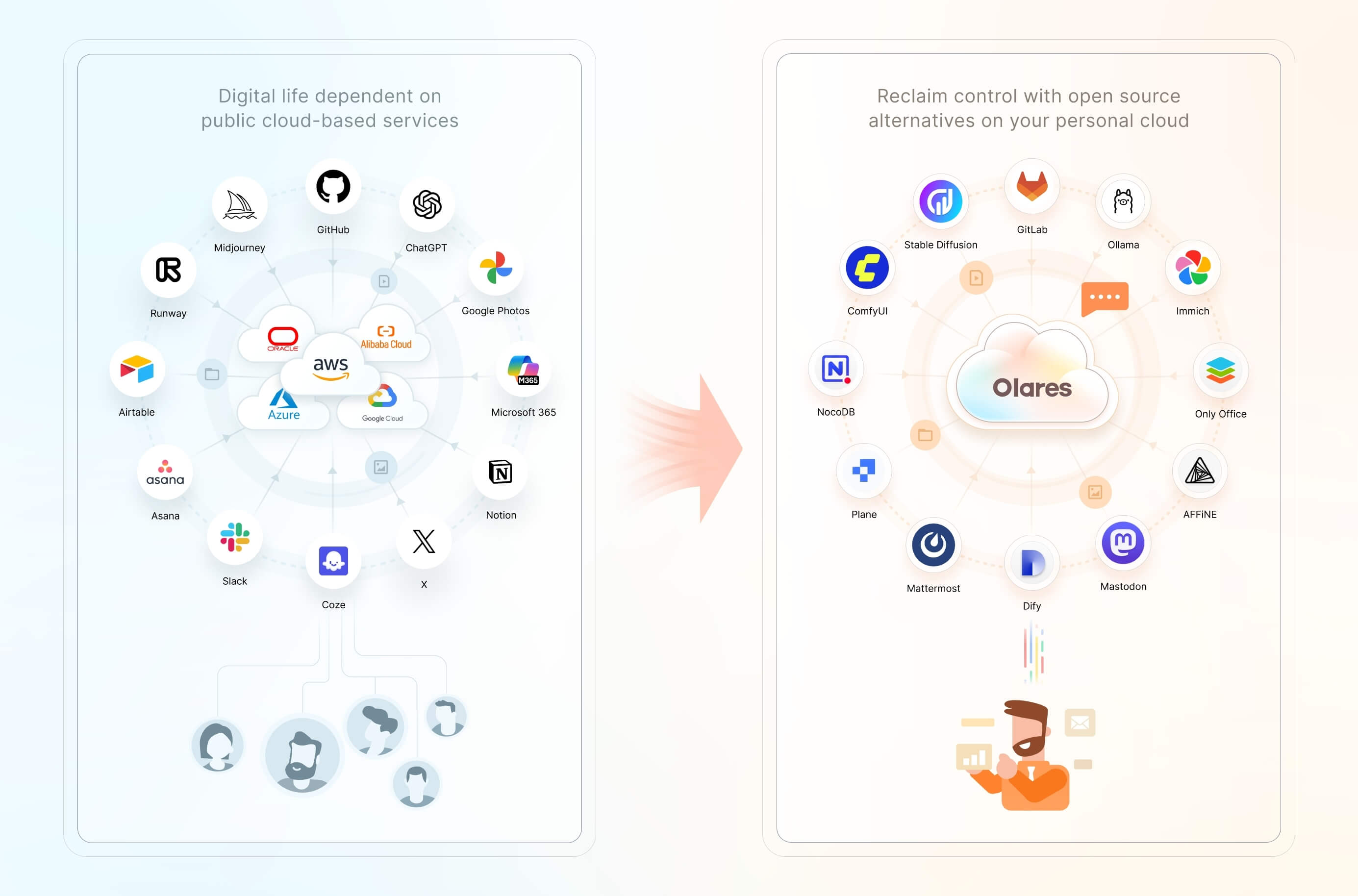
Features include:
- **One-click local AI:** Install open-source AI apps and models from [Olares Market](https://www.olares.com/market/) with one click.
- **Accelerated computing management:** Pool GPUs and other accelerators across nodes, with time-slicing, memory-slicing, and exclusive GPU modes for AI, media, and gaming workloads.
- **[Files and storage management](https://www.olares.com/docs/manual/olares/files/):** Access local files, synced data, connected cloud storage, and external SMB/NFS shares through the built-in Files app, with [configurable backups](https://www.olares.com/docs/manual/olares/settings/backup).
- **[Private networking and access controls](https://www.olares.com/docs/developer/concepts/network):** Use a private VPN, reverse proxy, and public, private, or internal entrances to give apps HTTPS endpoints without manually exposing individual ports.
- **Anytime, anywhere access:** Use your Olares ID and [LarePass](https://www.olares.com/docs/manual/larepass/) to access all your services from a phone, desktop, or browser.
- **A suite of system apps:** Files, Vault, Market, Dashboard, Control Hub, and more, ready the moment you log in.
## Get started
### Linux script requirements
Olares installs on a Linux host (bare metal or VM), with dedicated installation methods for Windows, macOS, and Raspberry Pi. Requirements vary by platform and installation method. The Linux script used below requires:
- **CPU:** At least 4 cores
- **RAM:** At least 8 GB of available memory
- **Storage:** At least 150 GB of available SSD storage; installation will fail on an HDD
- **OS:** Ubuntu 22.04 to 25.04, or Debian 12 or 13
A dedicated GPU is optional and enables local AI acceleration.
### Install and activate
1. Create your Olares ID in [LarePass](https://www.olares.com/docs/manual/larepass/), the client app that adds secure login, a built-in VPN, and file sync.
2. On your Linux host, run:
```bash
curl -fsSL https://olares.sh | bash -
```
This command downloads the official installer from `olares.sh` and runs it with Bash. For complete requirements, platform-specific instructions, and troubleshooting, see the [Linux script installation guide](https://www.olares.com/docs/manual/get-started/install-linux-script).
For Windows, macOS, Raspberry Pi, or a VM, choose your platform in the [installation guide](https://www.olares.com/docs/manual/get-started/install-olares).
3. Follow the guided web wizard, or do it entirely from the terminal with the [Activate using the Olares CLI](https://www.olares.com/docs/manual/best-practices/activate-olares-using-cli) tutorial.
Once activated, you can access Olares from any browser at an address based on your Olares ID. For example, if your Olares ID is `marvin123`, your desktop is at `https://desktop.marvin123.olares.com`.
## Key use cases
- **Use a personal AI agent.** Delegate research, coding, file management, and routine automation through plain language.
- **Run generative AI locally.** Chat with open models, generate images and video, and connect local models to other apps, all from your own hardware.
- **Manage smart home devices and media.** Connect home automation tools and stream your personal music and video libraries.
- **Build and host agentic apps.** Develop, test, and run apps and workflows in isolated environments on Olares.
- **Process audio locally.** Transcribe meetings, translate recordings, and generate speech without uploading audio to a third-party service.
- **Create a self-hosted workspace.** Give your family or team tools for documents, automation, project management, and communication.
- **Manage your personal data.** Store, sync, back up, and access files, photos, and documents across your devices.
## System architecture
Just as public clouds offer IaaS, PaaS, and SaaS layers, Olares provides open-source alternatives to each of these layers.
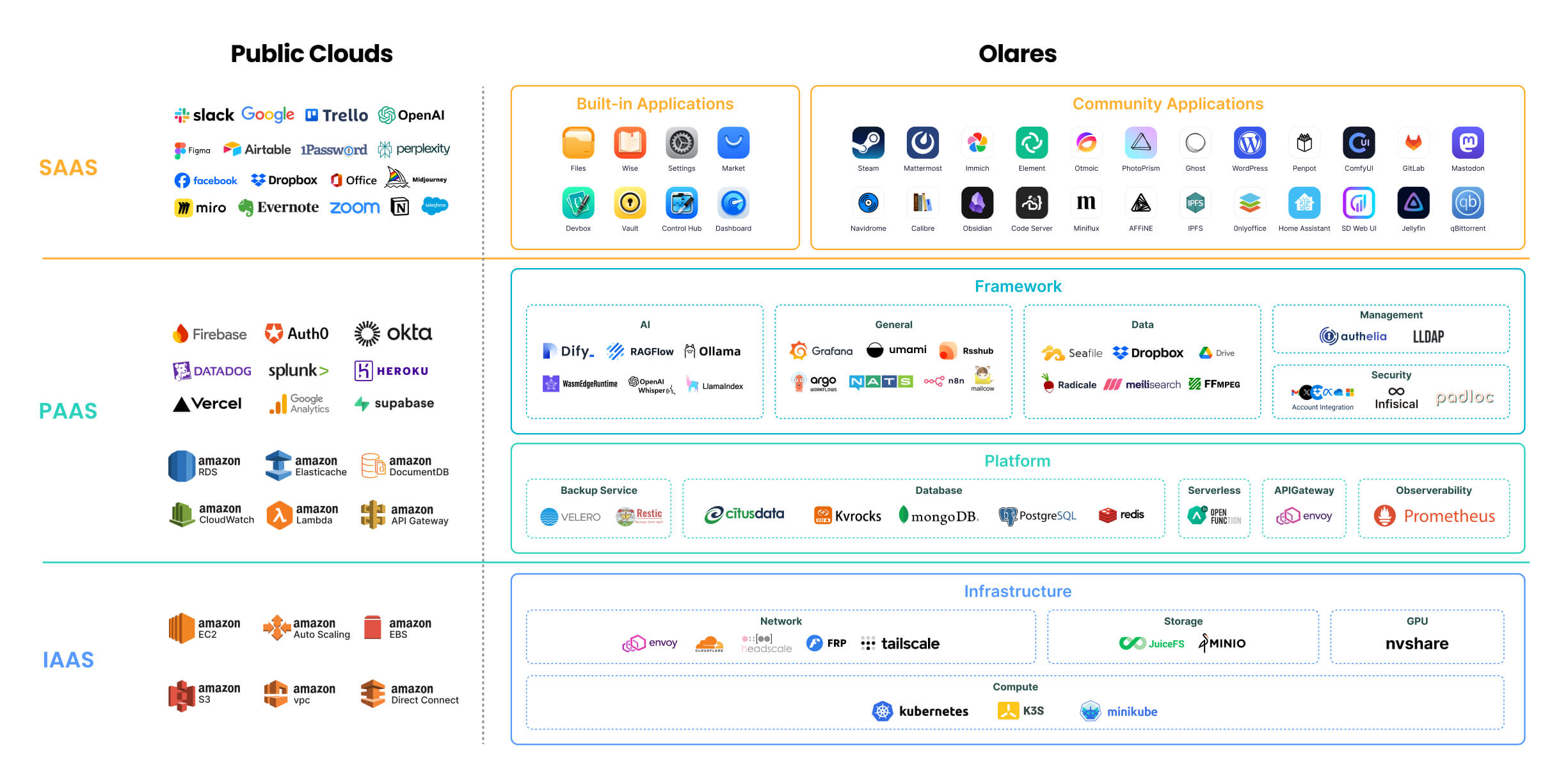
For a detailed description of each component, refer to [Olares architecture](https://www.olares.com/docs/developer/concepts/system-architecture).
> 🔍 **How is Olares different from traditional NAS?**
>
> Olares focuses on building an all-in-one self-hosted personal cloud experience. Its core features and target users differ significantly from Network Attached Storage (NAS) systems, which primarily focus on network storage. For more details, see [Compare Olares and NAS](https://www.olares.com/blog/compare-olares-and-nas/).
## Project navigation
The main directories in the Olares repository:
```
Olares/
├── apps/ # Built-in Olares system applications
├── cli/ # olares-cli: agent-native CLI with Agent Skills to install and operate Olares
├── daemon/ # olaresd, the system daemon process
├── docs/ # Project documentation
├── framework/ # Olares system services
├── infrastructure/ # Computing, storage, networking, and GPU components
├── platform/ # Cloud-native components like databases and message queues
└── vendor/ # Hardware-specific code for Olares devices
```
## Contributing
Olares welcomes contributions across the project. Choose the path that best matches what you want to improve:
- **Core development:** Browse [open issues](https://github.com/beclab/Olares/issues), or open an issue to discuss your proposal before starting a substantial change.
- **Documentation:** Improve the guides in [`docs/`](./docs). See the [documentation contributor guide](./docs/README.md) and [content and style guide](https://github.com/beclab/Olares/wiki/General-style-reference).
- **App distribution:** [Package and submit](https://www.olares.com/docs/developer/develop/distribute-index) an app to Olares Market.
- **Bug reports and feature requests:** Open a [GitHub issue](https://github.com/beclab/Olares/issues) with enough context for the team to investigate or evaluate it.
- **Security reporting:** Follow our [security policy](./SECURITY.md). Please do not report vulnerabilities through public issues, discussions, or community channels.
## Learn more
- **[Installation guide](https://www.olares.com/docs/manual/get-started/install-olares):** Choose an installation method and activate Olares.
- **[Use cases](https://www.olares.com/docs/use-cases/):** Explore local AI, media, productivity, and self-hosted workflows.
- **[CLI guide](https://www.olares.com/docs/developer/install/cli/olares-cli):** Install, manage, and diagnose Olares from the command line.
- **[Agent Skills](https://www.olares.com/docs/developer/cli-agent-skills):** Let AI agents operate Olares through `olares-cli`.
- **[Advanced tutorials](https://www.olares.com/docs/manual/best-practices/):** Configure GPUs, multi-node deployments, custom domains, and storage expansion.
## Community
- **[Discord](https://discord.gg/olares):** Get community support and discuss deployments and agent workflows.
- **[Olares Forum](https://www.olares.com/forum/):** Share product feedback and join longer-form discussions.
- Follow Olares on [X](https://x.com/Olares_OS) and [YouTube](https://www.youtube.com/@OlaresOS).
## Acknowledgements
The Olares project has incorporated numerous third-party open-source projects, including: [Kubernetes](https://kubernetes.io/), [Kubesphere](https://github.com/kubesphere/kubesphere), [Padloc](https://padloc.app/), [K3S](https://k3s.io/), [JuiceFS](https://github.com/juicedata/juicefs), [MinIO](https://github.com/minio/minio), [Envoy](https://github.com/envoyproxy/envoy), [Authelia](https://github.com/authelia/authelia), [Infisical](https://github.com/Infisical/infisical), [Dify](https://github.com/langgenius/dify), [Seafile](https://github.com/haiwen/seafile), [HeadScale](https://headscale.net/), [Tailscale](https://tailscale.com/), [Redis Operator](https://github.com/spotahome/redis-operator), [Nitro](https://nitro.jan.ai/), [RSSHub](http://rsshub.app/), [predixy](https://github.com/joyieldInc/predixy), [nvshare](https://github.com/grgalex/nvshare), [LangChain](https://www.langchain.com/), [Quasar](https://quasar.dev/), [TrustWallet](https://trustwallet.com/), [Restic](https://restic.net/), [ZincSearch](https://zincsearch-docs.zinc.dev/), [filebrowser](https://filebrowser.org/), [lego](https://go-acme.github.io/lego/), [Velero](https://velero.io/), [s3rver](https://github.com/jamhall/s3rver), [Citusdata](https://www.citusdata.com/).


