**Olares 是一款可以用自然语言操作的开源个人云操作系统,让你在自己的硬件上运行 AI Agent 和大模型。**
Olares 基于 Kubernetes 构建,能把你手中的设备变成一个自托管的 AI 平台,打开浏览器就能用。无论是个人用户还是小型团队,都能在这里统一管理算力、存储、网络和应用。
https://github.com/user-attachments/assets/01490c33-41ce-46fe-8450-6939b40db98e
> 🌟 *如果 Olares 对你有帮助,欢迎点亮 Star。你的支持会激励我们不断把它打磨得更好。*
## 为什么选择 Olares
真正好用的 AI,得足够懂你,而这意味着它要能读到你的文件、消息和过往记录。可是不少云端 AI 服务,会把这些敏感数据存在第三方服务器上,还要按用量向你收费。
Olares 把 AI 带回本地:你可以在自己的硬件上,用本地大模型运行像 [OpenClaw](https://www.olares.com/docs/zh/use-cases/openclaw) 这样的 Agent,同时依然保有云端那份随时随地、开箱即用的便利。
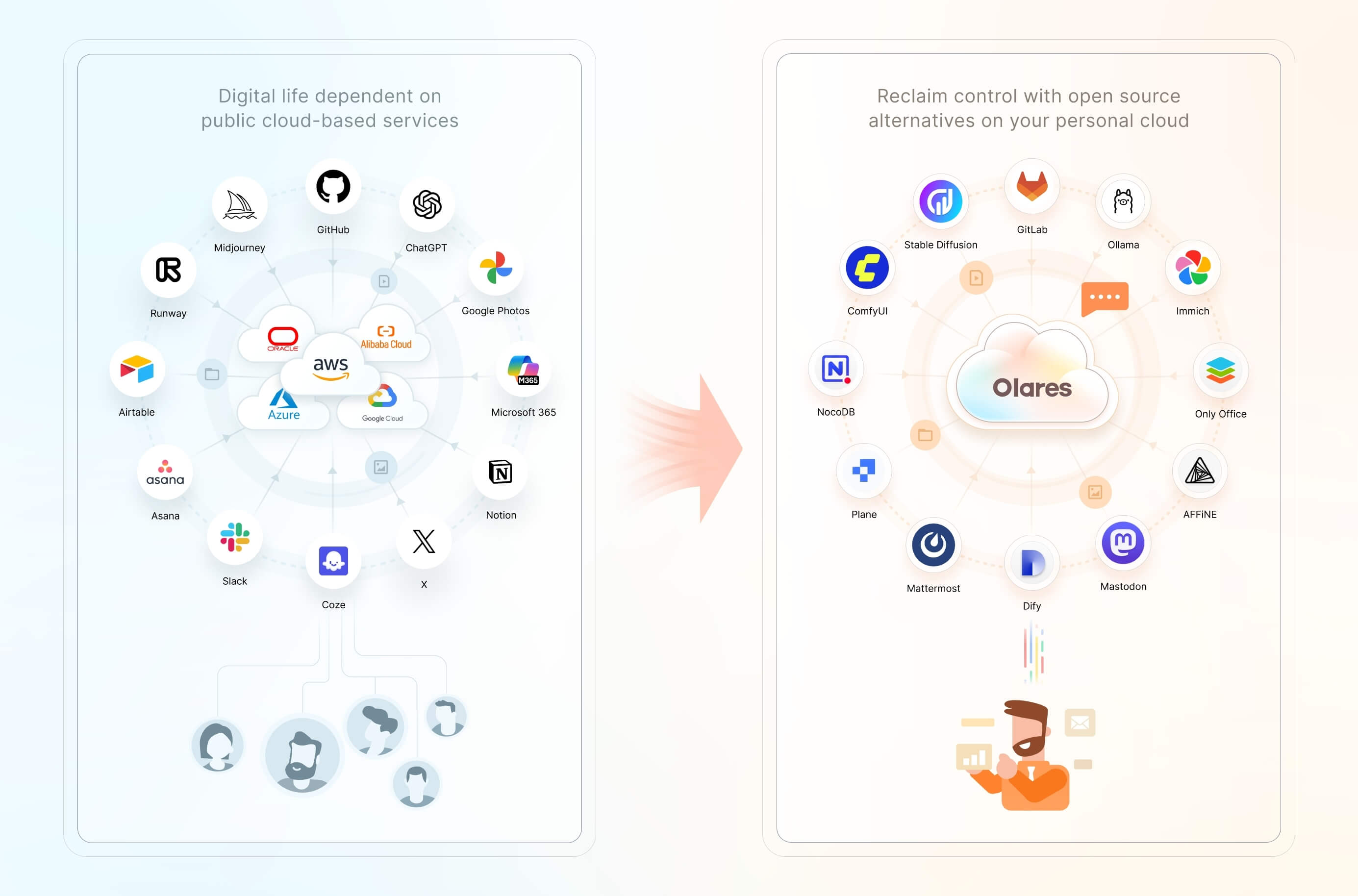
主要能力包括:
- **一键部署本地 AI**:在 [Olares 应用市场](https://www.olares.com/market/)一键安装开源 AI 应用和模型。
- **加速计算管理**:把多个节点上的 GPU 和加速器统一调度,支持时间切片、显存切片和 GPU 独占模式,兼顾 AI、媒体和游戏等不同负载。
- **[文件与存储管理](https://www.olares.com/docs/zh/manual/olares/files/)**:用内置的「文件」应用,统一管理本地文件、同步数据、已接入的云存储,以及外部的 SMB/NFS 共享,还能[自定义备份](https://www.olares.com/docs/zh/manual/olares/settings/backup)。
- **[私有网络与访问控制](https://www.olares.com/docs/zh/developer/concepts/network)**:内置私有 VPN 和反向代理,配合公开、私有、内部三种访问入口,为每个应用自动分配 HTTPS 地址,无需手动开放端口。
- **随时随地访问**:一个 Olares ID 加上 [LarePass](https://www.olares.com/docs/zh/manual/larepass/),就能从手机、电脑或浏览器访问你的全部服务。
- **完整的系统应用**:文件、Vault、应用市场、仪表盘、控制中心等一应俱全,登录即用。
## 快速开始
### Linux 脚本安装要求
Olares 可以装在 Linux 主机上(物理机或虚拟机),也为 Windows、macOS 和树莓派准备了专门的安装方式。不同平台、不同方式的要求各有差异。下面这个 Linux 脚本的要求如下:
- **CPU**:4 核及以上
- **内存**:8 GB 及以上可用内存
- **存储**:150 GB 及以上可用 SSD 空间(用机械硬盘会导致安装失败)
- **操作系统**:Ubuntu 22.04 ~ 25.04,或 Debian 12 / 13
独立显卡为可选项,装上后可加速本地 AI。
### 安装并激活
1. 先在 [LarePass](https://www.olares.com/docs/zh/manual/larepass/) 里创建你的 Olares ID。LarePass 是配套客户端,提供安全登录、内置 VPN 和文件同步。
2. 在 Linux 主机上运行:
```bash
curl -fsSL https://olares.sh | bash -
```
这条命令会从 `olares.sh` 下载官方安装程序,并交给 Bash 运行。完整要求、各平台的具体步骤和常见问题,请看 [Linux 脚本安装指南](https://www.olares.com/docs/zh/manual/get-started/install-linux-script)。
想装在 Windows、macOS、树莓派或虚拟机上?在[安装指南](https://www.olares.com/docs/zh/manual/get-started/install-olares)里选择对应平台即可。
3. 按照网页向导一步步操作,或者干脆全程用命令行,参考[用 Olares CLI 激活](https://www.olares.com/docs/zh/manual/best-practices/activate-olares-using-cli)教程。
激活完成后,你就能在任意浏览器里,通过与 Olares ID 关联的地址访问 Olares。比如 Olares ID 是 `marvin123`,桌面地址就是 `https://desktop.marvin123.olares.com`。
## 主要使用场景
- **交给个人 AI Agent**:用自然语言,把调研、编程、文件整理和日常自动化都交给它。
- **在本地跑生成式 AI**:与开源模型对话、生成图像和视频,还能把本地模型接入其他应用,全程都在自己的硬件上完成。
- **管理智能家居与媒体**:接入家庭自动化设备,随时串流播放自己的音乐和影片库。
- **开发和托管应用**:在 Olares 的隔离环境里开发、测试、运行应用和工作流。
- **在本地处理音频**:会议转写、录音翻译、语音合成,全都不必把音频上传到第三方。
- **搭建自托管工作空间**:为家人或团队提供文档协作、自动化、项目管理和沟通工具。
- **管理个人数据**:在各种设备之间,存储、同步、备份和取用文件、照片与文档。
## 系统架构
就像公有云分成 IaaS、PaaS、SaaS 几层,Olares 也为每一层提供了开源替代方案。
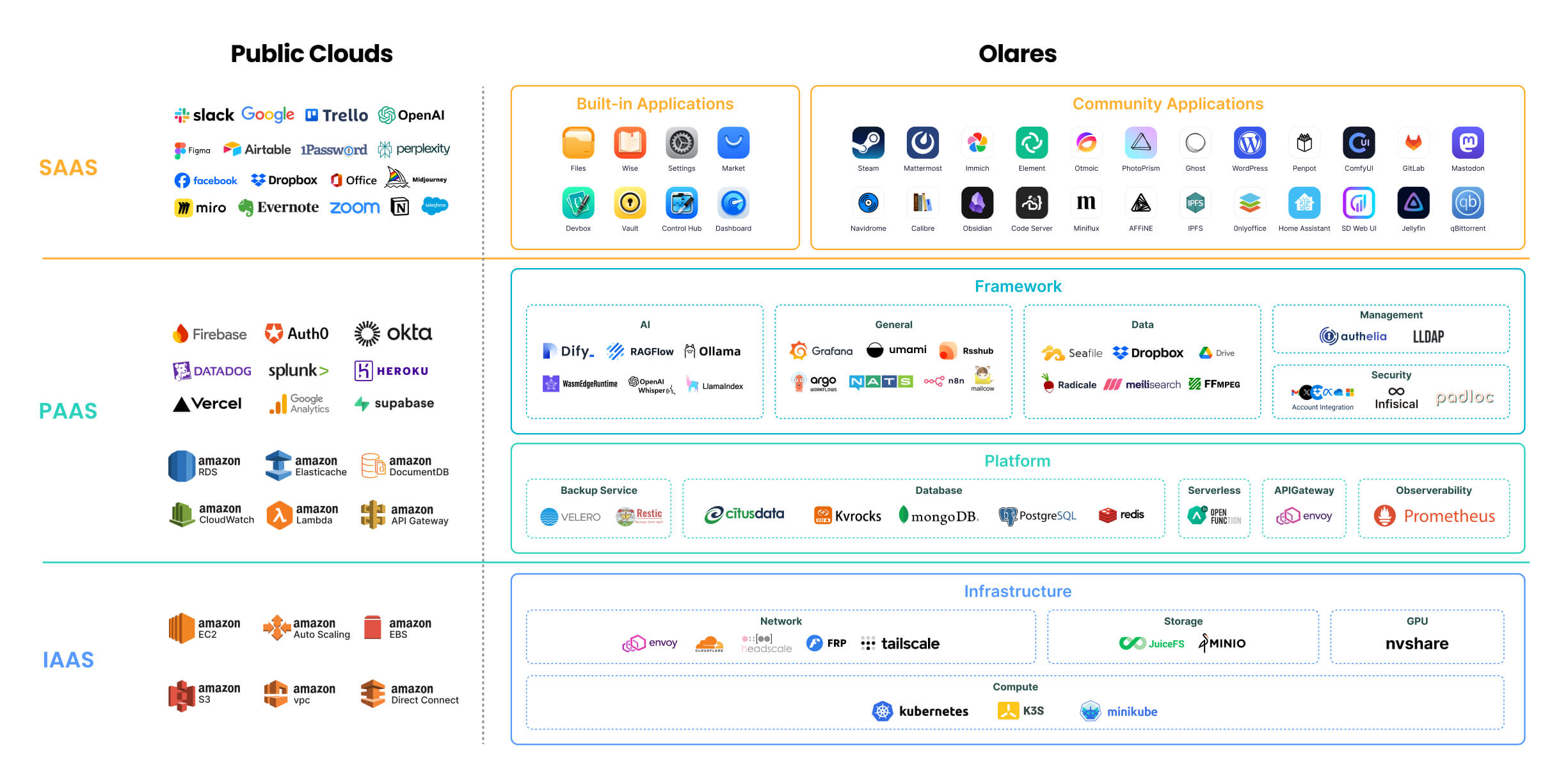
各组件的详细说明,参见 [Olares 架构](https://www.olares.com/docs/zh/developer/concepts/system-architecture)文档。
> 🔍 **Olares 和传统 NAS 有什么不同?**
>
> Olares 想做的是一站式、自托管的个人云体验。它的核心能力和目标用户,都和主打网络存储的传统 NAS 有明显区别。详情见 [Olares 与 NAS 对比](https://www.olares.com/blog/compare-olares-and-nas/)。
## 项目目录
Olares 代码库中的主要目录:
```
Olares/
├── apps/ # Olares 内置系统应用
├── cli/ # olares-cli:面向 AI Agent 的命令行工具,内置 Agent Skills,用于安装和操作 Olares
├── daemon/ # olaresd 系统守护进程
├── docs/ # 项目文档
├── framework/ # Olares 系统服务
├── infrastructure/ # 计算、存储、网络、GPU 等基础组件
├── platform/ # 数据库、消息队列等云原生组件
└── vendor/ # Olares 设备的硬件相关代码
```
## 参与贡献
Olares 欢迎各种形式的贡献,你可以按自己想改进的方向来选择:
- **核心开发**:先看看[待处理的 issue](https://github.com/beclab/Olares/issues);如果改动较大,建议先开一个 issue 聊聊思路再动手。
- **文档**:完善 [`docs/`](./docs) 里的内容,可参考[文档贡献指南](./docs/README.md)和[内容与风格规范](https://github.com/beclab/Olares/wiki/General-style-reference)。
- **应用分发**:把你的应用[打包并提交](https://www.olares.com/docs/zh/developer/develop/distribute-index)到 Olares 应用市场。
- **反馈问题、提功能建议**:开一个 [GitHub issue](https://github.com/beclab/Olares/issues),尽量写清背景,方便我们排查或评估。
- **安全问题**:请按[安全策略](./SECURITY.md)处理,不要在公开的 issue、讨论区或社区渠道里披露漏洞。
## 了解更多
- **[安装指南](https://www.olares.com/docs/zh/manual/get-started/install-olares)**:选择安装方式并激活 Olares。
- **[使用场景](https://www.olares.com/docs/zh/use-cases/)**:了解本地 AI、媒体、办公和自托管等玩法。
- **[CLI 指南](https://www.olares.com/docs/zh/developer/install/cli/olares-cli)**:从命令行安装、管理和诊断 Olares。
- **[Agent Skills](https://www.olares.com/docs/zh/developer/cli-agent-skills)**:让 AI Agent 通过 `olares-cli` 操作 Olares。
- **[进阶教程](https://www.olares.com/docs/zh/manual/best-practices/)**:配置 GPU、多节点部署、自定义域名、扩容存储等。
## 社区
- **[Discord](https://discord.gg/olares)**:获取社区支持,交流部署经验和 Agent 玩法。
- **[Olares 论坛](https://www.olares.com/forum/)**:反馈产品建议,参与更深入的讨论。
- 关注我们的 [X](https://x.com/Olares_OS) 和 [YouTube](https://www.youtube.com/@OlaresOS)。
## 致谢
Olares 站在众多优秀开源项目的肩膀上,在此一并致谢:[Kubernetes](https://kubernetes.io/)、[Kubesphere](https://github.com/kubesphere/kubesphere)、[Padloc](https://padloc.app/)、[K3S](https://k3s.io/)、[JuiceFS](https://github.com/juicedata/juicefs)、[MinIO](https://github.com/minio/minio)、[Envoy](https://github.com/envoyproxy/envoy)、[Authelia](https://github.com/authelia/authelia)、[Infisical](https://github.com/Infisical/infisical)、[Dify](https://github.com/langgenius/dify)、[Seafile](https://github.com/haiwen/seafile)、[HeadScale](https://headscale.net/)、[Tailscale](https://tailscale.com/)、[Redis Operator](https://github.com/spotahome/redis-operator)、[Nitro](https://nitro.jan.ai/)、[RSSHub](http://rsshub.app/)、[predixy](https://github.com/joyieldInc/predixy)、[nvshare](https://github.com/grgalex/nvshare)、[LangChain](https://www.langchain.com/)、[Quasar](https://quasar.dev/)、[TrustWallet](https://trustwallet.com/)、[Restic](https://restic.net/)、[ZincSearch](https://zincsearch-docs.zinc.dev/)、[filebrowser](https://filebrowser.org/)、[lego](https://go-acme.github.io/lego/)、[Velero](https://velero.io/)、[s3rver](https://github.com/jamhall/s3rver)、[Citusdata](https://www.citusdata.com/)。


