# Azure OpenAI Proxy
[](https://goreportcard.com/report/github.com/diemus/azure-openai-proxy)
[](https://github.com/diemus/azure-openai-proxy/blob/main/LICENSE)
[](https://github.com/diemus/azure-openai-proxy)
[](https://github.com/diemus/azure-openai-proxy)
[](https://github.com/diemus/azure-openai-proxy)
[](https://github.com/diemus/azure-openai-proxy)
## Introduction
English |
中文
Azure OpenAI Proxy is a proxy for Azure OpenAI API that can convert an OpenAI request to an Azure OpenAI request. It is designed to use as a backend for various open source ChatGPT web project. It also supports being used as a simple OpenAI API proxy to solve the problem of OpenAI API being restricted in some regions.
Highlights:
- 🌐 Supports proxying all Azure OpenAI APIs
- 🧠 Supports proxying all Azure OpenAI models and custom fine-tuned models
- 🗺️ Supports custom mapping between Azure deployment names and OpenAI models
- 🔄 Supports both reverse proxy and forward proxy usage
- 👍 Support mocking of OpenAI APIs that are not supported by Azure.
## Supported APIs
The latest version of the Azure OpenAI service currently supports the following 3 APIs:
| Path | Status |
| --------------------- | ------ |
| /v1/chat/completions | ✅ |
| /v1/completions | ✅ |
| /v1/embeddings | ✅ |
> Other APIs not supported by Azure will be returned in a mock format (such as OPTIONS requests initiated by browsers). If you find your project need additional OpenAI-supported APIs, feel free to submit a PR.
## Recently Updated
+ 2023-04-06 supported `/v1/models` interface, fixed the issue of some web projects depending on `models` interface error.
+ 2023-04-04 supported `options` interface, fixed the cross-domain check error issue of some web projects.
## Usage
### 1. Used as reverse proxy (i.e. an OpenAI API gateway)
Environment Variables
| Parameters | Description | Default Value |
| :------------------------- | :------------------------------------------------------------------------------------------------------------------------------------------------------------------------------------------------------------------------------------------------------------------------------------------------------------- | :---------------------------------------------------------------------- |
| AZURE_OPENAI_PROXY_ADDRESS | Service listening address | 0.0.0.0:8080 |
| AZURE_OPENAI_PROXY_MODE | Proxy mode, can be either "azure" or "openai". | azure |
| AZURE_OPENAI_ENDPOINT | Azure OpenAI Endpoint, usually looks like https://{custom}.openai.azure.com. Required. | |
| AZURE_OPENAI_APIVERSION | Azure OpenAI API version. Default is 2023-03-15-preview. | 2023-03-15-preview |
| AZURE_OPENAI_MODEL_MAPPER | A comma-separated list of model=deployment pairs. Maps model names to deployment names. For example, `gpt-3.5-turbo=gpt-35-turbo`, `gpt-3.5-turbo-0301=gpt-35-turbo-0301`. If there is no match, the proxy will pass model as deployment name directly (in fact, most Azure model names are same with OpenAI). | `gpt-3.5-turbo=gpt-35-turbo`
`gpt-3.5-turbo-0301=gpt-35-turbo-0301` |
| AZURE_OPENAI_TOKEN | Azure OpenAI API Token. If this environment variable is set, the token in the request header will be ignored. | "" |
Use in command line
```shell
curl https://{your-custom-domain}/v1/chat/completions \
-H "Content-Type: application/json" \
-H "Authorization: Bearer {your azure api key}" \
-d '{
"model": "gpt-3.5-turbo",
"messages": [{"role": "user", "content": "Hello!"}]
}'
```
### 2. Used as forward proxy (i.e. an HTTP proxy)
When accessing Azure OpenAI API through HTTP, it can be used directly as a proxy, but this tool does not have built-in HTTPS support, so you need an HTTPS proxy such as Nginx to support accessing HTTPS version of OpenAI API.
Assuming that the proxy domain you configured is `https://{your-domain}.com`, you can execute the following commands in the terminal to use the https proxy:
```shell
export https_proxy=https://{your-domain}.com
curl https://api.openai.com/v1/chat/completions \
-H "Content-Type: application/json" \
-H "Authorization: Bearer {your azure api key}" \
-d '{
"model": "gpt-3.5-turbo",
"messages": [{"role": "user", "content": "Hello!"}]
}'
```
Or configure it as an HTTP proxy in other open source Web ChatGPT projects:
```
export HTTPS_PROXY=https://{your-domain}.com
```
## Deploy
Deploying through Docker
```shell
docker pull ishadows/azure-openai-proxy:latest
docker run -d -p 8080:8080 --name=azure-openai-proxy \
--env AZURE_OPENAI_ENDPOINT={your azure endpoint} \
--env AZURE_OPENAI_MODEL_MAPPER={your custom model mapper ,like: gpt-3.5-turbo=gpt-35-turbo,gpt-3.5-turbo-0301=gpt-35-turbo-0301} \
ishadows/azure-openai-proxy:latest
```
Calling
```shell
curl https://localhost:8080/v1/chat/completions \
-H "Content-Type: application/json" \
-H "Authorization: Bearer {your azure api key}" \
-d '{
"model": "gpt-3.5-turbo",
"messages": [{"role": "user", "content": "Hello!"}]
}'
```
## Model Mapping Mechanism
There are a series of rules for model mapping pre-defined in `AZURE_OPENAI_MODEL_MAPPER`, and the default configuration basically satisfies the mapping of all Azure models. The rules include:
- `gpt-3.5-turbo` -> `gpt-35-turbo`
- `gpt-3.5-turbo-0301` -> `gpt-35-turbo-0301`
- A mapping mechanism that pass model name directly as fallback.
For custom fine-tuned models, the model name can be passed directly. For models with deployment names different from the model names, custom mapping relationships can be defined, such as:
| Model Name | Deployment Name |
| :----------------- | :--------------------------- |
| gpt-3.5-turbo | gpt-35-turbo-upgrade |
| gpt-3.5-turbo-0301 | gpt-35-turbo-0301-fine-tuned |
## License
MIT
## Star History
[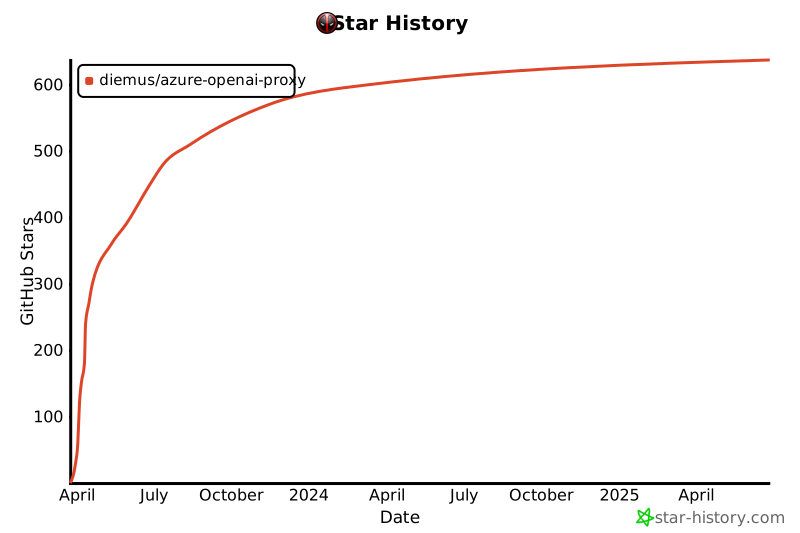](https://star-history.com/#diemus/azure-openai-proxy&Date)