# Azure OpenAI Proxy
[](https://goreportcard.com/report/github.com/diemus/azure-openai-proxy)
[](https://github.com/diemus/azure-openai-proxy/blob/main/LICENSE)
[](https://github.com/diemus/azure-openai-proxy)
[](https://github.com/diemus/azure-openai-proxy)
[](https://github.com/diemus/azure-openai-proxy)
[](https://github.com/diemus/azure-openai-proxy)
## 介绍
English |
中文
一个 Azure OpenAI API 的代理工具,可以将一个 OpenAI 请求转化为 Azure
OpenAI 请求,方便作为各类开源 ChatGPT 的后端使用。同时也支持作为单纯的 OpenAI 接口代理使用,用来解决 OpenAI 接口在部分地区的被限制使用的问题。
亮点:
- 🌐 支持代理所有 Azure OpenAI 接口
- 🧠 支持代理所有 Azure OpenAI 模型以及自定义微调模型
- 🗺️ 支持自定义 Azure 部署名与 OpenAI 模型的映射关系
- 🔄 支持反向代理和正向代理两种方式使用
- 👍 支持对Azure不支持的OpenAI接口进行Mock
## 支持的接口
目前最新版本的Azure OpenAI服务支持以下3个接口:
| Path | Status |
| --------------------- |------|
| /v1/chat/completions | ✅ |
| /v1/completions | ✅ |
| /v1/embeddings | ✅ |
> 其他Azure不支持的接口会通过mock的形式返回(比如浏览器发起的OPTIONS类型的请求,或者列出所有模型等)。如果你发现需要某些额外的OpenAI支持的接口,欢迎提交PR
## 最近更新
+ 2023-04-06 支持了`/v1/models`接口,修复了部分web项目依赖models接口报错的问题
+ 2023-04-04 支持了`options`接口,修复了部分web项目跨域检查时报错的问题
## 使用方式
### 1. 作为反向代理使用(即一个 OpenAI API 网关)
环境变量
| 参数名 | 描述 | 默认值 |
| :------------------------- | :------------------------------------------------------------------------------------------------------------------------------------------------------------------------------------------------------------------------------------------------------ | :---------------------------------------------------------------------- |
| AZURE_OPENAI_PROXY_ADDRESS | 服务监听地址 | 0.0.0.0:8080 |
| AZURE_OPENAI_PROXY_MODE | 代理模式,可以为 azure/openai 2 种模式 | azure |
| AZURE_OPENAI_ENDPOINT | Azure OpenAI Endpoint,一般类似 https://{custom}.openai.azure.com 的格式。必需。 | |
| AZURE_OPENAI_APIVERSION | Azure OpenAI API 的 API 版本。默认为 2023-03-15-preview。 | 2023-03-15-preview |
| AZURE_OPENAI_MODEL_MAPPER | 一个逗号分隔的 model=deployment 对列表。模型名称映射到部署名称。例如,`gpt-3.5-turbo=gpt-35-turbo`,`gpt-3.5-turbo-0301=gpt-35-turbo-0301`。未匹配到的情况下,代理会直接透传 model 作为 deployment 使用(其实 Azure 大部分模型名字和 OpenAI 的保持一致)。 | `gpt-3.5-turbo=gpt-35-turbo`
`gpt-3.5-turbo-0301=gpt-35-turbo-0301` |
| AZURE_OPENAI_TOKEN | Azure OpenAI API Token。 如果设置该环境变量则忽略请求头中的 Token | "" |
在命令行调用
```shell
curl https://{your-custom-domain}/v1/chat/completions \
-H "Content-Type: application/json" \
-H "Authorization: Bearer {your azure api key}" \
-d '{
"model": "gpt-3.5-turbo",
"messages": [{"role": "user", "content": "Hello!"}]
}'
```
### 2. 作为正向代理使用(即一个 HTTP Proxy)
通过 HTTP 访问 Azure OpenAI 接口时,可以直接作为代理使用,但是这个工具没有内置原生的 HTTPS 支持,需要在工具前架设一个类似 Nginx 的 HTTPS 代理,来支持访问 HTTPS 版本的 OpenAI 接口。
假设你配置好后的代理域名为`https://{your-domain}.com`,你可以在终端中执行以下命令来配置 http 代理:
```shell
export https_proxy=https://{your-domain}.com
curl https://api.openai.com/v1/chat/completions \
-H "Content-Type: application/json" \
-H "Authorization: Bearer {your azure api key}" \
-d '{
"model": "gpt-3.5-turbo",
"messages": [{"role": "user", "content": "Hello!"}]
}'
```
或者在其他开源 Web ChatGPT 项目中配置为 HTTP 代理
```
export HTTPS_PROXY=https://{your-domain}.com
```
## 部署方式
通过 docker 部署
```shell
docker pull ishadows/azure-openai-proxy:latest
docker run -d -p 8080:8080 --name=azure-openai-proxy \
--env AZURE_OPENAI_ENDPOINT={your azure endpoint} \
--env AZURE_OPENAI_MODEL_MAPPER={your custom model mapper ,like: gpt-3.5-turbo=gpt-35-turbo,gpt-3.5-turbo-0301=gpt-35-turbo-0301} \
ishadows/azure-openai-proxy:latest
```
调用
```shell
curl https://localhost:8080/v1/chat/completions \
-H "Content-Type: application/json" \
-H "Authorization: Bearer {your azure api key}" \
-d '{
"model": "gpt-3.5-turbo",
"messages": [{"role": "user", "content": "Hello!"}]
}'
```
## 模型映射机制
`AZURE_OPENAI_MODEL_MAPPER`中预定义了一系列模型映射的规则,默认配置基本上满足了所有 Azure 模型的映射,规则包括:
- `gpt-3.5-turbo` -> `gpt-35-turbo`
- `gpt-3.5-turbo-0301` -> `gpt-35-turbo-0301`
- 以及一个透传模型名的机制作为 fallback 手段
对于自定义的微调模型,可以直接透传模型名。对于部署名字和模型名不一样的,可以自定义映射关系,比如:
| 模型名称 | 部署名称 |
| :----------------- | :--------------------------- |
| gpt-3.5-turbo | gpt-35-turbo-upgrade |
| gpt-3.5-turbo-0301 | gpt-35-turbo-0301-fine-tuned |
## 许可证
MIT
## Star History
[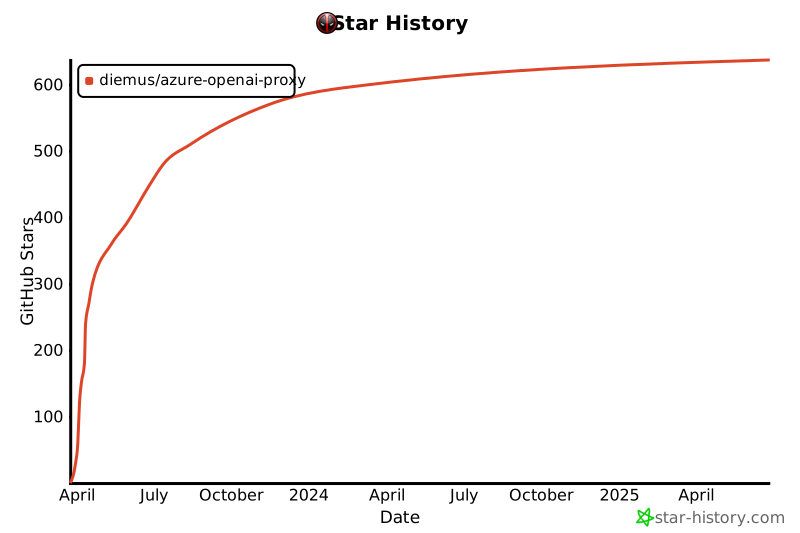](https://star-history.com/#diemus/azure-openai-proxy&Date)