Epic Harness
एक स्व-विकसित AI कोडिंग एजेंट हार्नेस — 3 कमांड्स, 19 स्किल्स, 1 स्वायत्त पाइपलाइन, आपकी विफलताओं से सीखता है।
याद रखने के लिए कम। प्रत्येक कीस्ट्रोक में अधिक बुद्धिमत्ता। हर सेशन के साथ और स्मार्ट।
English | 日本語 | 한국어 | Deutsch | Français | 简体中文 | 繁體中文 | Português | Español | हिन्दी







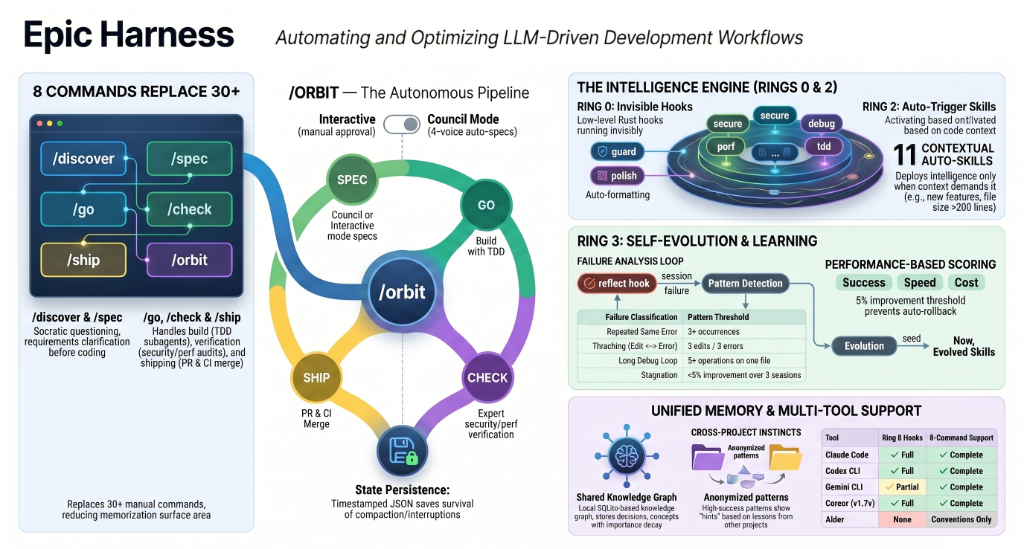
एक Claude Code प्लगइन जो **30+ कमांड्स + 19 ऑटो-ट्रिगर स्किल्स में समेकित** करता है, **आप जो कर रहे हैं उसके आधार पर स्वचालित रूप से स्किल्स ट्रिगर करता है**, और **आपके अपने विफलता पैटर्न से नई स्किल्स विकसित करता है**।
---

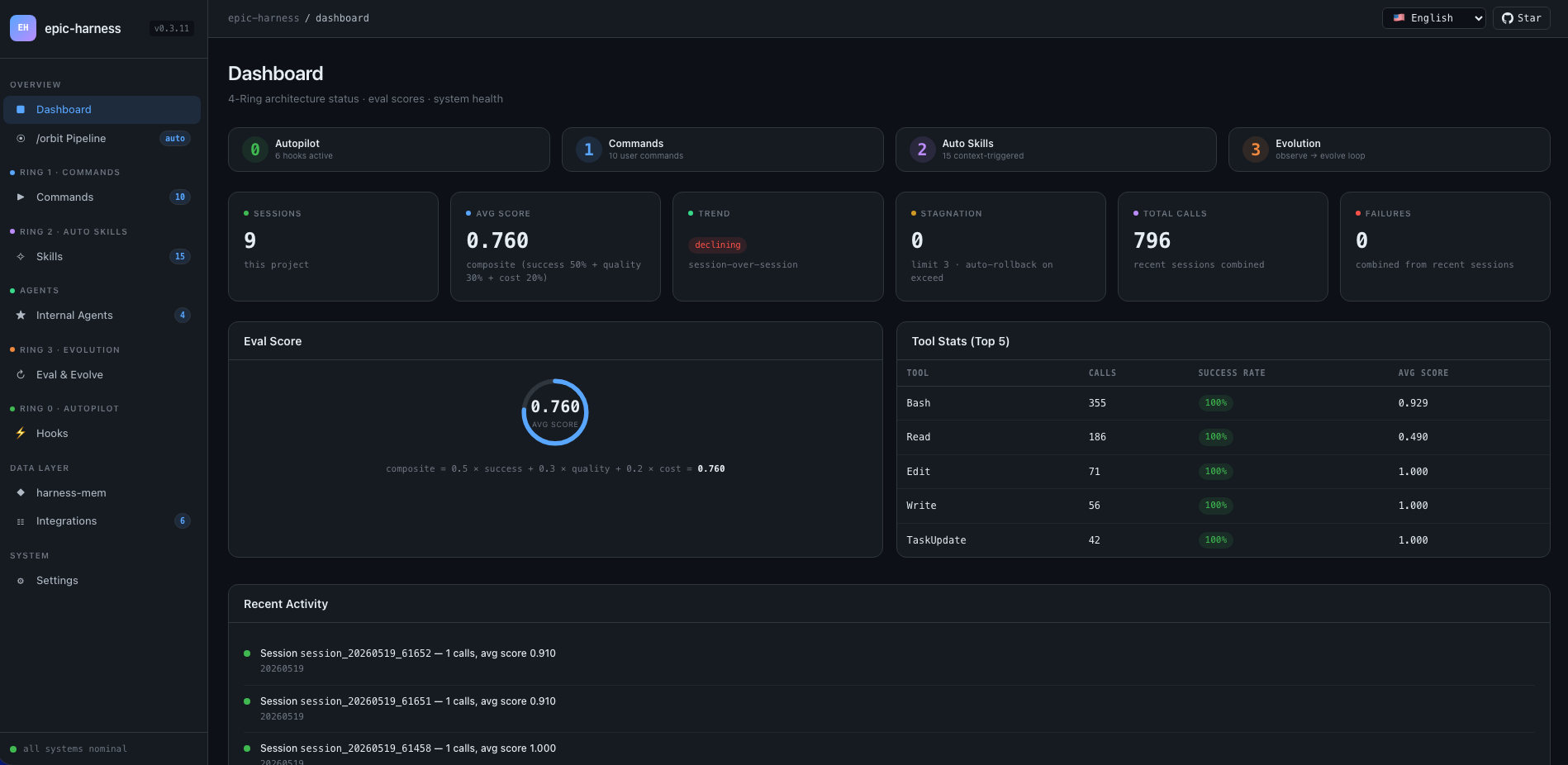
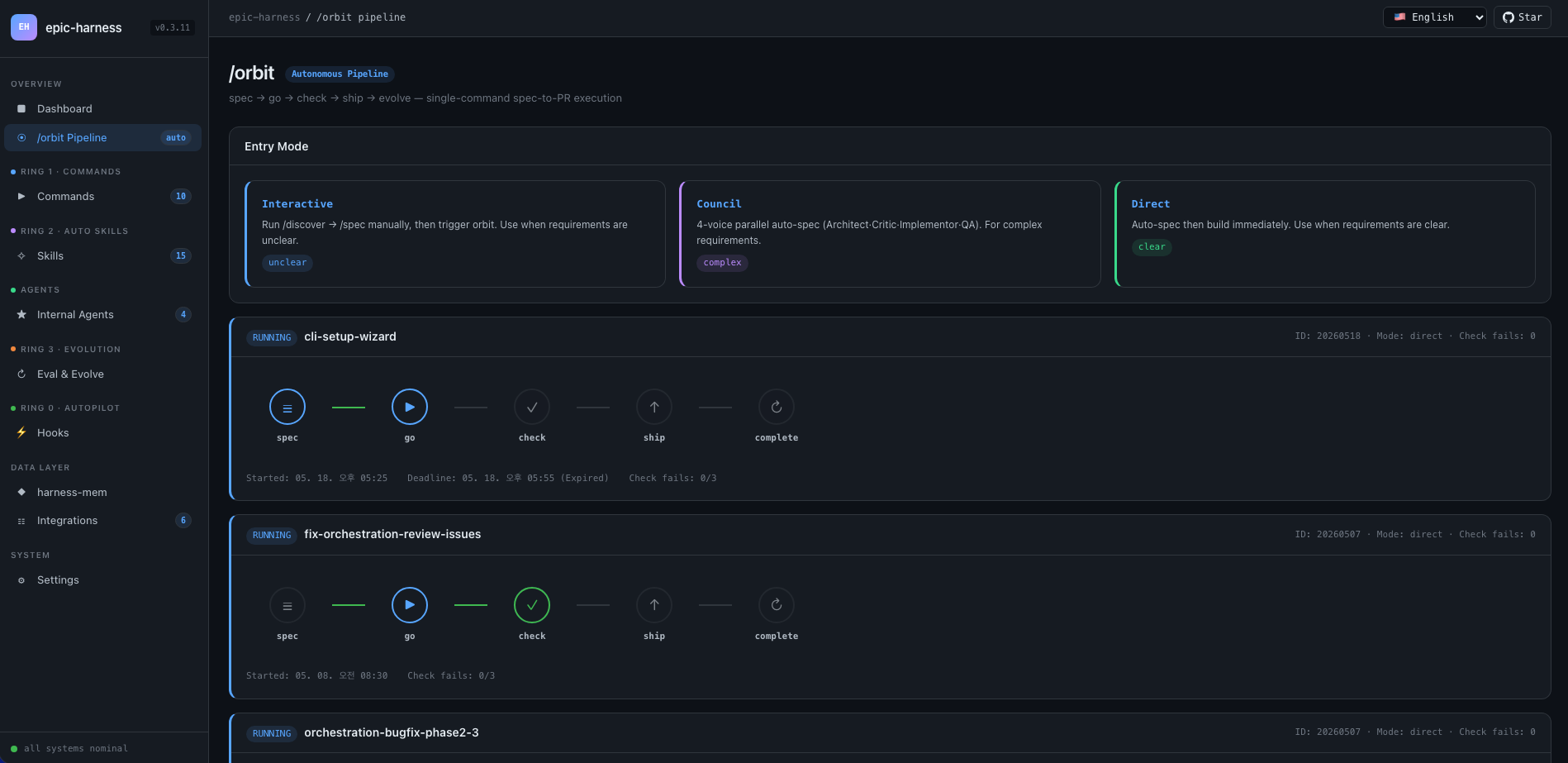
### वेब डैशबोर्ड — 10-स्क्रीन रियल-टाइम मेट्रिक्स
---
## यह क्या करता है
एक कमांड एंड-टू-एंड फीचर शिप करता है। स्किल्स आपके पूछे बिना चलती हैं। हर सेशन के बाद एजेंट और स्मार्ट होता जाता है।
```bash
$ /orbit "लॉगिन API में JWT auth जोड़ो"
→ spec approved → go (TDD subagents) → check (PASS) → ship (PR + CI) → evolve
```
या पाइपलाइन स्किल्स को सीधे इनवोक करें:
```bash
/spec "Add JWT auth to the login API" # आवश्यकताएँ स्पष्ट करता है → SPEC-*.md
/go # ऑटो-प्लान → TDD subagents → 4 मिनट
/check # समानांतर review + security + tests → PASS
/ship # isolated test → PR → CI green
```
स्किल्स बैकग्राउंड में अपने-आप ट्रिगर होती हैं — बिना अतिरिक्त कमांड:
```
फीचर बना रहे हैं? → tdd ट्रिगर (Red→Green→Refactor अनिवार्य)
टेस्ट फेल हुआ? → debug ट्रिगर (पहले root cause, कोई random fix नहीं)
Auth या DB छू रहे हैं? → secure ट्रिगर (OWASP checklist, कोई shortcut नहीं)
फ़ाइल 200 लाइनों तक? → simplify ट्रिगर (extract, rename, reduce)
```
सेशन खत्म होने के बाद, **evolve loop** विश्लेषण करता है कि क्या टूटा, targeted skills बनाता है, और अगले सेशन में लोड करता है। जो एजेंट TypeScript build विफलताओं से जूझ रहा था, अगली बार उसके पास `evo-ts-care` स्किल होगी।
---
## इंस्टॉलेशन
> **पहली बार?** [त्वरित प्रारंभ गाइड (5 मिनट)](../../docs/quickstart.md) पढ़ें।
epic-harness एक **प्लगइन** के रूप में वितरित होता है — स्किल्स, hooks और `harness-mem` MCP सर्वर सीधे प्लगइन लेआउट (`skills/`, `hooks.json`, `mcp_config.json`) से लोड होते हैं। कोई `install` सबकमांड नहीं है; प्रत्येक टूल प्लगइन को डिस्क से पढ़ता है।
### Claude Code (अनुशंसित)
```
/plugin marketplace add epicsagas/plugins
/plugin install epic@epicsagas
```
बाइनरी, स्किल्स, hooks और `harness-mem` MCP सर्वर को एक ही चरण में ऑटो-इंस्टॉल करता है।
### Codex CLI
```bash
codex plugin marketplace add epicsagas/plugins
```
स्किल्स और एजेंट तुरंत उपलब्ध — कोई अतिरिक्त चरण आवश्यक नहीं।
### agy (Antigravity CLI)
```bash
agy plugin install .
```
27 स्किल्स, hooks और `harness-mem` MCP सर्वर प्लगइन के `plugin.json` + `skills/` + `hooks.json` + `mcp_config.json` से ऑटो-डिस्कवर होते हैं।
### केवल बाइनरी (प्लगइन होस्ट के बिना)
```bash
brew install epicsagas/tap/epic-harness # macOS / Linux (Homebrew)
cargo binstall epic-harness # प्री-बिल्ट बाइनरी (Rust)
cargo install epic-harness # सोर्स से बिल्ड
```
Homebrew नहीं है? इंस्टॉलर स्क्रिप्ट का उपयोग करें:
```bash
curl --proto '=https' --tlsv1.2 -LsSf \
https://github.com/epicsagas/epic-harness/releases/latest/download/install.sh | sh
```
Windows:
```powershell
irm https://github.com/epicsagas/epic-harness/releases/latest/download/install.ps1 | iex
```
बाइनरी पहली hook रन पर `~/.harness/config.toml` और `HARNESS.md` को ऑटो-सीड करता है — सेटअप विज़ार्ड या `install` चरण की कोई आवश्यकता नहीं।
> `epic-harness --version` सत्यापित करने के लिए। `brew upgrade epic-harness` या इंस्टॉलर स्क्रिप्ट दोबारा चलाकर अपडेट करें।
पूर्वापेक्षाएं: **Git**। सोर्स/बाइनरी इंस्टॉल के लिए [Rust टूलचेन](https://rustup.rs) भी आवश्यक।
### सत्यापन
```bash
epic --version # बाइनरी इंस्टॉल है
ls ~/.harness/ # डेटा डायरेक्टरी (पहले सेशन पर ऑटो-क्रिएटेड)
```
Claude Code सेशन के अंदर: `/evolve status`
> **टेलीमेट्री**: उपयोग रिपोर्टिंग डिफ़ॉल्ट रूप से चालू (opt-out) है। `epic-harness telemetry status|on|off` से टॉगल करें।
---
## टेलीमेट्री
epic-harness hook विश्वसनीयता और स्किल इवोल्यूशन में सुधार के लिए डिफ़ॉल्ट रूप से **अनाम** उपयोग टेलीमेट्री एकत्र करता है (opt-out)। इवेंट्स Posthog पर भेजे जाते हैं।
**हम क्या एकत्र करते हैं:** कमांड नाम, अवधि, परिणाम (सफलता/विफलता), विफलता वर्ग और hook ब्लॉक/विफलता इवेंट्स — साथ ही `product`, `product_version`, `os` और एक यादृच्छिक `install_id` (पहले रन पर उत्पन्न UUID, `~/.config/epic-harness/install-id` में संग्रहीत)।
**हम कभी एकत्र नहीं करते:** सोर्स कोड, फ़ाइल सामग्री, फ़ाइल पथ, पर्यावरण चर, रहस्य या कोई व्यक्तिगत पहचान जानकारी।
**नियंत्रण:**
```bash
epic-harness telemetry status # वर्तमान सहमति दिखाएं
epic-harness telemetry off # अक्षम करें (सभी भेजना तुरंत रोकें)
epic-harness telemetry on # पुनः सक्षम करें
```
सहमति `~/.config/epic-harness/telemetry-consent` में संग्रहीत है। off होने पर कोई टेलीमेट्री नहीं भेजी जाती।
---
## कमांड
| कमांड | यह क्या करता है |
|---------|-------------|
| `/orbit` | **पूर्ण स्वायत्त पाइपलाइन**: spec → go → check → ship → evolve एक ही शॉट में |
| `/team` | ऑर्ग लाइब्रेरी ब्राउज़ करें, मौजूदा टीमों को हायर करें, या नई डिज़ाइन करें (3–6 एजेंट, `.claude/agents/` में सिंक) |
| `/evolve` | मैन्युअल एवोल्यूशन ट्रिगर — सेशन विश्लेषण, डैशबोर्ड देखें, स्किल प्रभावशीलता निरीक्षण, rollback |
पाइपलाइन चरण (`/spec`, `/go`, `/check`, `/ship`, `/discover`) अब **स्किल्स** हैं — संदर्भ के आधार पर ऑटो-ट्रिगर होते हैं या नाम से इनवोक किए जा सकते हैं। पुराने कमांड नाम अलियास राउटिंग के माध्यम से काम करते हैं।
---
## /orbit — स्वायत्त पाइपलाइन
`/orbit` पूर्ण पाइपलाइन को एकल स्वायत्त निष्पादन में लपेटता है। एक मोड चुनें — PR तक सब कुछ स्वचालित।
```mermaid
flowchart TD
START(["/orbit"]) --> MODE{"requirement?"}:::human
MODE -->|"unclear"| WAIT["Interactive\n/discover → /spec\nthen 'orbit go'"]:::human
MODE -->|"clear + complex"| COUNCIL["Council\n4-voice auto-spec"]:::auto
MODE -->|"clear + simple"| DIRECT["Direct\nauto-spec"]:::auto
WAIT --> SPEC_LOAD["Load spec"]
COUNCIL --> SPEC_LOAD
DIRECT --> SPEC_LOAD
SPEC_LOAD --> GO["Go\nplan → TDD → integrate"]:::auto
GO --> CHECK["Check\nreview + audit + test"]:::auto
CHECK -->|"PASS / WARN"| SHIP["Ship\nisolated test → PR → CI"]:::auto
CHECK -->|FAIL| RETRY{"retry < 3?"}
RETRY -->|yes| GO
RETRY -->|no| PAUSE["Pause\nuser decides"]:::human
PAUSE -->|continue| GO
PAUSE -->|abort| ABORT(["Abort"])
SHIP --> EVOLVE["Evolve\nauto-analyze session"]:::auto
EVOLVE --> DONE(["Orbit Complete\nconsolidated report"]):::auto
classDef human fill:#4a4a6a,stroke:#9b9bcc,color:#fff
classDef auto fill:#1a5c3a,stroke:#4caf7d,color:#fff
```
**बैंगनी** — मानव चरण: मोड चयन (अस्पष्ट → इंटरेक्टिव), 3× check विफलता पर रुकना।
**हरा** — clear + complex → council auto-spec; clear + simple → direct build; दोनों पूर्ण रूप से स्वायत्त।
स्थिति `$HARNESS_DIR/orbit/PIPELINE-{timestamp}.json` में बनी रहती है — context compaction के बाद भी जीवित।
> **चेतावनी**: एजेंट orbit को स्वयं संशोधित करते समय या केवल docs संपादित करते समय पाइपलाइन को बायपास कर सकता है। [Known Issues (Agent Judgment)](#known-issues-agent-judgment) देखें।
---
## ऑटो स्किल्स (Ring 2)
स्किल्स संदर्भ के आधार पर स्वचालित रूप से ट्रिगर होती हैं। आप उन्हें बुलाते नहीं हैं।
| स्किल | कब ट्रिगर होती है |
|-------|--------------|
| **spec** | आवश्यकताओं को परिभाषित करने की आवश्यकता — क्रमांकित R + AC दस्तावेज़ में रूपांतरित करता है |
| **go** | बिल्ड चरण — ऑटो-प्लानिंग → TDD सब-एजेंट → समानांतर निष्पादन → AC सत्यापन |
| **check** | समीक्षा चरण — समानांतर कोड समीक्षा + सुरक्षा ऑडिट + टेस्ट, स्कोप-आधारित अतिरिक्त |
| **ship** | शिपिंग चरण — आइसोलेटेड टेस्ट → पूर्ण चेक रिपोर्ट के साथ PR → CI मॉनिटरिंग + ऑटो-फिक्स |
| **tdd** | नई फीचर इम्प्लीमेंटेशन या बग फिक्स |
| **debug** | टेस्ट विफलता या runtime error |
| **discover** | अस्पष्ट अनुरोध, समस्या के बिना समाधान, अनफोकस्ड शिकायत |
| **secure** | Auth / DB / API / secrets कोड छूा गया |
| **perf** | लूप, क्वेरी, रेंडरिंग, batch operations |
| **simplify** | फ़ाइल > 200 लाइनें या उच्च cyclomatic complexity |
| **document** | सार्वजनिक API जोड़ा गया या signature बदली |
| **verify** | `/go` या `/ship` पूरा करने से पहले |
| **context** | Context window > 70% |
| **council** | अस्पष्ट architectural या design निर्णय |
| **agent-introspection** | 3+ लगातार विफलताएं या circular retry पैटर्न |
| **reflect** | ऑन-डिमांड: क्या आप AI को विचार एम्पलीफायर के रूप में उपयोग कर रहे हैं? ठंडे साक्ष्य-आधारित स्व-मूल्यांकन |
| **orchestrate** | मल्टी-एजेंट ऑर्केस्ट्रेशन स्टेटस और लाइव एजेंट नियंत्रण |
| **commit** | Conventional Commits जनरेशन — git diff से ऑटो-जनरेट किया गया |
---
## Evolve (Ring 3)
हार्नेस हर टूल कॉल को देखता है, 3 अक्षों पर स्कोर करता है, विफलता पैटर्न का पता लगाता है, और targeted skills बनाता है — स्वचालित रूप से, सेशन के अंत में।
### स्कोरिंग
```
composite = 0.5 × tool_success + 0.3 × output_quality + 0.2 × execution_cost
```
विफलता वर्गीकरण (9 प्रकार): `type_error` · `syntax_error` · `test_fail` · `lint_fail` · `build_fail` · `permission_denied` · `timeout` · `not_found` · `runtime_error`
### पैटर्न डिटेक्शन
| पैटर्न | पता लगाता है | डिफ़ॉल्ट थ्रेशोल्ड |
|---------|---------|-------------------|
| `repeated_same_error` | वही error N+ बार | 3 |
| `fix_then_break` | Edit सफलता → build/test विफलता | 3 lookback, 2 cycles |
| `long_debug_loop` | उसी फ़ाइल पर अटका | 5 operations |
| `thrashing` | Edit↔Error बदलाव | 3 edits, 3 errors |
### एवोल्यूशन फ्लो
```
Observe (PostToolUse — 3-अक्ष स्कोरिंग)
↓ obs/session_{id}.jsonl
Analyze (SessionEnd)
↓ प्रति-टूल, प्रति-ext स्कोर + पैटर्न
Propose (Solver — स्कोर द्वारा graduated: ≥0.90 skip, ≥0.70 moderate, <0.70 full)
↓ SkillProposal[] confidence के साथ
Curate (Accept/Merge/Skip, solver से feedback masked)
↓ evolved/{skill}/SKILL.md + meta.json
Gate (format check, dedup, cap 10, gated promotion ≥ 3 sessions)
↓ evolved_backup/ (best checkpoint)
Instinct (high-success patterns → cross-project memory.db nodes)
↓
Reload (अगला सेशन — resume विकसित स्किल्स लोड करता है)
```
स्किल सीडिंग: weak tool (success <60%, min 5 obs), weak file type (success <50%, min 3 obs), high-frequency error (5+ occurrences)।
स्थिरता: 5% सुधार के बिना 3 सेशन → best checkpoint पर ऑटो-rollback।
### स्किल प्रभावशीलता
हर विकसित स्किल A/B attribution के साथ ट्रैक की जाती है:
```
/evolve history → Skill Effectiveness
| Skill | With | Without | Delta |
|--------------------|------|---------|-------|
| evo-ts-care | 0.87 | 0.72 | +15% |
| evo-bash-discipline| 0.65 | 0.68 | -3% |
```
पॉज़िटिव delta = प्रभावी। नेगेटिव = `/evolve rollback` के माध्यम से हटाने पर विचार करें।
### कोल्ड-स्टार्ट प्रीसेट
पहले सेशन में, stack-उपयुक्त preset स्किल्स ऑटो-अप्लाई होती हैं:
| Stack | प्रीसेट |
|-------|---------|
| Node.js/TypeScript | `evo-ts-care`, `evo-fix-build-fail` |
| Go | `evo-go-care` |
| Python | `evo-py-care` |
| Rust | `evo-rs-care` |
### इंस्टिंक्ट लर्निंग
उच्च-सफलता पैटर्न निकाले और प्रोजेक्ट्स के पार promote किए जाते हैं:
```
observe (100% confirmed) → extract_instincts() → instinct node (confidence ≥ 0.8)
→ global में promote जब ≥ 2 प्रोजेक्ट्स में देखा गया
```
```bash
/evolve # अभी चलाएं
/evolve status # डैशबोर्ड: scores, trends, patterns, skills
/evolve history # पूर्ण इतिहास + स्किल प्रभावशीलता
/evolve cross-project # क्रॉस-प्रोजेक्ट पैटर्न विश्लेषण
/evolve rollback # पिछला सर्वश्रेष्ठ पुनर्स्थापित करें
/evolve reset # सभी एवोल्यूशन डेटा साफ़ करें
```
---
## Hooks (Ring 0)
हर सेशन में अदृश्य रूप से चलते हैं। सबकमांड के साथ एकल Rust बाइनरी (`epic-harness`)।
| Hook | कब | क्या करता है |
|------|------|------|
| **resume** | सेशन स्टार्ट | context पुनर्स्थापित करें, memory लोड करें, stack detect करें |
| **guard** | Bash से पहले | force-push-to-main, `rm -rf /`, DROP prod ब्लॉक करें |
| **polish** | Edit के बाद | ऑटो-format (Biome/Prettier/ruff/gofmt) + typecheck |
| **observe** | हर टूल उपयोग | `~/.harness/projects/{slug}/obs/` में log करें एवोल्यूशन के लिए |
| **snapshot** | compact से पहले | `~/.harness/projects/{slug}/sessions/` में state save करें |
| **reflect** | सेशन एंड | विफलताओं का विश्लेषण, evolved skills seed, gate, instincts निकालें |
Polish observe में फीडबैक देता है: format विफलता → `lint_fail`, TypeScript error → `build_fail`। Edit→Error thrashing तब भी detect होता है जब errors polish से आते हैं।
प्रत्येक सेशन अपना `session_{date}_{pid}_{random}.jsonl` लिखता है — कई समवर्ती सेशन एक-दूसरे के डेटा को corrupt नहीं करेंगे।
### Hook प्रोफ़ाइल
`~/.harness/config.toml` या `EPIC_HOOK_PROFILE` env var के माध्यम से:
| प्रोफ़ाइल | सक्रिय hooks |
|---------|-------------|
| `minimal` | guard, observe, resume |
| `standard` (डिफ़ॉल्ट) | उपरोक्त + polish, reflect, snapshot |
| `strict` | सभी hooks + भविष्य के strict-only checks |
### कस्टम Guard नियम
अपने प्रोजेक्ट रूट में `.harness/guard-rules.yaml` के माध्यम से प्रोजेक्ट-विशिष्ट नियम जोड़ें:
```yaml
blocked:
- pattern: kubectl\s+delete\s+namespace | msg: Namespace deletion blocked
warned:
- pattern: docker\s+system\s+prune | msg: Docker prune — verify first
```
---
## टीम (`epic team`)
टीमें **ऑर्ग-स्तरीय** हैं, प्रोजेक्ट-बाउंड नहीं। किसी भी प्रोजेक्ट में `/team` चलाना एजेंट परिभाषाओं के साझा पूल को समृद्ध करता है — कभी चुपचाप overwrite नहीं करता।
```bash
epic team # इंटरेक्टिव: scan → design → write → sync
epic team sync backend # एजेंट dispatch → .claude/agents/backend/
epic team link backend # Dispatch + team config में प्रोजेक्ट register
epic team list # वर्तमान org में सभी टीमें
epic team list --org netflix # नामित org में टीमें
epic team show backend --playbook # Config + पूर्ण playbook
epic team delete backend # केवल वर्तमान प्रोजेक्ट से recall
epic team delete backend --global # Org store से स्थायी रूप से हटाएं
```
Sync करने के बाद, एजेंट अगले सेशन में उपलब्ध होते हैं: `@domain-expert`, `@reviewer`, `@tester`, आदि।
| प्रकार | कीवर्ड | डिफ़ॉल्ट एजेंट |
|------|---------|---------------|
| Stream-aligned | `stream` | domain-expert, reviewer, tester |
| Platform | `platform` | api-designer, infra-specialist, dx-agent |
| Enabling | `enabling` | specialist |
| Complicated Subsystem | `subsystem` | domain-specialist, integration-tester |
मल्टी-org: `epic team --org netflix` — प्रत्येक org के लिए अलग topology।
Merge रणनीति: बदले गए एजेंट prompt करते हैं (डिफ़ॉल्ट: मौजूदा रखें, `.history/` में backup)। Playbook हमेशा append होता है।
---
## मल्टी-टूल समर्थन
सभी टूल एक ही `~/.harness/projects/{slug}/` डेटा डायरेक्टरी साझा करते हैं।
| टूल | Ring 0 Hooks | कमांड | स्किल्स | एजेंट |
|------|-------------|----------|--------|--------|
| **Claude Code** | ✓ पूर्ण | ✓ 3 कमांड (incl. /orbit) | ✓ 19 स्किल्स | Live |
| **Codex CLI** | ✓ पूर्ण¹ | ✓ 3 prompts (incl. /orbit) | ✓ 19 | — |
| **Antigravity** | ✓ आंशिक² | ✓ 3 कमांड (incl. /orbit) | ✓ 19 | — |
¹ `~/.codex/config.toml` में `plugin_hooks = true` · ² केवल PreInvocation/PostInvocation — PreToolUse नहीं (guard/polish अनुपलब्ध)
---
## आर्किटेक्चर: 4-रिंग मॉडल
```mermaid
flowchart TB
subgraph R0["Ring 0 — Autopilot (hooks, invisible)"]
direction LR
h1(resume) --- h2(guard) --- h3(polish) --- h4(observe) --- h5(snapshot) --- h6(reflect)
end
subgraph R1["Ring 1 — Commands (you call these)"]
direction TB
subgraph orbit_wrap[" /orbit "]
direction LR
c1("spec") --> c2("go") --> c3("check") --> c4("ship") --> c5("evolve")
end
c6("/team")
c7("/evolve (manual)")
end
subgraph R2["Ring 2 — Auto Skills (context-triggered)"]
direction LR
s1(spec) --- s2(go) --- s3(check) --- s4(ship) --- s5(tdd) --- s6(debug) --- s7(secure) --- s8(perf) --- s9(simplify) --- s10(verify)
end
subgraph R3["Ring 3 — Evolve (self-improving)"]
direction LR
e1(observe) --> e2(analyze) --> e3(seed) --> e4(gate) --> e5(reload)
end
R0 -->|"observe every tool call"| R3
R3 -.->|"evolved skills"| R2
R1 -->|"auto-trigger skills"| R2
R0 -->|"resume: restore context"| R1
```
---
## क्रॉस-प्रोजेक्ट लर्निंग
प्रोजेक्ट्स के पार विफलता पैटर्न साझा करने के लिए opt-in करें:
```bash
touch ~/.harness/projects/{slug}/.cross-project-enabled
```
सेशन एंड → anonymized patterns को `~/.harness/global_patterns.jsonl` में export। सेशन स्टार्ट → अन्य प्रोजेक्ट्स के कमज़ोर क्षेत्रों से hints दिखाता है।
---
## एकीकृत मेमोरी
सभी एजेंट `~/.harness/memory.db` (full-text search के साथ SQLite) में एक knowledge graph साझा करते हैं। कोई बाहरी runtime नहीं।
```
score = recency(25%) + importance(35%) + access_frequency(15%) + FTS_match(25%)
```
### CLI
```bash
epic mem recall "auth refactor" --project my-project # स्मार्ट recall
epic mem add --title "JWT rotation" --type decision # नोड जोड़ें
epic mem search "JWT" # FTS5 खोज
epic mem list --type decision --project my-project # फ़िल्टर
epic mem context --project my-project # प्रोजेक्ट context
epic mem serve # Web UI → :7700 या --port 8800 के साथ कस्टम port
epic mem mcp-install # MCP सर्वर register करें
epic mem export --out ./docs/memory # Markdown में export
```
### MCP टूल (6)
| टूल | उद्देश्य |
|------|---------|
| `mem_recall` | hint + project + graph neighbors के साथ स्मार्ट contextual recall |
| `mem_add` | type के अनुसार auto-importance (या explicit 0.0–1.0) के साथ नोड जोड़ें |
| `mem_search` | keyword खोज (full-text), importance के अनुसार ranked |
| `mem_query` | tag/type/project द्वारा फ़िल्टर |
| `mem_context` | प्रोजेक्ट-scoped स्मार्ट recall (कोई hint नहीं) |
| `mem_related` | नोड ID से graph traversal (connected knowledge ढूंढता है) |
### नोड प्रकार
| प्रकार | किसके द्वारा बनाया | Importance |
|------|-----------|------------|
| `decision` | मैन्युअल / MCP | 0.9 |
| `resolution` | मैन्युअल / MCP | 0.8 |
| `concept` | मैन्युअल / MCP | 0.7 |
| `project` | मैन्युअल / MCP | 0.7 |
| `instinct` | ऑटो (reflect) | 0.7 |
| `pattern` | ऑटो (reflect) | 0.5 |
| `error` | ऑटो (reflect) | 0.4 |
| `session` | ऑटो (reflect) | 0.2 |
Lifecycle: 30+ दिन बिना access → 10% importance decay (floor 0.05)। 180+ दिन → `stale` tag, recall से बाहर। `pinned` tag decay रोकता है।
> **Web UI**: Graph visualization सक्रिय रूप से सुधारा जा रहा है — clustering, neighbor highlighting, और offline fallback हाल ही में जोड़े गए। अधिक सुधार जारी।
---
प्रोजेक्ट डेटा — directory layout
## प्रोजेक्ट डेटा
सभी डेटा `~/.harness/` (होम डायरेक्टरी) में रहता है, आपके प्रोजेक्ट रूट में नहीं। प्रोजेक्ट deletion से बचा रहता है, git history pollute नहीं करता।
```
~/.harness/
├── memory.db # SQLite knowledge graph (nodes + edges + FTS5)
├── graph.json # Cached graph (web UI के लिए)
├── config.toml # User configuration
├── global_patterns.jsonl # Cross-project patterns (opt-in)
├── orgs/ # Team global store
│ └── {org}/teams/{team}/
│ ├── config.json, mission.md, playbook.md, agents/, .history/
└── projects/{slug}/
├── memory/ # प्रोजेक्ट patterns और rules
├── sessions/ # सेशन snapshots (resume के लिए)
├── obs/ # Tool usage observation logs (JSONL)
├── evolved/ # ऑटो-विकसित स्किल्स
│ ├── manifest.json
│ └── {skill}/SKILL.md + meta.json
├── evolved_backup/ # Best checkpoint (rollback के लिए)
├── dispatch/ # Skill dispatch logs
├── evolution.jsonl # पूर्ण एवोल्यूशन इतिहास
└── metrics.json # Aggregate stats + skill attribution
```
अपनी टीम के साथ safety rules साझा करें: प्रोजेक्ट रूट में `.harness/guard-rules.yaml` (git में committed)।
---
कॉन्फिगरेशन — config.toml reference
## कॉन्फिगरेशन
`~/.harness/config.toml` में सभी tunable parameters। अनुपस्थित = hardcoded defaults।
```toml
# प्राथमिकता: env var (EPIC_HOOK_PROFILE) > यह फ़ाइल > defaults
[hook]
profile = "standard" # "minimal" | "standard" | "strict"
gateguard_hints = true
[scoring]
weights = [0.5, 0.3, 0.2] # [success, quality, cost]
[evolution]
max_skills = 10
stagnation_limit = 3
improvement_threshold = 0.05
gated_promotion_min = 3
[pattern]
# repeated_error_min = 3
# debug_loop_min = 5
# graduated_scope_skip = 0.90
# graduated_scope_moderate = 0.70
[instinct]
# confidence_threshold = 0.8
# promotion_min_projects = 2
# max_instincts = 20
# min_observations = 10
# min_avg_score = 0.5
```
---
## Known Issues (Agent Judgment)
ये issues कोड में bugs के बजाय एजेंट के context interpretation से उत्पन्न होते हैं। यहां सूचीबद्ध हैं ताकि users जान सकें कि क्या देखना है।
### खोजी गई समस्याएं
| समस्या | कब | क्या होता है | Workaround |
|-------|------|-------------|------------|
| **Orbit self-modification bypass** | `/orbit` से orbit को स्वयं सुधारने को कहा जाता है | एजेंट orbit पाइपलाइन को पूरी तरह skip कर सकता है और main पर ad-hoc फ़ाइलें edit कर सकता है, बिना spec/PR/traceability के uncommitted changes छोड़ता है | Orbit पूरा होने के बाद, `git status` चेक करें। यदि main पर pipeline state के बिना changes हैं, manually commit करें या अलग branch से `/orbit` दोबारा चलाएं |
| **Doc-only task skips protocol** | `/orbit` को केवल markdown change मिलता है (test करने के लिए कोई code नहीं) | एजेंट TDD/test phases को अर्थहीन मान सकता है और पूर्ण पाइपलाइन skip कर सकता है | Pure doc changes के लिए स्वीकार्य। Mixed code+doc के लिए, सुनिश्चित करें कि एजेंट code-related phases skip न करे |
| **Mode misclassification** | अनुरोध Direct और Council के बीच borderline है | एजेंट Direct चुन सकता है जब Council (4-voice) अधिक edge cases पकड़ता, या Council जब Direct पर्याप्त है | यदि एजेंट गलत मोड चुनता है, तो स्पष्ट रूप से "use Council mode" या "use Direct mode" कहें |
### जानबूझकर किए गए design choices
इन्हें enhancement के लिए विचार किया गया था लेकिन मूल्यांकन के बाद ऐसे ही रखा गया:
| Choice | क्यों enhance नहीं किया | तर्क |
|--------|-----------------|-----------|
| **Worktree Go phase में enter होता है, orbit start में नहीं** | Preflight से isolate कर सकते थे | Preflight/mode/spec read-only हैं। पहले isolate करना बिना लाभ के complexity जोड़ता है — branch Go phase तक बनता ही नहीं |
| **Ship के बाद Worktree preserved** | PR merge पर auto-remove कर सकते थे | Branch PR head है। Merge से पहले हटाना PR तोड़ देगा। Cleanup user पर merge के बाद छोड़ा जाता है |
| **Branch का नाम `orbit-{slug}` है, `feature/{slug}` नहीं** | Conventional branch naming से match कर सकते थे | `EnterWorktree` names में `/` allow नहीं करता। Post-creation rename केवल cosmetic लाभ के लिए एक step जोड़ता है |
| **Doc changes के लिए कोई lightweight pipeline path नहीं** | Doc-only detect कर TDD/tests skip कर सकते थे | Detection fragile है (क्या "doc" माना जाए?)। अलग path जोड़ना marginal gain के लिए protocol complexity बढ़ाता है |
---
## ट्रबलशूटिंग
install के बाद command not found: epic
Cargo bin डायरेक्टरी को अपने PATH में जोड़ें:
```bash
export PATH="$HOME/.cargo/bin:$PATH"
```
इस line को अपने `~/.zshrc` या `~/.bashrc` में जोड़ें ताकि यह permanent हो जाए।
Hooks Claude Code में fire नहीं हो रहे
Hooks को Claude Code settings में sync करने के लिए install दोबारा चलाएं:
```bash
/plugin install epic@epicsagas
```
फिर Claude Code restart करें। Hooks `~/.claude/settings.json` में लिखे जाते हैं।
macOS पर Permission denied (Gatekeeper)
macOS internet से download किए गए unsigned binaries को block कर सकता है:
```bash
xattr -d com.apple.quarantine ~/.cargo/bin/epic-harness
xattr -d com.apple.quarantine ~/.cargo/bin/epic
```
epic: plugin hooks के अंदर binary not found
Plugin पहले `hooks/bin/epic-harness` में binary ढूंढता है। `cargo install` के माध्यम से update करने के बाद, इसे copy करें:
```bash
cp ~/.cargo/bin/epic-harness hooks/bin/epic-harness
```
---
## डेवलपमेंट
```bash
cargo install --path . # Build + install
cp ~/.cargo/bin/epic-harness hooks/bin/epic-harness # Plugin binary update
cargo test # Tests
```
Hooks binary दो जगहों पर ढूंढते हैं: `hooks/bin/epic-harness` (plugin local) → `~/.cargo/bin/epic-harness` (PATH)।
---
## लिंक
- [Changelog](../../CHANGELOG.md) — release इतिहास
- [Contributing](../../CONTRIBUTING.md) — कैसे योगदान करें
- [Security](../../SECURITY.md) — vulnerabilities report करना
- [Issues](https://github.com/epicsagas/epic-harness/issues) — bug reports और feature requests
## आभार
- [a-evolve](https://github.com/A-EVO-Lab/a-evolve) — स्वचालित एवोल्यूशन और benchmark patterns
- [agent-skills](https://github.com/addyosmani/agent-skills) — Claude Code एजेंट skill system
- [everything-claude-code](https://github.com/affaan-m/everything-claude-code) — व्यापक Claude Code patterns
- [gstack](https://github.com/garrytan/gstack) — Plugin architecture reference
- [harness](https://github.com/revfactory/harness) — Hook और harness infrastructure patterns
- [serena](https://github.com/oraios/serena) — स्वायत्त एजेंट design
- [SuperClaude Framework](https://github.com/SuperClaude-Org/SuperClaude_Framework) — Multi-command framework architecture
- [superpowers](https://github.com/obra/superpowers) — Claude Code extension patterns
## लाइसेंस
[Apache 2.0](../../LICENSE)