An AI agent uses a real iPhone like a person.
A small ESP32 board is its eyes (AirPlay) and hands (mouse and keyboard). No jailbreak, no computer, open source.
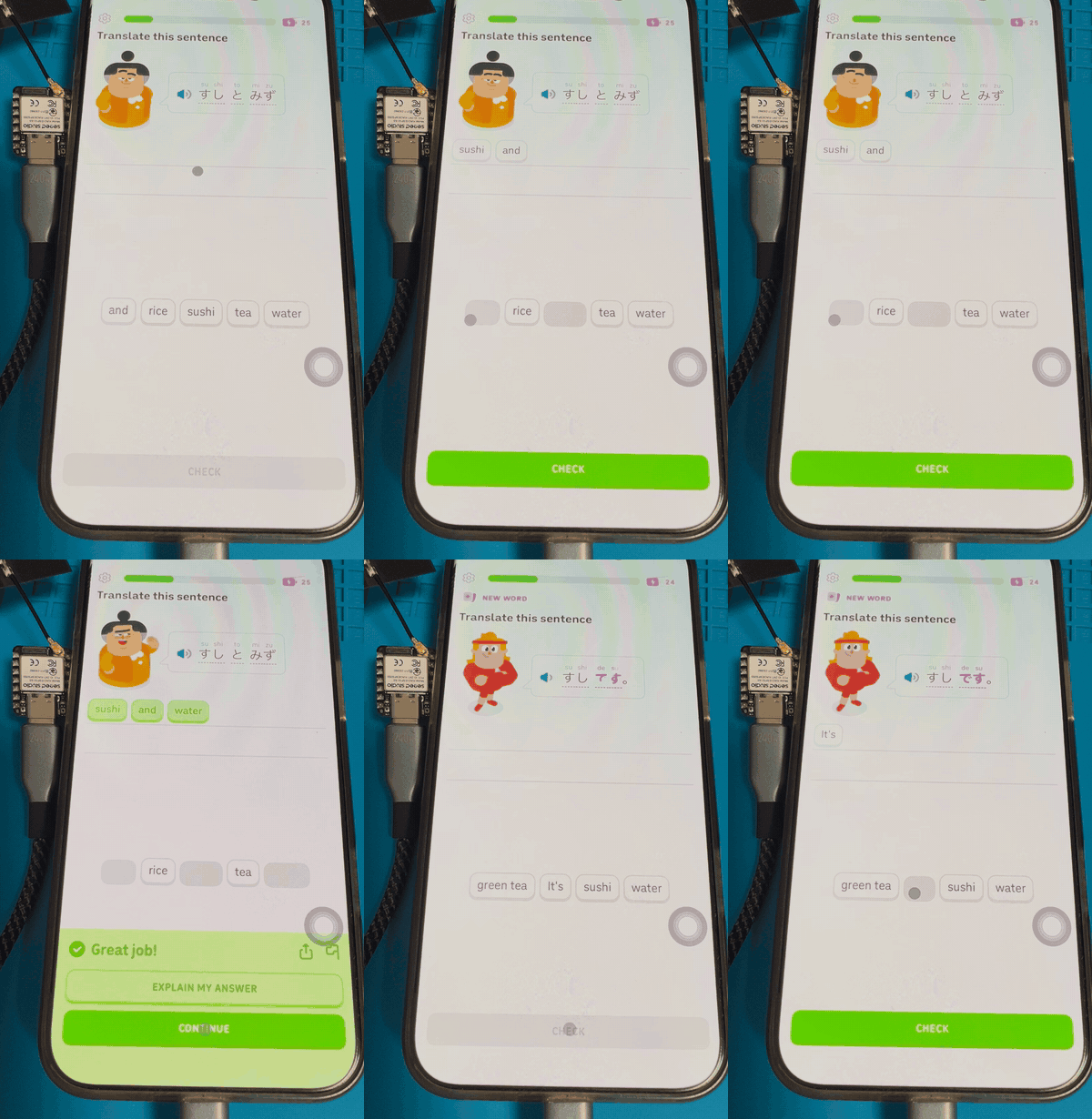
A real iPhone doing a Duolingo lesson by itself, sped up 8×. Nobody touches the screen. Watch the full demo.
Start in three steps
| 1. Get the board | 2. Flash it in one click | 3. Install the app |
|---|---|---|
| A Seeed Studio XIAO ESP32S3 (plain, not Sense or Plus). **[Which board to buy →](https://manina.ai/where-to-buy-esp32?from=github)** | Plug it into your computer and flash it in Chrome or Edge. Nothing to install. **[Flash the board →](https://manina.ai/install?from=github)** | Install the app and follow its four setup steps. **[Get it on TestFlight →](https://testflight.apple.com/join/1xQHgJcA)** |
Rather not flash a board? A ready-to-plug Manina AI device is coming: see the hardware page.
- **Bluetooth mode (1.0.8, firmware v0.2.7).** One firmware holds both inputs: the board is the iPhone's USB mouse
and keyboard, or a Bluetooth one, switched in the app. In Bluetooth mode no cable goes into the phone, so Lightning
iPhones work without a camera adapter; the board then needs its own power (a USB charger or power bank). Built on
[@cy41](https://github.com/cy41)'s Bluetooth mouse and keyboard work ([#94](https://github.com/onehumanbeing/esp32-iphone-agent/pull/94)).
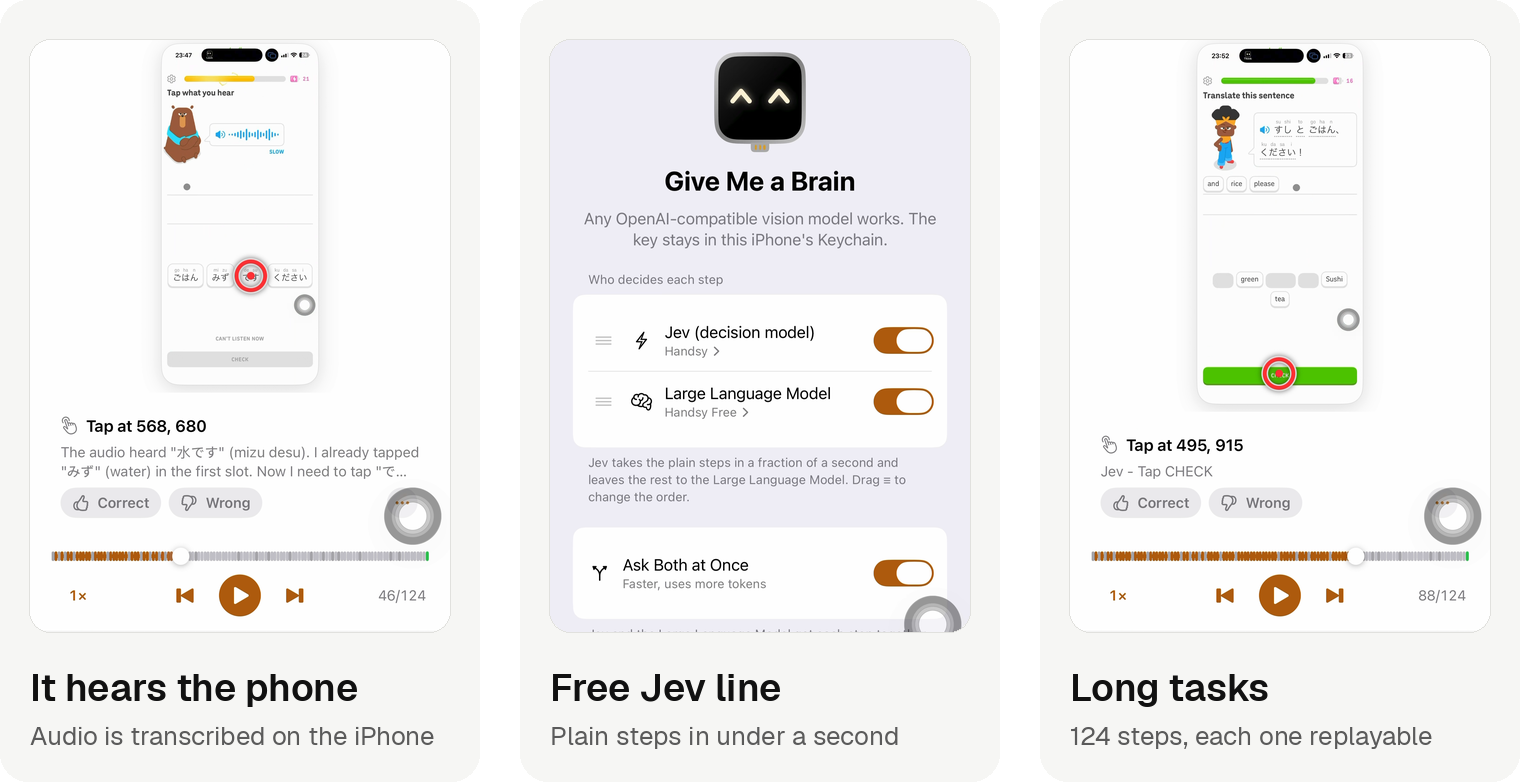
- **It hears the phone.** The board forwards AirPlay audio and the iPhone turns it into words, so listening
exercises and voice prompts work. [How it works](https://manina.ai/docs/listen?ref=github).
- **Free Jev line.** Jev takes the plain steps in a fraction of a second and leaves the rest to the large model;
the agent loop is rebuilt around one model call per step.
- **Long tasks.** No 40-step limit; any stopped run can continue. Every run can be replayed step by step on the phone.
Get it on [TestFlight](https://testflight.apple.com/join/1xQHgJcA) (App Store listing in review). Needs board firmware
v0.2.4. [Full changelog](https://manina.ai/docs/changelog?ref=github).
## Why a board
Most iPhone agents run on a computer. Before the first task you install Xcode, turn on Developer Mode, pair the
phone over USB and type commands into a terminal, and the computer has to stay on for every task after that.
Fine for a developer, a wall for everyone else. Here the board does the computer's job, so the phone is all you need.
| | **ESP32 iPhone Agent** | Computer-tethered agents WebDriverAgent, CoreDevice, idevice |
|---|---|---|
| What you need | **An iPhone and a $7 board** | A Mac (often a recent macOS), full Xcode, developer tools |
| Setup | **Flash in the browser, install from TestFlight, four guided steps in the app** | Terminal: clone, build, install dependencies, sign the helper app |
| Changes on the iPhone | **AssistiveTouch on (the app walks you through it)** | Developer Mode, USB trust and pairing |
| While it runs | **Just the phone. Take it anywhere** | The computer stays on and connected |
| Apps it can use | **Any app a person can use: it sees the screen and moves a pointer** | What the debug and accessibility interfaces expose |
| Hears the phone | **Yes (App 1.0.2)** | Usually not |
The honest costs: you buy a $7 board, each step takes a few seconds (most of it the model), and the phone uses
cellular data while it runs because the board's hotspot takes the Wi-Fi.
### Not a developer? Start here
1. **Get the board.** A Seeed XIAO ESP32S3, about $7: [what to buy](https://manina.ai/docs/hardware?ref=github).
2. **Flash it in Chrome or Edge.** No tools to install: [manina.ai/install](https://manina.ai/install?ref=github).
3. **Install the app and follow its four setup steps.** [TestFlight](https://testflight.apple.com/join/1xQHgJcA) ·
[setup guide with pictures](https://manina.ai/esp32-iphone-agent-setup?ref=github).
Stuck? See [troubleshooting](https://manina.ai/troubleshooting?ref=github) or mail [support@manina.ai](mailto:support@manina.ai).
> [!NOTE]
> **Free line busy or failing?** The free model line is shared and can be busy or return errors (HTTP 503) for a
> while, so a run may stall or fail every step. Switch to your own API key in Settings › Model to keep going, and
> let us know on X: [@iamhenryyuan](https://x.com/iamhenryyuan).
## How it works
New to the idea? Start with [AI control for iPhone](https://manina.ai/ai-control-iphone), then [how Manina AI works](https://manina.ai/how-it-works).
```
iPhone ──Screen Mirroring (Wi-Fi)──▶ ESP32-S3: AirPlay receiver ──Wi-Fi TCP :7201──▶ ESP32 Agent app (same iPhone)
▲ own hotspot, H.264 passthrough decode → vision model → action
└──────── USB HID mouse + keyboard ◀──────────── BLE commands ◀──────────────────────┘
```
- **Eyes — AirPlay to the board.** The board opens its own Wi-Fi hotspot and appears in the phone's Screen Mirroring
list as *ESP32 Agent*. It keeps the H.264 stream (no decoding on the board) and forwards it to the app over Wi-Fi
(TCP, port 7201). BLE carries commands and status. The phone keeps using cellular data for the model while it is
on the board's hotspot. Or switch the board to your home Wi-Fi (onboarding and Settings › Board, stored on the
board): phone and board share the router, and no cellular data is needed. The board is 2.4 GHz-only, and routers
with client isolation or blocked mDNS hide it from Screen Mirroring; the hotspot always works.
- **Hands — USB HID or Bluetooth HID.** The board is a standard mouse and keyboard, over USB or over Bluetooth (switched
in the app). With AssistiveTouch on, the mouse moves an
on-screen pointer, so a click is a tap and a drag is a swipe.
- **Brain — the app.** The app decodes the stream, sends screenshots to any OpenAI-compatible vision model, and runs
a planner and an actor: tap, swipe, draw, type, press keys, go home, finish. It runs in the background while it
works; the Dynamic Island shows what it is doing.
- **Closing the loop.** The pointer is relative, so the app tracks it and re-homes it in a corner; before precise taps
it wiggles the pointer, finds it on screen and corrects the miss. After each action it waits for the screen to
settle and tells the model whether anything changed. A lost board, hotspot or mirroring link pauses the run and
resumes it from the same step.
- **Review.** Every run is kept on the phone: replay it step by step with the taps and swipes drawn on top.
Export the screenshots, actions and saved annotations from **Runs → open a run → ⋯ → Export trace** for analysis
by another agent. See [Export runs for agent review](docs/run-data-export.md) for batch export, USB copying and file details.
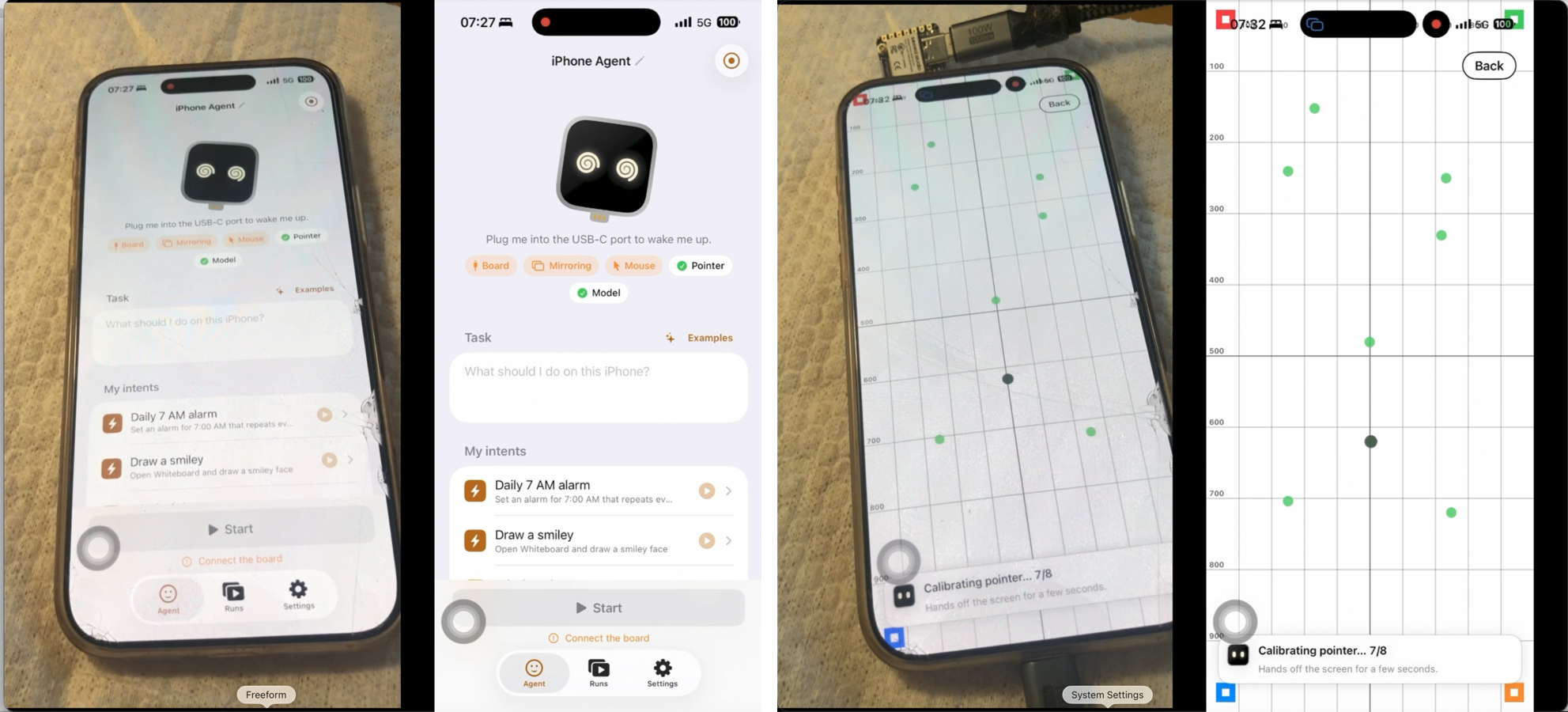
*Left: the real phone. Right: what the agent sees through the board's AirPlay mirror. The second shot is the pointer calibration.*
The first version (v0.1.0) ran on a Mac/Linux computer with UxPlay and a Python server. It is kept as tag
[`v0.1.0`](https://github.com/onehumanbeing/esp32-iphone-agent/tree/v0.1.0) and branch
[`legacy`](https://github.com/onehumanbeing/esp32-iphone-agent/tree/legacy); see [docs/legacy.md](docs/legacy.md).
## Hardware
Supported boards and setup details: [hardware guide](https://manina.ai/docs/hardware).
Picking a board, cables and adapters, or stuck during setup: [setup guide](https://manina.ai/esp32-iphone-agent-setup).
For wireless input built from source, see [Bluetooth mouse and keyboard](docs/bluetooth-hid.md). For the Zectrix Note 4 power, battery and flash layout, see the [Note 4 board guide](docs/note4-bluetooth.md).
| Part | Notes |
|---|---|
| **ESP32-S3 board** | Tested with a [Seeed Studio XIAO ESP32S3](https://wiki.seeedstudio.com/xiao_esp32s3_getting_started/) (plain version, 8 MB PSRAM; not Sense, not Plus). About $7 ([Amazon](https://amzn.to/3U6QKiz)\*). Any ESP32-S3 with native USB on its USB-C port and PSRAM should work. |
| **Or: M5Stack StopWatch** (experimental) | A round-screen ESP32-S3 watch with its own battery, Bluetooth mode only. It shows the run (face, steps, time), its keys pause, resume and stop it, and a done task's answer shows on it. Flash it from [manina.ai/install](https://manina.ai/install?board=m5stopwatch); needs the TestFlight app 1.0.9+. |
| **USB-C cable** | Short USB-C to USB-C, e.g. [Anker 60W, 1 ft, 2-pack](https://amzn.to/4yvNyvi)\*. |
| **iPhone** | iOS 18 or later (App Store app), or iOS 16.4 or later with the [TestFlight](https://testflight.apple.com/join/1xQHgJcA) app 1.0.9+ (iPhone 8 and iPhone X too; on iOS 16 the agent leaves apps through AssistiveTouch), with cellular data (the Wi-Fi is taken by the board's hotspot), or a 2.4 GHz home Wi-Fi the board can join instead. USB-C models plug in directly; Lightning models need a Lightning to USB Camera Adapter, or use Bluetooth mode. Over USB the phone powers the board; in Bluetooth mode the board needs its own power. |
| **Vision model** | Any OpenAI-compatible chat API that accepts images: a cloud API or your own server. |
| **Mac with Xcode** | Only to flash the board and build the app once. Not needed at run time. With the [TestFlight](https://testflight.apple.com/join/1xQHgJcA) app, Xcode is not needed for the app. |
\* Affiliate link. As an Amazon Associate I earn from qualifying purchases.
## Quick start
> [!WARNING]
> Only follow the install steps in this README. Never run commands from issues or comments (for example a "quick install" one-liner such as PowerShell `iex(irm ...)`); these are not from the maintainers.
### 1. Flash the board (plugged into the Mac)
Install [arduino-cli](https://arduino.github.io/arduino-cli/), the ESP32 core 3.3.x and NimBLE-Arduino 2.5.x, then:
```bash
arduino-cli lib install "NimBLE-Arduino@2.5.1"
hardware/flash.sh # optional: [serial port] [--debug]
```
Always build with `flash.sh`: it applies the BLE buffer sizes in `hardware/hid_bridge/nimble_cfg.h`.
The experimental M5Stack StopWatch target (`hardware/flash.sh --stopwatch --build-only`) also needs
`arduino-cli lib install --no-deps "M5Unified@0.2.29" "M5GFX@0.2.36"`.
No Mac or toolchain? [Install the firmware from Chrome or Edge](https://manina.ai/install) over USB instead.
### 2. Install the app
**Easiest: [join the TestFlight beta](https://testflight.apple.com/join/1xQHgJcA)** on your iPhone and install
**ESP32 Agent** from there, then go to step 3.
**Or build it yourself:**
```bash
cp ios/Config/Local.xcconfig.example ios/Config/Local.xcconfig # set DEVELOPMENT_TEAM and IA_BUNDLE_ID
open ios/IPhoneAgent.xcodeproj # run the IPhoneAgent scheme on your iPhone
```
The project is generated with [XcodeGen](https://github.com/yonaskolb/XcodeGen) from `ios/project.yml`
(`cd ios && xcodegen`). A free Apple ID can sign it (re-sign every 7 days). The one-tap hotspot join needs the
Hotspot Configuration capability (a paid account); without it the app shows the hotspot password to join by hand.
### 3. Set up (once, in the app)
Plug the board into the iPhone and open **ESP32 Agent**. Setup walks through four steps and checks each one itself:
1. **Plug Me In** — pair the board over Bluetooth.
2. **Let Me See the Screen** — join the board's Wi-Fi, then Control Center → Screen Mirroring → *ESP32 Agent*.
3. **Let Me Use the Pointer** — turn on AssistiveTouch; the app calibrates the pointer by itself.
4. **Give Me a Brain** — enter your model endpoint and key (stored in the Keychain), then choose a vision model
from the endpoint's model list (or enter its model ID).
### 4. Give it a task
Type a goal (for example *"Open Settings and go to Wi-Fi"*) and press **Start**. Stop it from the Dynamic Island,
or come back to the app. Siri, Shortcuts, widgets and Control Center can run saved tasks.
## Use from a coding agent
The `esp32agent` CLI (npm, `npx -y esp32agent mcp`) is an MCP server, so a coding agent on your computer can see
and drive the iPhone through the board (board firmware v0.2.2 or later); see [iPhone as an MCP server](https://manina.ai/iphone-mcp). This repository is also a plugin with that
MCP server and an agent skill ([skills/manina/SKILL.md](skills/manina/SKILL.md)). In Claude Code ([walkthrough](https://manina.ai/claude-code-iphone)):
```bash
/plugin marketplace add onehumanbeing/esp32-iphone-agent
/plugin install esp32agent@manina
```
Or add only the MCP server:
```bash
claude mcp add esp32agent -- npx -y esp32agent mcp
```
Cursor, Cline and other MCP clients:
```json
{
"mcpServers": {
"esp32agent": {
"command": "npx",
"args": ["-y", "esp32agent", "mcp"]
}
}
}
```
DeepSeek Harness (dsh): install the plugin in [integrations/dsh](integrations/dsh/README.md), which adds the same
MCP server and skill ([demo video](https://www.youtube.com/watch?v=DzYv0QVk_No)):
```bash
dsh plugin --profile web add dsh-esp32agent
```
Hermes Agent: install the plugin in [integrations/hermes](integrations/hermes/README.md), same MCP server and skill:
```bash
hermes plugins install onehumanbeing/esp32-iphone-agent/integrations/hermes --enable
```
The CLI talks to the board from your computer over Bluetooth, or over your Wi-Fi once both are on it (`esp32agent net join`),
so it works without the iPhone app or TestFlight.
Commands and options are in the [CLI reference](https://manina.ai/docs/cli) and [cli/README.md](cli/README.md).
## Model and prompts
- Any OpenAI-compatible vision endpoint works (vLLM, SGLang, llama.cpp, Ollama, cloud APIs). The app lists the
endpoint's models for you to choose one explicitly; you can also enter a model ID, and set a separate planner
and actor model.
- Settings → Model → Advanced → Extra body JSON is merged into each chat request. DeepSeek's API
(`api.deepseek.com`) thinks at high effort unless told otherwise, so the app sends
`{"thinking":{"type":"disabled"}}` there unless that JSON already contains `thinking`; use
`{"thinking":{"type":"enabled"},"reasoning_effort":"low"}` to keep a little reasoning.
- The prompts are plain text in [`prompts/`](prompts/) and bundled with the app: edit them, rebuild, done.
- Each finished run logs planner/actor call counts, requests with a screenshot, and token totals when the endpoint reports
`usage`. Missing usage is left absent (never coerced to 0); the run total is marked **partial** if any call
omitted it. A short task is typically a few planner calls plus one actor call per step — each actor step sends
a fresh screenshot — so image tokens dominate cost. Giving the planner a cheaper model while keeping a stronger
actor is usually the best tradeoff.
- The project was developed with [nvidia/Qwen3.8-Flash-Next-NVFP4](https://huggingface.co/nvidia/Qwen3.8-Flash-Next-NVFP4)
served on two DGX Sparks ([TensorFold](https://github.com/MiaAI-Lab/Qwen3.8-Flash-Dual-DGX-Sparks-TensorFold)).
## Project layout
```
ios/ the app (SwiftUI): BLE link, H.264 decode, agent, setup, replay, Live Activity, widgets; tests
prompts/ planner / actor prompts used by the app
hardware/ ESP32-S3 firmware (Arduino): BLE GATT, hotspot, AirPlay receiver, USB HID; flash script,
host tests, Mac BLE test harness (hardware/tools)
docs/ BLE protocol, legacy version notes
harness/ wireless development loop: Mac → iPhone app (Wi-Fi install) → board (firmware through the app)
server/ legacy v0.1.0 computer-side server; not used by this version (see server/README.md)
```
Debugging without the phone app: `hardware/tools/board_test.py` plays the app over BLE from a Mac
([hardware/tools/README.md](hardware/tools/README.md)). Board ↔ app protocol: [docs/ble-protocol.md](docs/ble-protocol.md).
### Harness development
With the board plugged into a test iPhone and the iPhone on the Mac's Wi-Fi, everything goes through `devicectl`,
no cable: `harness/app.sh` builds and installs the Debug app, `harness/fw.sh` builds the firmware and copies it
into the app, which installs it on the board (rolls back by itself if the new image fails), `harness/run.sh ""`
runs a task and `harness/logs.sh` pulls the log. BLE from the Mac is only for the one-time `net sta`. Setup
(Lightning iPhones: camera adapter), security: [harness/README.md](harness/README.md).
Phone out of reach (e.g. on cellular): the optional, off-by-default [remote debug log](docs/remote-debug-log.md)
uploads the app's text log to a server you run.
## Roadmap
- [x] Drop the computer: the board mirrors and clicks, the app on the phone thinks
- [x] iPad, portrait and landscape (calibrated per orientation; the shared prompts plus its own rules in `prompts/devices/ipad.md`)
- [ ] iPhone landscape apps (coordinates and calibration assume portrait)
- [x] Chinese text input (typed as pinyin through the board's keyboard; ctrl+space switches English and pinyin)
- [ ] Faster steps: several actions per model call, pointer checks only when needed
- [ ] A curated list of models that work best with this setup, shown inside the iOS app ([suggested by @asharthinks](https://x.com/asharthinks/status/2110740775030125019))
## Limitations
- **AirPlay source must be an iPhone.** Screen Mirroring from macOS is not supported: the handshake can look healthy
while the board never receives video.
- The screen is mirrored at 480×1040, up to 5 fps; each step takes a few seconds, most of it the model.
- iOS does not mirror some screens (passcode entry, Apple Pay, DRM video); the agent cannot see them. Mirroring stops
when the phone locks.
- While the agent runs on the board's hotspot, the phone's Wi-Fi is that hotspot (no internet over it); the model is
reached over cellular data. On a home Wi-Fi (LAN mode) the internet goes over that network.
- Chinese is typed as pinyin through the board's keyboard (ctrl+space switches English and pinyin). The clipboard is
not used for this; emoji are dropped. iPhone landscape apps are not supported yet; on iPad, each orientation is calibrated once (the app runs it before
the first run in that orientation) and this app itself runs full screen, not in Split View or Stage Manager.
If something doesn't work (no *ESP32 Agent* in Screen Mirroring, the board not connecting), see [troubleshooting](https://manina.ai/troubleshooting).
## Responsible use
Only automate devices and accounts you own or are allowed to use, and respect the terms of the apps involved. The
agent acts with your hands: watch it, and keep the stop button within reach.
## Contributing
Issues and pull requests are welcome; see [CONTRIBUTING.md](CONTRIBUTING.md). Start from the latest `main`
and open pull requests against `main`. Before opening a pull request, update your branch from the latest
`main` (fetch and rebase, or merge in the latest `main`). Security reports: [SECURITY.md](SECURITY.md).
The latest code is on `main`; [`release-1.0`](https://github.com/onehumanbeing/esp32-iphone-agent/tree/release-1.0) is the version submitted to TestFlight and App Store review, and is no longer the branch for contributions.
## Contact
Questions or feedback: [support@manina.ai](mailto:support@manina.ai) · Website: [manina.ai](https://manina.ai)
## Related projects
| Project | Approach | Difference from this project |
|---|---|---|
| [VersaiOS](https://github.com/zhaodashuaibi/VersaiOS) | UxPlay mirroring + ESP32-S3 Bluetooth mouse + vision model | Needs a computer; one tap per instruction |
| [ja1chen/actell](https://github.com/ja1chen/actell) | Agent app on the iPhone via Apple's CoreDevice debug channel | Needs Developer Mode and a Developer Disk Image |
| [AidenAI-IO/aiden-firmware](https://github.com/AidenAI-IO/aiden-firmware) | HDMI capture + USB keyboard/mouse + multimodal model | Capture hardware; mainly Android |
| [yoyicue/glassbox](https://github.com/yoyicue/glassbox) | PicoKVM HDMI capture + USB HID | macOS controller and PicoKVM |
| [boboabw/phone-agent](https://github.com/boboabw/phone-agent) | ESP32-S3 Bluetooth HID + AssistiveTouch, agent as an iPhone app | Closest to this version; this one also brings the eyes (AirPlay on the board) |
| [VKCOM/devicehub](https://github.com/VKCOM/devicehub) | ESP32 Bluetooth mouse for iOS device farms | Device-farm tooling, no AI agent |
WebDriverAgent/XCUITest-based tools such as [mobile-mcp](https://github.com/mobile-next/mobile-mcp) and
[Midscene](https://github.com/web-infra-dev/midscene) need a Mac and code signing.
## Acknowledgements
[UxPlay](https://github.com/FDH2/UxPlay) (the AirPlay receiver the firmware's is ported from) ·
[NimBLE-Arduino](https://github.com/h2zero/NimBLE-Arduino) ·
[M5Unified](https://github.com/m5stack/M5Unified) and [M5GFX](https://github.com/m5stack/M5GFX) (StopWatch target) ·
[Arduino ESP32 core](https://github.com/espressif/arduino-esp32) and [TinyUSB](https://github.com/hathach/tinyusb)
Bluetooth mode builds on [@cy41](https://github.com/cy41)'s Bluetooth mouse and keyboard support and the Zectrix
Note 4 board adapter ([#94](https://github.com/onehumanbeing/esp32-iphone-agent/pull/94)). Thank you.
## License
> **Building on this project?** Keep the [LICENSE](LICENSE) and credit **[ESP32 iPhone Agent by Henry Yuan](https://github.com/onehumanbeing/esp32-iphone-agent)** in your README, demos and posts. See [NOTICE](NOTICE).
[MIT](LICENSE), except `hardware/hid_bridge/src/airplay/` (ported from UxPlay), which is
[GPL-3.0](hardware/hid_bridge/src/airplay/LICENSE-GPL.md); the firmware binary that links it is therefore
distributed under GPL-3.0. Files under [`skills/`](skills/) are [MIT-0](skills/LICENSE) (MIT No Attribution);
the rest of the repository keeps the license above.
## Contributors
Thanks to everyone who has helped build ESP32 iPhone Agent: [@cy41](https://github.com/cy41) · [@shinjiyu](https://github.com/shinjiyu) · [@Yi-111-a](https://github.com/Yi-111-a) · [@buddyh](https://github.com/buddyh) · [@djs-91](https://github.com/djs-91) · [@EliotAndres](https://github.com/EliotAndres) · [@lukas-1997](https://github.com/lukas-1997) · [@mvanhorn](https://github.com/mvanhorn). Pull requests start from the latest `main`.
## Star History