
# Tabularis
Tabularis는 3종의 내장 데이터베이스 드라이버와 DuckDB, ClickHouse, Redis, Firestore를 포함한 24종의 출시된 플러그인을 갖춘 오픈소스 데스크톱 SQL 워크스페이스입니다. 내장 MCP 서버를 통해 Claude, Cursor, Devin(구 Windsurf)이 여러분이 이미 사용하는 앱에서 스키마를 읽고 쿼리를 실행할 수 있습니다.
웹사이트 ·
문서 ·
다운로드 ·
변경 로그











English ·
Italiano ·
Español ·
中文 ·
Français ·
Deutsch ·
日本語 ·
Русский ·
Tagalog ·
한국어 ·
Português (Brasil)
> [!NOTE]
> 이 문서는 번역된 버전입니다. 가장 최신이자 공식적인 원본은 [영문 README](../../README.md)입니다.
## 다운로드
```bash
winget install Debba.Tabularis # Windows
brew install --cask tabularis # macOS
sudo snap install tabularis # Linux
```
또는 설치 프로그램을 직접 받으세요:
- **Windows:** [](https://github.com/TabularisDB/tabularis/releases/download/v0.29.0/tabularis_0.29.0_x64-setup.exe)
- **macOS:** [](https://github.com/TabularisDB/tabularis/releases/download/v0.29.0/tabularis_0.29.0_aarch64.dmg) [](https://github.com/TabularisDB/tabularis/releases/download/v0.29.0/tabularis_0.29.0_x64.dmg)
- **Linux:** [](https://github.com/TabularisDB/tabularis/releases/download/v0.29.0/tabularis_0.29.0_amd64.AppImage) [](https://github.com/TabularisDB/tabularis/releases/download/v0.29.0/tabularis_0.29.0_amd64.deb) [](https://github.com/TabularisDB/tabularis/releases/download/v0.29.0/tabularis-0.29.0-1.x86_64.rpm)
앱 UI는 영어, 이탈리아어, 스페인어, 중국어(간체), 프랑스어, 독일어, 일본어, 러시아어, 한국어, 타갈로그어, 브라질 포르투갈어로 제공됩니다.
> [!TIP]
> **Discord:** [Discord 서버에 참여하세요](https://discord.com/invite/K2hmhfHRSt). 메인테이너와 이야기하고, 피드백을 공유하고, 커뮤니티의 도움을 받을 수 있습니다.
## 왜 tabularis인가?
| | **tabularis** | DBeaver CE | TablePlus | Beekeeper Studio |
| ---------------------------------------------------------- | :---------------------------: | :---------------------------: | :-----------------: | :-----------------: |
| 라이선스 | Apache 2.0, 무료 | Apache 2.0, 무료 (Pro는 유료) | 상용 | GPLv3 (유료 에디션) |
| SQL 노트북 (SQL + Markdown 셀, 셀 간 변수, 차트) | ✅ | ❌ | ❌ | ❌ |
| AI 에이전트용 내장 MCP 서버 | ✅ | ❌ | ❌ | ❌ |
| **모든 언어**로 작성 가능한 플러그인 (stdio 기반 JSON-RPC) | ✅ | Java/Eclipse 플러그인 | JavaScript 플러그인 | ❌ |
| **로컬 모델**(Ollama)을 사용하는 AI text-to-SQL | ✅ | 클라우드 기반 AI 어시스턴트 | ❌ | ❌ |
| 인터랙티브 플랜 그래프가 있는 Visual EXPLAIN | ✅ | ✅ | ❌ | ❌ |
| 기본 제공 데이터베이스 | 내장 3종 + 공식 플러그인 24종 | 100종 이상 | 20종 이상 | 약 10종 |
> [!NOTE]
> 2026년 6월 기준 비교이며, 다른 도구의 기능은 이후 변경되었을 수 있습니다. 수십 종의 드라이버가 필요하다면 DBeaver를 사용하세요. tabularis는 소수의 데이터베이스를 제대로 지원하는 데 집중합니다.
### 데이터베이스 지원
PostgreSQL, MySQL/MariaDB, SQLite는 기본 내장되어 있습니다. 내장 PostgreSQL 드라이버는 더 이상 권장되지 않으며, Tabularis가 자동으로 설치하는 [PostgreSQL 플러그인](https://github.com/TabularisDB/tabularis-postgresql-plugin)으로 대체됩니다. 그 외 모든 것은 플러그인입니다. 웹사이트의 [드라이버 및 플러그인 커버리지](https://tabularis.dev/#driver-coverage)를 반영한 현재 상태는 다음과 같습니다:
**출시됨**
| 데이터베이스 | 플러그인 | 데이터베이스 | 플러그인 |
| ------------------------ | ----------------------------------------------------------------------------------------------- | -------------- | ----------------------------------------------------------------------------------------------- |
| ClickHouse | [tabularis-clickhouse-plugin](https://github.com/TabularisDB/tabularis-clickhouse-plugin) | LibSQL / Turso | [tabularis-libsql-plugin](https://github.com/TabularisDB/tabularis-libsql-plugin) |
| Cloudflare D1 | [tabularis_cloudflare_d1_plugin](https://github.com/josejorge/tabularis_cloudflare_d1_plugin) | MongoDB | [tabularis-mongodb-plugin](https://github.com/danielnuld/tabularis-mongodb-plugin) |
| Cloudflare D1 (HTTP API) | [cloudflare-tabularis](https://github.com/GabrielMalava/cloudflare-tabularis) | MongoDB Atlas | [tabularis-mongodb-plugin](https://github.com/TabularisDB/tabularis-mongodb-plugin) |
| DM / Dameng | [tabularis-dameng-plugin](https://github.com/haos666/tabularis-dameng-plugin) | Oracle | [tabularis-oracle-plugin](https://github.com/TabularisDB/tabularis-oracle-plugin) |
| DuckDB | [tabularis-duckdb-plugin](https://github.com/TabularisDB/tabularis-duckdb-plugin) | Redis (Go) | [tabularis-redis-plugin-go](https://github.com/gzamboni/tabularis-redis-plugin-go) |
| DynamoDB | [tabularis-dynamodb-plugin](https://github.com/TabularisDB/tabularis-dynamodb-plugin) | Redis (Rust) | [tabularis-redis-plugin](https://github.com/nicholas-papachriston/tabularis-redis-plugin) |
| Elasticsearch | [tabularis-elasticsearch-plugin](https://github.com/TabularisDB/tabularis-elasticsearch-plugin) | SQL Server | [tabularis-sqlserver-plugin](https://github.com/TabularisDB/tabularis-sqlserver-plugin) |
| Firestore | [firestore-tabularis](https://codeberg.org/NewtTheWolf/firestore-tabularis) | CSV Folder | [tabularis-csv-plugin](https://github.com/TabularisDB/tabularis-csv-plugin) |
| IBM Db2 | [tabularis-db2-plugin](https://github.com/TabularisDB/tabularis-db2-plugin) | Google Sheets | [tabularis-google-sheets-plugin](https://github.com/TabularisDB/tabularis-google-sheets-plugin) |
| IBM Informix | [tabularis-informix-plugin](https://github.com/danielnuld/tabularis-informix-plugin) | HackerNews | [tabularis-hackernews-plugin](https://github.com/TabularisDB/tabularis-hackernews-plugin) |
| Cassandra / ScyllaDB | [tabularis-cassandra-plugin](https://github.com/TabularisDB/tabularis-cassandra-plugin) | Harper | [tabularis-harper-plugin](https://github.com/HarperFast/tabularis-harper-plugin) |
| PostgreSQL | [tabularis-postgresql-plugin](https://github.com/TabularisDB/tabularis-postgresql-plugin) | Trino | [tabularis-trino-plugin](https://github.com/TabularisDB/tabularis-trino-plugin) |
**바운티 보드에 등록됨**
| 상태 | 데이터베이스 |
| ------------- | ---------------------------------------------------------------------------- |
| 개발 중 | Amazon Redshift, Google BigQuery, Meilisearch |
| 계획됨 | CockroachDB, TiDB |
| 곧 출시 | Snowflake |
| 모집 중 | Etcd, Firebird, SQL Anywhere, SurrealDB |
> [!NOTE]
> **출시됨** 상태의 드라이버는 [플러그인 레지스트리](https://tabularis.dev/plugins)에서 설치할 수 있습니다. 그 외 모든 것은 [바운티 보드](https://tabularis.dev/plugins/bounties)에 있습니다. 직접 맡거나, 후원하거나, [데이터베이스를 요청](https://github.com/TabularisDB/tabularis/discussions)하세요.
## 설치
### Windows
```bash
winget install Debba.Tabularis
```
또는 [Releases](https://github.com/TabularisDB/tabularis/releases)에서 설치 프로그램을 다운로드하세요.
### macOS
```bash
brew install --cask tabularis
```
**v0.13.1**부터의 빌드는 Apple에서 서명 및 공증되어 별도 절차 없이 실행됩니다.
v0.13.1 이전 릴리스 참고 사항
아래 참고 사항은 직접 다운로드한 구버전(v0.13.1 이전)에만 해당합니다:
- tabularis 앱에 접근성 권한(개인정보 보호 및 보안)을 허용해야 할 수 있습니다. 업데이트 시 이미 허용 목록에 tabularis가 있다면, 새 버전에 접근성 권한을 부여하기 전에 수동으로 제거하세요.
- 앱을 응용 프로그램 폴더로 복사한 후 다음 명령을 실행해야 할 수 있습니다:
```bash
xattr -c /Applications/tabularis.app
```
### Linux
**Snap**
```bash
sudo snap install tabularis
sudo snap connect tabularis:password-manager-service # 저장된 자격 증명을 위한 키체인 접근
```
> [!IMPORTANT]
> `password-manager-service` 인터페이스는 아직 Snap Store에서 자동으로 연결되지 않습니다. 연결하지 않으면 연결을 저장할 때 `Platform secure storage failure` 오류가 발생합니다.
**Flatpak**
```bash
flatpak remote-add --if-not-exists flatpark https://dl.flatpark.org/flatpark.flatpakrepo
flatpak install flatpark dev.tabularis.Tabularis
```
**AppImage**
```bash
chmod +x tabularis_x.x.x_amd64.AppImage
./tabularis_x.x.x_amd64.AppImage
```
**Arch Linux**
```bash
yay -S tabularis-bin
```
## 업데이트
- 앱이 시작 시 자동으로 업데이트를 확인합니다.
- GitHub Releases에서 수동으로 업데이트할 수도 있습니다.
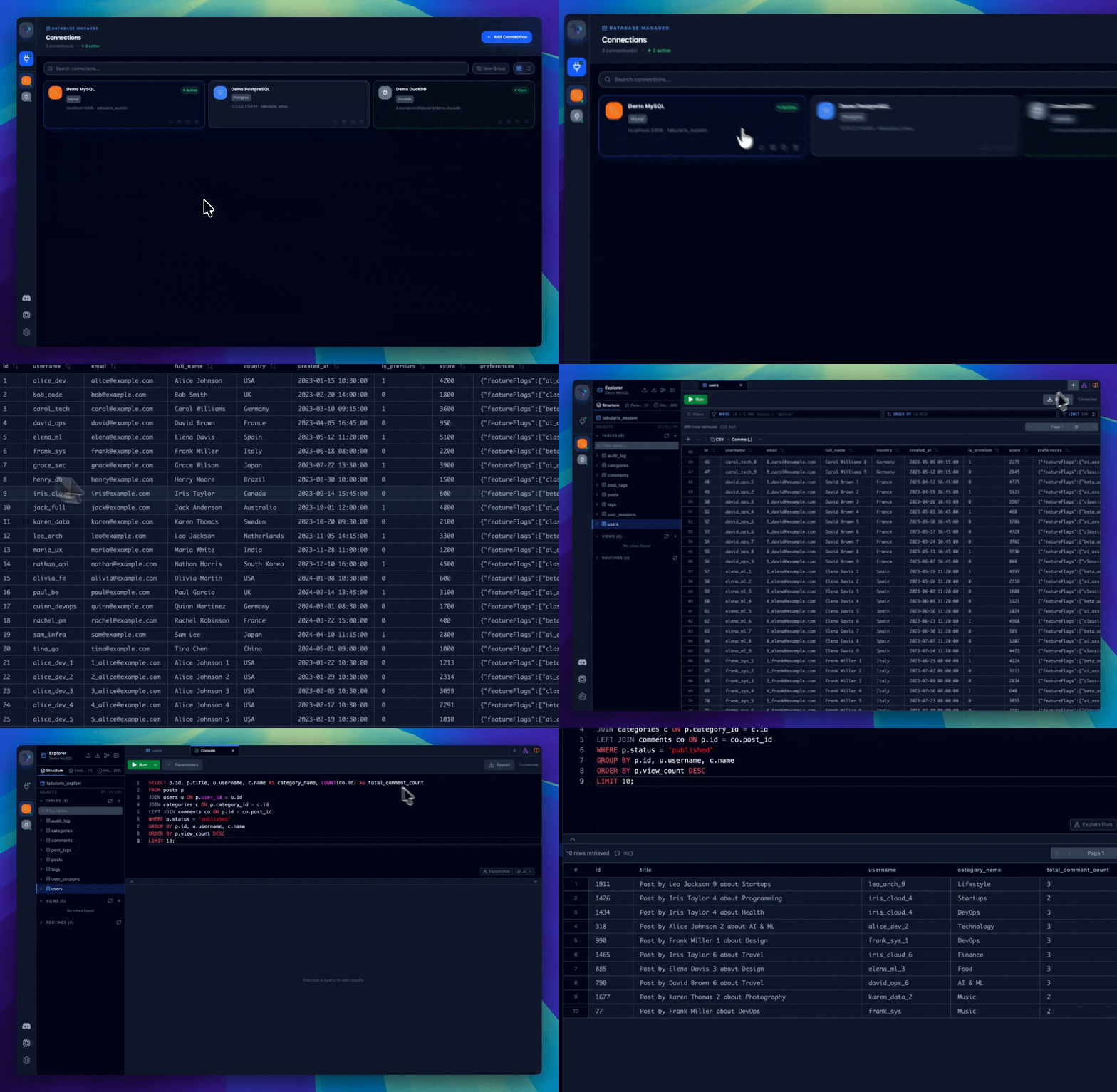
## 갤러리
전체 갤러리는 [tabularis.dev](https://tabularis.dev)에서 확인할 수 있습니다.
## 기능
### 연결 관리
[tabularis.dev에서 전체 레퍼런스 보기 →](https://tabularis.dev/wiki/connections)
- PostgreSQL, MySQL/MariaDB, SQLite 지원.
- 연결 프로필을 로컬에 저장.
- SSH 터널링 및 시스템 키체인에 비밀번호 저장.
- 그리드/리스트 뷰와 실시간 검색을 갖춘 연결 페이지.
- 연결별 외관 사용자 지정: 아이콘(Lucide, 이모지 또는 사용자 이미지)과 강조 색상.
### 데이터베이스 탐색기
[tabularis.dev에서 전체 레퍼런스 보기 →](https://tabularis.dev/wiki/schema-management)
- 테이블, 컬럼, 키, 인덱스, 뷰, 프로시저 탐색.
- 스키마 요소를 내장 편집 기능으로 수정.
- 인터랙티브 ER 다이어그램.
- 컨텍스트 메뉴를 통한 빠른 작업.
### SQL 편집기
[tabularis.dev에서 전체 레퍼런스 보기 →](https://tabularis.dev/wiki/editor)
- 구문 강조와 자동 완성을 제공하는 Monaco 편집기.
- 연결별로 격리된 탭.
- 개별 결과 표시를 지원하는 다중 문 실행.
- 저장된 쿼리 및 편집기 내장 AI 오버레이.
### SQL 노트북
[tabularis.dev에서 전체 레퍼런스 보기 →](https://tabularis.dev/wiki/notebooks)
- 하나의 문서에 SQL과 Markdown 셀.
- 인라인 결과 및 차트.
- 셀 간 변수 및 전역 파라미터.
- 모든 셀의 순차 실행.
### 비주얼 쿼리 빌더
[tabularis.dev에서 전체 레퍼런스 보기 →](https://tabularis.dev/wiki/visual-query-builder)
- 드래그 앤 드롭으로 쿼리 구성.
- 비주얼 JOIN, 필터, 집계, 정렬, LIMIT.
- 실시간 SQL 생성.
### Visual EXPLAIN
[tabularis.dev에서 전체 레퍼런스 보기 →](https://tabularis.dev/wiki/visual-explain)
- 실행 계획의 인터랙티브 그래프.
- 테이블 뷰, 원시 출력, 선택적 AI 분석.
- PostgreSQL, MySQL/MariaDB, SQLite 지원.
### 데이터 그리드
[tabularis.dev에서 전체 레퍼런스 보기 →](https://tabularis.dev/wiki/data-grid)
- 인라인 및 일괄 편집.
- 행 생성, 선택, 삭제.
- CSV 또는 JSON으로 내보내기.
- 공간 데이터(GEOMETRY) 초기 지원.
- JSON/JSONB 셀 강조 및 전용 편집 창(Tree / Monaco / Raw). 연결별 선택 옵션: 텍스트 컬럼의 JSON 자동 감지.
### 로깅
- Settings의 실시간 로그 뷰어.
- 레벨별 필터링.
- `.log` 파일로 내보내기.
- CLI 디버그 모드: `tabularis --debug`.
### 플러그인
[tabularis.dev에서 전체 레퍼런스 보기 →](https://tabularis.dev/wiki/plugins)
- stdin/stdout 기반 JSON-RPC 2.0을 사용하는 외부 플러그인 시스템.
- 재시작 없이 커뮤니티 드라이버 설치.
- 공식 레지스트리: [`plugins/registry.json`](../../plugins/registry.json).
- 개발자 가이드: [`plugins/PLUGIN_GUIDE.md`](../../plugins/PLUGIN_GUIDE.md).
## 설정
[tabularis.dev에서 전체 레퍼런스 보기 →](https://tabularis.dev/wiki/configuration)
설정은 다음 위치에 저장됩니다:
- Linux: `~/.config/tabularis/`
- macOS: `~/Library/Application Support/tabularis/`
- Windows: `%APPDATA%\tabularis\`
주요 파일:
- `connections.json`
- `saved_queries.json`
- `config.json`
- `themes/`
- `preferences/`
- `connection-icons/` (연결 아이콘용 사용자 이미지)
`config.json`의 `language` 필드는 `auto`, `en`, `it`, `es`, `zh`, `fr`, `de`, `ja`, `ru`, `ko`, `tl`, `pt-BR` 값을 지원합니다.
## AI
[tabularis.dev에서 전체 레퍼런스 보기 →](https://tabularis.dev/wiki/ai-assistant)
다음 제공자를 사용하는 선택적 Text-to-SQL 및 쿼리 설명 기능:
- OpenAI
- Anthropic
- MiniMax
- OpenRouter
- Requesty
- Ollama
- OpenAI 호환 API
모델 목록은 동적으로 불러와 로컬에 캐시됩니다.
## MCP
[tabularis.dev에서 전체 레퍼런스 보기 →](https://tabularis.dev/wiki/mcp-server)
내장 MCP 서버 실행:
```bash
tabularis --mcp
```
지원 클라이언트:
- Claude Desktop
- Cursor
- Windsurf
사용 가능한 도구:
| 도구 | 설명 |
| ------------------ | ---------------------------------------------- |
| `list_connections` | 저장된 모든 연결 목록 표시 |
| `list_databases` | 연결의 모든 데이터베이스 목록 표시 |
| `list_tables` | 연결의 테이블 목록 표시 (스키마로 필터링 가능) |
| `describe_table` | 전체 스키마 조회: 컬럼, 인덱스, 외래 키 |
| `run_query` | 임의의 SQL 쿼리를 실행하고 결과 반환 |
## 기술 스택
| 계층 | 스택 |
| ---------- | ------------------------------------- |
| 프론트엔드 | React 19, TypeScript, Tailwind CSS v4 |
| 백엔드 | Rust, Tauri v2, SQLx |
## 개발
**설정**
```bash
pnpm install
pnpm tauri dev
```
**빌드**
```bash
pnpm tauri build
```
## 로드맵
로드맵은 GitHub 이슈에서 자동으로 생성됩니다. 최신 상태는 [영문 README](../../README.md#roadmap)에서 확인하세요.
## 기여하기
기여를 환영합니다. [CONTRIBUTING.md](../../CONTRIBUTING.md)를 참고하세요. 다음에서 시작할 수 있습니다:
- [UI 디자인 시스템 및 비주얼 아이덴티티: 기여자 모집](https://github.com/TabularisDB/tabularis/issues/195)
- [Plugin Guide](../../plugins/PLUGIN_GUIDE.md)를 참고해 원하는 언어로 드라이버 플러그인 작성
## 스폰서 및 후원자
Tabularis는 훌륭한 스폰서와 후원자 덕분에 유지됩니다. 전체 목록은 [영문 README](../../README.md#sponsors-and-supporters)와 [tabularis.dev/sponsors](https://tabularis.dev/sponsors)에서 확인하세요.
## 프로젝트 이야기
Tabularis는 하나의 실험으로 시작했습니다: AI 지원 개발이 처음부터 동작하는 도구를 만드는 데 얼마나 멀리 갈 수 있을까? 예상보다 훨씬 멀리 갔습니다. 이제는 정기적인 릴리스와 플러그인 생태계를 갖춘 활발히 유지되는 프로젝트가 되었습니다.
## 라이선스
[Apache License 2.0](../../LICENSE)
---
tabularis가 마음에 드시나요? 저장소에 별을 눌러주세요 ⭐. 프로젝트에 큰 힘이 됩니다.