# Tabularis
Ang Tabularis ay isang open-source na desktop SQL workspace na may 3 built-in na database driver at 24 na inilabas na plugin, kabilang ang DuckDB, ClickHouse, Redis at Firestore. Pinapayagan ng built-in na MCP server nito ang Claude, Cursor at Devin (dating Windsurf) na basahin ang iyong schema at magpatakbo ng mga query sa parehong app na ginagamit mo na.
Website ·
Dokumentasyon ·
I-download ·
Changelog











English ·
Italiano ·
Español ·
中文 ·
Français ·
Deutsch ·
日本語 ·
Русский ·
Tagalog ·
한국어 ·
Português (Brasil)
> [!NOTE]
> Ito ay isinalin na bersyon ng dokumentasyon. Ang pinakabago at opisyal na pinagmulan ay ang [README sa Ingles](../../README.md).
## I-download
```bash
winget install Debba.Tabularis # Windows
brew install --cask tabularis # macOS
sudo snap install tabularis # Linux
```
O kumuha ng installer nang direkta:
- **Windows:** [](https://github.com/TabularisDB/tabularis/releases/download/v0.29.0/tabularis_0.29.0_x64-setup.exe)
- **macOS:** [](https://github.com/TabularisDB/tabularis/releases/download/v0.29.0/tabularis_0.29.0_aarch64.dmg) [](https://github.com/TabularisDB/tabularis/releases/download/v0.29.0/tabularis_0.29.0_x64.dmg)
- **Linux:** [](https://github.com/TabularisDB/tabularis/releases/download/v0.29.0/tabularis_0.29.0_amd64.AppImage) [](https://github.com/TabularisDB/tabularis/releases/download/v0.29.0/tabularis_0.29.0_amd64.deb) [](https://github.com/TabularisDB/tabularis/releases/download/v0.29.0/tabularis-0.29.0-1.x86_64.rpm)
Sinusuportahan ng UI ng app ang Ingles, Italyano, Espanyol, Tsino (Simplified), Pranses, Aleman, Hapones, Ruso, Koreano, Tagalog, at Portuges (Brazilian).
> [!TIP]
> **Discord:** [Sumali sa aming server](https://discord.com/invite/K2hmhfHRSt) para makipag-usap sa mga maintainer, magbahagi ng feedback, at humingi ng tulong.
## Bakit tabularis?
| | **tabularis** | DBeaver CE | TablePlus | Beekeeper Studio |
| ------------------------------------------------------------------ | :-------------------------------: | :----------------------------------: | :----------------: | :--------------------------: |
| Lisensya | Apache 2.0, libre | Apache 2.0, libre (may bayad na Pro) | Komersyal | GPLv3 (may bayad na edisyon) |
| SQL notebooks (SQL + Markdown cells, cross-cell variables, charts) | ✅ | ❌ | ❌ | ❌ |
| Built-in MCP server para sa AI agents | ✅ | ❌ | ❌ | ❌ |
| Mga plugin sa **anumang wika** (JSON-RPC sa stdio) | ✅ | Java/Eclipse plugins | JavaScript plugins | ❌ |
| AI text-to-SQL gamit ang **lokal na modelo** (Ollama) | ✅ | Cloud AI assistant | ❌ | ❌ |
| Visual EXPLAIN na may interactive plan graphs | ✅ | ✅ | ❌ | ❌ |
| Mga database out of the box | 3 built-in + 24 opisyal na plugin | 100+ | 20+ | ~10 |
> [!NOTE]
> Paghahambing noong Hunyo 2026; maaaring nagbago ang mga feature ng ibang tool mula noon. Kung kailangan mo ng dose-dosenang driver, gamitin ang DBeaver. Nakatuon ang Tabularis sa maayos na pagsuporta sa ilang database.
### Suporta sa database
Built-in ang PostgreSQL, MySQL/MariaDB at SQLite. Deprecated na ang built-in na PostgreSQL driver pabor sa [PostgreSQL plugin](https://github.com/TabularisDB/tabularis-postgresql-plugin), na awtomatikong ini-install ng Tabularis. Ang lahat ng iba ay plugin. Ang kasalukuyang estado ay tumutugma sa [driver coverage at plugins](https://tabularis.dev/#driver-coverage) sa website:
**Released**
| Database | Plugin | Database | Plugin |
| ------------------------ | ----------------------------------------------------------------------------------------------- | -------------- | ----------------------------------------------------------------------------------------------- |
| ClickHouse | [tabularis-clickhouse-plugin](https://github.com/TabularisDB/tabularis-clickhouse-plugin) | LibSQL / Turso | [tabularis-libsql-plugin](https://github.com/TabularisDB/tabularis-libsql-plugin) |
| Cloudflare D1 | [tabularis_cloudflare_d1_plugin](https://github.com/josejorge/tabularis_cloudflare_d1_plugin) | MongoDB | [tabularis-mongodb-plugin](https://github.com/danielnuld/tabularis-mongodb-plugin) |
| Cloudflare D1 (HTTP API) | [cloudflare-tabularis](https://github.com/GabrielMalava/cloudflare-tabularis) | MongoDB Atlas | [tabularis-mongodb-plugin](https://github.com/TabularisDB/tabularis-mongodb-plugin) |
| DM / Dameng | [tabularis-dameng-plugin](https://github.com/haos666/tabularis-dameng-plugin) | Oracle | [tabularis-oracle-plugin](https://github.com/TabularisDB/tabularis-oracle-plugin) |
| DuckDB | [tabularis-duckdb-plugin](https://github.com/TabularisDB/tabularis-duckdb-plugin) | Redis (Go) | [tabularis-redis-plugin-go](https://github.com/gzamboni/tabularis-redis-plugin-go) |
| DynamoDB | [tabularis-dynamodb-plugin](https://github.com/TabularisDB/tabularis-dynamodb-plugin) | Redis (Rust) | [tabularis-redis-plugin](https://github.com/nicholas-papachriston/tabularis-redis-plugin) |
| Elasticsearch | [tabularis-elasticsearch-plugin](https://github.com/TabularisDB/tabularis-elasticsearch-plugin) | SQL Server | [tabularis-sqlserver-plugin](https://github.com/TabularisDB/tabularis-sqlserver-plugin) |
| Firestore | [firestore-tabularis](https://codeberg.org/NewtTheWolf/firestore-tabularis) | CSV Folder | [tabularis-csv-plugin](https://github.com/TabularisDB/tabularis-csv-plugin) |
| IBM Db2 | [tabularis-db2-plugin](https://github.com/TabularisDB/tabularis-db2-plugin) | Google Sheets | [tabularis-google-sheets-plugin](https://github.com/TabularisDB/tabularis-google-sheets-plugin) |
| IBM Informix | [tabularis-informix-plugin](https://github.com/danielnuld/tabularis-informix-plugin) | HackerNews | [tabularis-hackernews-plugin](https://github.com/TabularisDB/tabularis-hackernews-plugin) |
| Cassandra / ScyllaDB | [tabularis-cassandra-plugin](https://github.com/TabularisDB/tabularis-cassandra-plugin) | Harper | [tabularis-harper-plugin](https://github.com/HarperFast/tabularis-harper-plugin) |
| PostgreSQL | [tabularis-postgresql-plugin](https://github.com/TabularisDB/tabularis-postgresql-plugin) | Trino | [tabularis-trino-plugin](https://github.com/TabularisDB/tabularis-trino-plugin) |
**Nasa bounty board**
| Status | Mga database |
| ---------- | ---------------------------------------------------------------------------- |
| Ginagawa | Amazon Redshift, Google BigQuery, Meilisearch |
| Scoped | CockroachDB, TiDB |
| Paparating | Snowflake |
| Open | Etcd, Firebird, SQL Anywhere, SurrealDB |
> [!NOTE]
> Maaaring i-install ang mga driver na may status na **Released** mula sa [plugin registry](https://tabularis.dev/plugins). Ang lahat ng iba ay nasa [bounty board](https://tabularis.dev/plugins/bounties): kunin ang isa, i-sponsor, o [mag-request ng database](https://github.com/TabularisDB/tabularis/discussions).
## Pag-install
### Windows
```bash
winget install Debba.Tabularis
```
O i-download ang installer mula sa [Releases](https://github.com/TabularisDB/tabularis/releases).
### macOS
```bash
brew install --cask tabularis
```
Simula sa **v0.13.1**, signed at notarized ang mga build ng Apple kaya magbubukas nang walang dagdag na hakbang.
Mga tala para sa mga release bago ang v0.13.1
Ang mga tala sa ibaba ay para lamang sa mas lumang release (bago ang v0.13.1) na direktang na-download:
- Maaaring kailanganin mong bigyan ng accessibility access (Privacy & Security) ang tabularis app. Kapag nag-a-update at nasa allowed list na ang tabularis, tanggalin ito nang manu-mano bago maibigay ang access sa bagong bersyon.
- Pagkatapos kopyahin ang app sa Applications folder, maaaring kailanganin mo ring patakbuhin:
```bash
xattr -c /Applications/tabularis.app
```
### Linux
**Snap**
```bash
sudo snap install tabularis
sudo snap connect tabularis:password-manager-service # keychain access para sa mga naka-save na credential
```
> [!IMPORTANT]
> Hindi pa awtomatikong kinokonekta ng Snap Store ang interface na `password-manager-service`. Kung wala ito, pumapalya ang pag-save ng koneksyon na may error na `Platform secure storage failure`.
**Flatpak**
```bash
flatpak remote-add --if-not-exists flatpark https://dl.flatpark.org/flatpark.flatpakrepo
flatpak install flatpark dev.tabularis.Tabularis
```
**AppImage**
```bash
chmod +x tabularis_x.x.x_amd64.AppImage
./tabularis_x.x.x_amd64.AppImage
```
**Arch Linux**
```bash
yay -S tabularis-bin
```
## Mga update
- Awtomatikong nagche-check ng update ang app sa startup.
- Maaari ring mag-update nang manu-mano mula sa GitHub Releases.
## Gallery
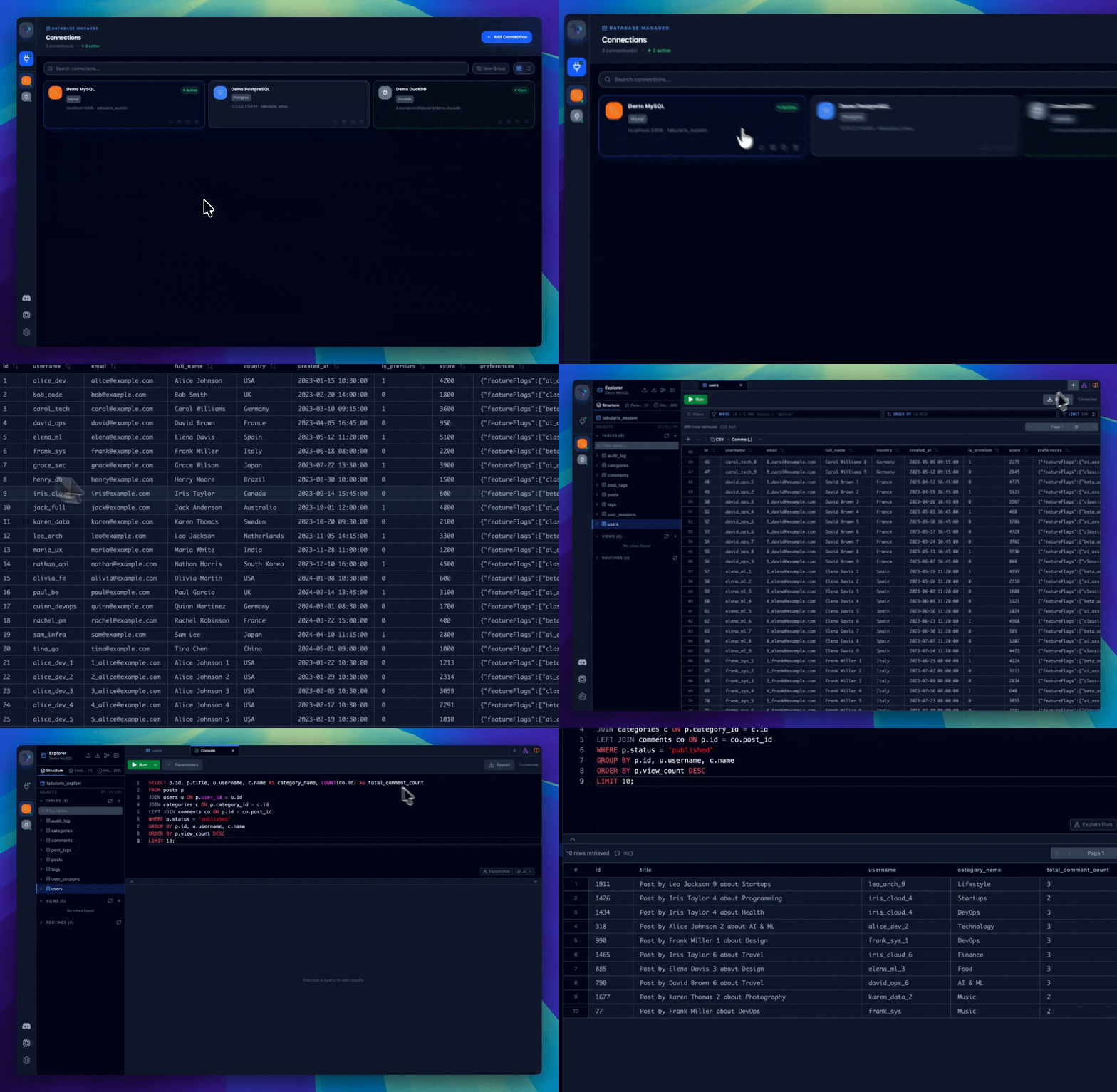
Makikita ang buong gallery sa [tabularis.dev](https://tabularis.dev).
## Mga feature
### Pamamahala ng koneksyon
[Buong reference sa tabularis.dev →](https://tabularis.dev/wiki/connections)
- Suporta para sa PostgreSQL, MySQL/MariaDB at SQLite.
- Lokal na pag-save ng mga profile ng koneksyon.
- SSH tunnels at pag-iimbak ng password sa system keychain.
- Connections page na may grid at list view at real-time search.
- Sariling itsura bawat koneksyon: custom na icon (Lucide, emoji o sariling larawan) at accent color.
### Database explorer
[Buong reference sa tabularis.dev →](https://tabularis.dev/wiki/schema-management)
- Mag-browse ng mga table, column, key, index, view at routine.
- Built-in na pag-edit ng schema elements.
- Interactive ER diagram.
- Mabilis na aksyon sa context menu.
### SQL editor
[Buong reference sa tabularis.dev →](https://tabularis.dev/wiki/editor)
- Monaco Editor na may syntax highlighting at autocomplete.
- Mga naka-isolate na tab para sa bawat koneksyon.
- Multi-statement execution na may hiwalay na result display.
- Mga nai-save na query at built-in na AI overlay sa editor.
### SQL notebooks
[Buong reference sa tabularis.dev →](https://tabularis.dev/wiki/notebooks)
- SQL at Markdown cells sa isang dokumento.
- Inline results at charts.
- Cross-cell variables at global parameters.
- Sunud-sunod na pagpapatakbo ng lahat ng cell.
### Visual query builder
[Buong reference sa tabularis.dev →](https://tabularis.dev/wiki/visual-query-builder)
- Pagbuo ng query gamit ang drag-and-drop.
- Visual JOIN, filter, aggregate, sort at LIMIT.
- Real-time na SQL generation.
### Visual EXPLAIN
[Buong reference sa tabularis.dev →](https://tabularis.dev/wiki/visual-explain)
- Interactive graph ng execution plan.
- Table view, raw output at opsyonal na AI analysis.
- Suporta para sa PostgreSQL, MySQL/MariaDB at SQLite.
### Data grid
[Buong reference sa tabularis.dev →](https://tabularis.dev/wiki/data-grid)
- Inline at batch editing.
- Paglikha, pagpili at pagbura ng row.
- Export sa CSV o JSON.
- Paunang suporta sa spatial data.
- JSON/JSONB cell highlighting at dedicated editor window (Tree / Monaco / Raw). Opsyonal bawat koneksyon: i-detect ang JSON sa text columns.
### Logging
- Real-time log viewer sa Settings.
- Filter ayon sa level.
- Export sa `.log` files.
- CLI debug mode: `tabularis --debug`.
### Mga plugin
[Buong reference sa tabularis.dev →](https://tabularis.dev/wiki/plugins)
- External plugin system gamit ang JSON-RPC 2.0 sa stdin/stdout.
- Mag-install ng community drivers nang walang restart.
- Opisyal na registry: [`plugins/registry.json`](../../plugins/registry.json).
- Gabay para sa developer: [`plugins/PLUGIN_GUIDE.md`](../../plugins/PLUGIN_GUIDE.md).
## Mga setting
[Buong reference sa tabularis.dev →](https://tabularis.dev/wiki/configuration)
Naka-imbak ang configuration sa:
- Linux: `~/.config/tabularis/`
- macOS: `~/Library/Application Support/tabularis/`
- Windows: `%APPDATA%\tabularis\`
Pangunahing mga file:
- `connections.json`
- `saved_queries.json`
- `config.json`
- `themes/`
- `preferences/`
- `connection-icons/` (mga sariling larawan para sa icon ng koneksyon)
Sinusuportahan ng field na `language` sa `config.json` ang mga value na `auto`, `en`, `it`, `es`, `zh`, `fr`, `de`, `ja`, `ru`, `ko`, `tl` at `pt-BR`.
## AI
[Buong reference sa tabularis.dev →](https://tabularis.dev/wiki/ai-assistant)
Opsyonal na Text-to-SQL at query explanation gamit ang mga provider:
- OpenAI
- Anthropic
- MiniMax
- OpenRouter
- Requesty
- Ollama
- OpenAI-compatible APIs
Dynamic na nilo-load at naka-cache nang lokal ang listahan ng modelo.
## MCP
[Buong reference sa tabularis.dev →](https://tabularis.dev/wiki/mcp-server)
Patakbuhin ang built-in MCP server:
```bash
tabularis --mcp
```
Mga suportadong client:
- Claude Desktop
- Cursor
- Windsurf
Mga available na tool:
| Tool | Paglalarawan |
| ------------------ | -------------------------------------------------------------------------------- |
| `list_connections` | Ilista ang lahat ng naka-save na koneksyon |
| `list_databases` | Ilista ang lahat ng database ng isang koneksyon |
| `list_tables` | Ilista ang mga table ng isang koneksyon (opsyonal na naka-filter ayon sa schema) |
| `describe_table` | Kunin ang buong schema: mga column, index, foreign key |
| `run_query` | Magpatakbo ng anumang SQL query at ibalik ang mga resulta |
## Tech stack
| Layer | Stack |
| -------- | ------------------------------------- |
| Frontend | React 19, TypeScript, Tailwind CSS v4 |
| Backend | Rust, Tauri v2, SQLx |
## Development
**Setup**
```bash
pnpm install
pnpm tauri dev
```
**Build**
```bash
pnpm tauri build
```
## Roadmap
Awtomatikong binubuo ang roadmap mula sa mga GitHub issue. Tingnan ang kasalukuyang estado nito sa [README sa Ingles](../../README.md#roadmap).
## Pag-contribute
Malugod na tinatanggap ang mga kontribusyon, tingnan ang [CONTRIBUTING.md](../../CONTRIBUTING.md). Maaari kang magsimula sa:
- [UI design system at visual identity: call for contributors](https://github.com/TabularisDB/tabularis/issues/195)
- Sumulat ng driver plugin sa anumang wika gamit ang [Plugin Guide](../../plugins/PLUGIN_GUIDE.md)
## Mga sponsor at tagasuporta
Sinusuportahan ang Tabularis ng mahuhusay na sponsor at tagasuporta. Tingnan ang buong listahan sa [README sa Ingles](../../README.md#sponsors-and-supporters) at sa [tabularis.dev/sponsors](https://tabularis.dev/sponsors).
## Kwento ng proyekto
Nagsimula ang Tabularis bilang eksperimento: hanggang saan makakarating ang AI-assisted development sa pagbuo ng gumaganang tool mula sa simula? Mas malayo kaysa inaasahan: ngayon ay aktibong mina-maintain na proyekto na may regular na release at plugin ecosystem.
## Lisensya
[Apache License 2.0](../../LICENSE)
---
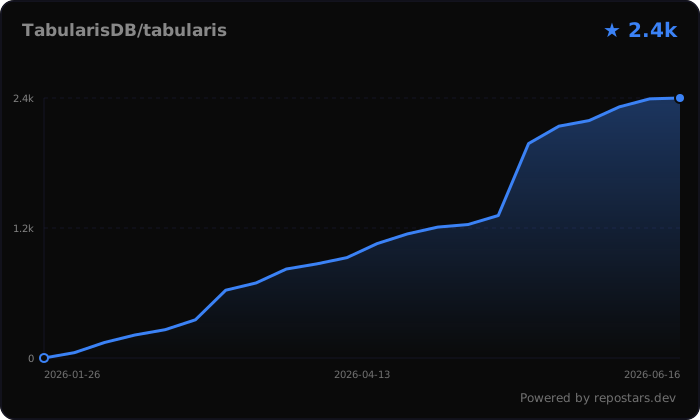
Nagustuhan mo ang tabularis? Mag-star sa repo ⭐, malaking tulong ito sa proyekto.