
Table of Contents
Entities are the objects that make up the game world. Using entities, you can create players, NPCs, loot, chat rooms, and many other interactive elements in your games.
Each entity type is implemented as a collection of Python scripts, and
an XML-based definition file that ties the scripts together. These scripts
are located in the resource tree under the folder scripts (i.e., <res>/scripts
<res> is the virtual
tree defined ~/.bwmachined.conf).
The list below summarises the important files and directories for
entities in <res>:
-
<res>‐ Resource tree defined in~/.bwmachined.conf.-
scripts ‐ Folder containing all entity files.
-
db.xml ‐ Persistent state for the XML database system.
-
entities.xml‐ Lists all entities to load into the client or the server at start-up time. -
base ‐ Folder contains Python scripts for entities with a base component.
-
cell ‐ Folder contains Python scripts for entities with a cell component.
-
client ‐ Folder contains Python scripts for entities with a client component.
-
common ‐ Folder listed in the Python search path for all components. Used for common game code.
-
lib ‐ Folder listed in the Python search path for all components. Used for common game code.
-
-
entity_defs ‐ Contains an XML
.deffile for each entity listed in file<res>/scripts/entities.xml-
alias.xml‐ Data types aliases used in the project. -
<entity>.def<res>/scripts/entities.xml. -
interfaces ‐ Entity interface definition files
-
-
-
server ‐ System-wide settings.
-
Default values for the system.
-
-
The file
<res>/scripts/entities.xml
Each tag in this file represents an entity type, and must have a
corresponding definition file in the directory <res>/scripts/entity_defs<res>/scripts/base<res>/scripts/cell<res>/scripts/client
The order in which the entity types are declared in this file corresponds to the final entity ID associated with each entity type.
In its simplest form, the entities file has one tag listed for each entity to be loaded.
To define an entity called NewEntityType,
simply add a line like the one below:
<root>
  ...
  <NewEntityType/>
</root>
<res>/scripts/entities.xml
The entity definition file
<res>/scripts/entity_defs/<entity>.def
The following diagram shows the conceptual parts of a BigWorld entity:
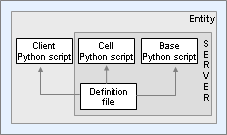
Conceptual parts of an entity
Each entity type has a corresponding definition file, named after
the entity's type name followed by the extension '.def'. For example, a
Seat entity type would have a file called
Seat.def.
It is useful then, to have a 'minimal' definition file to aid in quickly defining a new entity, as well as to assist in explaining what the document's section is trying to accomplish.
The following file is a minimal entity definition file:
<root> <Parent> optional parent entity </Parent><Implements>
<!-- interface references --> </Implements> <ClientName> optional client type </ClientName>
<Volatile>
<!-- volatile definitions --> </Volatile> <Properties>
<!-- properties --> </Properties> <ClientMethods>
<!-- declaration --> </ClientMethods> <CellMethods>
<!-- declaration --> </CellMethods> <BaseMethods>
<!-- declaration --> </BaseMethods> <LoDLevels>
<!-- levels of detail --> </LODLevels> </root>
<res>/scripts/entity_defs/<entity>.def
|
|
For details, see Entity Parents. |
|
|
For details, see Entity Interfaces. |
|
|
For details, see Client Entity Reuse. |
|
|
For details, see Volatile Properties. |
|
|
For details, see Properties. |
|
|
For details, see Methods. |
|
|
For details, see Methods. |
|
|
For details, see Methods. |
|
|
For details, see LOD (Level of Detail) on Properties. |
By the end of this chapter, we should be able to replace all placeholders (denoted by italics) in the example file above with actual code.
BigWorld Technology divides processing of entities in a game world into three different execution contexts:
| Entity type | Script file location | Description |
|---|---|---|
| Cell |
|
Takes care of the portions of an entity that affect the space around it. Processing takes place on the server cluster. |
| Base |
|
Takes care of the portions of an entity that do not affect the space around it (as well as possibly acting as a proxy for a player). Processing takes place on the server cluster. |
| Client |
|
Takes care of the portions of an entity that require heavy awareness of the surrounding environment. |
It is possible for some entity instances to not have one of these three parts. Furthermore, some entity types may not support ever having one of these parts. For each entity type, there is a script file for each of CellApp, BaseApp, and Client, if that type supports that execution context.
These script files are named after the entity type, followed by the
extension '.py'. This file must
contain a class with the name of the entity type.
For example, if you have an entity type Seat
that can have cell, base and client execution contexts, there would be
three script files, each with the implementation of the class:
-
<res>/scripts/cell/Seat.py -
<res>/scripts/base/Seat.py -
<res>/scripts/client/Seat.py
The entity's base class defined in the script file is determined by the execution context that the file represents, as described below:
| Script file execution context | Entity's base class |
|---|---|
| Cell |
BigWorld.Entity
|
| Base |
BigWorld.Base
or
BigWorld.Proxy
|
| Client |
BigWorld.Entity
|
For more details about the difference between the
Base and Proxy classes, see
Proxies and Players.
The start of the script for a Seat entity
could be implemented as below:
-
Cell script file ‐
<res>/scripts/cell/Seat.pyimport BigWorld class Seat( BigWorld.Entity ): def __init__( self ): BigWorld.Entity.__init__( self )
-
Base script file ‐
<res>/scripts/base/Seat.pyimport BigWorld class Seat( BigWorld.Base ): def __init__( self ): BigWorld.Base.__init__( self )
-
Client script file ‐
<res>/scripts/client/Seat.pyimport BigWorld class Seat( BigWorld.Entity ): def __init__( self ): BigWorld.Entity.__init__( self )