
Table of Contents
Properties describe what the state of an entity is. Like traditional object systems, a BigWorld property has a type and a name. Unlike traditional object systems, a property also has distribution properties that affect where and how frequently it is distributed around the system.
Properties are declared in the entity's definition file (named
<res>/scripts/entity_defs/<entity>.defProperties.
The grammar for property definition is displayed below:
<root>
...
<Properties>
<propertyName>
<!-- type of this property -->
<Type> TYPE_NAME </Type>  <!-- Method of distribution -->
<Flags>
<!-- Method of distribution -->
<Flags> DISTRIBUTION_FLAGS </Flags>  <!-- Default value (optional) -->
<Default>
<!-- Default value (optional) -->
<Default> DEFAULT_VALUE </Default>  <!-- Is the property editable? (true/false) (optional) -->
<Editable> [true|false] </Editable>
<!-- Level of detail for this property (optional) -->
<DetailLevel>
<!-- Is the property editable? (true/false) (optional) -->
<Editable> [true|false] </Editable>
<!-- Level of detail for this property (optional) -->
<DetailLevel> LOD </DetailLevel>  <!-- Is the property persistent? -->
<Persistent> [true|false] </Persistent>
<!-- Is the property persistent? -->
<Persistent> [true|false] </Persistent>  </
</propertyName>
</Properties>
...
</root><res>/scripts/entity_defs/<entity>.def
|
|
For details, see Property Types. |
|
|
For details, see Data Distribution. |
|
|
For details, see Default Values. |
|
|
For details, see LOD (Level of Detail) on Properties. |
|
|
For details, see The Database Layer. |
BigWorld needs to efficiently transmit data over a network between its various components. For this purpose, BigWorld definition file describes the type of each property of an entity (despite the fact that BigWorld is scripted using Python — an untyped language).
Because bandwidth conservation is important in implementing an MMOG, property types should be selected such that they are the smallest type (in terms of number of bits) that can represent the data.
The following list summarises the primitive types available for BigWorld properties:
-
BLOB — Size (bytes):
N+kBinary data. Similar to a string, but can contain NULL characters.
Stored in base-64 encoding when in XML, e.g., in the XML database.
Nis the number of bytes in the blob, andk=4. -
FLOAT32 — Size (bytes): 4
IEEE 32-bit floating-point number.
-
FLOAT64 — Size (bytes): 8
IEEE 64-bit floating-point number.
-
INT8 — Size (bytes): 1 — Range: From: -128 To: 127
Signed 8-bit integer.
-
INT16 — Size (bytes): 2 — Range: From: -32,768 To: 32,767
Signed 16-bit integer.
-
INT32 — Size (bytes): 4 — Range: From: -2,147,483,648 To: 2,147,483,647
Signed 32-bit integer.
-
INT64 — Size (bytes): 8 — Range: From: -9,223,372,036,854,775,808 To: 9,223,372,036,854,775,807
Signed 64-bit integer.
-
MAILBOX — Size (bytes): 12
A BigWorld mailbox.
Passing an entity to a MAILBOX argument automatically converts it to MAILBOX.
For details, see Mailboxes.
-
PYTHON — Size(bytes): Size of pickled string, as per STRING
Uses the Python pickler to pack any Python type into a string, and transmits the result.
This should not be used between client and server, as it is insecure and inefficient.
It is recommended to use a user data type for production code. For more details, see Implementing Custom Property Data Types.
-
STRING — Size (bytes):
N+kCharacter string.
Nis the number of characters in the string, andk=4. -
UINT8 — Size(bytes): 1 - Range: From: 0 To: 255
Unsigned 8-bit integer.
-
UINT16 — Size(bytes): 1 — Range: From: 0 To: 65,535
Unsigned 16-bit integer.
-
UINT32 — Size(bytes): 1 — Range: From: 0 To: 4,294,967,295
Unsigned 32-bit integer.
This type may use Python's long type instead of int, and so might be less efficient than INT32.
-
UINT64 — Size(bytes): 1 — Range: From: 0 To: 18,446,744,073,709,551,615
Unsigned 64-bit integer.
-
VECTOR2 — Size(bytes): 8
Two-dimensional vector of 32-bit floats. Represented in Python as a tuple of two numbers (or Math.Vector2).
-
VECTOR3 — Size(bytes): 12
Three-dimensional vector of 32-bit floats. Represented in Python as a tuple of three numbers (or Math.Vector3).
-
VECTOR4 — Size(bytes): 16
Four-dimensional vector of 32-bit floats. Represented in Python as a tuple of four numbers (or Math.Vector4).
The following sections describe the composite types available in BigWorld.
BigWorld also has ARRAY and TUPLE types, which can create an array of values of any of the BigWorld primitive types.
Properties of ARRAY type have a byte size calculated by the formula below:
N * t + k
The components of the formula are described below:
-
N — Number of elements in the array.
-
t — Size of the type contained in the array.
-
k — Constant.
The BigWorld TUPLE type is represented in script by the Python tuple type, while the BigWorld ARRAY type is represented in script by Python list type.
Tuples are specified as follows:
<Type> TUPLE <of> [TYPE_NAME|TYPE_ALIAS] </of> [<size> n </size>] </Type>
<res>/scripts/entity_defs/<entity>.def
Arrays are specified as follows:
<Type> ARRAY <of> [TYPE_NAME|TYPE_ALIAS] </of> [<size> n </size>] </Type>
<res>/scripts/entity_defs/<entity>.def
In case the size of an ARRAY or
TUPLE is specified, then it must have the
declared n elements. Adding or deleting elements
to fixed-sized ARRAY or
TUPLE is not allowed. If the default value is not
specified, then a fixed-sized ARRAY or
TUPLE will contain n default
values of the element type.
Arrays can not only contain aliased data types, but may also be aliased themselves. For more details, see Alias of Data Types.
The FIXED_DICT data type allows you to define dictionary-like attributes with a fixed set of string keys. The keys and the types of the keyed values are predefined.
The declaration of a FIXED_DICT is illustrated below:
<Type> FIXED_DICT <Parent>ParentFixedDictTypeDeclaration</Parent> <Properties> <field> <Type>FieldTypeDeclaration</Type> </field> </Properties> <AllowNone> true|false </AllowNone>
FIXED_DICT data type declaration
This data type may be declared anywhere a type declaration may
appear, e.g., in
<res>/scripts/entity_defs/alias.xml<res>/scripts/entity_defs/<entity>.def
The code excerpt below shows the declaration of a FIXED_DICT attribute:
<root>
  <TradeLog> FIXED_DICT
    <Properties>
      <dbIDA>
        <Type>      INT64                 </Type>
      </dbIDA>
      <itemsTypesA>
        <Type>      ARRAY <of> ITEM </of> </Type>
      </itemsTypesA>
      <goldPiecesA>
        <Type>      GOLDPIECES            </Type>
      </goldPiecesA>
    </Properties>
  </TradeLog>
</root>
fantasydemo/res/scripts/entity_defs/alias.xml
Instances of FIXED_DICT can be accessed and modified like a Python dictionary, with the following exceptions:
-
Keys cannot be added or deleted
-
The type of the value must match the declaration.
For example:
if entity.TradeLog[ "dbIDA" ] == 0:
  entity.TradeLog[ "dbIDA" ] = 100
Example of FIXED_DICT usage in script
Alternatively, it also supports the following:
if entity.TradeLog.dbIDA == 0:
  entity.TradeLog.dbIDA = 100
Example of FIXED_DICT usage as struct in script
A FIXED_DICT instance can be set using a Python dictionary that has a superset of the keys required. Any unnecessary keys in the dictionary are ignored.
For example:
entity.TradeLog = { "dbIDA" : 100, "itemsTypesA" : [ 1, 2, 3 ],
     "goldPiecesA" : 1000, "redundantKey" : 12345 }
Example of FIXED_DICT instance being set using a Python dictionary
When setting a FIXED_DICT instance using a Python dictionary, the values of the Python dictionary are referenced by the FIXED_DICT instance.
Note
When setting a FIXED_DICT instance using a Python dictionary in the BaseApp, the Python dictionary replaces the FIXED_DICT instance. Thus, the entire Python dictionary is being referenced, not just its values.
As a result of this behaviour, there is the possibility of FIXED_DICT attribute having more keys than in its declaration.
This BaseApp behaviour may be changed in a future release of BigWorld so that it matches the rest of the system.
Changes to FIXED_DICT values are propagated
efficiently wherever a change to the whole property would be
propagated, i.e., to ghosts and to clients —
including ownClients.
The default value of a FIXED_DICT data type can be specified at the entity property level. For example:
<root>
  <Properties> FIXED_DICT
    <someProperty>
      <Type>  TradeLog    </Type>    <!-- From last example -->
      <Default>
        <dbIDA>  0  </dbIDA>
        <itemsTypesA>
          <item>  101  </item>
          <item>  102  </item>
        </itemsTypesA>
        <goldPiecesA>  100  </goldPiecesA>
      </Default>
    </someProperty>
  </Properties>
</root>
Example of specifying default value of a FIXED_DICT data type in an entity definition file
If the <Default> section is not
specified, then the default value of a FIXED_DICT
data type will depend on the value of the
<allowNone> tag, as described below:
| <AllowNone> | FIXED_DICT default value |
|---|---|
| True | Python None object. |
| False |
Python dictionary with keys as specified in the type definition. Each keyed value will have a default value according to its type. For example, a keyed value of INT type will have a default value of 0. |
There are two ways to incorporate user-defined Python classes into BigWorld entities: wrapping a FIXED_DICT data type, or implementing a USER_TYPE.
The FIXED_DICT data type supports being wrapped by a user-defined Python type. When a FIXED_DICT is wrapped, BigWorld will instantiate the user-defined Python type in place of a FIXED_DICT instance. This enables the user to customise the behaviour of a FIXED_DICT data type.
The type system can also be arbitrarily extended with the USER_TYPE type. Unlike a wrapped FIXED_DICT type, the structure of a USER_TYPE type is completely opaque to BigWorld. As such, the implementation of a USER_TYPE type is more involved. The implementation of the type operations is performed by a Python object (such as an instance of a class) written by the user. The Python object serves as a factory and serialiser for instances of that type, and it can choose to use whatever Python representation of that type it sees fit — it can be as simple as an integer, or it can be an instance of a Python class.
For more details on custom user types, see Implementing Custom Property Data Types.
BigWorld also allows aliases of types to be created. Aliases are a
concept similar to a C++ typedef, and are listed in
the XML file
<res>/scripts/entity_defs/alias.xml
<root>
  ... other alias definitions ...
  <ALIAS_NAME> TYPE_TO_ALIAS [<Default> Value </Default> ] </ALIAS_NAME>
</root><res>/scripts/entity_defs/alias.xml
|
|
For details, see Default Values. |
Some examples of useful aliases are described in the list below:
| Alias | Maps to | Description |
|---|---|---|
| ANGLE | FLOAT32 | An angle measured in radians. |
| BOOL | INT8 |
A Boolean type (encoded as zero=false, non-zero=true). Mapped to INT8, the smallest BigWorld type. |
| INFO | UINT16 | Element of information about a mission. |
| MISSION_STATS | ARRAY <of> INFO </of> |
Array of mission information data elements (i.e., INFO type alias). Note that this is an aliased array, and the type of its elements is an aliased type. |
| OBJECT_ID | INT32 | Handle to another entity. The name makes clear the property contains a handle to an entity. |
| STATS_MATRIX | ARRAY <of> MISSION_STATS </of> |
Matrix of mission information data elements (i.e., INFO type alias). Note that this is an aliased array, and the type of its elements is another aliased array. |
Using the syntax for alias definition to the aliases describe above, we have the following file:
<root>

  <!-- Aliased data types -->
  <OBJECT_ID>  INT32   </OBJECT_ID>
  <BOOL>       INT8    </BOOL>
  <ANGLE>      FLOAT32 </ANGLE>
  <INFO>       UINT16  </INFO>

  <!-- Aliased arrays ?
  <MISSION_STATS>  ARRAY <of> INFO           </of> </MISSION_STATS>
  <STATS_MATRIX>   ARRAY <of> MISSION_STATS  </of>  </STATS_MATRIX>

</root>
<res>/scripts/entity_defs/alias.xml
With aliases, one can also define custom Python data types, which
have their own streaming semantics on the network. We declare these
types in the file
<res>/scripts/entity_defs/alias.xml
<root>
  <ALIAS_NAME>
    USER_TYPE
    <implementedBy> UserDataType.instance </implementedBy>
  </ALIAS_NAME>
</root><res>/scripts/entity_defs/alias.xml
— Custom Python data type declaration syntax
For more details on this mechanism, see Implementing Custom Property Data Types.
When an entity is created, its properties are initialised to their
default values. Default values can be overridden at the property level (in
the entity definition file[2]) or at the type level (in
alias.xml[3]).
The default value for each type and the syntax for overriding it are described below:
-
ARRAY — Default: []
Example:
<Default>
   <item> Health potion </item>
   <item> Bear skin     </item>
   <item> Wooden shield </item>
</Default> -
BLOB — Default: ''
Example:
<Default> SGVsbG8gV29ybGQhB </Default>
<!-Hello World! --> -
FIXED_DICT
For details, see FIXED_DICT Data Type.
-
FLOAT32 — Default: 0.0
Example:
<Default> 1.234 </Default>
-
FLOAT64 — Default: 0.0
Example:
<Default> 1.23456789 </Default>
-
INT8, INT16, INT32, INT64 — Default: 0
Example:
<Default> 99 </Default>
-
MAILBOX — Default: None
Default value cannot be overridden.
-
PYTHON — Default: None
Example:
<Default> { "Strength": 90, "Agility": 77 } </Default> -
STRING — Default: ''
Example:
<Default> Hello World! </Default> -
TUPLE — Default: ()
Example: See ARRAY data type
-
UINT8, UINT16, UINT32, UINT64 — Default: 0
Example:
<Default> 99 </Default>
-
USER_TYPE — Default: Return value of the user-defined defaultValue() function.
Example:
<Default> <intVal> 100 </intVal> <strVal> opposites </stringVal> <dictVal> <value> <key> good </key> <value> bad </value> </value> </dictValue> </Default> -
VECTOR2 — Default: PyVector of 0.0 of the appropriate length.
Example:
<Default> 3.142 2.71 </Default>
-
VECTOR3 — Default: PyVector of 0.0 of the appropriate length.
Example:
<Default> 3.142 2.71 1.4 </Default>
-
VECTOR4 — Default: PyVector of 0.0 of the appropriate length.
Example:
<Default> 3.142 2.71 1.4 3.8 </Default>
Properties represent the state of an entity. Some states are only relevant to the cell, others only to the base, and yet others only to the client. Some states, however, are relevant to more than one of these.
Each property then has a distribution type that specifies to BigWorld which execution context (cell, base, or client) is responsible for updating the property, and where to propagate its value within the system.
Data distribution is set up by specifying the sub-section
<Flags> of the section
<Properties> in the file
<res>/scripts/entity_defs/<entity>.def
The bit flags available are defined in
src/lib/entitydef/data_description.hpp, and are
described in the list below:
-
DATA_BASE
Required flags: N/A — Excluded flags: DATA_GHOSTED — Master value on: Base
Data will be updated on the base, and will not be available on the cell.
-
DATA_GHOSTED
Required flags: N/A — Excluded flags: DATA_BASE — Master value on: Cell
Data will be updated on the cell, and will be ghosted on other cells.
This means that it is safe to read the value of this property from another entity, because BigWorld safely makes it available even across cell boundaries.
-
DATA_OTHER _CLIENT
Required flags: DATA_GHOSTED — Excluded flags: N/A — Master value on: Cell
Data will be updated on the cell, and made available to clients who have this entity in their AoI.
This makes the property safe to read from the client for any entity, except for that client's player avatar entity. This flag is often combined with DATA_OWN_CLIENT to create a property that is distributed to all clients.
-
DATA_OWN_CLIENT
Required flags: N/A — Excluded flags: N/A — Master value on: Base, if DATA_BASE is set. Otherwise, on cell.
Data is propagated to client owning this entity.
This only makes sense with player entities.
The list below describes the valid combinations of the above bit flags:
-
ALL_CLIENTSA
Available to: Other cells, Cell, Own client, Other clients
Property is available to all entities on cell and client.
Corresponds to setting both OWN_CLIENT and OTHER_CLIENTS flags.
Examples include:
-
The name of a player.
-
The health status of a player or a creature.
-
-
BASE
Available to: Base
Property is only available on the base.
Examples include:
-
List of members of a chat room.
-
Items in a character's inventory.
-
-
BASE_AND_CLIENT
Available to: Base, Own client
Property is available on the base and on the owning client. Corresponds to setting both OWN_CLIENT and BASE flags.
Note
Properties of this type are only synchronised when the client entity is created. Neither the client nor the base is automatically updated when property changes. Methods must be used to propagate new value, which is simple, since only one player needs to receive it.
-
CELL_PRIVATE
Available to: Cell
Property is only available to its entity, and only on cell.
Examples include:
-
Properties of an NPCs 'thoughts' in AI algorithms.
-
Player properties relevant to game play, but dangerous to allow players to see (e.g., healing time after battle).
-
-
CELL_PUBLIC
Available to: Other cells, Cell
Property is available only on the cell, and is available to other entities.
Examples include:
-
The mana level of a player (which can be seen only by enemies, not by other players).
-
The call sign for grouping from enemy NPC.
-
-
CELL_PUBLIC_AND_OWN
Available to: Other cells, Cell, Own client
Property is available to other entities on the cell, and to this one on both the cell and the client.
Unlike OWN_CLIENT, this data is also ghosted, and therefore available to other entities on the cell.
-
DATA_EDITOR_ONLY
Available to: WorldEditor
This value may be useful when using BigWorld.fetchEntitiesFromChunks from a BaseApp. It could be used to decide programmatically whether a particular entity should be loaded.
For example, you may associate a level of difficulty with each entity, so entity will only be loaded if the mission's level of difficulty is high enough.
-
OTHER_CLIENTSA
Available to: Other cells, Cell, Other clients
Property is available from client to entities that are not this player's avatar. Also available on cell to other entities.
Examples include:
-
The state of dynamic world items (e.g., doors, loot containers, and buttons).
-
The type of a particle system effect.
-
The player who is currently sitting on a seat.
-
-
OWN_CLIENTA
Available to: Cell, Own client
Property is only available to this entity, on both the cell and the client.
Examples include:
-
The character class of a player.
-
Number of experience points for a player.
-
A — When properties
with this distribution flag are updated by server, an implicit method is
called on client. For details, see Implicit
set_
Methods.<property_name>
The list below describes the deprecated data distribution constants:
| Deprecated enumeration | Equivalent to |
|---|---|
| ALL_CLIENT | ALL_CLIENTS |
| CELL | CELL_PUBLIC |
| CELL_AND_OWN | CELL_PUBLIC_AND_OWN |
| GHOSTED | CELL_PUBLIC |
| GHOSTED_AND_OWN | CELL_PUBLIC_AND_OWN |
| OTHER_CLIENT | OTHER_CLIENTS |
| PRIVATE | CELL_PRIVATE |
When choosing a distribution flag for a property, consider the points described below:
-
Which methods need the property?
You have to make the property available on an execution context (cell, base, or client) if that context has a method that manipulates the property.
-
Does this property need to be accessed by other entities?
This could include methods being called to access its value. If this is the case, we need to make the property ghosted.
When doing this, remember that the ghosted entities' properties may be a little 'lagged', i.e., they may not represent the exact state of an entity at a given time. Also, remember that other entities can only read the property; only the entity that owns the property may change it.
-
Is the client interested in this value directly?
Client/server bandwidth is scarce, so the number of properties on the client needs to be minimised.
Sometimes, a group of properties can be maintained on the cell and only a derived additional property needs to be sent to the client. For example, a client part would probably not need to know that a combination of six AI state variables are causing a guard to be angry; they would however need to know the derived value that the guard is brandishing an axe.
-
Could a player cheat by seeing this property?
If so, then care must be taken about sending it to the client.
-
There can only be one master value of any property.
The master value must reside on either the base or cell. Consequently, if the same property is available on both the base and the cell, the other holder of the property needs to have the value propagated to it via a method.
Data propagation occurs when the entity is first created. Subsequent modifications to properties will only be local to the component, except when the modification occurs in a CellApp, in which case the change will be automatically propagated to all interested parties. For example, CELL_PUBLIC properties are propagated to all other CellApps that have a ghost of the entity, OTHER_CLIENTS properties are propagated to all clients that have the entity in their AoI, and so on.
When changing the value of a property in a component other than a CellApp, the change can be manually propagated using remote method calls. For details, see Methods.
Changes to properties of PYTHON and custom user types are not automatically propagated, unless the property is reassigned.
This behaviour mainly affects composite Python types like dictionaries, arrays, and classes, because modifications to the object do not cause data propagation unless the property is reassigned to itself.
For example, if entity e has the property as illustrated below:
<pythonProp>
  <Type> PYTHON </Type>
  ...
</pythonProp>
Assigning a new value to pythonProp will
cause data propagation:
e.pythonProp = { 'gold': 100 }However, modifying the value will not cause data propagation:
e.pythonProp[ 'gold' ] = 50
e.pythonProp[ 'arrows' ] = 200
Different parts of the entity will see different values for
pythonProp, unless data propagation is manually
triggered by reassigning the property back to itself:
e.pythonProp = e.pythonProp
Custom data types are useful for the implementation of data structures with complex behaviour that is shared between different components, or that must be attached to cell entities (in which case they must be able to be transferred from one cell to another).
By default, the FIXED_DICT data type behaves like a Python dictionary. This behaviour can be changed by replacing the dictionary-like FIXED_DICT type with another Python type (referred to as a wrapper type in this document).
To do so, specify a type converter object in the
<implementedBy> section in the
FIXED_DICT type declaration. For example:
<Type>
  FIXED_DICT
  <implementedBy> CustomTypeConverterInstance  </implementedBy>
  <Properties> ... </Properties>
  ...
</Type>
Declaration of a Wrapped FIXED_DICT Data Type
CustomTypeConverterInstance must be a
Python object that converts between FIXED_DICT
instances and wrapper instances.
It must implement the following methods:
| Method | Description |
|---|---|
addToStream(
self, obj
)
|
Optional method that converts a wrapper instance to a string suitable for transmitting over the network. The If this method is present, then
If this method is not present, then wrapper instances
are transmitted over the network by first converting them to
FIXED_DICT instances using the
|
createFromStream(
self, stream
)
|
Optional method that creates an instance of the wrapper type from its string network form. The If this method is present, then
|
createObjFromDict(
self, dict
)
|
Method to convert a FIXED_DICT instance to a wrapper instance. The |
getDictFromObj(
self, obj
)
|
Method to convert a wrapper instance to a FIXED_DICT instance. The |
isSameType(
self, obj
)
|
Method to check whether an object is of the wrapper type. The |
It is often desirable to wrap a FIXED_DICT data type with a class to facilitate object-oriented programming.
import cPickle

class MyCustomType:          // wrapper type
  def __init__( self, dict ):
    self.a = dict[ "a" ]
    self.b = dict[ "b" ]
  ...                    // other MyCustomType methods

class MyCustomTypeConverter:    // type converter class
  def getDictFromObj( self, obj ):
    return { "a": obj.a, "b": obj.b }

  def createObjFromDict( self, dict ):
    return MyCustomType( dict )

  def isSameType( self, obj ):
    return isinstance( obj, MyCustomType )

  def addToStream( self, obj ):          // optional
    return cPickle.dumps( obj )

  def createFromStream( self, stream ):    // optional
    return cPickle.loads( stream )

instance = MyCustomTypeConverter() // type converter object<res>/scripts/common/MyCustomTypeImpl.py
<Type>
  FIXED_DICT
  <implementedBy> MyCustomTypeImpl.instance  </implementedBy>
  <Properties>
    <a> ... </a>
    <b> ... </b>
  </Properties>
  ...
</Type>
Excerpt of a wrapped FIXED_DICT type declaration
The above example makes a FIXED_DICT type
behave as a class with members a and
b, instead of as a dictionary with the same
keys.
The drawback with the above example is that member updates are
not automatically propagated to other components. For example, if the
above data type is used in an entity attribute called
custType, the following script code would only set
the value of the attribute for the local copy of the entity:
e.custType.a = 100
e.custType.b = 200
To ensure that all copies of the entity e have the updated
values, the attribute must be set to a different instance of
MyCustomType with the updated values:
e.custType = MyCustomType( { "a": 100, "b": 200 } )Alternatively, MyCustomType can be implemented using descriptors that reference the original FIXED_DICT instance:
class MemberProxy:              // descriptor class
  def __init__( self, memberName ):
    self.member = memberName

  def __get__( self, instance, owner ):
    instance.fixedDict[ self.memberName ]

  def __set__( self, instance, value ):
    instance.fixedDict[ self.memberName ] = value

  def __delete__( self, instance ):
    raise NotImplementedError( self.memberName )

class MyCustomClass:            // wrapper class
  a = MemberProxy( "a" )
  b = MemberProxy( "b" )

  def __init__( self, dict ):
    self.fixedDict = dict
  ...                      // other MyCustomType methods

class MyCustomTypeConverter:      // type converter class
  def getDictFromObj( self, obj ):
    return obj.fixedDict        // must return original instance

  def createObjFromDict( self, dict ):
    return MyCustomType( dict )

  def isSameType( self, obj ):
    return isinstance( obj, MyCustomType )

// addToStream and createFromStream cannot be implemented<res>/scripts/common/MyCustomTypeImpl.py
In the above example, MyCustomClass
references the original FIXED_DICT instance in its
fixedDict member. Access to members
a or b will be redirected via
the descriptor class to the fixedDict member. As
updates to FIXED_DICT instances are automatically
propagated to other components, updates to members
a and b are also automatically
propagated.
The drawback with this approach is that custom streaming is not possible. If the addToStream and createFromStream methods are implemented, then the custom object is created directly from the stream. Since it is not possible to instantiate a FIXED_DICT object in Python script, it will not be possible for the custom object to reference a FIXED_DICT object that will propagate partial changes.
The USER_TYPE data type predates the
FIXED_DICT data type, and much of its functionality
can be achieved by wrapping a FIXED_DICT data type.
However, USER_TYPE data type additionally allows
customising its representation as a
<DataSection>.
A USER_TYPE data type consists of the following pieces:
-
A declaration of the Python instance implementing the USER_TYPE data type. For example:
<Type> USER_TYPE <implementedBy> UserType.instance </implementedBy> </Type>
<res>/scripts/entity_defs/<entity>.defHowever, it is recommended to declare a USER_TYPE data type in
<res>/scripts/entity_defs/alias.xml<res>/scripts/entity_defs/<entity>.def -
A class that defines methods to read and write this data type from various places.
-
A module, containing the above class, and an instance of this class, which will be used to serialise and unserialise the custom data type.
The custom data type might also declare a Python class that represents the type at runtime. A Python list, a dictionary, or some other native Python data type might also represent it.
The class we implement provides methods to serialise whatever Python type we use to represent a concept. This means that we can transmit the class over the network and serialise it to a database, simply by writing the appropriate methods in this class.
These methods are described in the list below:
| Method | Description |
|---|---|
addToStream(
self,
obj)
|
Converts the Python object obj into a string
representation to be placed onto the network, and return
that string. It does the opposite of
For example, if your type contains a single
INT32 member, then
def addToStream( self, obj ): return struct.pack( "i", obj ) |
createFromStream(
self, stream
)
|
Creates a Python object from the string passed in
through The length of the For example, if your type contains a single
INT32 member, then
def createFromStream( self, stream ):
  if len(stream) != 4: # one integer
    raise "Error: string has wrong length"
  else:
    return struct.unpack( "I", stream )
|
addToSection(
self, obj,
section )
|
Adds a representation of It is used for persisting properties into the database. Hence, if a property is not persistent, this method does not have to be implemented. |
createFromSection(
self, section
)
|
Creates and returns a Python object from its
persisted representation in section
It is used for persisting properties into the
database, and parsing default values from
You should always implement this method, even if you
do not implement
|
fromStreamToSection(
self, stream,
section )
|
Converts data from a def fromStreamToSection( self, stream, section ): o = self.createFromStream( stream ) self.addToSection( o, section ) It can also be implemented more efficiently (for
instance if the section.asBlob = stream |
fromSectionToStream(
self, section
)
|
Converts data from a
It can be implemented as follows: def fromSectionToStream( self, section ): o = self.createFromSection( section ) return self.addToStream( o ) It can also be implemented more efficiently (for
instance if the return section.asBlob |
defaultValue(
self )
|
Returns a reasonable default value for this data type. It is used when there is no default value specified when this data type is used in a property. |
We place a class implementing these methods into a module in the
directory <res>/scripts/common
For example, we may define a module called
MyCustDataType.py, as illustrated below:
class MyCustDataType:
  def addToStream( self, obj ):
    ...
  def createFromStream( self, stream ):
    ...
  def addToSection( self, obj, section ):
    ...
  def createFromSection( self, section ):
    ...
  def fromStreamToSection( self, stream, section ):
    ...
  def fromSectionToStream( self, section ):
    ...
  def defaultValue( self ):
    ...
instance = MyCustDataType()<res>/scripts/common/MyCustDataType.py
If the property is persistent, and stored in a MySQL database, then an additional method has to be implemented. This method will declare the binding of the data into the database. For more details, see The Database Layer.
The variable instance is the object that performs the
manipulation of this data type by BigWorld. In the aliases file
<res>/defs/alias.xml
<root>
  ...
  <MY_CUSTOM_DATA_TYPE>
    USER_TYPE
    <implementedBy> MyCustDataType.instance </implementedBy>
</MY_CUSTOM_DATA_TYPE><res>/defs/alias.xml
Some properties are updated more often than others, and almost all entities have a set of properties that need to be handled specially due to this. These properties are called volatile properties, and are pre-defined by the BigWorld engine.
The default volatile properties defined by BigWorld are outlined below:
| Property | Description |
|---|---|
position
|
The (x,y,z) position of the entity. Represented in Python as a TUPLE of three floats. |
|
|
Three extra volatile properties, which are typically used for the direction an entity is facing, but may be used for other purposes. They still must, however, have the ranges of the corresponding element of a direction:
|
These properties are updated with an optimised protocol used between the client and the server, in order to minimise bandwidth.
The volatile properties are listed separately to the normal
properties in the file
<res>/scripts/entity_defs/<entity>.def
Each entity can decide which of these volatile properties are automatically updated. Additionally, they can have a priority attached to them. This priority determines a distance from the entity above which the property is no longer sent.
The syntax is as follows:
<root>
  ...
  <Volatile>
    <position/> | <position>  float  </position>
    <yaw/>      | <yaw>       float  </yaw>
    <pitch/>    | <pitch>     float  </pitch>
    <roll/>     | <roll>      float  </roll>
  </Volatile>
...<res>/scripts/entity_defs/<entity>.def
This is how the volatility status and priority of a property are interpreted:
-
If a property is not specified, then it will never be updated (
BigWorld.VOLATILE_NEVER). -
If a property is specified:
-
If a priority is not specified, then property will always be updated, regardless of distance from entity (
BigWorld.VOLATILE_ALWAYS). -
If a priority is specified, then the value is used as the maximum distance from entity (in metres) for which property will still be updated.
-
Supposing an entity the volatile properties as defined below:
<root>
  ...
  <Volatile>
    <position/>
    <yaw>    30.0  </yaw>
    <pitch>  25.0  </pitch>
  </Volatile>
  ...
</root><res>/scripts/entity_defs/<entity>.def
For the above example, we have the following for each property:
-
position— Always updated (BigWorld.VOLATILE_ALWAYS) -
yaw— Updated up to a distance of 30.0 metres. -
pitch— Updated up to a distance of 25.0 metres. -
roll— Never updated (BigWorld.VOLATILE_NEVER)
Note
Only non-moving entities should be defined without volatile properties.
Such entities will still behave as if all their properties were
defined as volatile, and with priority
VOLATILE_ALWAYS. This is required due to the
necessity of being able to update a non-moving entity's properties when
it is occasionally moved (e.g., a chair has been
slightly moved).
Sometimes bandwidth usage can be optimised even further, by not
distributing information to clients that are distant. We can do this by
attaching a <DetailLevel> tag to a property.
This tag determines the distance after which property changes will not be
sent to the client.
Note that this is purely an optimisation for the property. This option should only be used if bandwidth usage is proven to be too high. If this feature is enabled for the property, then you must test it very carefully to check if the result achieved in terms of game play is what you expected.
The definition of the LOD (level of detail) of a property in the
file
<res>/scripts/entity_defs/<entity>.def
<root>
  ...
  <Properties>
    ...
    <modelNumber>
      ...
      <DetailLevel> NEAR </DetailLevel>
    </modelNumber>
...<res>/scripts/entity_defs/<entity>.def
The example above declared a LOD labelled NEAR
for the property. The actual value of NEAR is defined
in the sub-section <level> of the section
<LodLevels> in the entity's file.
For example, to subdivide the AoI into the ranges labelled NEAR, MEDIUM, and FAR (with everything further than FAR being transmitted whenever entities are within each other's AoI), the entity's definition file will include the lines below:
<root>
  ...
  <LODLevels>
    <level>  20  <label> NEAR    </label> </level>
    <level> 100  <label> MEDIUM  </label> </level>
    <level> 250  <label> FAR     </label> </level>
  </LODLevels>
  ...
</root><res>/scripts/entity_defs/<entity>.def
The LODs specified for the entity in the example file above are illustrated below:
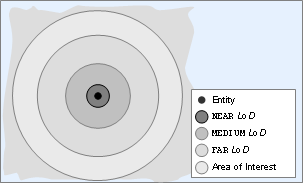
Location of LOD boundaries relative to the entity
Detail levels are inherited from parent definition files. Any level with the same label as a parent will modify that level, and any new levels will be added.
There is currently a limit of six levels of detail for each entity type
In addition to its parameter <label>,
the sub-section <level> can also have
<hyst> parameter.
It is defined as illustrated in the example below:
<root>
  ...
  <LODLevels>
    <level>  20 <label> NEAR   </label> <hyst>  4 </hyst> </level>
    <level> 100 <label> MEDIUM </label> <hyst> 10 </hyst> </level>
    <level> 250 <label> FAR    </label> <hyst> 20 </hyst> </level>
  </LODLevels>
...<res>/scripts/entity_defs/<entity>.def
This parameter defines a hysteresis region starting from the LOD's
outer boundary and moving outwards. It prevents frequent changes in the
LOD of a property, which saves significant processing time on the cell,
as properties do not have to change their priorities often. In order to
do this, the <hyst> specifies a buffer region
around the boundary of a LOD level, which an entity must pass through
completely before changing to a lower LOD.
The declaration of the <hyst> parameter
is optional, and if not declared, it will default to 10 metres.
As an example, consider a stationary entity, and another entity travelling through points A, B, C, D, E, and finally back to A, as illustrated in the diagram below:
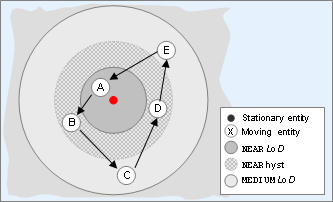
Entity moving around LODs of another entity
We consider the minimum LOD of properties that will be propagated from the moving entity to the stationary entity, as listed in the table below:
| Point | LOD | Reason |
|---|---|---|
| A | NEAR | Unaffected by hysteresis. |
| B | NEAR | Entity has moved from NEAR to MEDIUM, but not yet completely through the hysteresis. |
| C | MEDIUM | Entity has moved from NEAR to MEDIUM, and completely through the hysteresis. |
| D | MEDIUM | Entity is still in MEDIUM. |
| E | MEDIUM | Entity is still in MEDIUM. |
| A | NEAR | Entity has moved from MEDIUM to NEAR. |
In the example above, we have the following regarding the change of LOD for the moving entity:
-
The change of LOD for the moving entity from NEAR to MEDIUM occurs at a distance of 24 metres from the stationary entity (20 metres as defined for the NEAR LOD, plus 4 metres for its hysteresis). If no
<hyst>parameter were specified, the change would happen at 30 metres (since hysteresis would then default to 10 metres). -
The change of LOD for the moving entity from MEDIUM to NEAR occurs at 20 metres from the stationary entity (since hysteresis does not affect moving to a higher LOD).
[1] For details on this file's grammar, see the document File Grammar Guide's
section alias.xml
[2] For details, see the introduction to this chapter.
[3] For details on this file's grammar, see the document File Grammar Guide's section
alias.xml.
[4] For details on this file's grammar, see the document File Grammar Guide's section alias.xml
[5] For an example of declaration of aliases for data types, see Alias of Data Types.