
Table of Contents
The database layer is BigWorld's persistent storehouse of entities. It allows writing specific entities into online storage (usually into a database table or disk file), and retrieving them back into the world again later.
The database layer is not intended to be accessed frequently by each entity, but instead only at entity creation and destruction times (and perhaps at critical trade points). You should not attempt to access the database in response to every action a character performs ‐ let the disaster recovery mechanisms handle game integrity.
This chapter provides details on how to store and retrieve entities from the database.
The first step to make an entity persistent is to edit its
definition file (named
<res>/scripts/entity_defs/<entity>.def
The persistent set of properties is often a small subset of the entity properties. For example, a role playing game typically has a set of core attributes (strength, dexterity, etc...), and a set of derived attributes that need to be modified transiently (maybe the character always gets full vitality when logging on, and so vitality points need not be persisted).
To mark an entity property as persistent, it needs the tag
<Persistent> added to it, as illustrated
below:
<root>
  ...
  <Properties>
    ...
    <somePersistentProperty>
      <Type>       TYPENAME </Type>
      <Flags>      FLAGS    </Flags>
      <Persistent> true     </Persistent>
    </somePersistentProperty>
    ...
  </Properties>
  ...
</root><res>/scripts/entity_defs/<entity>.def
If the type is FIXED_DICT, then the
<Persistent> tag can be specified for each
property of the FIXED_DICT data type.
For example:
<root>
  ...
  <Properties>
    ...
    <someFixedDictProperty>
      <Type>    FIXED_DICT
        <Properties>
          <a> <Type> TYPENAME </Type> </a>
          <b>
            <Type> TYPENAME </Type>
            <Persistent> false </Persistent>
          </b>
        </Properties>
      </Type>
      <Flags>    FLAGS      </Flags>
      <Persistent>  true    </Persistent>
    </somePersistentProperty>
    ...
  </Properties>
  ...
</root>
In the above example,
someFixedDictProperty.a is
persistent, but
someFixedDictProperty.b is not.
If the <Persistent> tag at the
<someFixedDictProperty> level is
false, then neither a nor
b will be persistent. By default, the
<Persistent> tag at the FIXED_DICT
field level is true, so it is not necessary to specify
it, except for selectively turning off the persistence of some
fields.
During startup, the database process (DBMgr) automatically allocates
the tables, fields, or other storage required for persistent properties.
Sometimes this behaviour is not desirable (for example in a production
system), and it can be controlled with the
<dbMgr/syncTablesToDefs> configuration option.
For details on this option, see the document Server Operations Guide's
section Software Configuration
with bw.xml →
DBMgr configuration
options.
Other parameters can be set for persistent properties for the MySQL database engine. For more details, see Mapping BigWorld Properties Into SQL.
Properties that are reset each time the entity is created should not be made persistent. For example, entity's A.I. and GUI states are usually non-persistent. Reducing the number of persistent properties will reduce the load on the database. If a property is not persistent, its value will be set to its default value when the entity is loaded from the database (see Reading and Writing Entities).
A MAILBOX property is always non-persistent.
The following built-in properties are persistent:
- Base
:
databaseID. - Cell
:
position,directionandspaceID.
All other built-in properties are non-persistent.
Note
The entity's built-in id property is not
persistent. It will change each time the entity is re-created. This
includes the case where the entity is re-created automatically by the
disaster recovery mechanism (see Disaster Recovery). Therefore, when storing entity
IDs of other entities, they should be stored in non-persistent
properties so that they will be automatically reset to the properties'
default value when the entity is re-created by the disaster recovery
mechanism. This avoids the possibility of storing invalid entity
IDs.
The entity's id property is unchanged when
the entity is restored by our fault tolerance mechanism (see Fault Tolerance).
Use the entity's database ID for a long term reference to the entity.
The <Identifier> tag is an optional tag
for persistent STRING or BLOB entity
properties. It specifies a property to be the identifier for that entity
type. Entities can be retrieved from the database by using their
identifier instead of their database ID. For this reason, all entities
of the same type must have unique identifiers. At most one property per
entity can be tagged as an identifier.
For example, assuming the entity definition file below:
<root>
  ...
  <Properties>
    ...
    <playerNickname>
      <Type>       STRING </Type>
      <Flags>      Flags  </Flags>
      <Persistent> true   </Persistent>
      <Identifier> true   </Identifier>
    </playerNickname>

    <someProperty1>
      <Type>       UINT32 </Type>
    </someProperty1>

    <someProperty2>
      <Type>       STRING </Type>
      <Persistent> true   </Persistent>
    <someProperty2>
    ...
Example
<res>/scripts/entity_defs/<entity>.def
Then assuming that there are three instances of the above entity type, they could be represented like in the table below:
<Identifier>
property.</title>| playerNickname | someProperty2 |
|---|---|
playerNickname1
|
"cfeh" |
playerNickname2
|
"fwep" |
playerNickname3
|
"fwep" |
Note that <someProperty1> is not
represented in the database because it is not specified as being
persistent.
Entity types with an <Identifier>
property can be searched by name, using methods such as
BigWorld.lookUpBaseByName
and
BigWorld.createBaseFromDB.
For details, see the BaseApp Python API
documentation.
The database provides the means of saving entities and bringing them back into the world at a later time. It also guarantees that each saved entity can have only one instance within the world. This assures that any writes to the database for the entity will be correctly carried out.
In order to use this functionality, you must first create a
persistent entity. Such an entity must exist on a BaseApp, and could be of
type BigWorld.Base or
BigWorld.Proxy. You can
create it with any of the normal techniques. For more details, see Entity Instantiation on the BaseApp.
The key for persisting an entity is its property
databaseID, combined with its entity type. The property
databaseID is a 64-bit integer that is unique among
entities of the same type, and usually corresponds to an auto-increment
field in a database table. When an entity is created with any of the usual
techniques, its databaseID is set to 0, indicating that
it has never been written to the database.
To add a newly created entity to the database, its method
writeToDB has to be invoked (from either cell or
base).
If invoked on the base entity, writeToDB
receives an optional argument specifying the callback method. Upon
completion, writeToDB will invoke the callback,
passing a Boolean argument indicating if writing to the database succeeded
or failed, and the base entity that invoked the method. A notification
method is used, as the database write is an asynchronous operation.
The code fragments below illustrate the use of method
writeToDB from the base.
-
In
someEntity's base script (<res>/scripts/base/someEntity.pywriteToDB:import BigWorld class someEntity( BigWorld.Base ) ... def onWriteToDBComplete( successful, entity ): if successful: print "write %i OK. databaseID = %i" % (entity.id, databaseID) else: print "write %i was not successful" % entity.id ... -
Invoke methods to create base and add it to database:
ent = BigWorld.createBase( "someEntity" )
ent.writeToDB( onWriteToDBComplete )
-
The result displayed in BaseApp:
write 92 OK. databaseID = 376182
Next time this entity is destroyed (by invoking method
ent.destroy), it will be
'logged off' ‐ the database layer keeps
track of whether the entity is in the world.
A destroyed entity can later be brought back to the world using the
method
BigWorld.createBaseFromDBID
and the properties stored in the database, as illustrated below:
BigWorld.createBaseFromDBID( "someEntity", 376182, optionalCallbackMethod )
Since loading a destroyed entity from the database is also an
asynchronous operation, if you wish to be notified of the completion of
this process, you need to pass a callback function as the third argument
of method
BigWorld.createBaseFromDBID.
The callback function receives the entity identifier as the only argument,
which is the databaseID if entity was successfully
loaded, or None, otherwise.
The code fragments below illustrate the request to reload entities from the database:
-
In
someEntity's base script (<res>/scripts/base/someEntity.pycreateBaseFromDBID:import BigWorld def onComplete( entity ): if entity is not None: print "entity successfully created" else: print "entity was not created" -
Call
createBaseFromDBIDwith a validdatabaseID:BigWorld.createBaseFromDBID( "someEntity", 376182, onComplete )
-
The result displayed in BaseApp:
entity successfully created
-
Call
createBaseFromDBIDwith an invaliddatabaseID:BigWorld.createBaseFromDBID( "someEntity", 10000000000, onComplete )
-
The result displayed in BaseApp:
entity was not created
When designing persistent properties, it is useful to understand how the mapping from BigWorld types to SQL types is performed by the database layer. This information can be used for performance tuning, or in manually modifying the database.
Each entity type will have a main entity table, and zero or more sub-tables in the database.
An entity type's main table is named
tbl_<entity_type_name>.
Data for the majority of BigWorld types will be stored in the columns of
the main table. Types like ARRAY and TUPLE,
however, require the use of additional tables, referred to as sub-tables
in this document.
Except for ARRAY and TUPLE properties, data for each entity is stored as a single row in the entity type's main table.
The databaseID property of an entity is stored
in the id column in the main table ‐ this
is why entities without persistent properties still have a main entity
table.
A property with a simple data type is mapped to a single SQL
column (named
sm_<property_name>)
with a type that accommodates.
The table below describes each BigWorld simple data type, and which MySQL type it is mapped to:
| BigWorld data type | Mapped to MySQL type (column sm_<property_type>) |
|---|---|
| INT8 | TINYINT |
| UINT8 | TINYINT UNSIGNED |
| INT16 | SMALLINT |
| UINT16 | SMALLINT UNSIGNED |
| INT32 | INT |
| UINT32 | INT UNSIGNED |
| INT64 | BIGINT |
| UINT64 | BIGINT UNSIGNED |
| FLOAT32 | FLOAT |
| FLOAT64 | DOUBLE |
Properties with vector types are mapped to the appropriate number
of columns of MySQL type FLOAT ‐ named
vm_<index>_<property_name>,
where <index> is a
number from 0 to the size of the vector minus 1.
The list below describes each BigWorld VECTOR data type, and which MySQL type it is mapped to:
| BigWorld data type | # of columns | Mapped to MySQL type (column vm_<index>_<property_name>) |
|---|---|---|
| VECTOR2 | 2 | FLOAT |
| VECTOR3 | 3 | FLOAT |
| VECTOR4 | 4 | FLOAT |
Properties of types STRING, BLOB, and
PYTHON will be mapped to column
sm_<property_name>,
with the type being dependent on the
<DatabaseLength> attribute of the property
specified in the entity definition file (for details, see The Entity Definition File, and Properties), as it determines the width of the column
when the type is mapped to SQL.
The list below summarises the mapping of STRING, BLOB, and PYTHON data types:
-
PYTHON
-
DatabaseLength < 256 ‐ TINYBLOB
-
DatabaseLength >= 256 and < 65536 ‐ BLOB
-
DatabaseLength >= 65536 and < 16777215 ‐ MEDIUMBLOB
-
-
STRING
-
DatabaseLength < 256 ‐ VARCHAR
-
DatabaseLength >= 256 and < 65536 ‐ TEXT
-
DatabaseLength >= 65536 and < 16777215 ‐ MEDIUMTEXT
-
The definition of <DatabaseLength> is
illustrated below:
<root>
  ...
  <Properties>
    ...
    <someProperty>
      <Type>            STRING  </Type>
      <DatabaseLength>  16      </DatabaseLength>
    </someProperty>
...<res>/scripts/entity_defs/<entity>.def
The PATROL_PATH type has been deprecated in favor of
the use of User Data Objects and should be avoided as they will be
removed in a future release. The <PatrolNode>
User Data Object replaces the station nodes of the old system.
Properties with UDO_REF type are mapped to a column
of type BINARY, named
sm_<property_name>.
The column width is 16 bytes, which corresponds to the 128-bit GUID that
identifies a Patrol Path or User Data Object type.
The 128-bit GUID is stored in the column as four groups of 32-bit unsigned integers. Each integer is in little endian order. For example, if the GUID is 00112233.44556677.8899AABB.CCDDEEFF, then the byte values in the column will be 3322110077665544BBAA9988FFEEDDCC.
Each ARRAY or TUPLE property is mapped
to an SQL table, referred to as sub-tables of the entity's main table,
and named
<parent_table_name>_<property_name>.
<parent_table_name>
is the name of the entity type's main table, unless the
ARRAY or TUPLE is nested in another
ARRAY or TUPLE property, in which case
<parent_table_name>
is the name of the parent ARRAY's or TUPLE's
table.
Note
Although BigWorld does not impose a limit on nesting ARRAY or TUPLE types, MySQL has a limit of 64 characters on table names.
As sub-table names are always prefixed with their parent table name, this effectively limits the nesting depth.
ARRAY or TUPLE sub-tables have a parentID column that stores the id of the row in the parent table associated with the data. The sub-table will also have an id column to maintain the order of the elements, as well as to provide a row identifier in case there are sub-tables of this sub-table.
The other columns of the sub-table will be determined by the ARRAY's or TUPLE's element type (e.g., an ARRAY <of> INT8 </of> will result in one additional column of type TINYINT). Most BigWorld types only require one additional column, which will be called sm_value. For details on how an ARRAY or TUPLE of FIXED_DICT is mapped into the database, see FIXED_DICTs.
The <DatabaseLength> attribute of an
ARRAY or TUPLE property is applied to the
element type of the array if the element type is STRING,
BLOB or PYTHON.
Other types either disregard the
<DatabaseLength> modifier or, as in the
case of FIXED_DICT, have their own method of specifying
the <DatabaseLength>.
If an entity type contains a FIXED_DICT property, then that property's fields are mapped to the database as though they where properties of the entity.
FIXED_DICT columns have more elaborate names than non-FIXED_DICT columns:
-
sm_
<property_name>_<field_name>
If the FIXED_DICT property contains an ARRAY or TUPLE field then the name of the sub-table is correspondingly more elaborate:
-
<parent_table_name>_<property_name>_<field_name>.
If a FIXED_DICT type is used as an element of an ARRAY or TUPLE, then the fields are mapped into the columns of the ARRAY's or TUPLE's sub-table. The columns will be named sm_<field name>.
If the FIXED_DICT property has the
<AllowNone> attribute set to
true, then an additional column called
fm_<property_name>
will be added to the table. This column will have the value
0 when the property's value is
None, or 1 otherwise.
The <DatabaseLength> attribute should
be specified at the field level of a FIXED_DICT property
‐ the one specified at the property level
is ignored.
If you have a USER_TYPE data type, then you can specify how it should be mapped to SQL. For more details on custom data types, see Implementing Custom Property Data Types.
In order to provide this mapping, a method called
bindSectionToDB needs to be implemented in the
USER_TYPE implementation. This method receives an object as
its argument to be used to declare the data binding. For example, for a
USER_TYPE implemented by an instance of the type
TestUserType:
...
  class TestUserType:
    ...
    def addToStream( self, obj ):
      ...

    def bindSectionToDB( self, binder ):
      ...

instance = TestUserType()
Defining USER_TYPE database mapping method.
The object received by bindSectionToDB to
perform the type mapping (binder in the preceding
example) provides the following methods:
-
bind(property,type,databaseLength)Binds a property (based on name) from the data section to a field (or fields) in the current SQL table, and creates a column called sm_
<property_name>.The parameter type is a string that corresponds to the <Type> field of the XML definition of the property. For example:
<title>Examples of type mapped to string.</title>Data type XML type Simple <Type> INT </Type> INT ARRAY <Type> ARRAY <of> INT</of> </Type> ARRAY <of> INT</of> Custom <Type> USER_TYPE <implementedBy> module.instance </implementedBy> </Type> USER_TYPE <implementedBy> module.instance </implementedBy> The parameter
databaseLengthis optional (defaulting to 255), and determines the size and data type of STRING mapped. For more details, see STRING, BLOB, and PYTHON Data Types. -
beginTable(property)Starts the specification of a new SQL table (called
<current_table_name>_<property_name>) for binding Python compound objects e.g. lists, tuples, dictionaries. Any calls to the methodbindfollowing abeginTablecall will bind to fields in the new table untilendTableis called.Typically,
beginTableis only used for binding Python compound objects that contains a variable number of compound objects e.g. list of tuples. For simple lists and tuples, it is sufficient to call bind with 'ARRAY <of><simple_type></of>' as the type. For compound objects that contain a fixed number of items, it is more efficient to bind each item as a separate field in parent table instead of creating a new table.All tables created by
beginTablewill have an additional field calledparentIDused in associating rows in the new table with the parent table. -
endTable()Finishes the specification of new SQL table started by method
beginTable.Upon completion, specification of the parent table is resumed.
The implementation of the method
bindSectionToDB must match the implementation
of the method addToStream. The order and the
parameter type of calls to bind must match the
order in which the properties are serialised.
The table below shows the addToStream
implementation followed by the corresponding
bindSectionToDB implementation:
addToStream
and corresponding bindSectionToDB.</title>addToStream
implementation
|
Corresponding
bindSectionToDB implementation
|
|---|---|
| stream += struct.pack ( "b", obj.intValue ) | binder.bind( "intValue", "INT8" ) |
| stream += struct.pack ( "B", obj.intValue ) | binder.bind( "intValue", "UINT8" ) |
| stream += struct.pack ( "h", obj.intValue ) | binder.bind( "intValue", "INT16" ) |
| stream += struct.pack ( "H", obj.intValue ) | binder.bind( "intValue", "UINT16" ) |
| stream += struct.pack ( "i", obj.intValue ) | binder.bind( "intValue", "INT32" ) |
| stream += struct.pack ( "I", obj.intValue ) | binder.bind( "intValue", "UINT32" ) |
| stream += struct.pack ( "q", obj.intValue ) | binder.bind( "intValue", "INT64" ) |
| stream += struct.pack ( "Q", obj.intValue ) | binder.bind( "intValue", "UINT64" ) |
| stream += struct.pack ( "f", obj.floatValue ) | binder.bind( "floatValue", "FLOAT32") |
| stream += struct.pack ( "b", len(obj.stringValue) ) + stringValue | binder.bind( "stringValue", "STRING", 50) |
| stream += struct.pack ( "i", len(obj.listValue) ) for item in obj.listValue stream += struct.pack ( "f", item ) |
binder.beginTable( "listValue" ) binder.bind( "value", "FLOAT32" ) binder.endTable() or binder.bind( "listValue", "ARRAY <of> FLOAT32 </of>" ) |
-
Mapping a simple user-defined data type
The example below illustrates a simple user data type that represents a UTF-8 string.
It maps the Python type unicode to a BigWorld data type. The method
bindSectionToDBbinds the property to a 50-byte SQL string column. Since this type requires only one column, there is no need to give it a name, thus the property argument can be an empty string.class UTF8String(): " UTF8(unicode) string " def addToStream( self, obj ): # obj is a Python Unicode object. string = obj.encode( "utf-8" ) return struct.pack( "b", len(string) ) + string def addToSection( self, object, section ): # Since UTF-8 is compatible to C strings(no NULL characters) # it is safe to store a Unicode string as C string. # The asString setter/getter method stores the value in the # root of DataSection 'section'. section.asString = obj.encode( "utf-8" ) def createFromStream( self, stream ): # Return a Python Unicode object. (length,) = struct.unpack( "b", stream[0] ) string = stream[ 1 : length+1 ] return string.decode( "utf-8" ) def createFromSection( self, section ): # The asString method returns the value of section root # as a simple C string. # Return a Python Unicode object. return section.asString.decode( "utf-8" ) def bindSectionToDB( self, binder ): # The empty string represents the root of DataSection. # The value in the DataSection root will be stored in # SQL database as a column of STRING type binder.bind( "", "STRING", 50 ) def defaultValue( self ): # Return an empty Python Unicode object. return u"" instance = UTF8String()<res>/scripts/common/UTF8String.py
-
Mapping a complex user-defined type
The example below implements the class
Test, and the classTestDataType, which accesses the values onTest.Testcontains three member variables:- An integer.
- A string.
- A dictionary.
TestDataType's methodaddToSectionwill represent the attributes ofTestobjects like the following<DataSection>:<testData> <intValue> 100 </intValue> <stringValue> opposites </stringValue> <dictValue> <value> <key> good </key> <value> bad </value> </value> <value> <key> old </key> <value> new </value> </value> <value> <key> big </key> <value> small </value> </value> </dictValue> </testData>Testobject'sDataSectionTestDataType's methodcreateFromSectionwill createTestobjects fromDataSections like the one above.TestDataType's methodbindSectionToDBwill bind theTestobject's integer and string variables to two columns, and add a child table for the dictionary member, as illustrated below:
Representation of Test entity data in the MySQL database
The classes
TestandTestDataTypeare defined as below:import struct class Test: def __init__( self, intValue, stringValue, dictValue ): self.intValue = intValue self.stringValue = stringValue self.dictValue = dictValue def writePascalString( string ): return struct.pack( "b", len(string) ) + string def readPascalString( stream ): (length,) = struct.unpack( "b", stream[0] ) string = stream[1:length+1] stream = stream[length+1:] return (string, stream) class TestDataType: def addToStream( self, obj ): if not obj: obj = self.defaultValue() stream = struct.pack( "i", obj.intValue ) stream += writePascalString( obj.stringValue ) for key in obj.dictValue.keys(): stream += writePascalString( key ) stream += writePascalString( obj.dictValue[key] ) return stream def createFromStream( self, stream ): (intValue,) = struct.unpack( "i", stream[:4] ) stream = stream[4:] stringValue, stream = readPascalString( stream ) dictValue = {} while len(stream): key, stream = readPascalString( stream ) value, stream = readPascalString( stream ) dictValue[key] = value return Test( intValue, stringValue, dictValue ) def addToSection( self, obj, section ): if not obj: obj = self.defaultValue() section.writeInt( "intValue", obj.intValue ) section.writeString( "stringValue", obj.stringValue ) s = section.createSection( "dictValue" ) for key in obj.dictValue.keys(): v = s.createSection( "value" ) print key, obj.dictValue[key] v.writeString( "key", key ) v.writeString( "value", obj.dictValue[key] ) def createFromSection( self, section ): intValue = section.readInt( "intValue" )
if intValue is None:
return self.defaultValue()
stringValue = section.readString( "stringValue" )
dictValue = {}
for value in section["dictValue"].values():
dictValue[value["key"].asString] = value["value"].asString
return Test( intValue, stringValue, dictValue )
def fromStreamToSection( self, stream, section ):
o = self.createFromStream( stream )
self.addToSection( o, section )
def fromSectionToStream( self, section ):
o = self.createFromSection( section )
return self.addToStream( o )
def bindSectionToDB( self, binder ):
binder.bind( "intValue", "INT32" )
binder.bind( "stringValue", "STRING", 50 )
binder.beginTable( "dictValue" )
binder.bind( "key", "STRING", 50 )
binder.bind( "value", "STRING", 50 )
binder.endTable()
def defaultValue( self ):
return Test(100, "opposites", {"happy":"sad", "big":"small", "good":"bad"})
instance = TestDataType()
intValue = section.readInt( "intValue" )
if intValue is None:
return self.defaultValue()
stringValue = section.readString( "stringValue" )
dictValue = {}
for value in section["dictValue"].values():
dictValue[value["key"].asString] = value["value"].asString
return Test( intValue, stringValue, dictValue )
def fromStreamToSection( self, stream, section ):
o = self.createFromStream( stream )
self.addToSection( o, section )
def fromSectionToStream( self, section ):
o = self.createFromSection( section )
return self.addToStream( o )
def bindSectionToDB( self, binder ):
binder.bind( "intValue", "INT32" )
binder.bind( "stringValue", "STRING", 50 )
binder.beginTable( "dictValue" )
binder.bind( "key", "STRING", 50 )
binder.bind( "value", "STRING", 50 )
binder.endTable()
def defaultValue( self ):
return Test(100, "opposites", {"happy":"sad", "big":"small", "good":"bad"})
instance = TestDataType()<res>/scripts/common/TestDataType.pyFor details on methods supported for
DataSectionobjects, see the BaseApp Python API documentation, CellApp Python API documentation, and Client Python API documentation's entry Class list → DataSection.
BigWorld provides a facility for developers to execute arbitrary
commands on the underlying database. By using the method
BigWorld.executeRawDatabaseCommand
you can execute custom statements or commands, and access data that do not
conform to the standard BigWorld database schema.
Each database interface can interpret the data (command) and convert it to the expected format. For example, the MySQL interface expects an SQL statement, and the XML interface expects a Python statement.
When executing a command on a SQL database, the method
BigWorld.executeRawDatabaseCommand
has the following signature:
BigWorld.executeRawDatabaseCommand( sql_statement, sqlResultCallback )
It has the following parameters:
-
sql_statementThe SQL statement to execute. For example: 'select * from tbl_Avatar'.
-
sqlResultCallbackThe Python callback to be invoked with the result from SQL.
The callback will be invoked with the following parameters:
-
resultSet(List of list of strings)For SQL statements that return a result set (such as SELECT), this is a list of rows, with each row being a list of strings.
For SQL statements that do not return a result set (such as DELETE), this is None.
-
affectedRows(Integer)For SQL statements that return a result set (such as SELECT), this is None.
For SQL statements that do not return a result set (such as DELETE),this is the number of affected rows
-
error(String)If there was an error in executing the SQL statement, this is the error message. Otherwise, this is None.
When executing a command on a XML database, the method
BigWorld.executeRawDatabaseCommand
has the following signature:
BigWorld.executeRawDatabaseCommand( python_statement, pythonResultCallback )
It has the following parameters:
-
python_statementThe Python expression to execute
-
pythonResultCallbackThe Python callback to be invoked with the result from the Python expression.
The XML database is stored in a global data section named
BigWorld.dbRoot. The structure of the data section
is defined by the entity definition files
(<res>/scripts/entity_defs/<entity>.def
The callback is called with three parameters:
-
resultSet (List of list of strings)
Output of the Python expression, as a string.
The string is embedded inside two levels of lists, so resultSet[0][0] retrieves the string.
-
affectedRows (Integer)
This parameter will always be None.
-
error (String)
If there was an error in executing the Python expression, this is the error message. Otherwise, this is None.
The code fragments below execute a command on the XML database:
-
Request the health level of an avatar called 'Fred':
BigWorld.executeRawDatabaseCommand( "[a[1]['health'].asInt for a in BigWorld.dbRoot.items() if a[0]=='Avatar' and a[1]['playerName'].asString == 'Fred']", healthCallback ) -
Implement the Python callback:
def healthCallback( result, dummy, error ): if (error): print "Error:", error return print "Health:", result[0][0] -
If the avatar's health level is 87, then the output will be:
Health: [87]
Secondary databases are an optional feature that can be used to help reduce load on the primary database by distributing database writes onto machines with BaseApp processes. After an entity has been loaded from the primary database onto a BaseApp they are considered active and store any property modifications into a secondary database stored on the same machine as their associated BaseApp. Secondary databases will write back their contents to the primary database after an active entity is destroyed, becoming inactive.
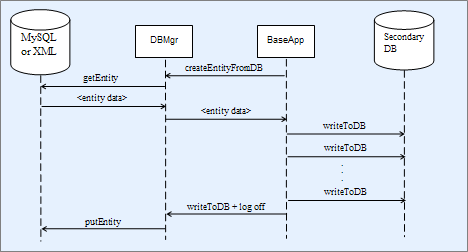
Flow of persistent entity data when secondary databases are enabled
Each BaseApp has its own secondary database, including machines
which may host more than one BaseApp. A secondary database is an SQLite
database file on the BaseApp machine's local disk. Secondary databases can
be enabled or disabled using the
<baseApp/secondaryDB/enable> configuration
option. For details on this option, see the document ????'s section ???? → ????
.
Entities are currently stored in raw binary form inside secondary databases and should only be manipulated using BigWorld tools like the data consolidation tool consolidate_dbs.
In case of a complete system failure, active entities may not have the opportunity to flush their data to the primary database. The data consolidation tool is run to transfer the active entity data from secondary databases to the primary database.
The data consolidation process is automatically run during system shutdown to transfer the persistent data of entities that were active when the system was shutdown.
The data consolidation tool is automatically run during start-up if the system was not shutdown successfully.
Unlike the BigWorld server, which uses UDP for interprocess communications, the data consolidation tool uses TCP connections to transfer the secondary databases from the BaseApp machines to the DBMgr machine. If there is a firewall on the DBMgr machine, it needs to be configured to allow TCP connections from BaseApp machines.
For more details on the data consolidation tool, see the document ????'s section ????.
Due to the existence of secondary databases, the data in the primary database may be quite stale. A backup made of the primary database may be considered too stale for functional use. As a solution to this issue, a secondary database snapshot tool is provided to make more up-to-date backups by backing up data from secondary databases as well. For details, see the document ????'s section ????.
Note
Despite the name of the tool, it does not generate a true snapshot of the system. The tool does not ensure that all active entities have flushed their data to the secondary databases before taking a copy of the secondary database. It makes a best effort at copying the primary and all the secondary databases at close to the same time.