Run a state-of-the-art model on your own gaming PC
Support for NVIDIA, AMD, Intel · Windows, Linux, Mac · free and open source

A voxel pagoda garden, 1 shot prompt running on an RTX 5070 with Strata (IQ3_S, 128K context) ·
full video (49 s)
Strata runs **[Qwen3.8-Flash-Next](https://huggingface.co/Qwen/Qwen3.8-Flash-Next)**, a 125-billion-parameter model that
normally needs a server, on a normal PC. It chats, writes code, reads pictures and works with your apps and coding
agents. Your chats and files stay on your PC.
**New here?** Check [what you need](#what-you-need), then [install the app](#option-a-the-strata-app).
- **Runs on a gaming PC.** 32 GB of RAM and graphics memory together is enough to start.
- **Works with your tools.** It speaks the OpenAI and Anthropic APIs, so Claude Code, Codex CLI, OpenCode and other agents connect to it.
- **Reads pictures.** They are on by default.
- **Free.** MIT license, no account, no cloud.
- **Private.** No telemetry. What Strata downloads, when it uses the internet and how it checks downloads is in [docs/SAFETY.md](docs/SAFETY.md).
Version 0.2.1 · engine 0.1.46
## What you need
**You need at least 32 GB of RAM and graphics memory (VRAM) together.** On a Mac or a Ryzen AI Max, that is the unified
memory. More memory gives a bigger model or a faster one.
- A 32 GB PC with a 12-16 GB card runs the Coder.
- 64 GB of RAM runs every size.
| Your computer | Details |
| --- | --- |
| **NVIDIA** GeForce RTX 20, 30, 40, 50 series (12 GB or more) | Install the app or the Terminal. |
| **AMD** Radeon RX 6800 and newer, Radeon AI PRO R9700 (12 GB or more) | [AMD cards](docs/AMD_HIP.md) |
| **Intel** Arc | [Intel Arc](docs/INTEL_ARC.md), [Intel engine](docs/INTEL.md) |
| **Apple Silicon Mac** (M1 or newer, macOS 15 or newer) | [Mac](docs/MAC.md) |
| **AMD Ryzen AI Max (Strix Halo)** and other unified-memory systems | [Strix Halo](docs/STRIX_HALO.md) |
| Older cards and processors | [Older GPUs](docs/OLDER_GPUS.md), [Older CPUs](docs/INSTALL.md#older-cpus-experimental) |
Also needed:
- about 80 GB of free disk (an SSD makes the first start much faster)
- Windows 10 / 11, Linux or macOS
- a current graphics driver
Two or three cards of the same make can share a model ([multi-GPU](docs/MULTI_GPU.md)). Strata never splits a model across
NVIDIA and AMD cards. Full list: [docs/INSTALL.md](docs/INSTALL.md#what-you-need).
## Install
Pick one option. They all start the same engine and use the same models.
### Option A: the Strata app
The easiest way. The app has the engine inside: install it, pick a model, chat. Download the file for your system and
graphics card from the [releases page](https://github.com/Niko1221/Strata/releases/latest). Not sure which one? See the
line under the table.
| System | Your graphics card | File to download |
| --- | --- | --- |
| **Windows 10 / 11** | NVIDIA RTX, driver 580 or newer | [`Strata-0.2.1-windows-cuda13.exe`](https://github.com/Niko1221/Strata/releases/latest/download/Strata-0.2.1-windows-cuda13.exe) |
| | NVIDIA, older card or driver older than 580 | [`Strata-0.2.1-windows-cuda12.exe`](https://github.com/Niko1221/Strata/releases/latest/download/Strata-0.2.1-windows-cuda12.exe) |
| | AMD Radeon RX 9000 series or Radeon AI PRO R9700 | [`Strata-0.2.1-windows-hip.exe`](https://github.com/Niko1221/Strata/releases/latest/download/Strata-0.2.1-windows-hip.exe) |
| | AMD Radeon RX 7000 series or Ryzen AI Max (Strix Halo) | [`Strata-0.2.1-windows-hip-rdna3.exe`](https://github.com/Niko1221/Strata/releases/latest/download/Strata-0.2.1-windows-hip-rdna3.exe) |
| **Linux** | NVIDIA RTX, driver 580 or newer | [`Strata-0.2.1-linux-nvidia-cuda13.AppImage`](https://github.com/Niko1221/Strata/releases/latest/download/Strata-0.2.1-linux-nvidia-cuda13.AppImage) |
| | NVIDIA, older card or driver older than 580 | [`Strata-0.2.1-linux-nvidia-cuda12.AppImage`](https://github.com/Niko1221/Strata/releases/latest/download/Strata-0.2.1-linux-nvidia-cuda12.AppImage) |
| | AMD Radeon RX 9000 series or Radeon AI PRO R9700 | [`Strata-0.2.1-linux-amd-rx9070.AppImage`](https://github.com/Niko1221/Strata/releases/latest/download/Strata-0.2.1-linux-amd-rx9070.AppImage) |
| | AMD Radeon RX 7000 series | [`Strata-0.2.1-linux-amd-rx7900.AppImage`](https://github.com/Niko1221/Strata/releases/latest/download/Strata-0.2.1-linux-amd-rx7900.AppImage) |
| | AMD Ryzen AI Max (Strix Halo) | [`Strata-0.2.1-linux-amd-strixhalo.AppImage`](https://github.com/Niko1221/Strata/releases/latest/download/Strata-0.2.1-linux-amd-strixhalo.AppImage) |
| **Mac** (Apple Silicon, macOS 15 or newer) | built in | [`Strata-0.2.1-mac.dmg`](https://github.com/Niko1221/Strata/releases/latest/download/Strata-0.2.1-mac.dmg) |
**If you are unsure:** for NVIDIA, take `cuda13` if your driver is version 580 or newer, otherwise `cuda12`. `cuda12` is
for older cards and older drivers. The `hip` and `amd` files are for AMD cards. Other AMD cards (RX 6000) have no
ready-made app yet: see [AMD cards](docs/AMD_HIP.md).
Then:
- **Windows:** run the `.exe`. It installs for your user and needs no administrator rights. If Windows says "Windows
protected your PC", choose **More info**, then **Run anyway** (the installer is not code-signed yet).
- **Linux:** make the file runnable (`chmod +x`) and start it. It needs FUSE 2: `sudo apt install libfuse2` (Ubuntu 22.04)
or `libfuse2t64` (Ubuntu 24.04 and newer).
- **Mac:** open the `.dmg` and drag Strata onto Applications.
On the first screen the app reads your PC and recommends a model that fits. Press install. The model is a big download
(about 40-70 GB) and continues where it stopped if it is interrupted. Closing the window stops Strata and the engine.
### Option B: the Terminal (one line)
The Terminal is the `strata` command, for scripts, servers and AI agents.
Linux and Mac:
```sh
curl -fsSL https://github.com/Niko1221/Strata/releases/latest/download/install.sh | sh
```
Windows (PowerShell):
```powershell
irm https://github.com/Niko1221/Strata/releases/latest/download/install.ps1 | iex
```
The script checks your PC, downloads the Terminal, verifies its SHA-256 and unpacks it into your home folder. It needs no
administrator rights. On Windows, open a new terminal window afterwards. Then start Strata:
```sh
strata launch
```
It asks one question at a time: model, context, pictures, who may connect. Then it downloads the engine for your graphics
card (signed, and test-started before use) and the model, and starts serving. For scripts and AI agents, use flags:
```sh
strata launch --model q2_0 --yes --no-tui
```
To read the install script before it runs, download it first with `curl -fsSL -o install.sh`, read it, then run
`sh install.sh`. All screens and flags: [docs/TERMINAL_LAUNCH.md](docs/TERMINAL_LAUNCH.md).
### Option C: let your AI set it up
Paste this into Claude Code, Cursor, Codex, GitHub Copilot or another coding assistant:
```text
Set up Strata on this PC for me: https://github.com/Niko1221/Strata - follow docs/AI_SETUP.md in that repository.
```
It checks your graphics card, RAM and disk, picks the model that fits, installs and starts it, and tells you how to
connect your apps. AI tools can also install, start and stop Strata through its [MCP server](docs/MCP_SERVER.md).
Prefer to build it yourself? See [Build from source](#build-from-source).
## Models
The app and `strata launch` recommend a model for your memory. It is one model in several sizes, compressed more or less.
Smaller sizes are faster. Larger sizes are a bit smarter.
### Low on memory? Try Gyro
[Gyro](https://huggingface.co/agentionai/Qwen3.8-Flash-Next-Gyro-GGUF) (by agentionai) is the smallest way to run this model.
| Size | Memory it needs (RAM + VRAM) | Download | What it is |
| --- | ---: | ---: | --- |
| **Gyro-S** | 27.6 GB | 58.5 GB | For PCs that fit nothing else. Quality is lower than IQ2_XS. |
| **Gyro-M** | 35 GB | 92.0 GB | About IQ3_XXS quality with about 20% less GPU memory. It writes answers 17-21% slower than Q2_0 on a 12 GB card and on an R9700. |
Gyro runs on NVIDIA and AMD cards (AMD is experimental), not on Intel Arc or the Mac. Details and measurements:
[docs/GYRO.md](docs/GYRO.md). Start it with `strata launch --model gyro-s`.
### The other sizes
| Your memory (RAM + VRAM) | Take | Notes |
| --- | --- | --- |
| **32 GB** | **Gyro-S**, or the **[Coder](docs/MODELS.md#coder)** for code | The Coder needs 32 GB of RAM and keeps half of the experts, so it is weaker outside code |
| **40 GB** | **[Swift 1.5](docs/MODELS.md#swift-15)** IQ2_XS (39.2 GB), or **Gyro-M** (35 GB) | Swift thinks for a shorter time before it answers. Gyro-M is close to IQ3_XXS in quality, but it writes answers 17-21% slower than Q2_0 |
| **48 GB** | **IQ3_XXS** (47.0 GB) | Slower, better |
| **64 GB** | **IQ3_S** (54.8 GB), the original or Swift 1.5 | The slowest, the best: it matches the full model on the published tests |
| **96 GB or more** | Unsloth's **UD-IQ4_XS** (about 72 GB of RAM) to **Q8_0** (about 136 GB), 4 to 8 bit | Closer to the full model. With less RAM, Strata reads part of them from the SSD, which is much slower |
Less RAM than a row says can still work: Strata switches to its
[low-RAM mode](docs/MODELS.md#a-big-graphics-card-and-little-ram) by itself. Expect it to be slower, and much slower
with a small graphics card.
More choices:
- **[Swift 1.5](docs/MODELS.md#swift-15)** is a fine-tune that thinks for a shorter time before it answers, at about the same quality and RAM.
- **[NVFP4](docs/NVFP4.md)** is NVIDIA's 4-bit version for NVIDIA cards. It needs about 80 GB of RAM to keep every expert in RAM.
- **[Qwen3.6-35B-A3B](docs/QWEN36.md)** is a smaller, different model that reads pictures and can answer several requests at once.
- **[OrcaRouter's Uncensored IQ3_XXS](docs/MODELS.md#orcarouter-uncensored-iq3_xxs)** is set up by hand.
Every size, download and what fits where: [docs/MODELS.md](docs/MODELS.md).
## How fast is it?
Based on a 12 GB graphics card (RTX 5070, Ryzen 5 7600, 64 GB RAM). See results from other cards:
[speed of each model](docs/MODELS.md#how-fast-is-each-size), [community results](docs/COMMUNITY_BENCHMARKS.md).
| Model | Answers appear at | Reads your prompt at |
| --- | --- | --- |
| **Q2_0** | `████████████` 94 tokens/s | `████████████` 2,650 tokens/s |
| **IQ2_XS** | `██████████░░` 79 tokens/s | `█████████░░░` 2,090 tokens/s |
| **IQ3_XXS** | `████████░░░░` 62 tokens/s | `████████░░░░` 1,750 tokens/s |
| **IQ3_S** | `███████░░░░░` 53 tokens/s | `███████░░░░░` 1,620 tokens/s |
| **Coder** | `███████░░░░░` 55 tokens/s | `██████████░░` 2,180 tokens/s |
A token is about ¾ of a word, so 60 tokens per second is faster than you can read. "Reads your prompt" is how fast Strata
takes in a long document, code or chat history.
Measured on a 16 GB AMD card (RX 9070 XT, Ryzen 9 3900X, 47 GB RAM):
| Model | Answers appear at | Reads your prompt at |
| --- | --- | --- |
| **Q2_0** | `████████░░░░` 60 tokens/s | `█████░░░░░░░` 1,160 tokens/s |
| **IQ2_XS** | `███████░░░░░` 52 tokens/s | `█████░░░░░░░` 1,110 tokens/s |
| **Coder** | `██████░░░░░░` 44 tokens/s | `██████░░░░░░` 1,420 tokens/s |
The bars use one scale for both tables. A card with more VRAM is faster: an RTX 3090 (24 GB) should write about 100-140
tokens per second. The engine version behind each number is in [DETAILS.md](docs/DETAILS.md#speed-measured).
## Using it
### In the app
The app has a **Chat**, a **Monitor** of the model and your GPU, CPU and RAM, a **Models** page and **Settings**. The chat
can work in a folder on your PC. In **Manual** mode it asks before it changes a file or runs a command. Type
`/loop 10m ` to repeat a message every 10 minutes while the chat is open.
The chat can search the web with DuckDuckGo (or Bing), with no account. You can add a search key under **Settings, Tools**.
Search is the one feature that sends something off your PC, the search words.
To run two models, turn on **Run multiple models** and give each model its own card of the same make.
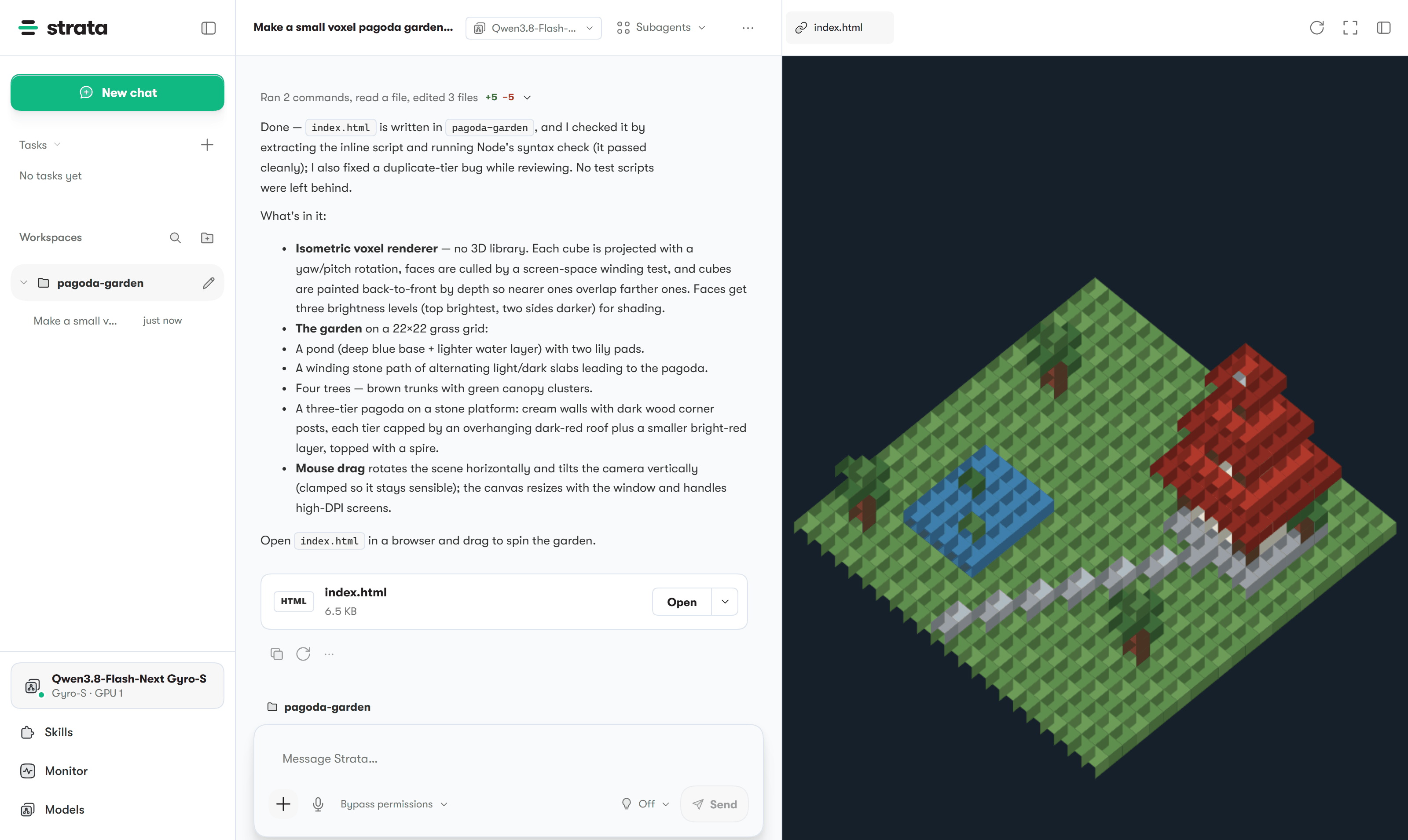
A chat in the Strata app: the agent wrote a small voxel pagoda garden as one HTML file, and the page opens in the preview next to the conversation
### In the Terminal
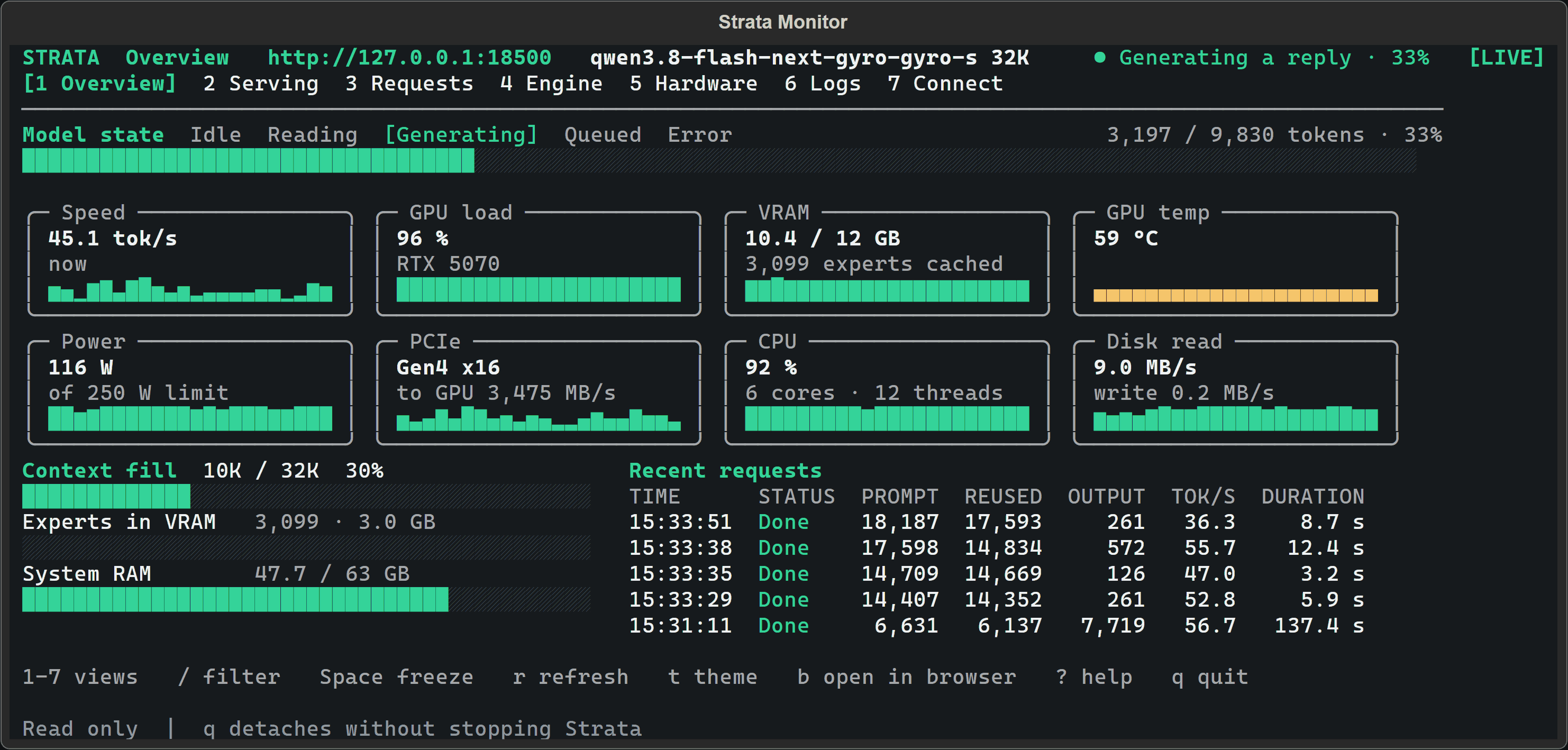
strata monitor while the model writes a reply: speed, GPU, memory and the recent requests
```sh
strata launch # guided screens: model, context, pictures, access, then serve
strata launch --model q2_0 --yes --no-tui # no questions: serve, print the address, return
strata launch --plan --model q2_0 # show what would happen; nothing changes
strata launch --status # what is being served now
strata launch --stop # stop it
strata monitor --url http://127.0.0.1:8080 # watch speed, GPU, memory and requests
strata update --check # is there a new engine? (strata update installs it)
strata doctor # check the installed engine files
```
`strata --help` lists everything. Starting and serving never download anything. Only the install, `strata launch` (when
you choose a model) and `strata update` do. To reach Strata from your phone or another PC, use
`strata launch --access lan`. It makes an API key and will not start on a network without one. No browser opens unless
you add `--open`. Guide: [docs/TERMINAL_LAUNCH.md](docs/TERMINAL_LAUNCH.md). Whole client: [docs/TERMINAL.md](docs/TERMINAL.md).
### With AI agents
An agent installs Strata with the one-line command in Option B and runs
`strata launch --model NAME --yes --no-tui`. The steps, flags and exit codes are in [docs/AI_SETUP.md](docs/AI_SETUP.md),
and the repository rules are in [AGENTS.md](AGENTS.md).
### Connect your other apps
| App type | Base URL |
| --- | --- |
| OpenAI-compatible (most apps and agents) | `http://127.0.0.1:8080/v1` (any API key, any model name) |
| Anthropic API (Claude Code and others) | `http://127.0.0.1:8080`, without `/v1`. These apps add `/v1/messages` themselves. Claude Code: `ANTHROPIC_BASE_URL=http://127.0.0.1:8080` |
| OpenAI Responses API (Codex CLI) | `http://127.0.0.1:8080/v1/responses` ([setup](docs/DETAILS.md#the-responses-api-and-codex-cli)) |
`strata connect` prints the exact settings for OpenCode, Codex CLI, Claude Code, oh-my-pi, pi, Hermes Agent and OpenClaw.
`strata connect opencode --write` writes the file after asking and keeps a backup.
### Pictures
Pictures are on by default for models that can read them. Attach or paste a picture in the chat, or send it from your app.
The picture reader runs on the processor when your graphics card has less than 24 GB (a few seconds per picture, nothing
taken from the card's memory) and on the graphics card from 24 GB. The rule is the same for NVIDIA and AMD. Turn pictures
off per model, or choose the reader with `--vision off`, `--vision gpu` or `--vision cpu`.
The numbers behind the rule: on a Radeon AI PRO R9700 the card's reader took 57 ms for a 260-token picture and the
processor's took 3.1 s. On 16 GB cards (Tesla P100 and RTX A4000, Linux) the card's reader cost 3-5% of text speed,
because it holds about 1.4 GB that the model would use otherwise. On a Mac the reader runs on the Mac's GPU whatever its memory (0.45 s for a 260-token picture on an M4 with 32 GB, about 1.2 GB of the shared
memory); the processor reader needs about 50 s per picture there, so it runs only when you ask for it with `--vision cpu`.
### Good to know
- Choose the thinking level (**off, low, medium or high**) in the chat menu or in your app's "reasoning effort". Off is fastest.
- Strata answers one request at a time by default. For several at once, use `--parallel N` in `strata launch` or
`"parallel": 2` in the config ([BATCHING.md](docs/BATCHING.md)). On a 12 GB card this makes each answer slower.
- Strata reads the first message of a chat in full, about 1 minute per 30,000 tokens. Follow-up messages start in seconds.
- Where your chats are stored and the whole API: [docs/INSTALL.md](docs/INSTALL.md#where-things-are-stored), [docs/DETAILS.md](docs/DETAILS.md#using-it).
## Build from source
Windows, Linux and Mac from the repository
[Download Strata](https://github.com/Niko1221/Strata/archive/refs/heads/main.zip) and unzip it, or `git clone` it.
**Windows:** double-click `START-HERE.bat`. **Linux:** run `./setup.sh` in the Strata folder.
**Mac (Apple Silicon, macOS 15 or newer):** install Apple's Command Line Tools once with `xcode-select --install`
(Xcode itself is not needed). Open Terminal in the Strata folder and run `./setup.sh`. It builds the Mac engine on your
Mac (about 7 minutes), asks the same questions, downloads the model and starts it. Next time, `./setup.sh` starts it
right away. Which size fits your Mac: [docs/MAC.md](docs/MAC.md).
The installer finds your card and sets up the right engine. It asks which model and size, how much context (how much text
the model keeps in mind) and whether it should read pictures. Press Enter for the recommended answer. Then it downloads the
model (about 70 GB) and starts it. If the download stops, run it again and it continues. Your browser opens the Strata
page at `http://127.0.0.1:8080`.
> While the model starts, your PC can be slow or stop responding for 1-3 minutes (longest the first time). Strata loads
> 35-55 GB into your RAM and locks part of it for the graphics card. Wait, and don't close the window.
Next time, run `START-HERE.bat` (or `./setup.sh`) again. It starts right away and downloads nothing twice. Close its
window to stop the model. `UPDATE.bat` (`./update.sh`) updates Strata without starting it. Updating, Docker, several cards,
where the files go and every option: [docs/INSTALL.md](docs/INSTALL.md).
To measure your PC, run `BENCH.bat` (`./bench.sh`). It takes 5-10 minutes and writes a report you can share
([how](docs/COMMUNITY_BENCHMARKS.md#run-the-benchmark)).
**Optional: more speed on one card when the whole model fits in RAM.** Two opt-in settings by RubenTorney (#1904, #1905).
They help when you run one graphics card and your RAM holds every expert, for example Q2_0 or IQ3_XXS on a 64 GB PC. Open
`strata-.json` in the Strata data folder ([where](docs/INSTALL.md#where-things-are-stored)) and add:
- `"--adapt-async", "1"` to the `"args"` list. The expert cache then updates on a helper thread instead of pausing the
answer. Measured on an RTX 5070 (Windows, Q2_0): +4-5% decode, +7-10% on code and long documents. Answers can differ
slightly from the default and stay the same from run to run.
- `"STRATA_PIN_BY_NEED": "1"` in the `"env"` block (Windows). Windows can lock only about half the RAM for the graphics
card, and this locks the experts the card needs first. Measured on the RTX 5070: +4.4% prompt reading.
```json
"args": [ ..., "--adapt-async", "1" ],
"env": { "STRATA_PIN_BY_NEED": "1" }
```
Restart Strata after the change. To undo, remove the two entries.
## How does it work?
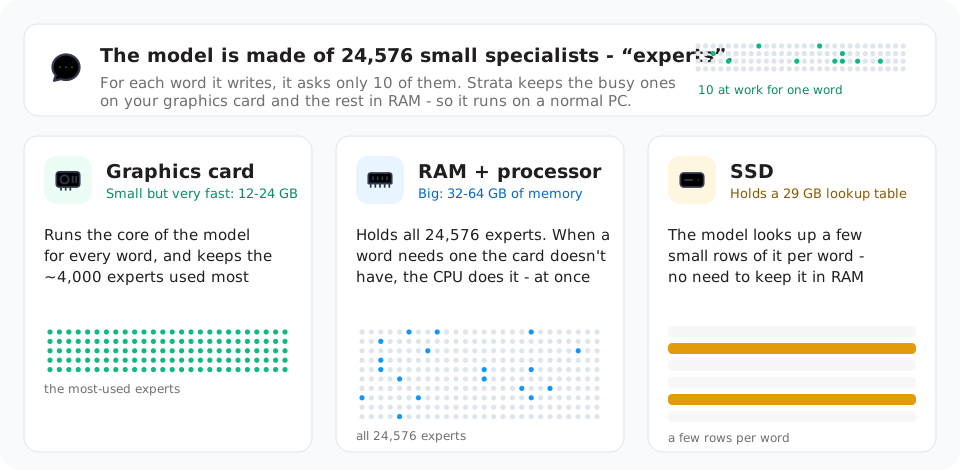
Models like this one usually run on servers with hundreds of gigabytes of graphics memory. Your graphics card has
12-24 GB. Strata makes the model fit by sharing the work across your whole PC. Picture a library.
- The model is a team of 24,576 small specialists ("experts"), like 24,576 reference books. Each word needs only 10 of them.
- **Your graphics card is the desk.** It is small and fast. The roughly 4,000 books used most often lie open on it.
- **Your RAM is the shelves in the reading room.** All 24,576 books are there. When a word needs a book that is not on the
desk, your processor reads it from the shelf at once, while the card keeps working.
- **Your SSD is the archive.** It holds a 29 GB lookup table. The model reads a few rows of it per word, so it does not
need to sit in RAM.
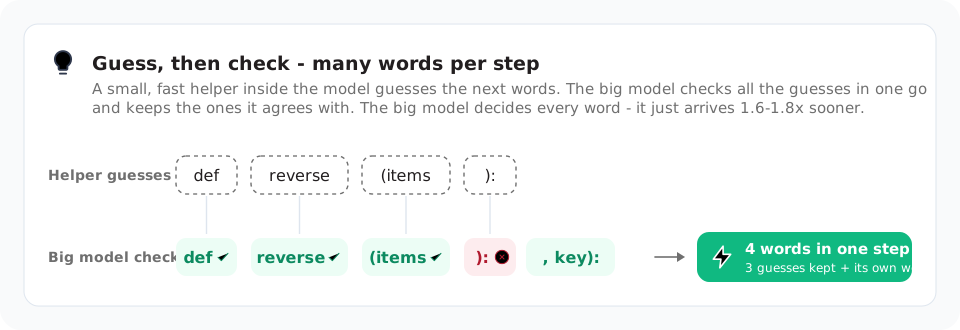
A small helper also guesses the next few words. The big model checks all of them at once and keeps the right ones. You get
the same answer, 1.6-1.8x sooner. Long texts are read in big pieces, up to 8,192 tokens at a time, at over 1,000 tokens
per second.
The longer explanation: [docs/HOW_IT_WORKS.md](docs/HOW_IT_WORKS.md). Every part and its numbers:
[the details](docs/DETAILS.md#how-it-works) and the [paper](docs/paper/Strata-Paper.pdf).
## Something went wrong?
- **My PC froze the first time Strata started.** It loads the model into RAM. Wait, and don't close the window. Still
frozen after 10 minutes? Restart the PC, close other programs and try again, or pick a smaller size.
- **It stopped while downloading or installing.** Start the app or `strata launch` again, or run `START-HERE.bat` (or
`./setup.sh`) again. It continues where it stopped.
- **It is very slow, the disk light keeps blinking, or it says "the engine stopped unexpectedly".** Your PC does not have
enough free RAM. Close other programs (browsers use a lot), or pick a smaller size such as Q2_0 or IQ2_XS.
- **It says there is no engine for this PC.** In the app, open **Settings, Engine** and press **Update engine**. In the
Terminal, run `strata update`. `strata doctor` shows which engine files are installed.
- **It says port 8080 is already in use.** Strata is already running. Look for its window.
More problems and fixes: [docs/TROUBLESHOOTING.md](docs/TROUBLESHOOTING.md). Still stuck? Open an
[issue](https://github.com/Niko1221/Strata/issues). In the app, attach the file from **Settings, Engine, Diagnostics, View
logs, Save logs**. In the Terminal, paste the output of `strata doctor`. From source, attach `strata-.log` from the
Strata folder. For a security problem, report it privately: [SECURITY.md](SECURITY.md).
## Credits and license
The model is [Qwen3.8-Flash-Next](https://huggingface.co/Qwen/Qwen3.8-Flash-Next) by the Qwen team. It was compressed by
[ISTA-DASLab](https://huggingface.co/ISTA-DASLab/Qwen3.8-Flash-Next-GSQ-RCO-GGUF), UkisAI (Swift 1.5), agentionai (Gyro)
and Unsloth. Strata uses parts of [llama.cpp / ggml](https://github.com/ggml-org/llama.cpp). All credits:
[docs/HOW_IT_WORKS.md](docs/HOW_IT_WORKS.md#credits). Strata is open source under the [MIT License](LICENSE). A few parts and
every model have their own licenses ([which ones](docs/HOW_IT_WORKS.md#license)).
## Contributing
Found a bug, or want to send a change or a benchmark? Read [CONTRIBUTING.md](CONTRIBUTING.md) first. It says what to
include so that others can check your work.
## Support Strata
Strata is free and MIT-licensed. I build it and test it on whatever hardware I can get. If it runs well on your PC, a coffee helps
me keep testing new cards and fixing what you report. No pressure. Using it and reporting what you find helps just as much.
Interested in sponsoring Strata? Contact me via [GitHub](https://github.com/Niko1221).


 Interested in sponsoring Strata? Contact me via [GitHub](https://github.com/Niko1221).