🌍
English |
简体中文 |
日本語 |
한국어 |
Español |
Português |
Deutsch |
Français |
Русский |
Türkçe |
Tiếng Việt
---

ComfyUI-Easy-Install
One-click Portable ComfyUI with EZi Desktop: a dashboard for packages, environments and configuration
Windows • NVIDIA GPUs • Pixaroma Community Edition
[](https://github.com/Tavris1/ComfyUI-Easy-Install/releases/latest/download/ComfyUI-Easy-Install.zip)
[](https://github.com/Tavris1/ComfyUI-Easy-Install/releases)
[](https://github.com/Tavris1/ComfyUI-Easy-Install/releases)
📥 INSTALL ·
✨ Features ·
🎭 Meet EZi ·
🍎 macOS/Linux ·
💬 Pixaroma Discord ·
❤️ Support Development
## ✨ Features
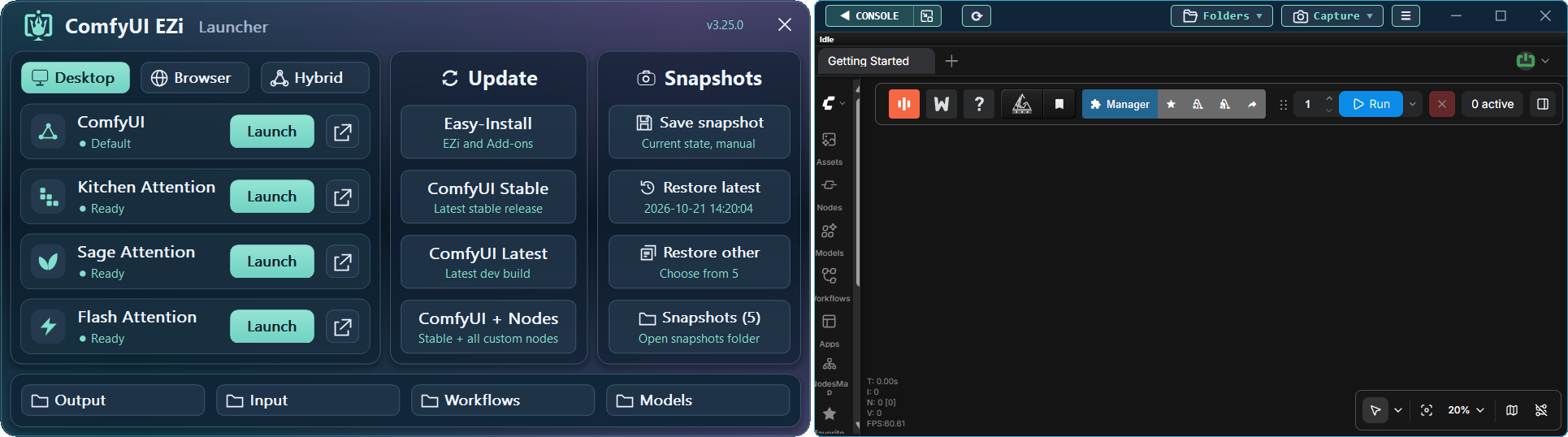
**ComfyUI-Easy-Install** provides a portable ComfyUI environment with **EZi Desktop**.
No manual Python or Git setup required.
Install complex packages such as Nunchaku, SageAttention, FlashAttention, InsightFace, and others with one click.
Manage **models, packages, PyTorch/CUDA versions, Dynamic VRAM,
ComfyUI/frontend versions, UV/PIP caches, and GGUF conversion** from one place.
## 📦 Included Components
Core Components
| 🔧 Component | 📝 Note |
|---|---|
| [Git](https://git-scm.com/) |  - Latest (will install/update if needed) |
| [Python](https://www.python.org/downloads/release/python-31210/) |  - Embedded version |
| [ComfyUI](https://github.com/Comfy-Org/ComfyUI) |  - Latest stable version |
Nodes Used in Pixaroma Tutorials
| 🖼️ Image | 🎬 Video | 🎵 Audio | 🧩 Utility / WF | 🤖 Models |
|---|---|---|---|---|
| [Tiled Diffusion & VAE](https://github.com/shiimizu/ComfyUI-TiledDiffusion) | [VideoHelperSuite](https://github.com/Kosinkadink/ComfyUI-VideoHelperSuite) | [MelBandRoFormer](https://github.com/kijai/ComfyUI-MelBandRoFormer) | [ComfyUI Manager](https://github.com/Comfy-Org/ComfyUI-Manager) | [QwenVL](https://github.com/1038lab/ComfyUI-QwenVL) |
| [Inpaint CropAndStitch](https://github.com/lquesada/ComfyUI-Inpaint-CropAndStitch) | [WanVideoWrapper](https://github.com/kijai/ComfyUI-WanVideoWrapper) | [Qwen3-TTS](https://github.com/flybirdxx/ComfyUI-Qwen-TTS) | [Easy-Use](https://github.com/yolain/ComfyUI-Easy-Use) | [GGUF](https://github.com/city96/ComfyUI-GGUF) |
| [ControlNet Aux](https://github.com/Fannovel16/comfyui_controlnet_aux) | [WanAnimatePreprocess](https://github.com/kijai/ComfyUI-WanAnimatePreprocess) | | [KJNodes](https://github.com/kijai/ComfyUI-KJNodes) | |
| [LayerStyle](https://github.com/chflame163/ComfyUI_LayerStyle) | [SeedVR2 VideoUpscaler](https://github.com/numz/ComfyUI-SeedVR2_VideoUpscaler) | | [rgthree](https://github.com/rgthree/rgthree-comfy) | |
| [RMBG](https://github.com/1038lab/ComfyUI-RMBG) | | | [iTools](https://github.com/MohammadAboulEla/ComfyUI-iTools) | |
| [Easy-Sam3](https://github.com/yolain/ComfyUI-Easy-Sam3) | | | [ControlAltAI Nodes](https://github.com/gseth/ControlAltAI-Nodes) | |
| [SCAIL-Pose](https://github.com/kijai/ComfyUI-SCAIL-Pose) | | | ✨[Pixaroma](https://github.com/pixaroma/ComfyUI-Pixaroma) | |
| | | | [Krea2Edit](https://github.com/lbouaraba/comfyui-krea2edit) | |
| | | | | | |
Optional Add-ons & Tools
| 🧩 Nodes | 🛠️ Tools |
|---|---|
| [Nunchaku](https://github.com/nunchaku-ai/nunchaku) | Easy-Models-Linker |
| [SageAttention (v2.2.0 and v3)](https://github.com/woct0rdho/SageAttention) | Easy-System-Checker |
| [FlashAttention](https://github.com/Dao-AILab/flash-attention) | ComfyUI-Version-Switcher |
| [InsightFace](https://github.com/deepinsight/insightface) | Easy-model2GGUF |
| [Trellis 2.0 + Pixal3D @visualbruno](https://github.com/visualbruno/ComfyUI-Trellis2) | Long-Paths-Enabler |
| | Torch-Pack |
| | Toggle-DynamicVRAM |
| | Update Easy-Install |
---
## 🖥️ Windows Installation
> [!IMPORTANT]
> - Use a short, English-only path (e.g., `D:\AI\`).
> - Keep NVIDIA drivers up to date.
1. [**📥 DOWNLOAD LATEST VERSION**](https://github.com/Tavris1/ComfyUI-Easy-Install/releases/latest/download/ComfyUI-Easy-Install.zip)
2. Extract the ZIP file to a new folder and run **`ComfyUI-Easy-Install.bat`**
3. Optionally, after the setup, install or run components from the **Add-ons** folder or **EZi Desktop Menu**:
- **Easy-Models-Linker** - *Uses existing **MODELS** folder via **extra_model_paths.yaml**, no re-download needed*
- *Some folders like **LLM** and **llm_gguf** cannot be redirected this way*
- **Easy-System-Checker** - *Provides information about key hardware and software components*
- **Nunchaku** - *Installs Nunchaku*
- **SageAttention-Multi** - *Installs both SageAttention v2.2.0 and v3 (v3 effective only on NVIDIA 50-series GPUs)*
- **FlashAttention** - *Installs FlashAttention v2.8.3*
- **InsightFace** - *Installs InsightFace*
- **Trellis2+Pixal3D @visualbruno** - *Installs Trellis 2.0 + Pixal3D and the model (requires `Torch 2.8.0+cu128`)*
- **Torch-Pack** - *Quick switch between:`Torch 2.7.1+cu128`, `Torch 2.8.0+cu128`,
`Torch 2.9.1+cu130`, `Torch 2.10+cu130`, `Torch 2.11+cu130`, `Torch 2.12.1+cu130` & `Torch 2.13.0+cu130`*
- **Easy-model2GGUF** - *Convert & quantize models to GGUF (Q2_K–Q8_0) with 5D tensor fixes if available*
- **Long-Paths-Enabler** - *Enables **Long Paths** in Windows 10/11. Essential for Python/ComfyUI*
- **ComfyUI-Version-Switcher** - ***Reversible** rollback to a **previous** ComfyUI version if issues occur*
- **Toggle-DynamicVRAM** - *Toggles **--disable-dynamic-vram** option in ComfyUI startup files*
- **Update Easy-Install** - *Updates **Add-ons** and other folders. Creates desktop shortcuts*
- **EZi Desktop Themes** - *via EZi Desktop > Menu > Advanced*
- **Custom Input, Output & User folders** - *via EZi Desktop > Menu > Advanced*
- **ComfyUI & Frontend Version Changer** - *via EZi Desktop > Menu > Advanced*
- **UV & PIP cache cleaner** - *via EZi Desktop > Menu*
- **ComfyUI-Manager Security-Level Config** - *Easy configuration of security_level via EZi Desktop > Menu*
- **Pinned-Packages-Manager** - *Freeze package versions such as NumPy==1.26.4 via EZi Desktop > Menu*
---
## 🎭 Meet EZi - The Comic Guide
New to EZi? Explore this illustrated guide. Click any image to view it full-size.
| Install ComfyUI |
EZi Launcher |
Reuse Models |
Install Add-ons |
Update/Restore |
Your System |
 |
 |
 |
 |
 |
 |
## ❤️ Support Development
Enjoy the project? Your support helps keep it going.
[](https://paypal.me/tavris1)
[](https://buymeacoffee.com/tavris1)
[](https://github.com/sponsors/Tavris1)