🌍
English |
简体中文 |
日本語 |
한국어 |
Español |
Português |
Deutsch |
Français |
Русский |
Türkçe |
Tiếng Việt
---

ComfyUI-Easy-Install
ComfyUI portátil com um clique e EZi Desktop: um painel completo para pacotes, ambientes e configuração
Windows • NVIDIA GPUs • Pixaroma Community Edition
[](https://github.com/Tavris1/ComfyUI-Easy-Install/releases/latest/download/ComfyUI-Easy-Install.zip)
[](https://github.com/Tavris1/ComfyUI-Easy-Install/releases)
[](https://github.com/Tavris1/ComfyUI-Easy-Install/releases)
📥 Instalar ·
✨ Recursos/Componentes ·
🍎 macOS/Linux ·
💬 Pixaroma Discord ·
❤️ Apoiar o desenvolvimento
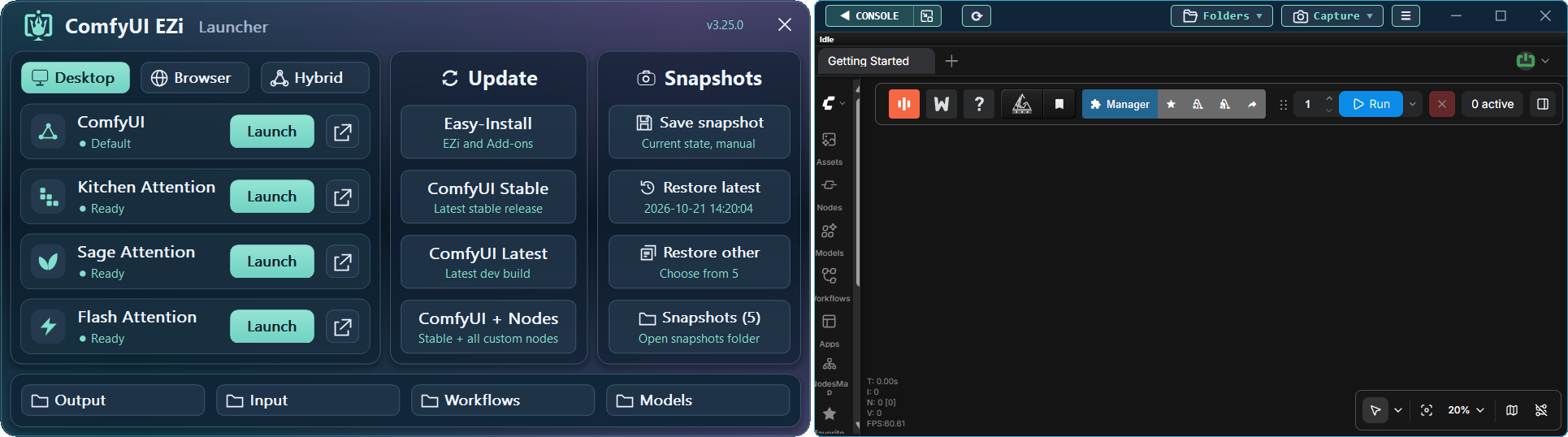
## ✨ Recursos
**ComfyUI-Easy-Install** fornece um ambiente portátil do ComfyUI com **EZi Desktop**.
Não é necessária nenhuma configuração manual do Python ou Git.
Instale pacotes complexos como Nunchaku, SageAttention, FlashAttention, InsightFace e outros com um único clique.
Gerencie **modelos, pacotes, versões do PyTorch/CUDA, Dynamic VRAM,
versões do ComfyUI/frontend, caches do UV/PIP e conversão para GGUF** em um só lugar.
## 📦 Componentes incluídos
Componentes principais
| 🔧 Componente | 📝 Observação |
|---|---|
| [Git](https://git-scm.com/) |  - Mais recente (será instalado/atualizado se necessário) |
| [Python](https://www.python.org/downloads/release/python-31210/) |  - Versão Embedded |
| [ComfyUI](https://github.com/Comfy-Org/ComfyUI) |  - Versão estável mais recente |
Nodes usados nos tutoriais da Pixaroma
| 🖼️ Imagem | 🎬 Vídeo | 🎵 Áudio | 🧩 Utilitário / WF | 🤖 Modelos |
|---|---|---|---|---|
| [Tiled Diffusion & VAE](https://github.com/shiimizu/ComfyUI-TiledDiffusion) | [VideoHelperSuite](https://github.com/Kosinkadink/ComfyUI-VideoHelperSuite) | [MelBandRoFormer](https://github.com/kijai/ComfyUI-MelBandRoFormer) | [ComfyUI Manager](https://github.com/Comfy-Org/ComfyUI-Manager) | [QwenVL](https://github.com/1038lab/ComfyUI-QwenVL) |
| [Inpaint CropAndStitch](https://github.com/lquesada/ComfyUI-Inpaint-CropAndStitch) | [WanVideoWrapper](https://github.com/kijai/ComfyUI-WanVideoWrapper) | [Qwen3-TTS](https://github.com/flybirdxx/ComfyUI-Qwen-TTS) | [Easy-Use](https://github.com/yolain/ComfyUI-Easy-Use) | [GGUF](https://github.com/city96/ComfyUI-GGUF) |
| [ControlNet Aux](https://github.com/Fannovel16/comfyui_controlnet_aux) | [WanAnimatePreprocess](https://github.com/kijai/ComfyUI-WanAnimatePreprocess) | | [KJNodes](https://github.com/kijai/ComfyUI-KJNodes) | |
| [LayerStyle](https://github.com/chflame163/ComfyUI_LayerStyle) | [SeedVR2 VideoUpscaler](https://github.com/numz/ComfyUI-SeedVR2_VideoUpscaler) | | [rgthree](https://github.com/rgthree/rgthree-comfy) | |
| [RMBG](https://github.com/1038lab/ComfyUI-RMBG) | | | [iTools](https://github.com/MohammadAboulEla/ComfyUI-iTools) | |
| [Easy-Sam3](https://github.com/yolain/ComfyUI-Easy-Sam3) | | | [ControlAltAI Nodes](https://github.com/gseth/ControlAltAI-Nodes) | |
| [SCAIL-Pose](https://github.com/kijai/ComfyUI-SCAIL-Pose) | | | ✨[Pixaroma](https://github.com/pixaroma/ComfyUI-Pixaroma) | |
| | | | [Krea2T-Enhancer](https://github.com/capitan01R/ComfyUI-Krea2T-Enhancer) | |
| | | | [Krea2Edit](https://github.com/lbouaraba/comfyui-krea2edit) | |
Add-ons e Tools opcionais
| 🧩 Nodes | 🛠️ Tools |
|---|---|
| [Nunchaku](https://github.com/nunchaku-ai/nunchaku) | Easy-Models-Linker |
| [SageAttention (v2.2.0 and v3)](https://github.com/woct0rdho/SageAttention) | Easy-System-Checker |
| [FlashAttention](https://github.com/Dao-AILab/flash-attention) | ComfyUI-Version-Switcher |
| [InsightFace](https://github.com/deepinsight/insightface) | Easy-model2GGUF |
| [Trellis 2.0 + Pixal3D @visualbruno](https://github.com/visualbruno/ComfyUI-Trellis2) | Long-Paths-Enabler |
| | Torch-Pack |
| | Toggle-DynamicVRAM |
| | Update Easy-Install |
---
## 🖥️ Instalação no Windows
> [!WARNING]
> **Windows 11:** Se o ComfyUI exibir **"Bad Image" (`0xc0e90002`)**, desative o **Smart App Control** e reinicie o ComfyUI.
> Isso reduz a proteção contra aplicativos não confiáveis. Leia o aviso do Windows antes de confirmar.
> [!IMPORTANT]
> - Não execute o instalador como **Administrator**.
> - Evite pastas do sistema (`Program Files`, `Windows`, raiz de `C:\`).
> - Evite espaços e caracteres especiais nos nomes das pastas.
> - Certifique-se de que os drivers NVIDIA estejam atualizados.
1. [**📥 DOWNLOAD LATEST VERSION**](https://github.com/Tavris1/ComfyUI-Easy-Install/releases/latest/download/ComfyUI-Easy-Install.zip)
2. Extraia o arquivo ZIP para uma nova pasta e execute **`ComfyUI-Easy-Install.bat`**
3. Opcionalmente, após a configuração, instale ou execute componentes da pasta **Add-ons** ou do **EZi Desktop Menu**:
- **Easy-Models-Linker** - *Usa a pasta **MODELS** existente por meio do **extra_model_paths.yaml**, sem necessidade de baixar novamente*
- *Algumas pastas, como **LLM** e **llm_gguf**, não podem ser redirecionadas dessa forma*
- **Easy-System-Checker** - *Fornece informações sobre os principais componentes de hardware e software*
- **Nunchaku** - *Instala o Nunchaku*
- **SageAttention-Multi** - *Instala tanto o SageAttention v2.2.0 quanto o v3 (v3 é efetivo apenas em NVIDIA 50-series GPUs)*
- **FlashAttention** - *Instala o FlashAttention v2.8.3*
- **InsightFace** - *Instala o InsightFace*
- **Trellis2+Pixal3D @visualbruno** - *Instala o Trellis 2.0 + Pixal3D e o modelo (requer `Torch 2.8.0+cu128`)*
- **Torch-Pack** - *Alternância rápida entre: `Torch 2.7.1+cu128`, `Torch 2.8.0+cu128`,
`Torch 2.9.1+cu130`, `Torch 2.10+cu130`, `Torch 2.11+cu130`, `Torch 2.12.1+cu130` & `Torch 2.13.0+cu130`*
- **Easy-model2GGUF** - *Converte e quantiza modelos para GGUF (Q2_K–Q8_0), com correções de tensor 5D quando disponíveis*
- **Long-Paths-Enabler** - *Ativa **Long Paths** no Windows 10/11. Essencial para Python/ComfyUI*
- **ComfyUI-Version-Switcher** - *Rollback **reversível** para uma versão **anterior** do ComfyUI caso ocorram problemas*
- **Toggle-DynamicVRAM** - *Alterna a opção **--disable-dynamic-vram** nos arquivos de inicialização do ComfyUI*
- **Update Easy-Install** - *Atualiza **Add-ons** e outras pastas. Cria atalhos na área de trabalho*
- **EZi Desktop Themes** - *via EZi Desktop > Menu > Advanced*
- **Custom Input, Output & User folders** - *via EZi Desktop > Menu > Advanced*
- **ComfyUI & Frontend Version Changer** - *via EZi Desktop > Menu > Advanced*
- **UV & PIP cache cleaner** - *via EZi Desktop > Menu*
- **ComfyUI-Manager Security-Level Config** - *Configuração fácil de security_level via EZi Desktop > Menu*
- **Pinned-Packages-Manager** - *Fixe versões de pacotes, como NumPy==1.26.4, via EZi Desktop > Menu*
---
## ❤️ Apoiar o desenvolvimento
Gostou do projeto? Seu apoio ajuda a mantê-lo em andamento.
[](https://paypal.me/tavris1)
[](https://buymeacoffee.com/tavris1)
[](https://github.com/sponsors/Tavris1)