🌍
English |
简体中文 |
日本語 |
한국어 |
Español |
Português |
Deutsch |
Français |
Русский |
Türkçe |
Tiếng Việt
---

ComfyUI-Easy-Install
EZi Desktop を搭載したワンクリック・ポータブル ComfyUI:パッケージ、環境、設定を管理するためのフルダッシュボード
Windows • NVIDIA GPUs • Pixaroma Community Edition
[](https://github.com/Tavris1/ComfyUI-Easy-Install/releases/latest/download/ComfyUI-Easy-Install.zip)
[](https://github.com/Tavris1/ComfyUI-Easy-Install/releases)
[](https://github.com/Tavris1/ComfyUI-Easy-Install/releases)
📥 インストール ·
✨ 機能/コンポーネント ·
🍎 macOS/Linux ·
💬 Pixaroma Discord ·
❤️ 開発を支援
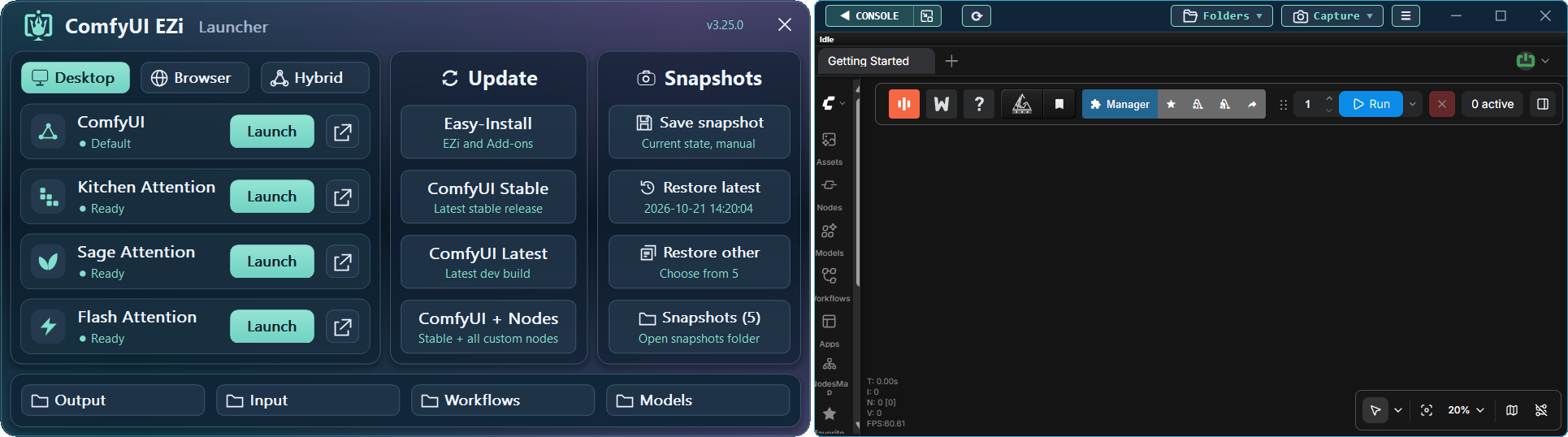
## ✨ 機能
**ComfyUI-Easy-Install** は、**EZi Desktop** を備えたポータブルな ComfyUI 環境を提供します。
Python や Git を手動でセットアップする必要はありません。
Nunchaku、SageAttention、FlashAttention、InsightFace などの複雑なパッケージをワンクリックでインストールできます。
**モデル、パッケージ、PyTorch/CUDA バージョン、Dynamic VRAM、
ComfyUI/frontend バージョン、UV/PIP キャッシュ、GGUF 変換**を1か所から管理できます。
## 📦 含まれるコンポーネント
コアコンポーネント
| 🔧 コンポーネント | 📝 説明 |
|---|---|
| [Git](https://git-scm.com/) |  - 最新版(必要に応じてインストール/更新) |
| [Python](https://www.python.org/downloads/release/python-31210/) |  - Embedded バージョン |
| [ComfyUI](https://github.com/Comfy-Org/ComfyUI) |  - 最新の安定版 |
Pixaroma チュートリアルで使用される Nodes
| 🖼️ 画像 | 🎬 動画 | 🎵 オーディオ | 🧩 ユーティリティ / WF | 🤖 モデル |
|---|---|---|---|---|
| [Tiled Diffusion & VAE](https://github.com/shiimizu/ComfyUI-TiledDiffusion) | [VideoHelperSuite](https://github.com/Kosinkadink/ComfyUI-VideoHelperSuite) | [MelBandRoFormer](https://github.com/kijai/ComfyUI-MelBandRoFormer) | [ComfyUI Manager](https://github.com/Comfy-Org/ComfyUI-Manager) | [QwenVL](https://github.com/1038lab/ComfyUI-QwenVL) |
| [Inpaint CropAndStitch](https://github.com/lquesada/ComfyUI-Inpaint-CropAndStitch) | [WanVideoWrapper](https://github.com/kijai/ComfyUI-WanVideoWrapper) | [Qwen3-TTS](https://github.com/flybirdxx/ComfyUI-Qwen-TTS) | [Easy-Use](https://github.com/yolain/ComfyUI-Easy-Use) | [GGUF](https://github.com/city96/ComfyUI-GGUF) |
| [ControlNet Aux](https://github.com/Fannovel16/comfyui_controlnet_aux) | [WanAnimatePreprocess](https://github.com/kijai/ComfyUI-WanAnimatePreprocess) | | [KJNodes](https://github.com/kijai/ComfyUI-KJNodes) | |
| [LayerStyle](https://github.com/chflame163/ComfyUI_LayerStyle) | [SeedVR2 VideoUpscaler](https://github.com/numz/ComfyUI-SeedVR2_VideoUpscaler) | | [rgthree](https://github.com/rgthree/rgthree-comfy) | |
| [RMBG](https://github.com/1038lab/ComfyUI-RMBG) | | | [iTools](https://github.com/MohammadAboulEla/ComfyUI-iTools) | |
| [Easy-Sam3](https://github.com/yolain/ComfyUI-Easy-Sam3) | | | [ControlAltAI Nodes](https://github.com/gseth/ControlAltAI-Nodes) | |
| [SCAIL-Pose](https://github.com/kijai/ComfyUI-SCAIL-Pose) | | | ✨[Pixaroma](https://github.com/pixaroma/ComfyUI-Pixaroma) | |
| | | | [Krea2T-Enhancer](https://github.com/capitan01R/ComfyUI-Krea2T-Enhancer) | |
| | | | [Krea2Edit](https://github.com/lbouaraba/comfyui-krea2edit) | |
オプションの Add-ons と Tools
| 🧩 Nodes | 🛠️ Tools |
|---|---|
| [Nunchaku](https://github.com/nunchaku-ai/nunchaku) | Easy-Models-Linker |
| [SageAttention (v2.2.0 and v3)](https://github.com/woct0rdho/SageAttention) | Easy-System-Checker |
| [FlashAttention](https://github.com/Dao-AILab/flash-attention) | ComfyUI-Version-Switcher |
| [InsightFace](https://github.com/deepinsight/insightface) | Easy-model2GGUF |
| [Trellis 2.0 + Pixal3D @visualbruno](https://github.com/visualbruno/ComfyUI-Trellis2) | Long-Paths-Enabler |
| | Torch-Pack |
| | Toggle-DynamicVRAM |
| | Update Easy-Install |
---
## 🖥️ Windows インストール
> [!WARNING]
> **Windows 11:** ComfyUI で **"Bad Image" (`0xc0e90002`)** が表示される場合は、**Smart App Control** をオフにして ComfyUI を再起動してください。
> これにより、信頼できないアプリに対する保護が低下します。確定する前に Windows の警告をお読みください。
> [!IMPORTANT]
> - インストーラーを **Administrator** として実行しないでください。
> - システムフォルダ(`Program Files`、`Windows`、`C:\` ルート)は避けてください。
> - フォルダ名にスペースや特殊文字を使用しないでください。
> - NVIDIA ドライバーが最新であることを確認してください。
1. [**📥 DOWNLOAD LATEST VERSION**](https://github.com/Tavris1/ComfyUI-Easy-Install/releases/latest/download/ComfyUI-Easy-Install.zip)
2. ZIP ファイルを新しいフォルダに展開し、**`ComfyUI-Easy-Install.bat`** を実行します
3. セットアップ後、必要に応じて **Add-ons** フォルダまたは **EZi Desktop Menu** からコンポーネントをインストールまたは実行できます:
- **Easy-Models-Linker** - ***extra_model_paths.yaml** を使用して既存の **MODELS** フォルダを利用するため、再ダウンロードは不要*
- ***LLM** や **llm_gguf** など、一部のフォルダはこの方法ではリダイレクトできません*
- **Easy-System-Checker** - *主要なハードウェアおよびソフトウェアコンポーネントに関する情報を提供*
- **Nunchaku** - *Nunchaku をインストール*
- **SageAttention-Multi** - *SageAttention v2.2.0 と v3 の両方をインストール(v3 は NVIDIA 50-series GPUs でのみ有効)*
- **FlashAttention** - *FlashAttention v2.8.3 をインストール*
- **InsightFace** - *InsightFace をインストール*
- **Trellis2+Pixal3D @visualbruno** - *Trellis 2.0 + Pixal3D とモデルをインストール(`Torch 2.8.0+cu128` が必要)*
- **Torch-Pack** - *以下を素早く切り替え:`Torch 2.7.1+cu128`、`Torch 2.8.0+cu128`、
`Torch 2.9.1+cu130`、`Torch 2.10+cu130`、`Torch 2.11+cu130`、`Torch 2.12.1+cu130`、`Torch 2.13.0+cu130`*
- **Easy-model2GGUF** - *モデルを GGUF(Q2_K–Q8_0)に変換・量子化し、利用可能な場合は 5D tensor 修正を適用*
- **Long-Paths-Enabler** - *Windows 10/11 で **Long Paths** を有効化。Python/ComfyUI に不可欠*
- **ComfyUI-Version-Switcher** - *問題が発生した場合、**以前の** ComfyUI バージョンへ**元に戻せる**ロールバック*
- **Toggle-DynamicVRAM** - *ComfyUI 起動ファイル内の **--disable-dynamic-vram** オプションを切り替え*
- **Update Easy-Install** - ***Add-ons** やその他のフォルダを更新。デスクトップショートカットを作成*
- **EZi Desktop Themes** - *EZi Desktop > Menu > Advanced 経由*
- **Custom Input, Output & User folders** - *EZi Desktop > Menu > Advanced 経由*
- **ComfyUI & Frontend Version Changer** - *EZi Desktop > Menu > Advanced 経由*
- **UV & PIP cache cleaner** - *EZi Desktop > Menu 経由*
- **ComfyUI-Manager Security-Level Config** - *EZi Desktop > Menu 経由で security_level を簡単に設定*
- **Pinned-Packages-Manager** - *EZi Desktop > Menu 経由で NumPy==1.26.4 などのパッケージバージョンを固定*
---
## ❤️ 開発を支援
このプロジェクトを気に入っていただけましたか?皆様の支援がプロジェクトの継続に役立ちます。
[](https://paypal.me/tavris1)
[](https://buymeacoffee.com/tavris1)
[](https://github.com/sponsors/Tavris1)