🌍
English |
简体中文 |
日本語 |
한국어 |
Español |
Português |
Deutsch |
Français |
Русский |
Türkçe |
Tiếng Việt
---

ComfyUI-Easy-Install
ComfyUI mit einem Klick als portable Version mit EZi Desktop: ein vollständiges Dashboard für Pakete, Umgebungen und Konfiguration
Windows • NVIDIA GPUs • Pixaroma Community Edition
[](https://github.com/Tavris1/ComfyUI-Easy-Install/releases/latest/download/ComfyUI-Easy-Install.zip)
[](https://github.com/Tavris1/ComfyUI-Easy-Install/releases)
[](https://github.com/Tavris1/ComfyUI-Easy-Install/releases)
📥 Installieren ·
✨ Funktionen/Komponenten ·
🍎 macOS/Linux ·
💬 Pixaroma Discord ·
❤️ Entwicklung unterstützen
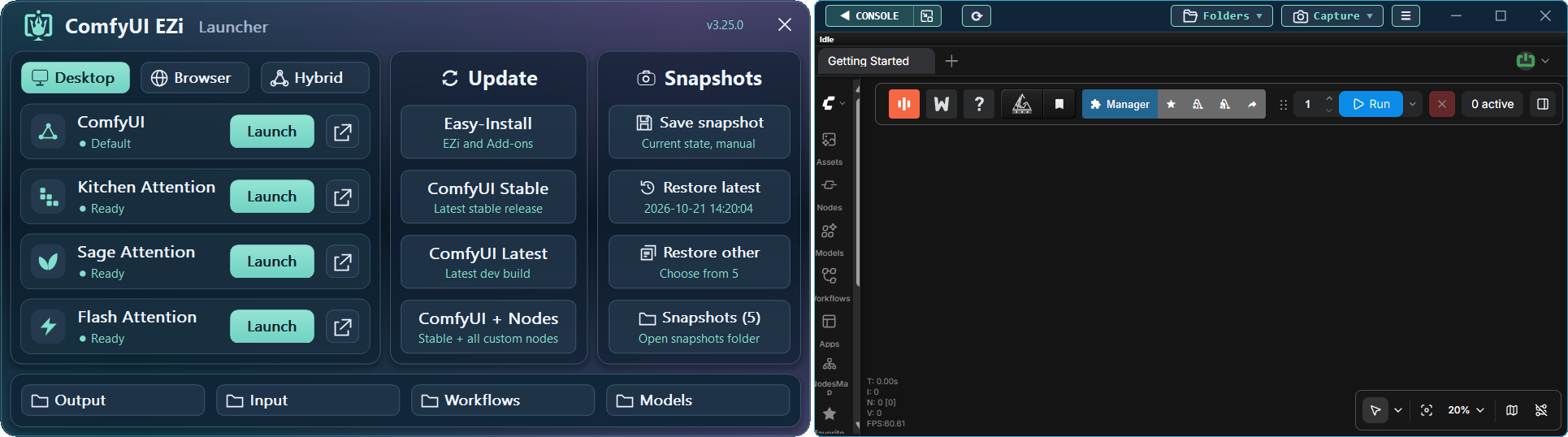
## ✨ Funktionen
**ComfyUI-Easy-Install** bietet eine portable ComfyUI-Umgebung mit **EZi Desktop**.
Keine manuelle Einrichtung von Python oder Git erforderlich.
Installieren Sie komplexe Pakete wie Nunchaku, SageAttention, FlashAttention, InsightFace und andere mit einem Klick.
Verwalten Sie **Modelle, Pakete, PyTorch/CUDA-Versionen, Dynamic VRAM,
ComfyUI-/Frontend-Versionen, UV/PIP-Caches und GGUF-Konvertierung** an einem Ort.
## 📦 Enthaltene Komponenten
Kernkomponenten
| 🔧 Komponente | 📝 Hinweis |
|---|---|
| [Git](https://git-scm.com/) |  – Neueste Version (wird bei Bedarf installiert/aktualisiert) |
| [Python](https://www.python.org/downloads/release/python-31210/) |  – Eingebettete Version |
| [ComfyUI](https://github.com/Comfy-Org/ComfyUI) |  – Neueste stabile Version |
In Pixaroma-Tutorials verwendete Nodes
| 🖼️ Bild | 🎬 Video | 🎵 Audio | 🧩 Utility / WF | 🤖 Modelle |
|---|---|---|---|---|
| [Tiled Diffusion & VAE](https://github.com/shiimizu/ComfyUI-TiledDiffusion) | [VideoHelperSuite](https://github.com/Kosinkadink/ComfyUI-VideoHelperSuite) | [MelBandRoFormer](https://github.com/kijai/ComfyUI-MelBandRoFormer) | [ComfyUI Manager](https://github.com/Comfy-Org/ComfyUI-Manager) | [QwenVL](https://github.com/1038lab/ComfyUI-QwenVL) |
| [Inpaint CropAndStitch](https://github.com/lquesada/ComfyUI-Inpaint-CropAndStitch) | [WanVideoWrapper](https://github.com/kijai/ComfyUI-WanVideoWrapper) | [Qwen3-TTS](https://github.com/flybirdxx/ComfyUI-Qwen-TTS) | [Easy-Use](https://github.com/yolain/ComfyUI-Easy-Use) | [GGUF](https://github.com/city96/ComfyUI-GGUF) |
| [ControlNet Aux](https://github.com/Fannovel16/comfyui_controlnet_aux) | [WanAnimatePreprocess](https://github.com/kijai/ComfyUI-WanAnimatePreprocess) | | [KJNodes](https://github.com/kijai/ComfyUI-KJNodes) | |
| [LayerStyle](https://github.com/chflame163/ComfyUI_LayerStyle) | [SeedVR2 VideoUpscaler](https://github.com/numz/ComfyUI-SeedVR2_VideoUpscaler) | | [rgthree](https://github.com/rgthree/rgthree-comfy) | |
| [RMBG](https://github.com/1038lab/ComfyUI-RMBG) | | | [iTools](https://github.com/MohammadAboulEla/ComfyUI-iTools) | |
| [Easy-Sam3](https://github.com/yolain/ComfyUI-Easy-Sam3) | | | [ControlAltAI Nodes](https://github.com/gseth/ControlAltAI-Nodes) | |
| [SCAIL-Pose](https://github.com/kijai/ComfyUI-SCAIL-Pose) | | | ✨[Pixaroma](https://github.com/pixaroma/ComfyUI-Pixaroma) | |
| | | | [Krea2T-Enhancer](https://github.com/capitan01R/ComfyUI-Krea2T-Enhancer) | |
| | | | [Krea2Edit](https://github.com/lbouaraba/comfyui-krea2edit) | |
Optionale Add-ons & Tools
| 🧩 Nodes | 🛠️ Tools |
|---|---|
| [Nunchaku](https://github.com/nunchaku-ai/nunchaku) | Easy-Models-Linker |
| [SageAttention (v2.2.0 and v3)](https://github.com/woct0rdho/SageAttention) | Easy-System-Checker |
| [FlashAttention](https://github.com/Dao-AILab/flash-attention) | ComfyUI-Version-Switcher |
| [InsightFace](https://github.com/deepinsight/insightface) | Easy-model2GGUF |
| [Trellis 2.0 + Pixal3D @visualbruno](https://github.com/visualbruno/ComfyUI-Trellis2) | Long-Paths-Enabler |
| | Torch-Pack |
| | Toggle-DynamicVRAM |
| | Update Easy-Install |
---
## 🖥️ Windows-Installation
> [!WARNING]
> **Windows 11:** Wenn ComfyUI **"Bad Image" (`0xc0e90002`)** anzeigt, deaktivieren Sie **Smart App Control** und starten Sie ComfyUI erneut.
> Dadurch wird der Schutz vor nicht vertrauenswürdigen Apps reduziert. Lesen Sie die Windows-Warnung, bevor Sie bestätigen.
> [!IMPORTANT]
> - Führen Sie den Installer nicht als **Administrator** aus.
> - Vermeiden Sie Systemordner (`Program Files`, `Windows`, `C:\` root).
> - Vermeiden Sie Leerzeichen und Sonderzeichen in Ordnernamen.
> - Stellen Sie sicher, dass Ihre NVIDIA-Treiber aktuell sind.
1. [**📥 NEUESTE VERSION HERUNTERLADEN**](https://github.com/Tavris1/ComfyUI-Easy-Install/releases/latest/download/ComfyUI-Easy-Install.zip)
2. Entpacken Sie die ZIP-Datei in einen neuen Ordner und führen Sie **`ComfyUI-Easy-Install.bat`** aus
3. Optional können Sie nach der Einrichtung Komponenten aus dem Ordner **Add-ons** oder dem **EZi Desktop Menu** installieren oder ausführen:
- **Easy-Models-Linker** – *Verwendet den vorhandenen **MODELS**-Ordner über **extra_model_paths.yaml**, kein erneuter Download erforderlich*
- *Einige Ordner wie **LLM** und **llm_gguf** können auf diese Weise nicht umgeleitet werden*
- **Easy-System-Checker** – *Liefert Informationen über wichtige Hardware- und Softwarekomponenten*
- **Nunchaku** – *Installiert Nunchaku*
- **SageAttention-Multi** – *Installiert sowohl SageAttention v2.2.0 als auch v3 (v3 ist nur auf NVIDIA GPUs der 50er-Serie wirksam)*
- **FlashAttention** – *Installiert FlashAttention v2.8.3*
- **InsightFace** – *Installiert InsightFace*
- **Trellis2+Pixal3D @visualbruno** – *Installiert Trellis 2.0 + Pixal3D und das Modell (erfordert `Torch 2.8.0+cu128`)*
- **Torch-Pack** – *Schneller Wechsel zwischen:`Torch 2.7.1+cu128`, `Torch 2.8.0+cu128`,
`Torch 2.9.1+cu130`, `Torch 2.10+cu130`, `Torch 2.11+cu130`, `Torch 2.12.1+cu130` & `Torch 2.13.0+cu130`*
- **Easy-model2GGUF** – *Modelle in GGUF (Q2_K–Q8_0) konvertieren und quantisieren, mit 5D-Tensor-Fixes, falls verfügbar*
- **Long-Paths-Enabler** – *Aktiviert **Long Paths** in Windows 10/11. Wichtig für Python/ComfyUI*
- **ComfyUI-Version-Switcher** – ***Reversibler** Rollback auf eine **frühere** ComfyUI-Version, falls Probleme auftreten*
- **Toggle-DynamicVRAM** – *Schaltet die Option **--disable-dynamic-vram** in den ComfyUI-Startdateien ein bzw. aus*
- **Update Easy-Install** – *Aktualisiert **Add-ons** und andere Ordner. Erstellt Desktop-Verknüpfungen*
- **EZi Desktop Themes** – *über EZi Desktop > Menu > Advanced*
- **Custom Input, Output & User folders** – *über EZi Desktop > Menu > Advanced*
- **ComfyUI & Frontend Version Changer** – *über EZi Desktop > Menu > Advanced*
- **UV & PIP cache cleaner** – *über EZi Desktop > Menu*
- **ComfyUI-Manager Security-Level Config** – *Einfache Konfiguration von security_level über EZi Desktop > Menu*
- **Pinned-Packages-Manager** – *Friert Paketversionen wie NumPy==1.26.4 über EZi Desktop > Menu ein*
---
## ❤️ Entwicklung unterstützen
Gefällt Ihnen das Projekt? Ihre Unterstützung hilft, es am Laufen zu halten.
[](https://paypal.me/tavris1)
[](https://buymeacoffee.com/tavris1)
[](https://github.com/sponsors/Tavris1)