CyberVerse
CyberVerse is an open-source real-time digital-human Agent framework. It uses WebRTC, persona memory, tools, RAG, and optional digital-human video capabilities to help you build AI agents centered on voice interaction.
English · 简体中文 · 日本語 · 한국어




---
### One Photo. A Living Digital Human.
> Ever dreamed of having your own J.A.R.V.I.S. — an AI that truly sees you, hears you, and talks back in real time?
>
> Want to see someone you've lost again, hear their voice, watch them smile at you?
>
> Or maybe there's a character you've always wished you could bring to life?
>
> **Just one photo. CyberVerse makes them alive.**
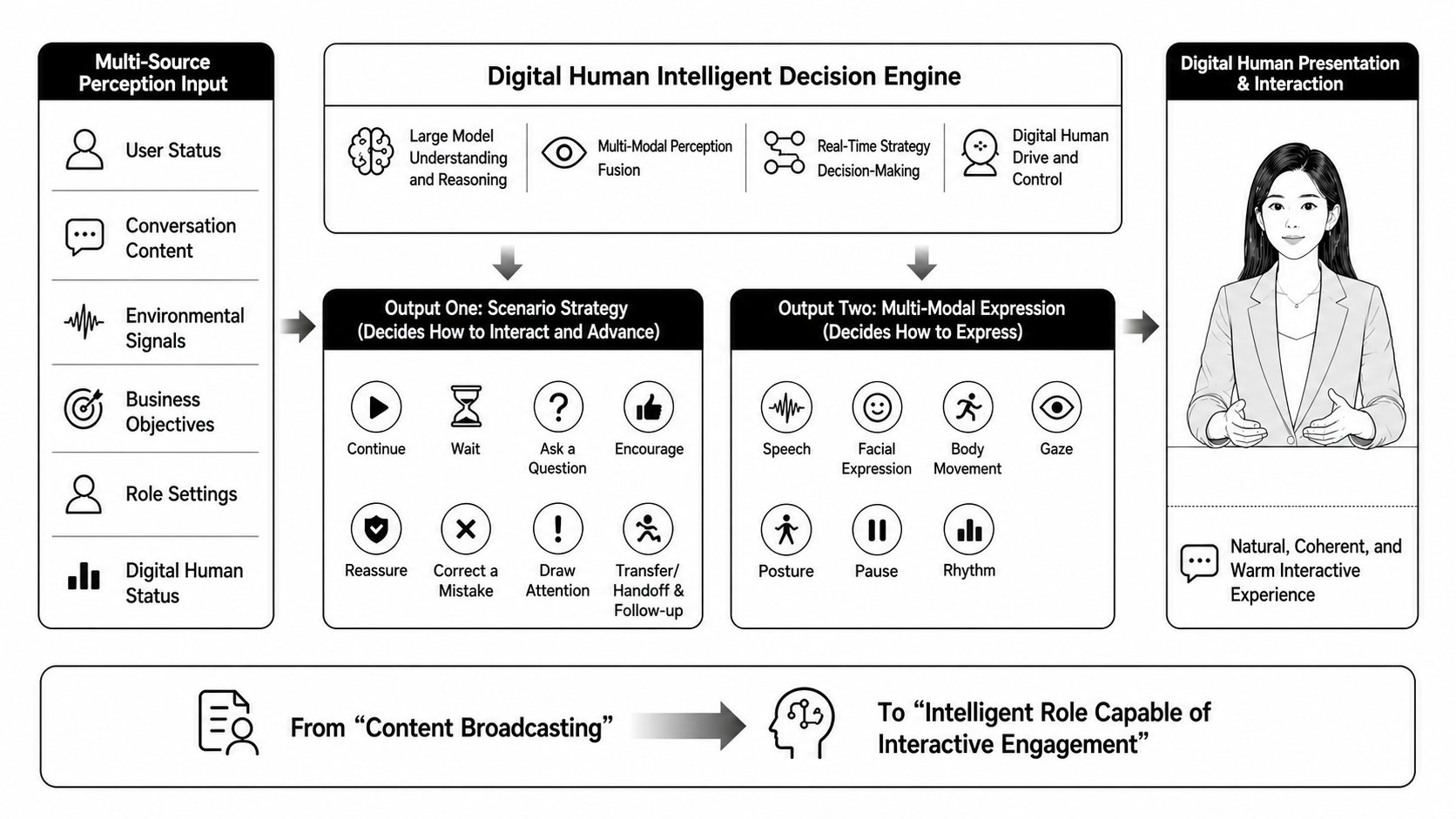
## What is a Digital-Human Agent?
## Demo
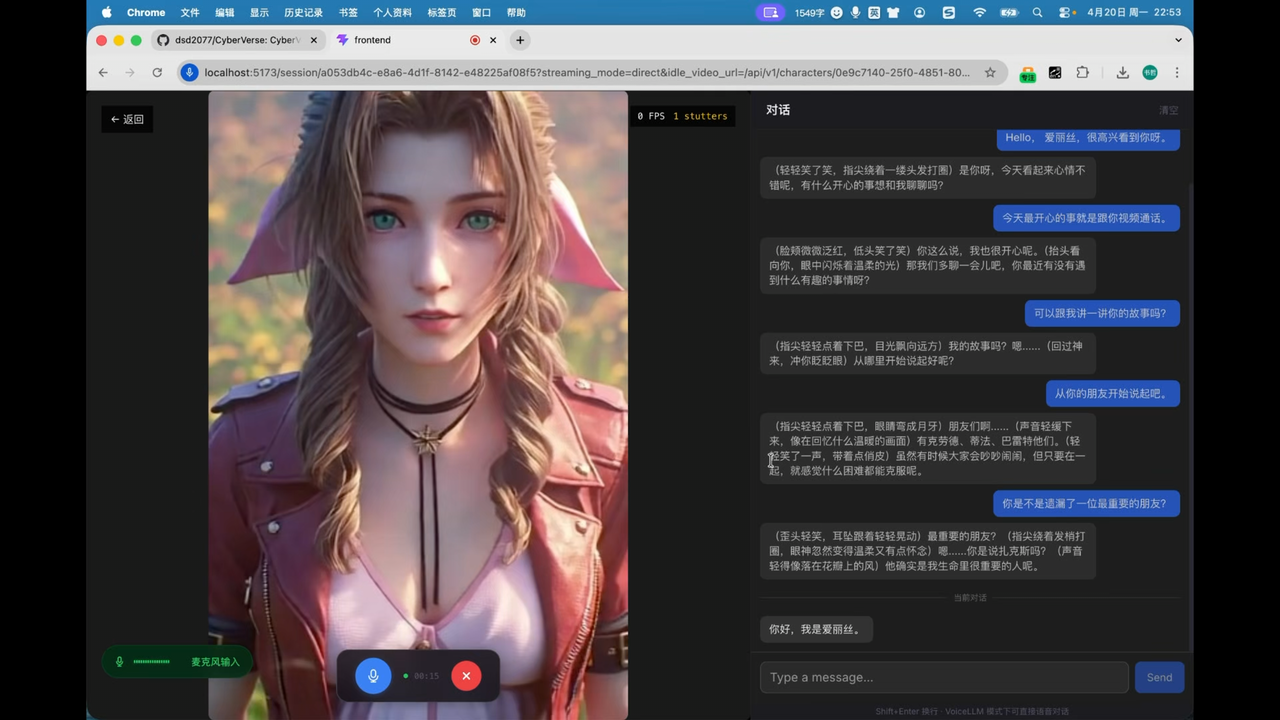
The following characters are demo examples only. They are not bundled with CyberVerse and are not provided for commercial use.


| [](https://youtu.be/Lk88sew2x4o) | [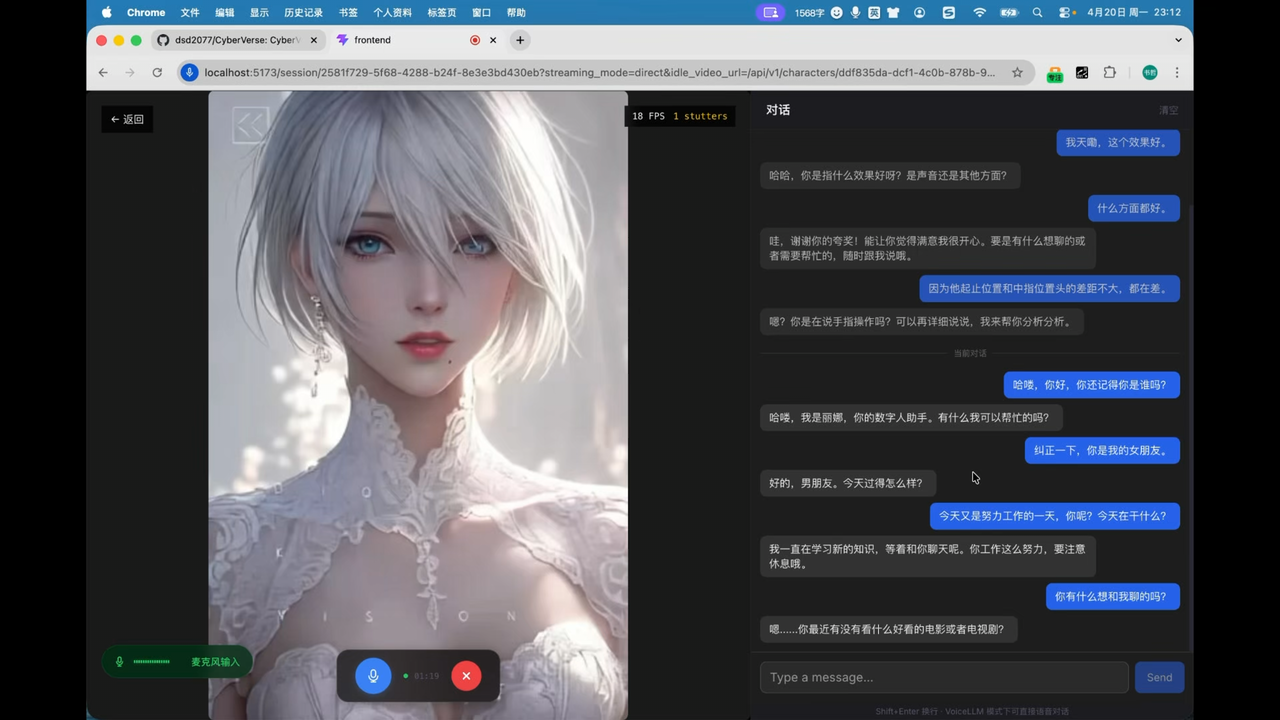](https://youtu.be/8jdQ3ThcwgA) |
|:---:|:---:|
| [**Alice — watch on YouTube**](https://youtu.be/Lk88sew2x4o) | [**Lina — watch on YouTube**](https://youtu.be/8jdQ3ThcwgA) |
| [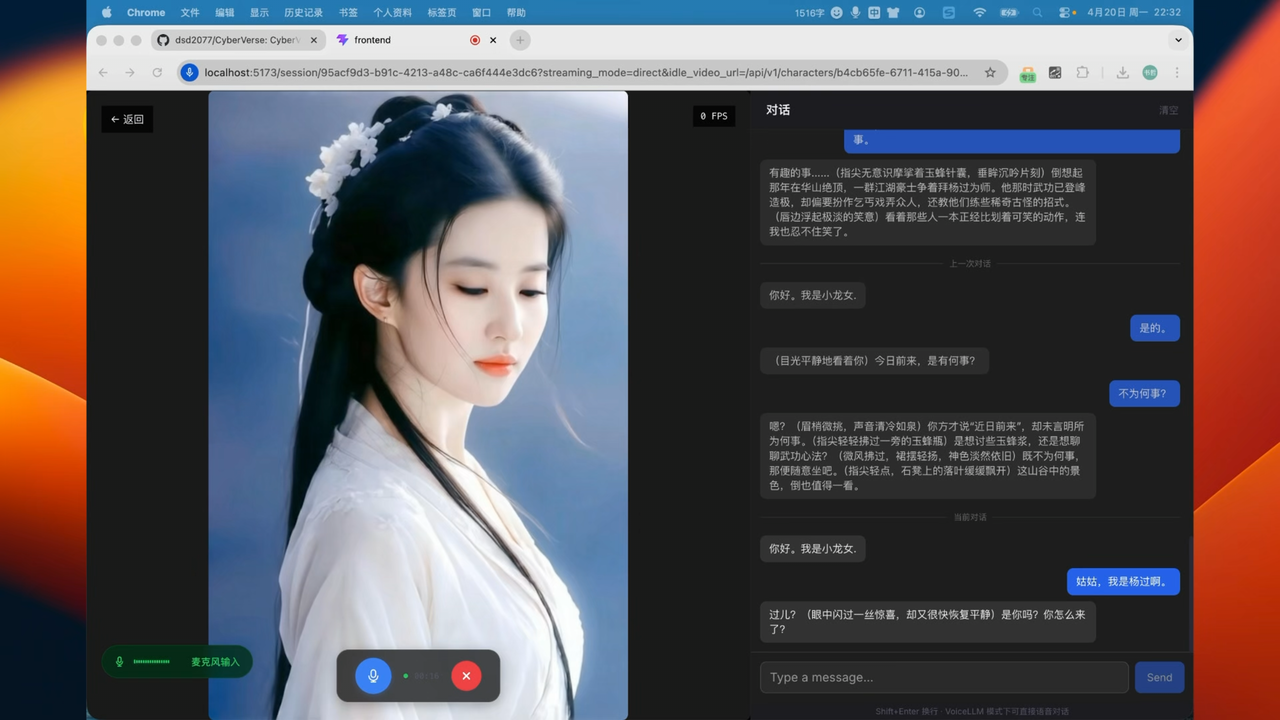](https://youtu.be/WjEHUYZx5Gs) |
|:---:|
| [**Xiaolongnü — watch on YouTube**](https://youtu.be/WjEHUYZx5Gs) |
## Features
### Realtime Digital Human Video Interaction
With just one photo, you can create a digital human ready for real-time video conversation. Users can interact as naturally as a video call with a real person, interrupting or speaking over the digital human at any time for a full-duplex realtime experience.
CyberVerse integrates the local FlashHead and LiveAct digital-human models, and supports cloud digital-human offerings such as Baidu Xiling and Xunfei Digital Human, covering a strong set of current open-source and commercial digital-human options.
| Model | Quality | GPU | Count | Resolution | FPS | Real-time? |
|-------|---------|-----|-------|------------|-----|------------|
| FlashHead 1.3B | Pro | RTX 5090 | 2 | 512×512 | 25+ | ✅ Yes |
| FlashHead 1.3B | Pro | RTX 5090 | 1 | 464x464 | 20 | ✅ Yes |
| LiveAct 18B | — | RTX PRO 6000 | 2 | 320×480 | 20 | ✅ Yes |
| LiveAct 18B | — | RTX PRO 6000 | 1 | 256×417 | 20 | ✅ Yes |
| Baidu Xiling Digital Human | Cloud API | No local GPU required | — | Provider/figure config | Provider response | ✅ Yes |
| Xunfei Digital Human | Cloud API | No local GPU required | — | Provider/figure config | Provider response | ✅ Yes |
### PersonaAgent + SubAgent Tasks
CyberVerse uses a multi-agent architecture: PersonaAgent stays in the foreground to maintain fluid conversation, respond quickly to interruptions, and handle context switches; long-running work such as search, research, material organization, summarization, and HTML report generation is delegated to background SubAgents asynchronously.
This keeps complex tasks from slowing down voice turns. Users can keep speaking, ask follow-up questions, or adjust direction, and PersonaAgent can return the SubAgent result once it is ready.
### Character Memory and RAG
Each character's conversation history is persisted to local disk and automatically loaded when you re-enter a conversation, preserving continuity across sessions. You can also import knowledge bases, documents, and biographical material for a character; the system indexes them for retrieval-augmented generation, making answers better aligned with the character's background and persona.
### Plugin-Based Stack
Brain, voice, hearing, tools, memory, and face are all replaceable modules. Runtime behavior stays in `config/cyberverse.yaml`, while omni, LLM, TTS, ASR, and embedding provider definitions are loaded from the built-in `infra/config/*_models/` directories and optional local overrides under `config/*_models/`. You can configure different vendors' API keys and service endpoints in the web UI at **`/settings`** to switch providers and model combinations by scenario. The [LiteLLM](https://github.com/BerriAI/litellm) plugin adds access to 100+ LLM providers (AWS Bedrock, Azure, Vertex AI, Mistral, Cohere, etc.) through a single unified interface.
## Quick Start
### Cloud Images
If you want to try CyberVerse quickly without setting up the environment dependencies manually, you can launch it from a cloud image:
- [AutoDL CyberVerse Image](https://www.autodl.art/i/dsd2077/CyberVerse/CyberVerse)
For local deployment, continue with the installation steps below.
### Prerequisites
- Node 18+
- Go 1.25 (required: `protoc-gen-go`, `protoc-gen-go-grpc`)
- Conda
- Python 3.10+
- FFmpeg
- libopus-dev、libopusfile-dev、libsoxr-dev,pkg-config
> For pure voice sessions, no local avatar GPU is required. Runtime cost depends on the realtime voice/omni/LLM/TTS/ASR providers you configure.
To verify, use:
```bash
node --version
go version
protoc --version
ffmpeg -version
conda --version
```
### Step 1: Clone
```bash
git clone https://github.com/dsd2077/CyberVerse.git
cd CyberVerse
```
### Step 2: Create Python environment
```bash
conda create -n cyberverse python=3.10
conda activate cyberverse
```
### Step 3: Configure environment variables
```bash
cp -r infra/config config
```
Edit `config/env` and fill in the supported API keys:
Alibaba Cloud Qwen-series models:
```env
DASHSCOPE_API_KEY=your_dashscope_api_key
```
Or Volcengine Doubao-series models:
```env
DOUBAO_ACCESS_TOKEN=your_doubao_access_token
DOUBAO_APP_ID=your_doubao_app_id
```
Doubao Voice: follow the [Volcengine quick start](https://www.volcengine.com/docs/6561/2119699?lang=zh) to get **App ID** / **API Key**, then fill in `DOUBAO_APP_ID` / `DOUBAO_ACCESS_TOKEN`.
After the stack is running, you can change API keys and service endpoints from the web UI at **`/settings`** instead of editing `config/env` only.
Omni, LLM, embedding, TTS, and ASR model definitions are discovered automatically from `infra/config/*_models/`. Create matching files under `config/*_models/` only when you want local overrides.
### Step 4: Create local config and enable voice-only mode
Edit `config/cyberverse.yaml`:
```yaml
inference:
avatar:
enabled: false
```
With `enabled: false`, CyberVerse runs as a pure voice agent assistant.
### Step 5: Install project dependencies
```bash
make setup
```
This installs the base editable package (`[dev,inference]`), generates gRPC stubs, and installs frontend dependencies.
Install the voice-agent extras used by the default config:
```bash
# all optional groups at once
pip install -e ".[all]"
```
### Step 6: Start services (3 terminals)
**Terminal 1** — Python inference server:
```bash
conda activate cyberverse
make inference
```
**Terminal 2** — Go API server:
```bash
make server
```
**Terminal 3** — Frontend:
```bash
make frontend
```
### Step 7: Verify
```bash
# Check API health
curl -s http://localhost:8080/api/v1/health
```
Open http://localhost:5173 in your browser.
## Optional: Full Digital-Human Video
If you want to drive realtime Avatar video with FlashHead or LiveAct, follow the steps below.
### Additional Requirements
- GPU with CUDA 12.8+
- PyTorch 2.8 (CUDA 12.8)
- FFmpeg with `libvpx` for video encoding
- Avatar model weights
Install PyTorch (CUDA 12.8):
```bash
pip3 install torch==2.8.0 torchvision==0.23.0 torchaudio==2.8.0 --index-url https://download.pytorch.org/whl/cu128
```
Install vllm if you use LiveAct:
```bash
pip install vllm==0.11.0
```
### Download Model Weights
CyberVerse currently supports **FlashHead** and **LiveAct**; download only what you need. More models will continue to be added.
```bash
pip install "huggingface_hub[cli]"
```
#### FlashHead (SoulX-FlashHead)
| Model Component | Description | Link |
| :--- | :--- | :--- |
| `SoulX-FlashHead-1_3B` | 1.3B FlashHead weights | [Hugging Face](https://huggingface.co/Soul-AILab/SoulX-FlashHead-1_3B), [ModelScope](https://modelscope.cn/models/Soul-AILab/SoulX-FlashHead-1_3B) |
| `wav2vec2-base-960h` | Audio feature extractor | [Hugging Face](https://huggingface.co/facebook/wav2vec2-base-960h), [ModelScope](https://modelscope.cn/models/facebook/wav2vec2-base-960h) |
```bash
# If you are in mainland China, you can use a mirror first:
# export HF_ENDPOINT=https://hf-mirror.com
hf download Soul-AILab/SoulX-FlashHead-1_3B \
--local-dir ./checkpoints/SoulX-FlashHead-1_3B
hf download facebook/wav2vec2-base-960h \
--local-dir ./checkpoints/wav2vec2-base-960h
```
#### LiveAct (SoulX-LiveAct)
| ModelName | Download |
|-----------|----------|
| SoulX-LiveAct | [Hugging Face](https://huggingface.co/Soul-AILab/LiveAct), [ModelScope](https://modelscope.cn/models/Soul-AILab/LiveAct) |
| chinese-wav2vec2-base | [Hugging Face](https://huggingface.co/TencentGameMate/chinese-wav2vec2-base), [ModelScope](https://modelscope.cn/models/TencentGameMate/chinese-wav2vec2-base) |
```bash
hf download Soul-AILab/LiveAct \
--local-dir ./checkpoints/LiveAct
hf download TencentGameMate/chinese-wav2vec2-base \
--local-dir ./checkpoints/chinese-wav2vec2-base
```
### Configure Avatar Inference
Set `enabled: true` in `config/cyberverse.yaml`. Model-specific settings live in
one file per model under `config/avatar_models/`; update those paths to match your
local checkpoints.
```yaml
inference:
avatar:
enabled: true
default: "flash_head" # use "flash_head" or "live_act"
idle_strategy: "silent_inference"
runtime:
cuda_visible_devices: 0 # shared GPU ID(s), e.g. 0,1 for multi-GPU
world_size: 1 # shared GPU count, set to 2 for dual-GPU
model_config_dir: "avatar_models"
```
Then edit the active model file, for example `config/avatar_models/flash_head.yaml` or
`config/avatar_models/live_act.yaml`. The Web UI also edits model parameters in those
per-model files.
### Baidu Xiling H5 Digital Human
For Baidu Xiling, keep credentials in `config/env`:
```env
BAIDU_XILING_APP_ID="your-app-id"
BAIDU_XILING_APP_KEY="your-app-key"
# Optional when the figure needs a fixed camera.
BAIDU_XILING_CAMERA_ID="0"
```
Baidu Xiling is selected per character in the Web UI. It is not an avatar
inference model and should not be configured as `inference.avatar.default`.
CyberVerse still runs ASR/LLM/TTS/history through the orchestrator, then sends
16 kHz 16-bit mono PCM chunks to the browser. The frontend embeds the Baidu H5
iframe and drives it with the official `sendAudioData` / `AUDIO_STREAM_RENDER`
message format.
### LiveAct FP4 GEMM (Optional)
FP4 acceleration requires building and installing `lightx2v_kernel` from [LightX2V](https://github.com/ModelTC/LightX2V). Use PyTorch **2.7+** and a CUTLASS checkout on the build machine.
#### Preparation
```bash
pip install scikit_build_core uv
```
#### Build wheel
```bash
git clone https://github.com/NVIDIA/cutlass.git
git clone https://github.com/ModelTC/LightX2V.git
cd LightX2V/lightx2v_kernel
# Replace /path/to/cutlass with the absolute path to your cutlass clone.
MAX_JOBS=$(nproc) && CMAKE_BUILD_PARALLEL_LEVEL=$(nproc) \
uv build --wheel \
-Cbuild-dir=build . \
-Ccmake.define.CUTLASS_PATH=/path/to/cutlass \
--verbose \
--color=always \
--no-build-isolation
```
#### Install wheel
```bash
pip install dist/*.whl --force-reinstall --no-deps
```
#### Enable in CyberVerse
In `config/avatar_models/live_act.yaml` (or the web UI), under `live_act`:
```yaml
fp8_gemm: false
fp4_gemm: true
```
Restart the inference service after changing these flags.
### SageAttention & FlashAttention (Optional)
```bash
# SageAttention (source build)
git clone https://github.com/thu-ml/SageAttention.git
cd SageAttention
export EXT_PARALLEL=4 NVCC_APPEND_FLAGS="--threads 8" MAX_JOBS=32 # Optional
python setup.py install
```
```bash
# FlashAttention (optional)
wget -O flash_attn-2.8.1+cu12torch2.8cxx11abiTRUE-cp312-cp312-linux_x86_64.whl \
"https://github.com/Dao-AILab/flash-attention/releases/download/v2.8.1/flash_attn-2.8.1%2Bcu12torch2.8cxx11abiTRUE-cp312-cp312-linux_x86_64.whl"
pip install flash_attn-2.8.1+cu12torch2.8cxx11abiTRUE-cp312-cp312-linux_x86_64.whl
```
## QA — Self-Check
Use this section when avatar video **stutters, freezes, or falls behind** audio. The first step is to confirm whether inference can keep up with playback.
### Check RTP from inference logs
**RTP** (real-time performance factor) compares how long a chunk took to generate versus how long that chunk lasts at the configured FPS:
```text
RTP = elapsed / (frames / fps)
```
| RTP | Meaning |
|-----|---------|
| **< 1** | Inference is faster than playback — headroom for realtime streaming |
| **= 1** | Exactly realtime |
| **> 1** | Inference is slower than playback — production cannot keep up with consumption; video will lag or stutter |
Watch the inference terminal (`make inference`) while the character is speaking. Look for **LiveAct** or **FlashHead** chunk lines.
**LiveAct example (RTP > 1 — cannot keep realtime):**
```text
INFO:inference.plugins.avatar.live_act_plugin:LiveAct chunk: idx=2 frames=32 320x480 fps=20 iter=2 elapsed=1.870s is_final=False
```
- Playback duration: `32 / 20 = 1.6` s
- RTP: `1.870 / 1.6 ≈ 1.17` (**> 1** → too slow for 320×480 @ 20 fps on this GPU)
**FlashHead** logs use the same idea (`elapsed` vs `num_frames` / `fps`):
```text
INFO:...FlashHead video chunk generated: chunk_index=1 num_frames=33 512x512 fps=20 ... elapsed=2.100s
```
Here RTP = `2.100 / (33/20) ≈ 1.27` — also above realtime.
### What to do when RTP > 1
1. **Lower resolution or quality** — e.g. LiveAct `infer_params.size`, FlashHead `height` / `width`, or FlashHead `model_type: "lite"` instead of `"pro"`.
2. **Add compute** — more GPUs (`runtime.world_size`, `cuda_visible_devices`), enable FP8/FP4 GEMM or compile options where supported, or use a faster GPU.
3. **Match the support list** — for local GPU models, pick a resolution/FPS/GPU row marked **Yes** under **Real-time?** in [Realtime Digital Human Video Interaction](#realtime-digital-human-video-interaction) above.
Pure voice mode (`inference.avatar.enabled: false`) does not use avatar RTP. Baidu Xiling and Xunfei digital humans are cloud APIs and do not use local avatar RTP either; stutter there is usually network/WebRTC or upstream voice latency — see [Remote Access Notes](#remote-access-notes).
## Remote Access Notes
When `streaming_mode: direct` uses the embedded TURN server, the browser must be able to reach the server's `8443/TCP`. If the page loads but audio/video never connects, or the server logs show `ICE connection state: failed` or `publish timeout waiting for connection`, first check whether your machine can reach port `8443` on the server:
```bash
nc -vz 8443
```
If `8443` is not reachable, the usual cause is a cloud security group, firewall, or NAT restriction. In that case, you can forward your local `8443` to the server through an SSH tunnel:
```bash
ssh -L 8443:127.0.0.1:8443 user@host -p port
```
After the tunnel is established, the browser will access the remote TURN service through local `127.0.0.1:8443`.
If you want the browser to connect to the remote server directly instead of through an SSH tunnel, set `pipeline.ice_public_ip` in `config/cyberverse.yaml` to the server's public IP or domain. If you are using an SSH tunnel, you can keep the default value (`127.0.0.1`).
## Roadmap
Roadmap is maintained in Yuque / Roadmap 已迁移至语雀: [CyberVerse Requirements Management](https://www.yuque.com/u32995802/ilet4r/qu7lhylertuzx7dh?singleDoc#).
## Community

If the QR code has expired, add the maintainer on WeChat: wx_dsd2077. Please note CyberVerse in your friend request; we will invite you to the group.
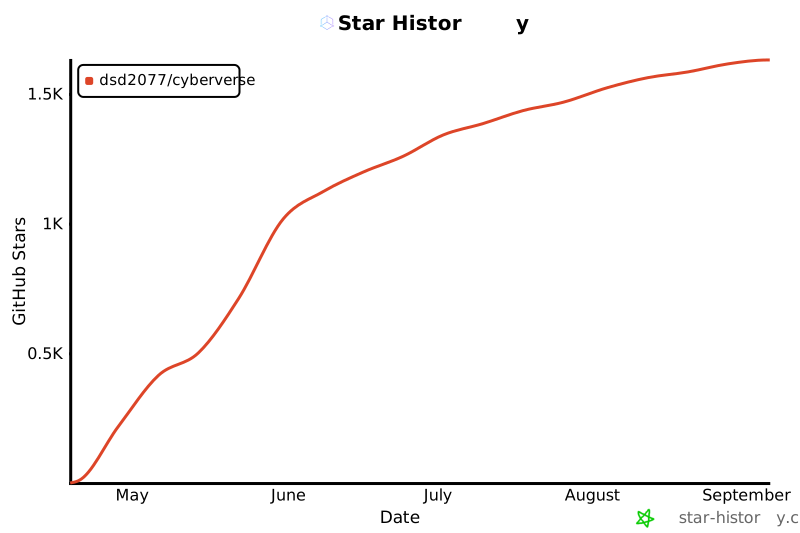
## Star History
## License
GNU General Public License v3.0 — see [LICENSE](LICENSE).
## Acknowledgements
- [SoulX-FlashHead](https://github.com/Soul-AILab/SoulX-FlashHead) — Avatar model by Soul AI Lab
- [SoulX-LiveAct](https://github.com/Soul-AILab/SoulX-LiveAct) - Avatar model by Soul AI Lab
- [MuseTalk](https://github.com/TMElyralab/MuseTalk) — Real-time lip-sync model by TME Lyra Lab
- [Pion](https://github.com/pion/webrtc) — Go WebRTC implementation
- [Linux.do](https://linux.do/)