The world's first full-featured open-source AI Office suite.
Word, Excel, PowerPoint and PDF files, edited by you and your AI, saved back in the real formats.
GenOffice is a free, open-source alternative to Microsoft Office for macOS,
Windows and Linux. It opens and saves native `.docx`, `.xlsx` and `.pptx`
files, edits PDF, Markdown and HTML, and puts an AI agent next to every
document — not a chat box bolted on the side, but an editor that reads the
file, makes the change, and shows you exactly what it touched.
- **Real formats, byte-preserving.** Only what you edit is rewritten. Everything
else in the file survives byte-for-byte, so documents keep working in Word,
Excel and PowerPoint.
- **AI you can review.** Edits land as tracked changes and diffs with one-click
rollback. Spreadsheets get live formulas, not pasted numbers. Decks and pages
are generated onto the canvas and stay fully editable.
- **Local by design.** Files open, edit, save and convert on your machine.
PDF → Word / Excel / PowerPoint, Markdown → Word and HTML → Word all run
on-device. Only the AI calls leave the machine, to the provider you choose.
- **Your keys or none.** Sign in with Genspark and skip keys, or bring your own
key for Claude, OpenAI, Gemini, DeepSeek, Kimi, GLM, Qwen, Doubao, MiniMax,
Grok, Mistral, OpenRouter, Requesty, or any OpenAI-compatible endpoint, local
servers included.
- **Scriptable and agent-ready.** The app ships a `genoffice` command line and
a skill for Claude Code, Codex, Cursor, Gemini CLI, GitHub Copilot, OpenCode
and Windsurf, so a coding agent can create, convert, read and edit real
Office files on your machine without opening a window.
**Get it:** [macOS](https://github.com/genspark-ai/genoffice/releases/latest) (Apple Silicon and Intel) ·
[Windows](https://github.com/genspark-ai/genoffice/releases/latest) (x64 and Arm) ·
[Linux](https://github.com/genspark-ai/genoffice/releases/latest) (deb, rpm, AppImage) —
details and requirements in [Download](#download).
## Demo
Six apps, one AI panel, and a command line for your coding agent. Every
screenshot is the real app on macOS, with the AI driven from the prompt you
can read in the panel.
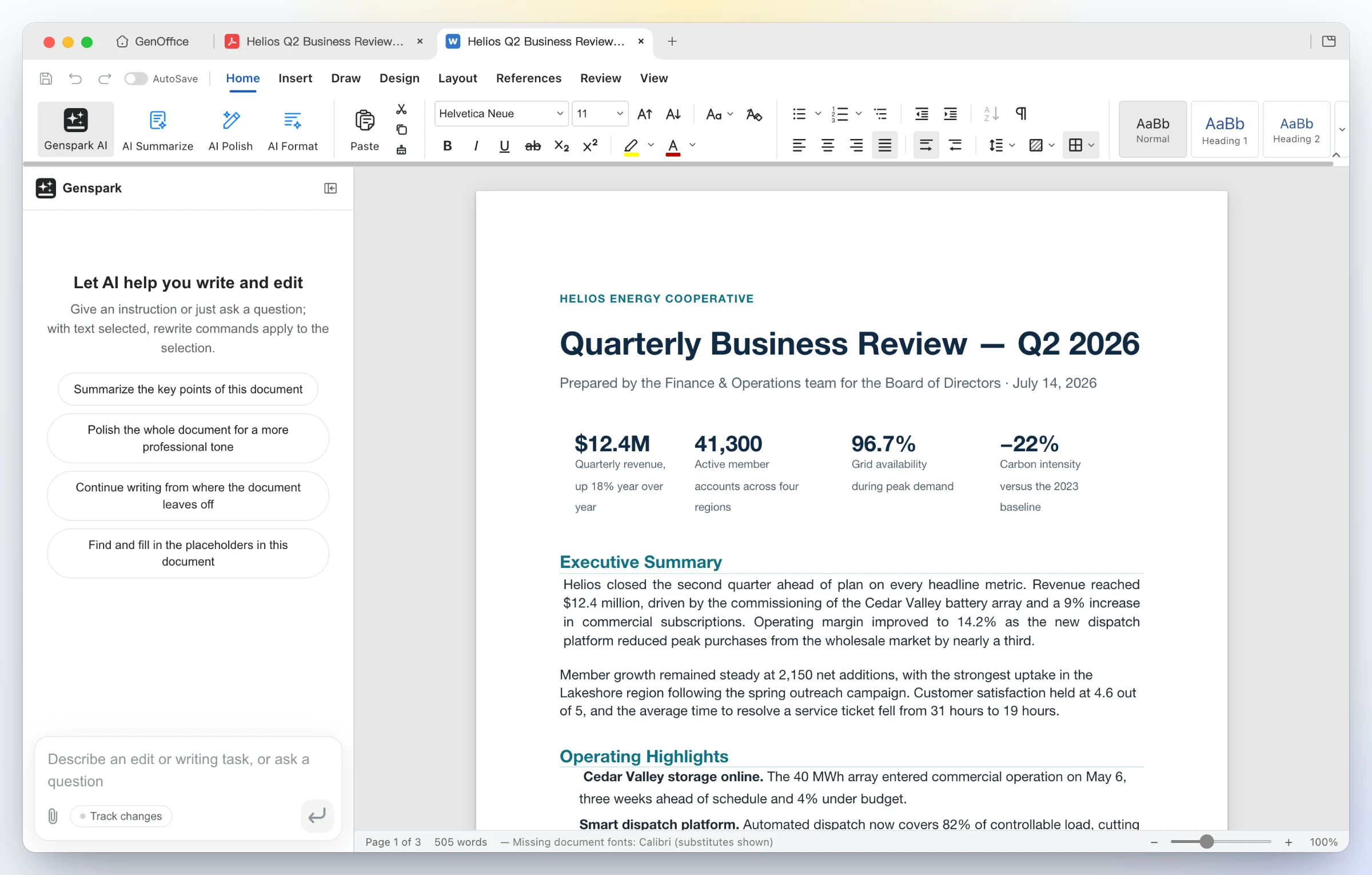
### 1 · Docs — open and edit `.docx` with an AI you can review
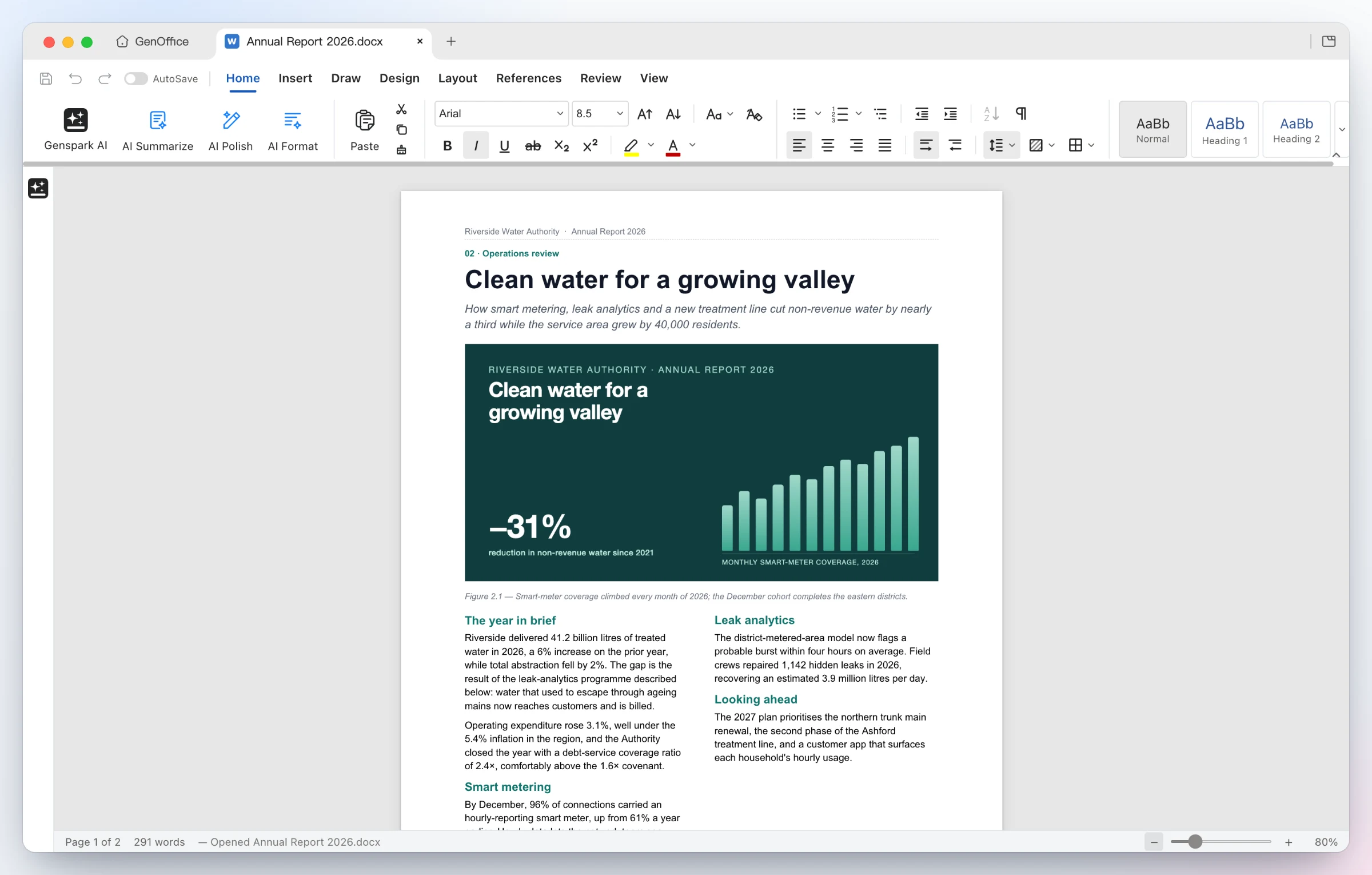
Opens the file as Word lays it out — two-column sections, full-bleed images, shaded tables, headers and footers, pagination on Word's line metrics. Styles, comments, tracked changes, equations and ink round-trip untouched.
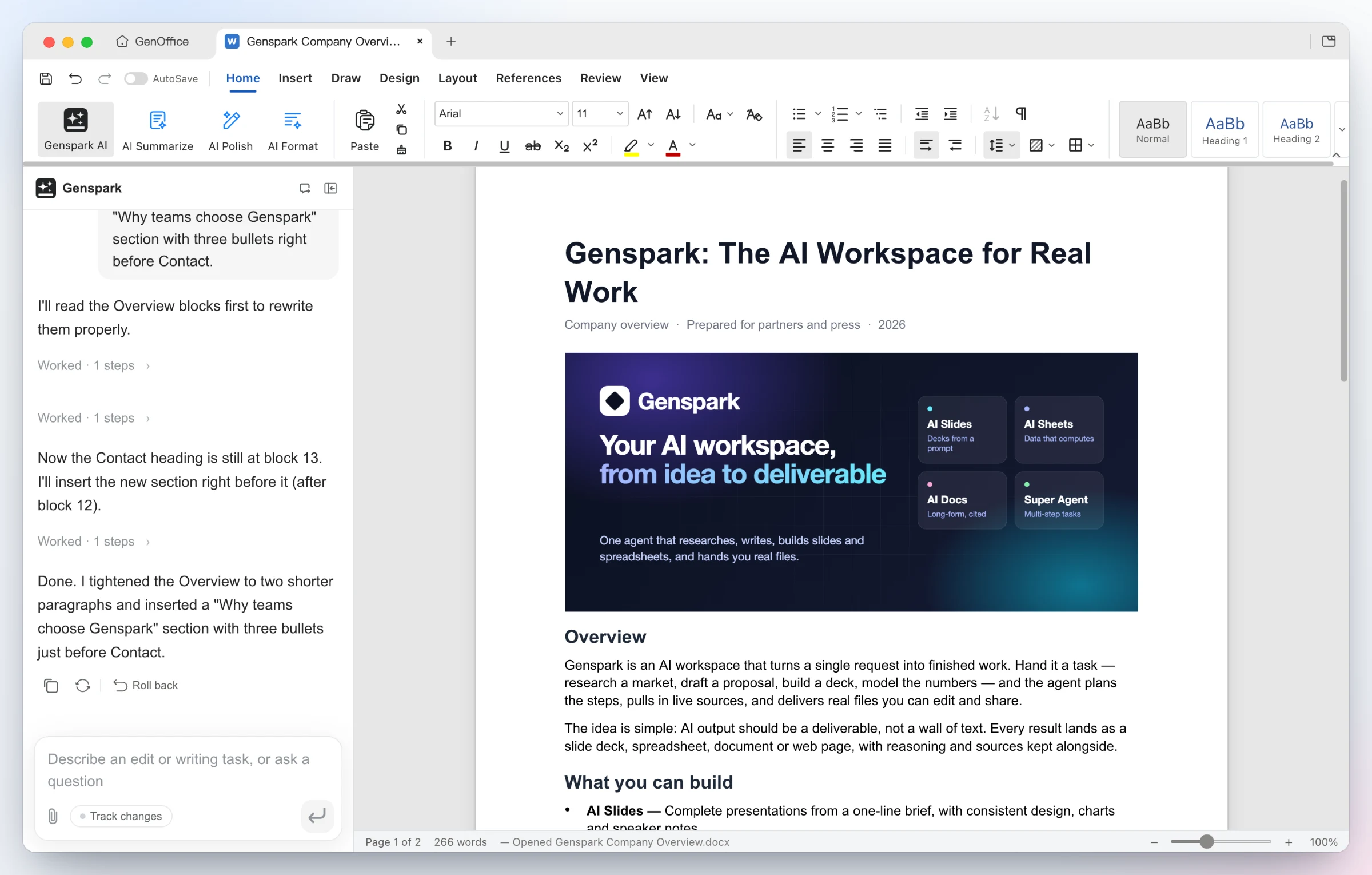
Ask for the edit — the AI reads the blocks it needs, rewrites the Overview and inserts a new bulleted section. Every AI turn is a snapshot you can roll back; with Track changes on, edits arrive as Word-style revisions.
### 2 · Sheets — `.xlsx` with live formulas and charts, not pasted numbers
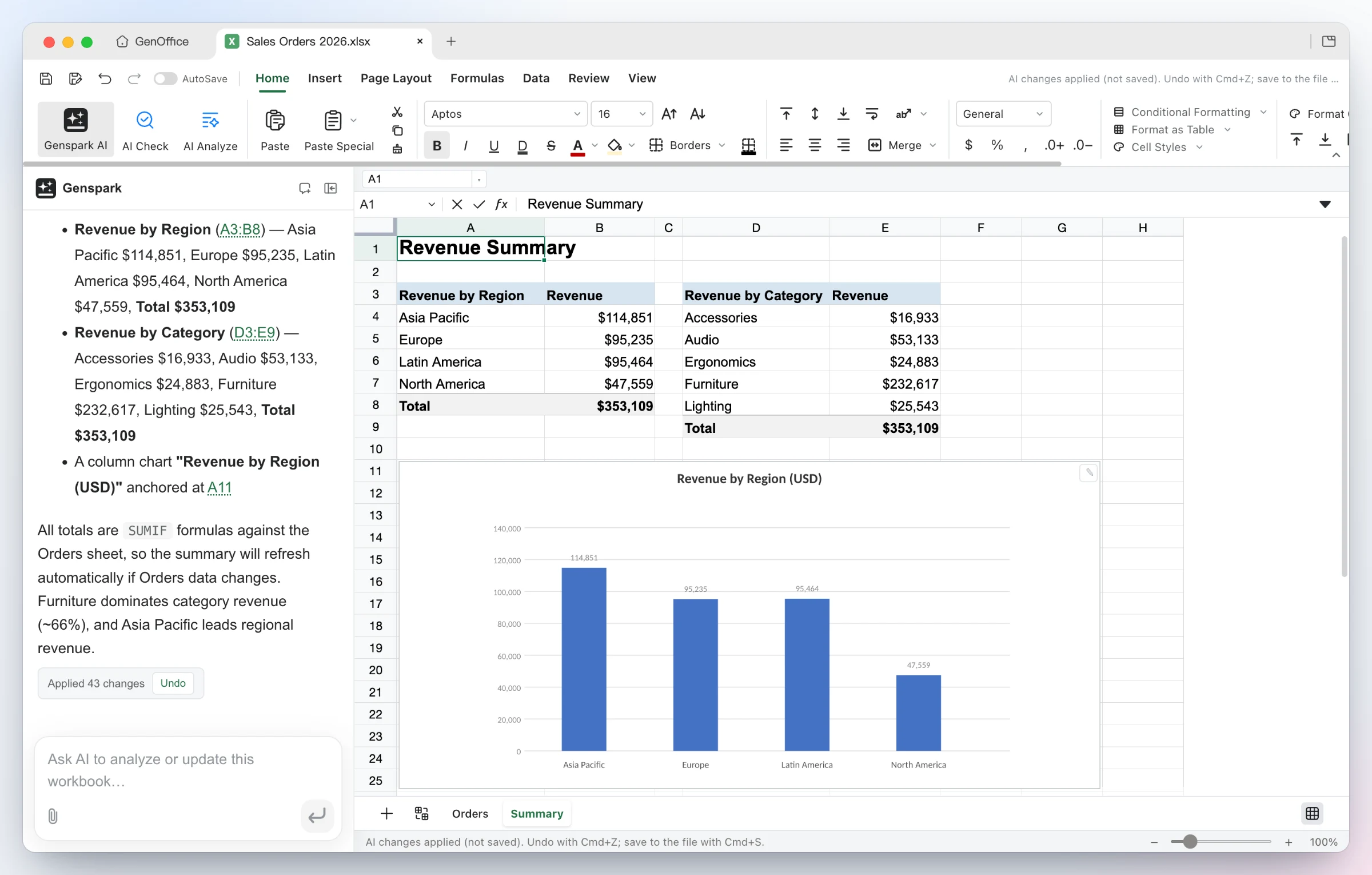
Build it — from one sentence the agent adds a Summary sheet with real SUMIFs by region and category, inserts a column chart, and applies the 43 changes as a single undoable batch.
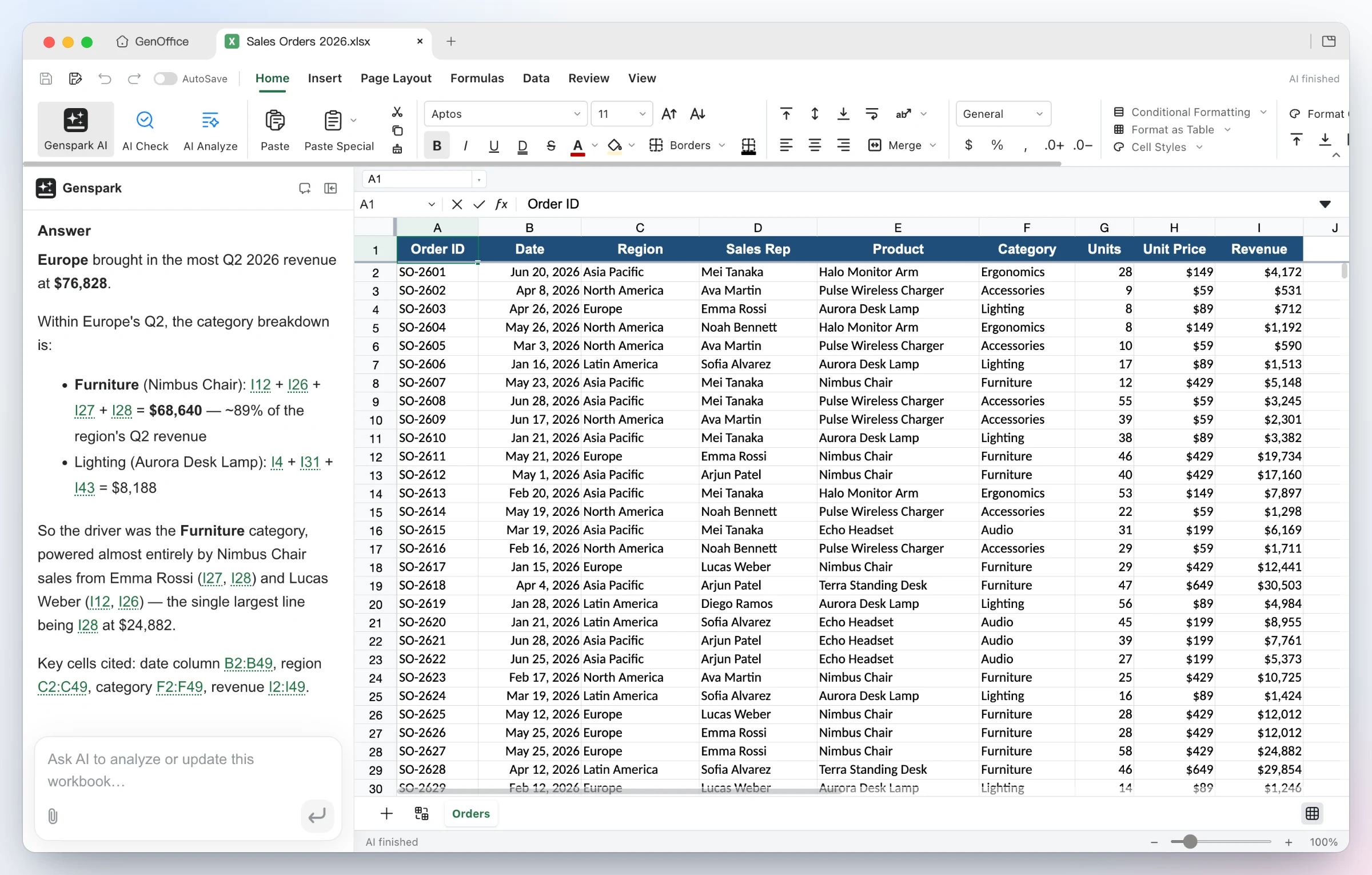
Ask it — questions about the workbook come back with the reasoning and the exact cells used as clickable citations. Under the hood: an in-house Rust .xlsx engine, pivot tables, slicers, conditional formatting and formula tracing.

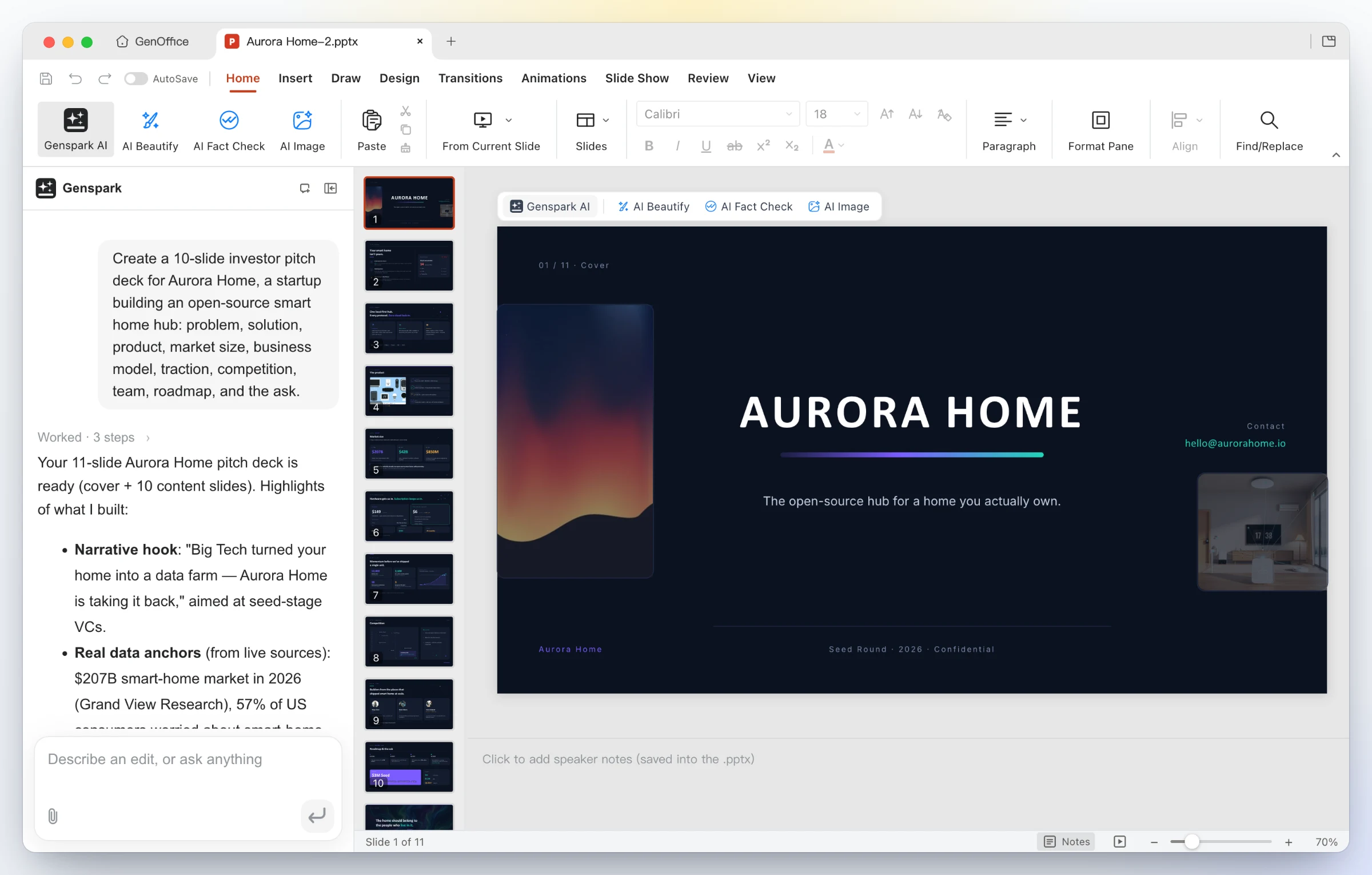
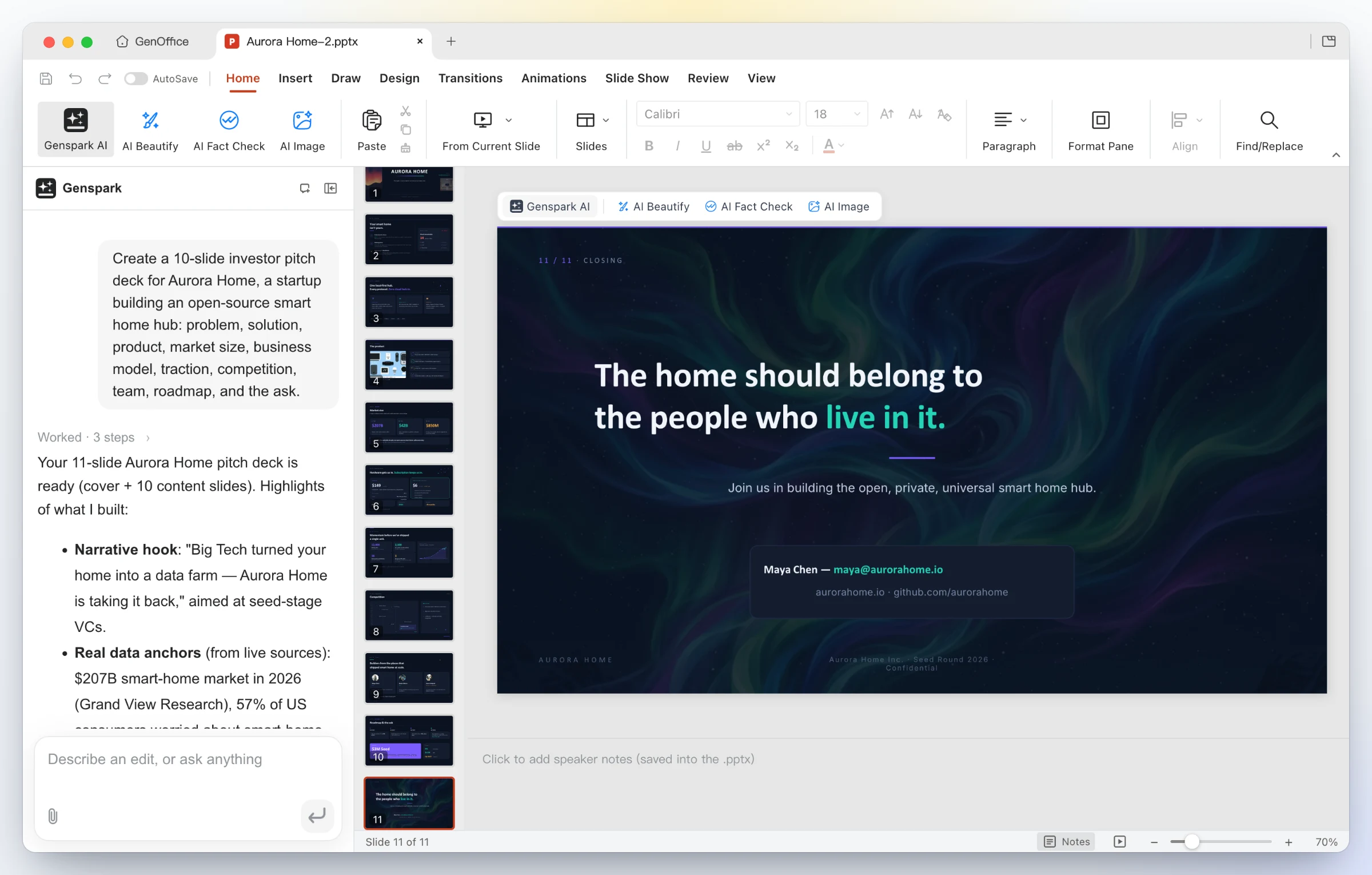
### 3 · Slides — from a prompt to a `.pptx` deck
One line in — "Create a 10-slide investor pitch deck for Aurora Home…". GenOffice plans the storyline, researches the numbers, and drafts every slide onto the canvas as a real .pptx.
A finished deck out — eleven designed slides with consistent typography, imagery and a closing call to action; keep editing with masters, layouts, smart guides and non-destructive cropping, or ask the panel to restyle, rewrite and reorder.
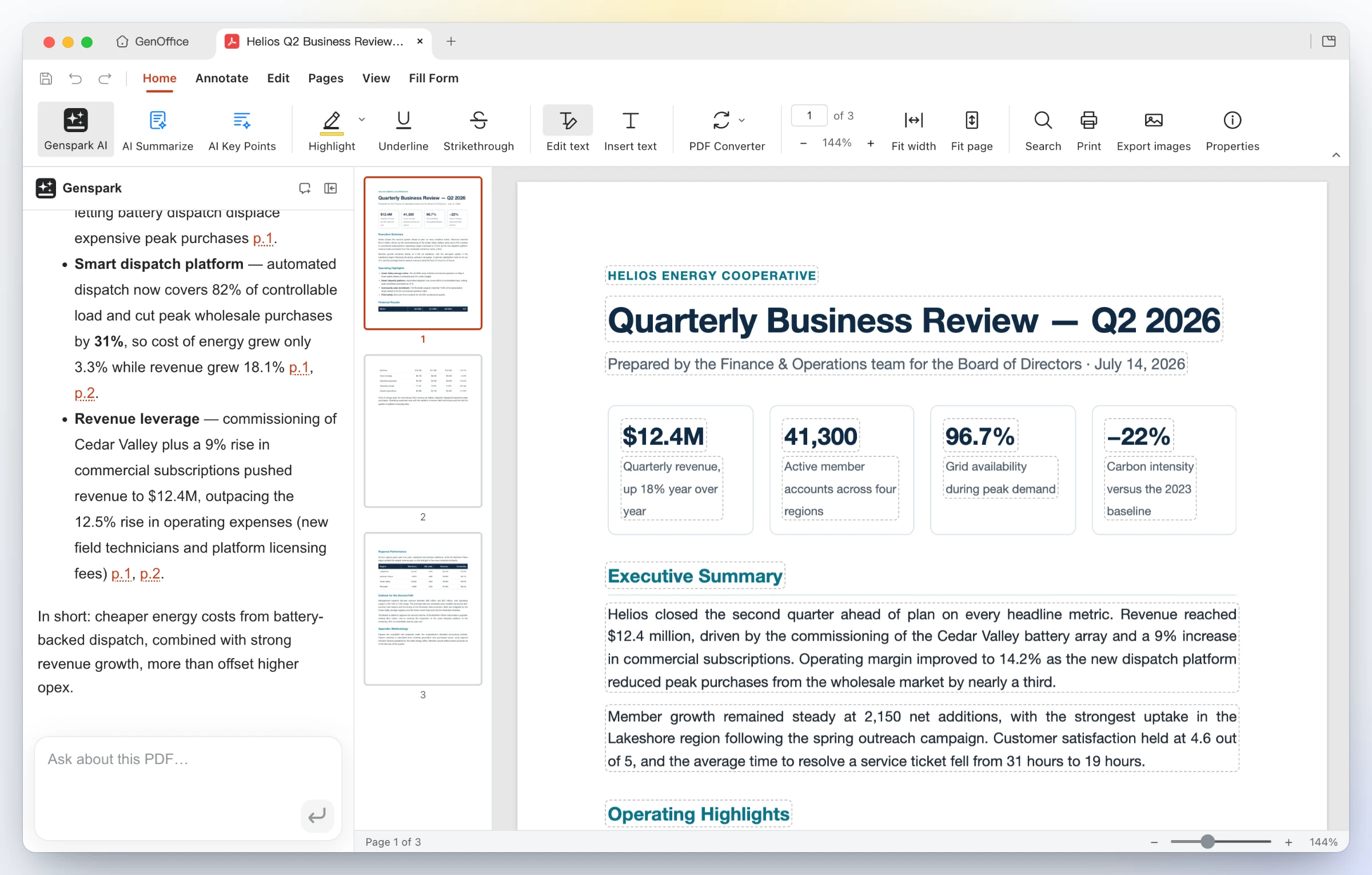
### 4 · PDF — edit PDF text in place, convert PDF to Word on-device
Edit inside the page — Edit text mode outlines every text block for in-place retyping; the content stream is rewritten through PDFium with the original fonts, not a cover-up annotation. Ask the AI about a long report and get answers with page citations.
Convert on-device — PDF Converter → PDF to Word produces an editable .docx that opens in Docs next to the source, headings, stat rows and paragraphs intact. Excel and PowerPoint targets work the same way; scanned pages go through the system OCR.

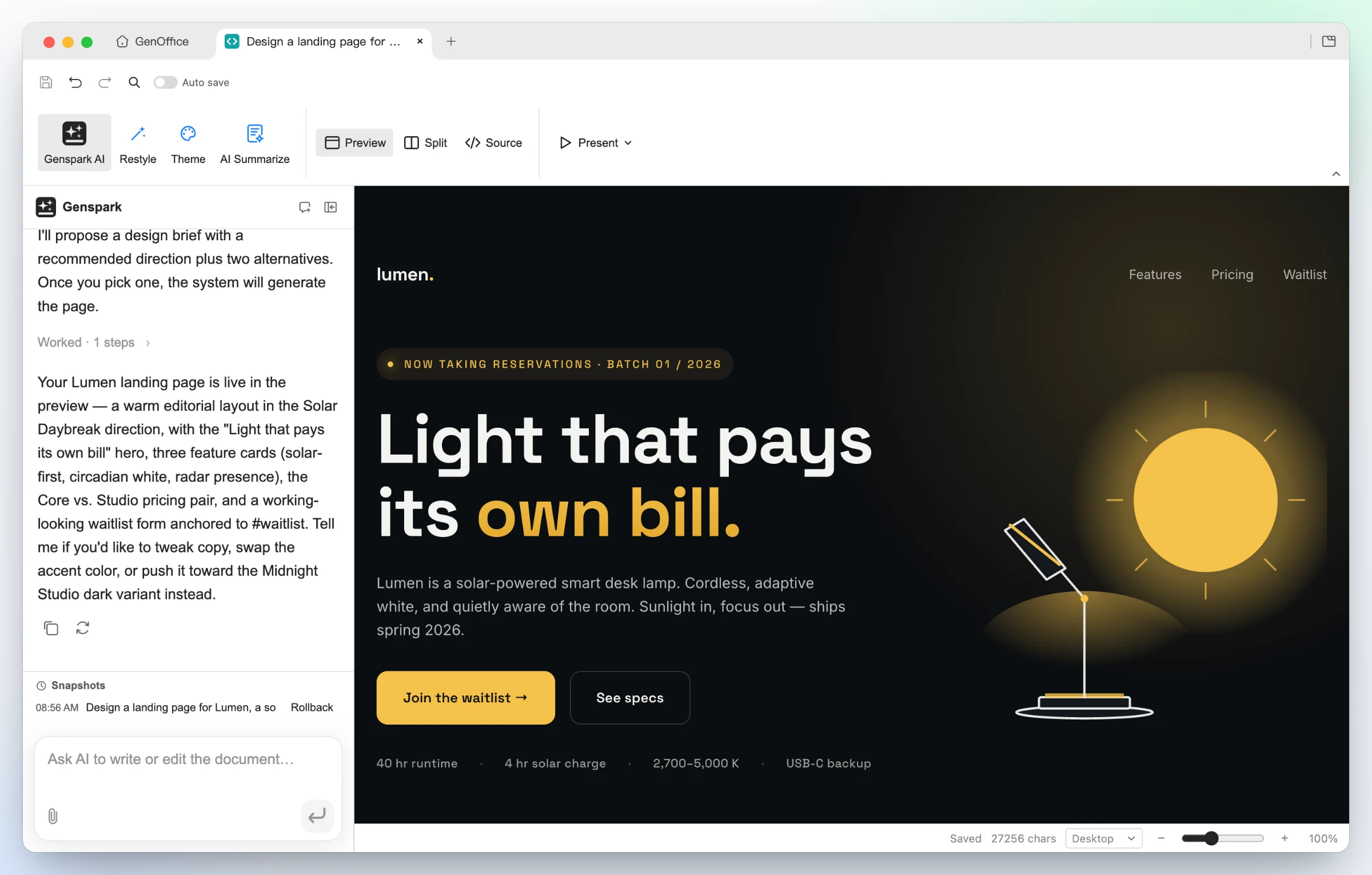
### 5 · HTML — an AI page and UI builder, design brief first
Say what the page is for and who it is for. The AI proposes a **design brief**
first — hook, palette, typography and style directions — then builds a single
self-contained `.html` file against those tokens.
Generated from one prompt — a bold hero, feature cards, pricing and a waitlist form for Lumen, built in the Midnight Studio direction. Click any element to restyle it, double-click to edit text, or switch to the CodeMirror source view.
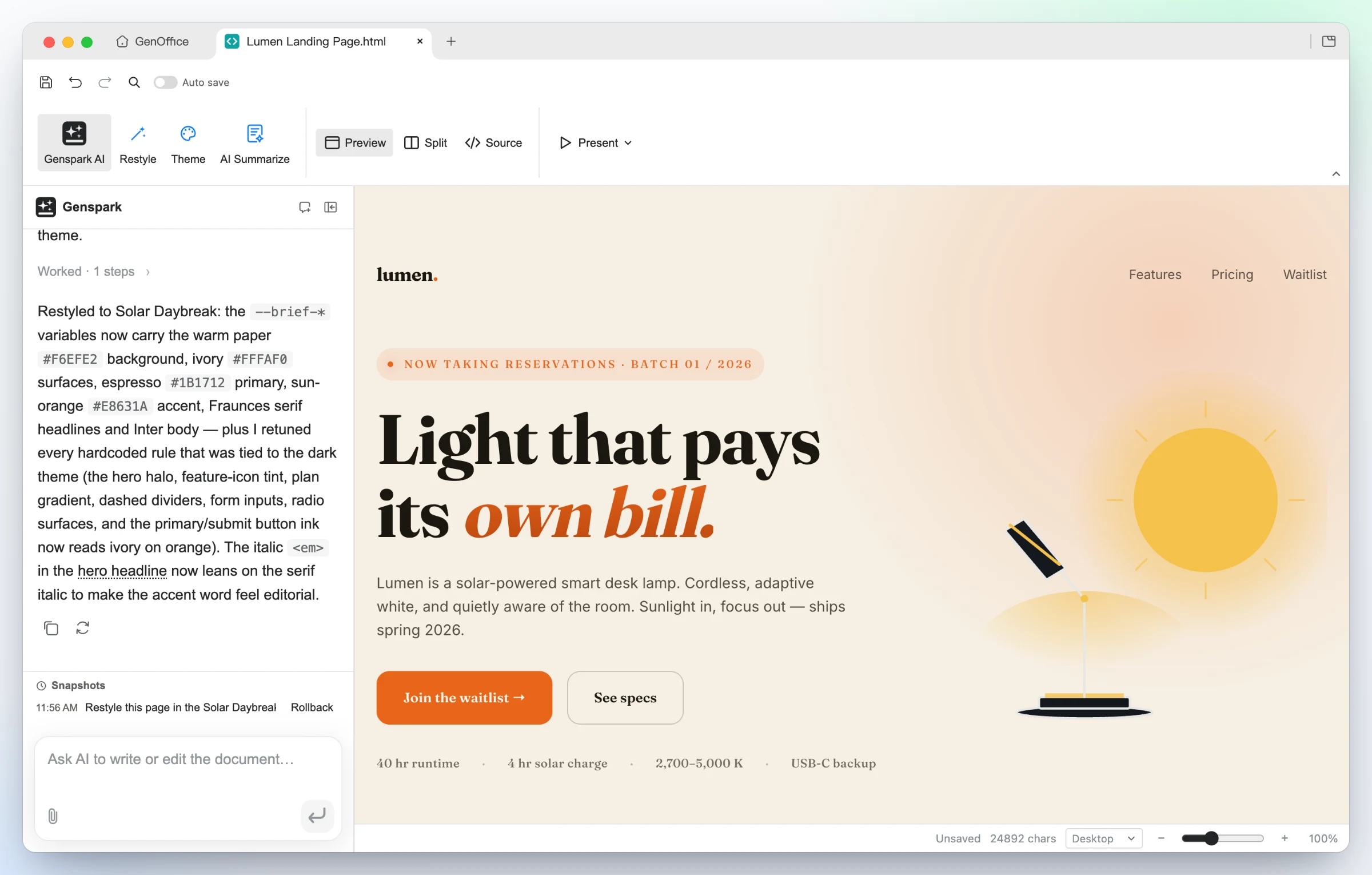
Same design, new direction — one Restyle request swaps the brief's tokens and the page follows: warm paper, editorial serif, sun-orange accent, nothing rewritten. Present fullscreen, or export as PDF or a native editable Word document.
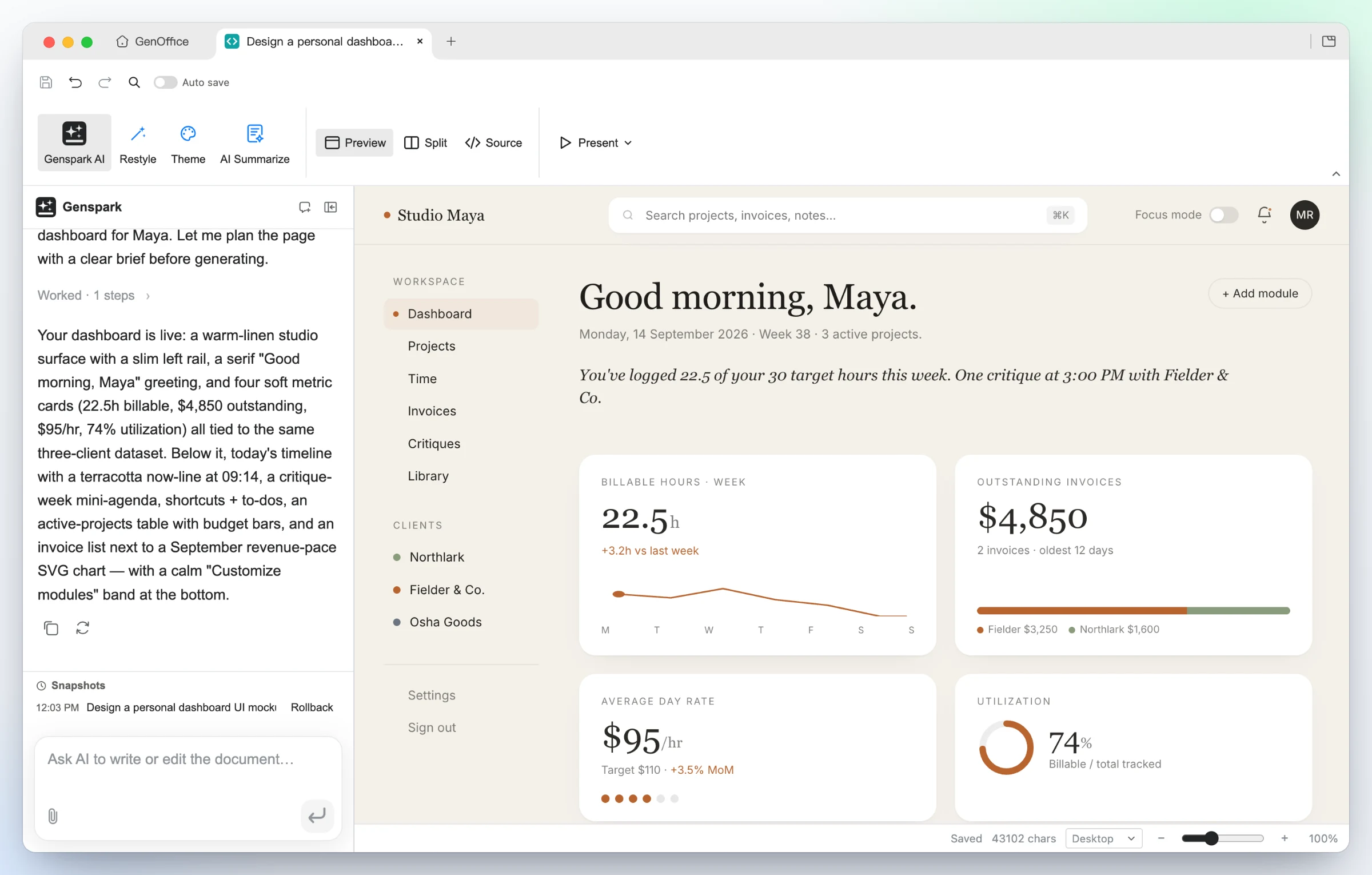
UI mockups — the "personal dashboard" starter turns a persona into a working layout: left rail, greeting, billable-hours sparkline, invoice and utilization cards, all real HTML you can hand to a developer.
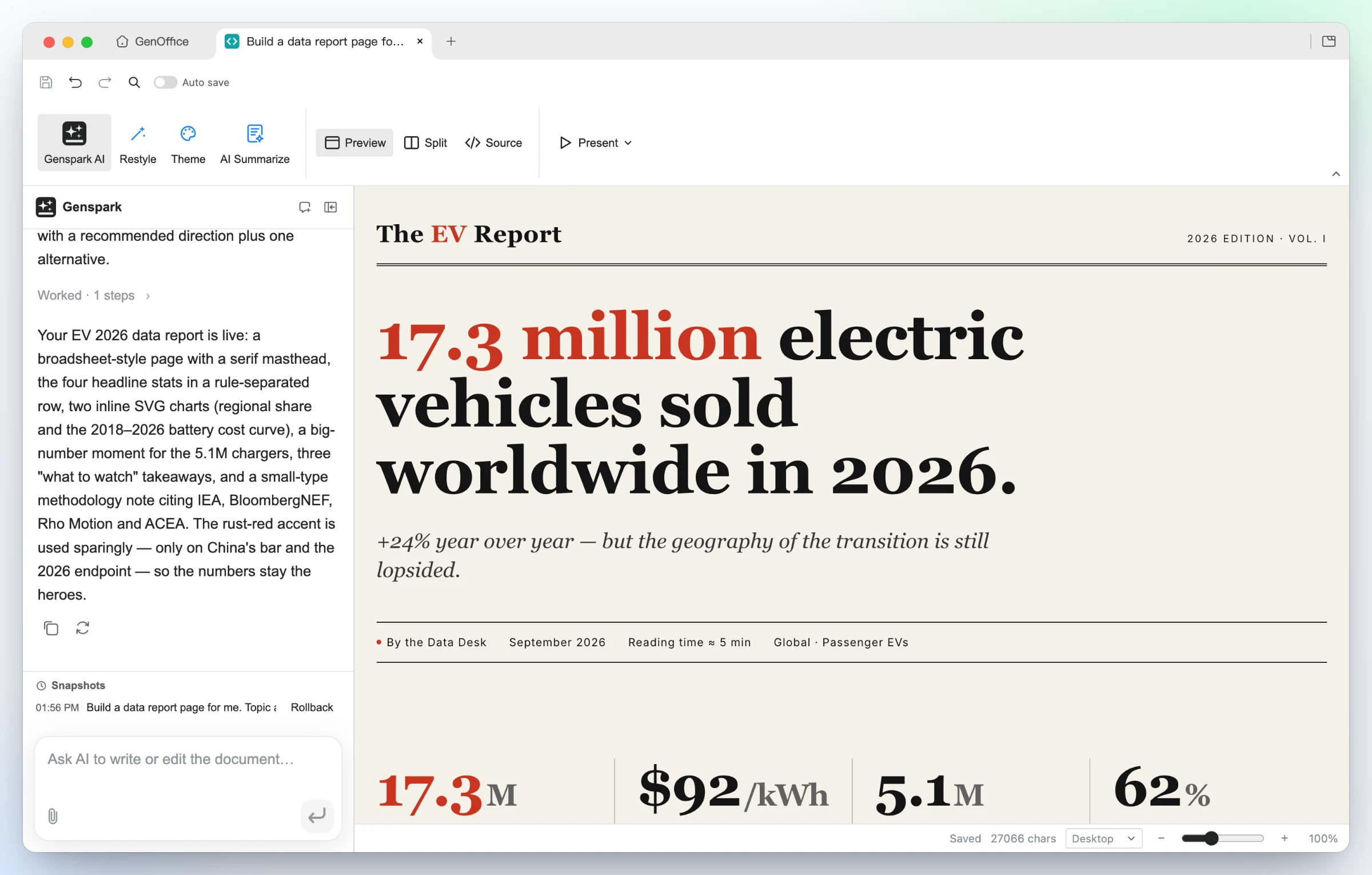
Data stories — the "data report" starter builds an editorial broadsheet: serif masthead, one headline number, a rule-separated stat row, inline SVG charts and a methodology note.
### 6 · Markdown — a block editor over plain `.md`, with Ask AI
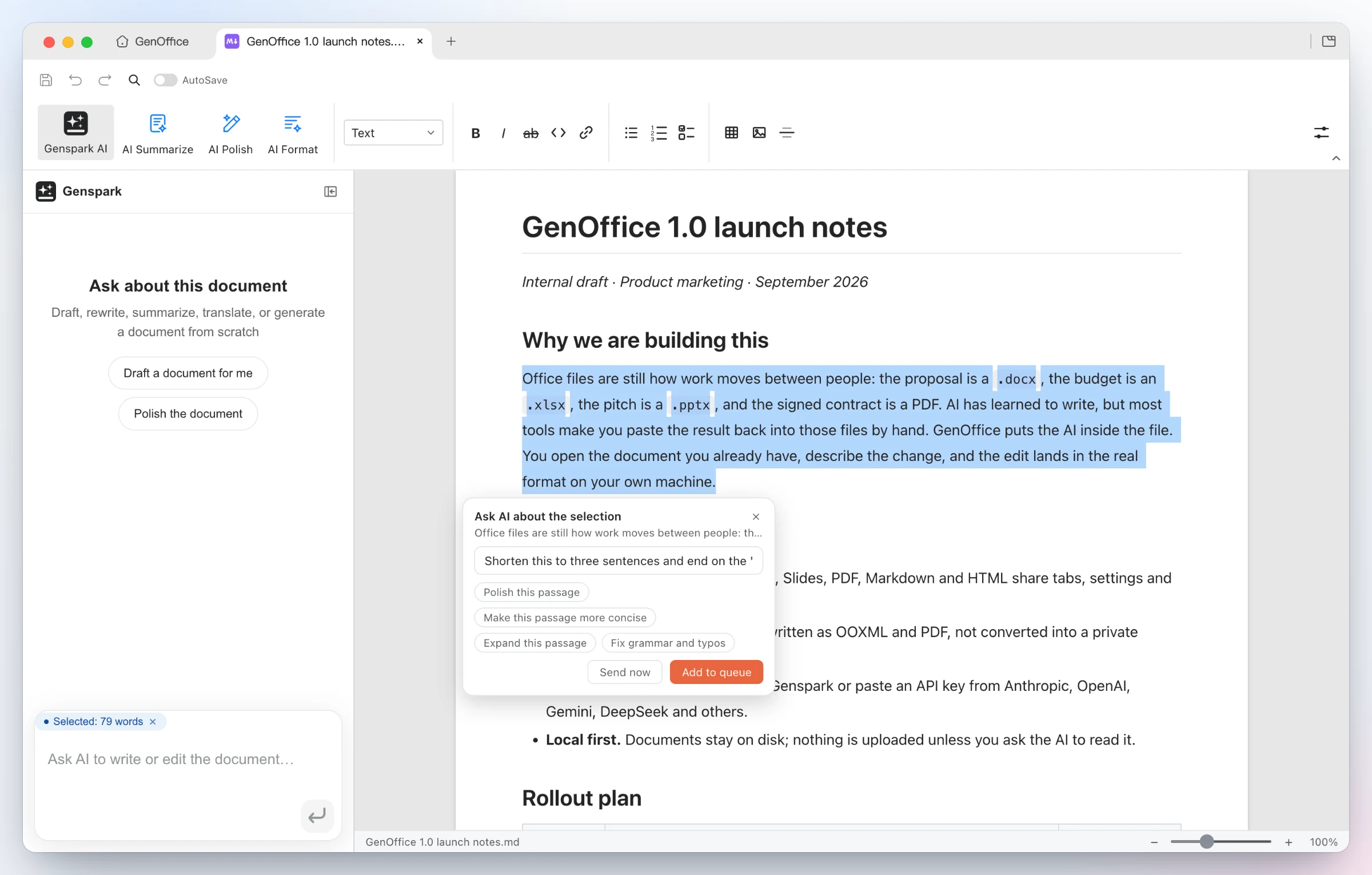
Ask AI about a selection — select any passage and an Ask AI chip appears: type an instruction or pick a suggestion, send it now, or queue several anchored edits and run them in one pass. The same entry exists in every app.
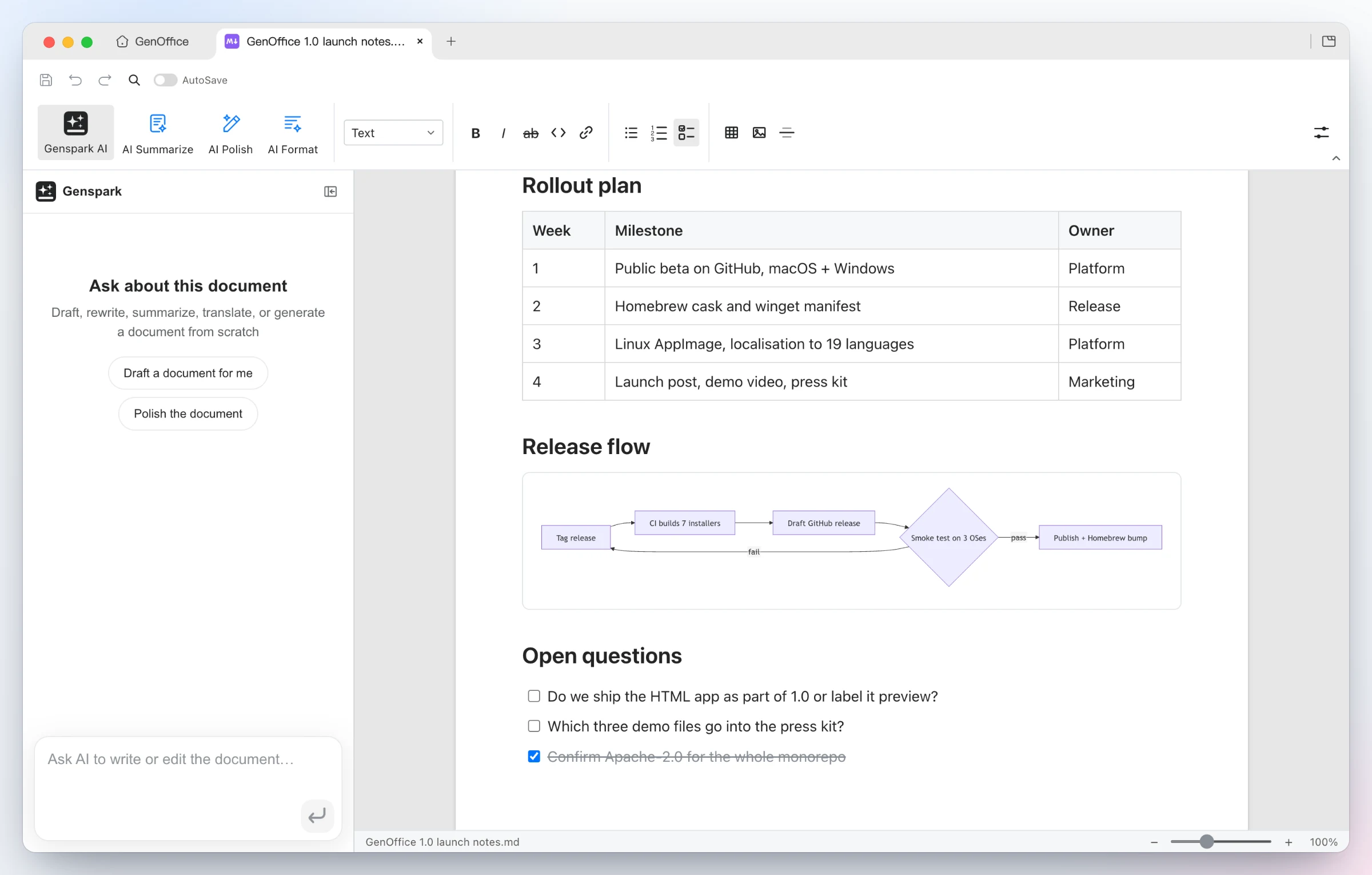
Rendered, saved as plain Markdown — headings, lists, tables, images, code blocks and Mermaid diagrams in a Tiptap block editor, written back as plain .md, with a fully local Markdown → Word export.
### 7 · CLI — your coding agent drives GenOffice, on your machine
GenOffice ships a `genoffice` command line and an agent skill. Install the
skill and Claude Code, Codex, Cursor, Gemini CLI, GitHub Copilot, OpenCode or
Windsurf can create, convert, read and edit real Office files through the
same engines as the apps, without opening a window.
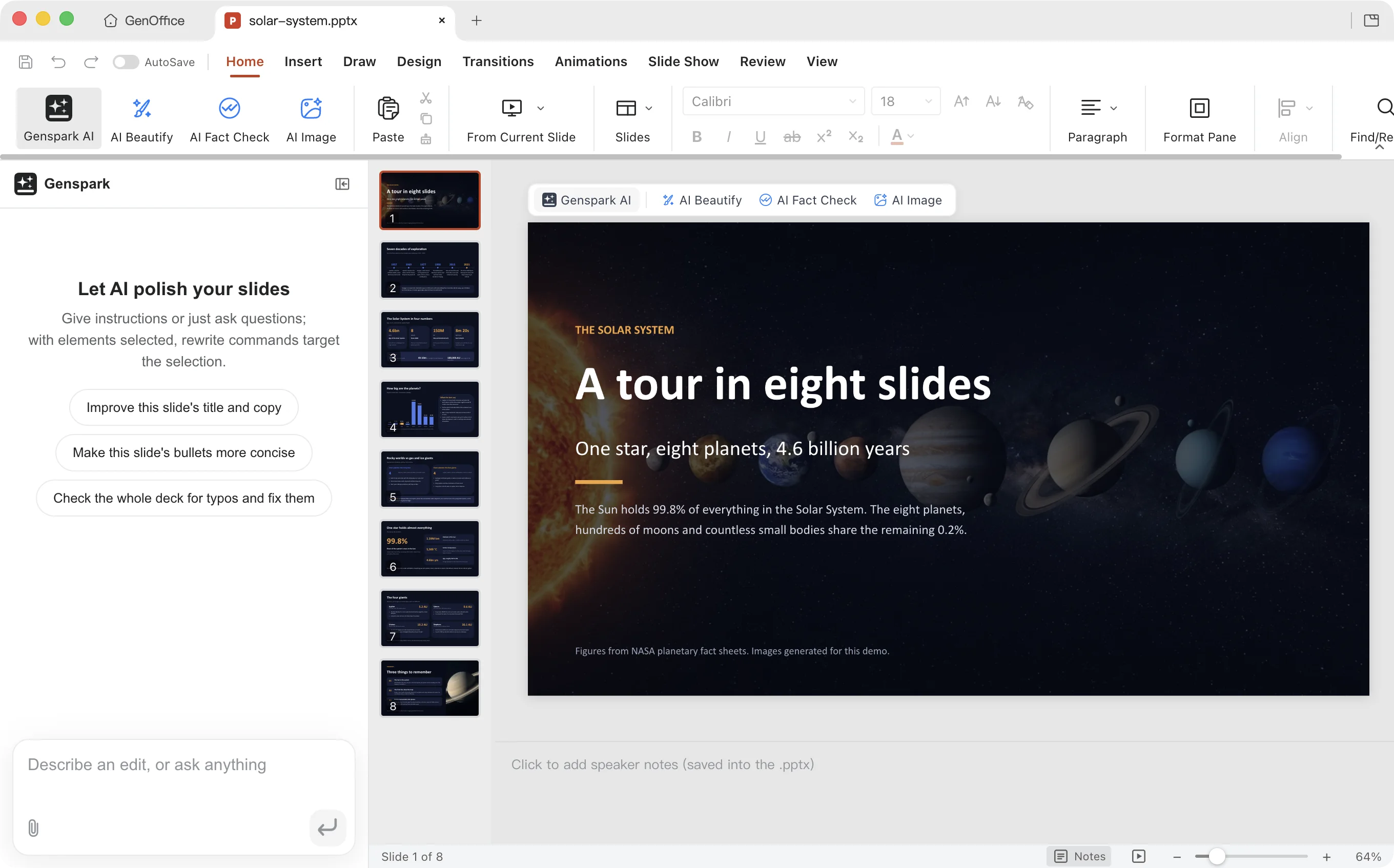
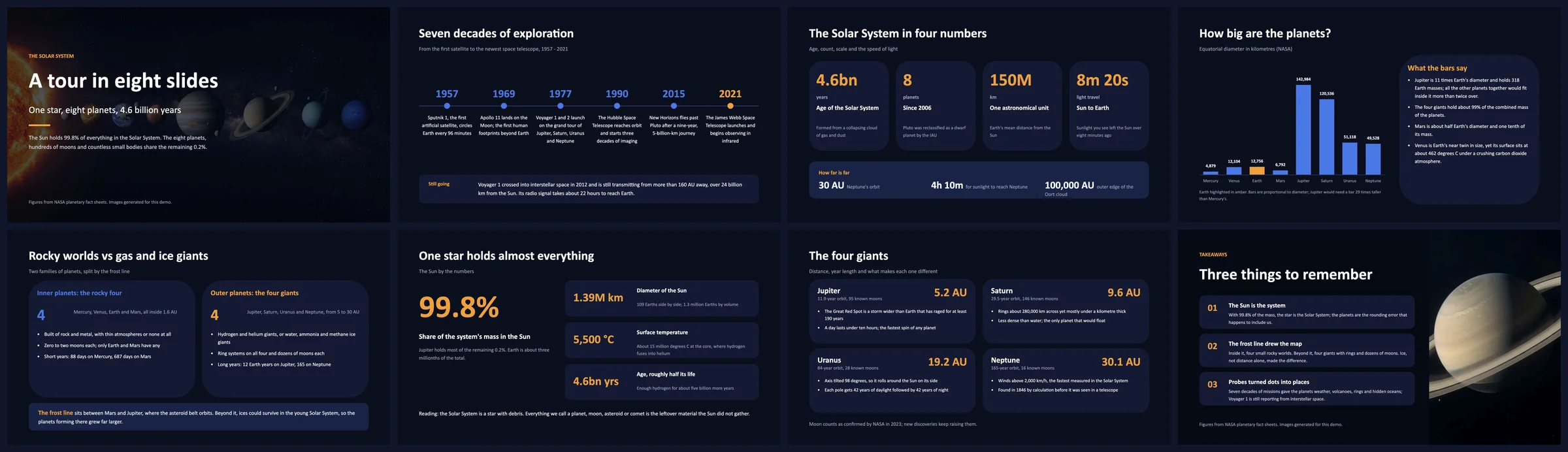
One prompt to your agent — "Build an eight-slide deck about the Solar System." The agent reads the skill, writes a style sheet, an outline and one page spec per slide, generates the two photos with genoffice image, and lets genoffice slides check reject anything that overflows or overlaps before genoffice create assembles the .pptx and slides render hands back a PNG per slide to look at.
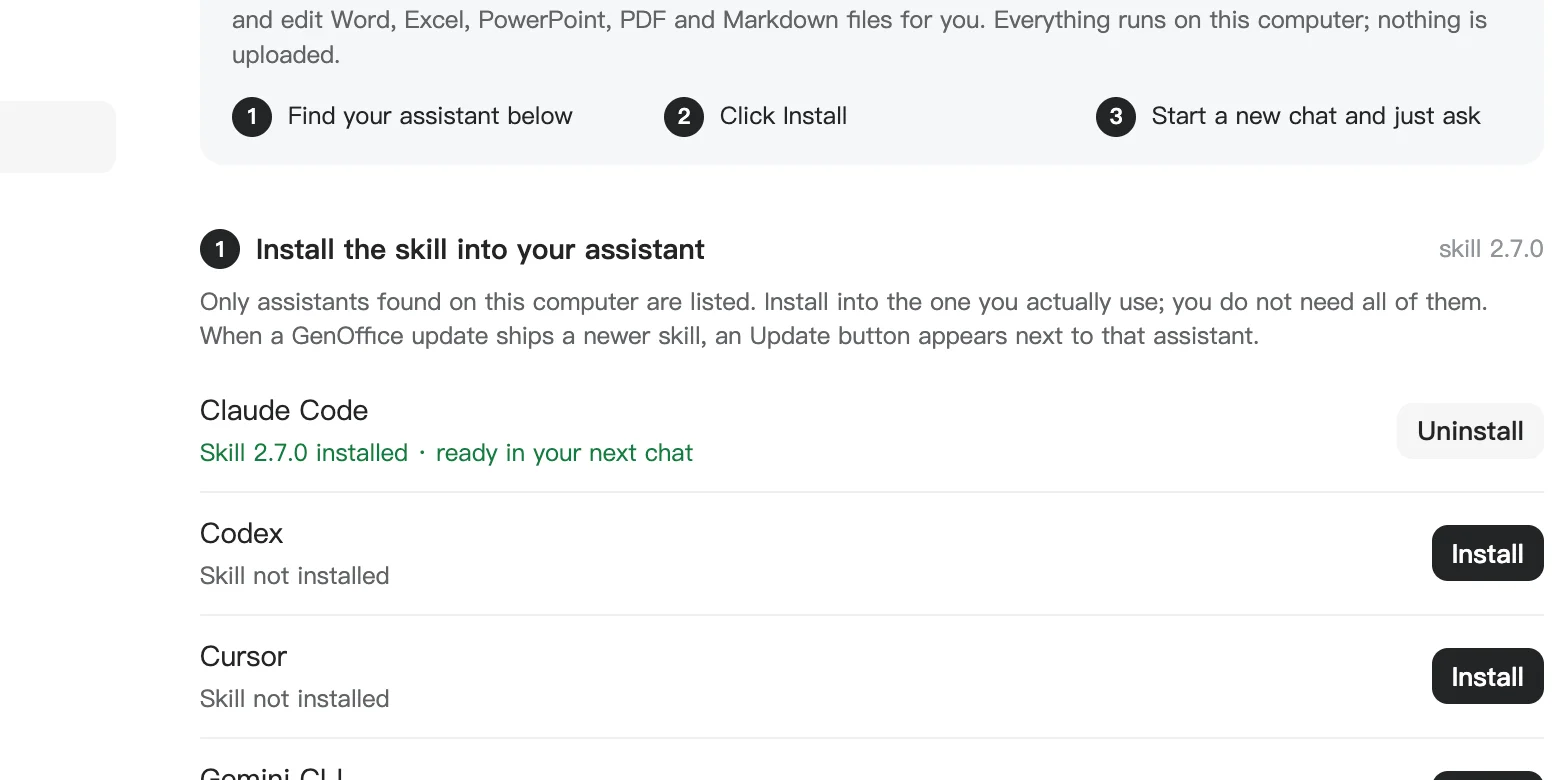
Install once, from Settings → Integrations — GenOffice lists the coding agents it finds on this computer and writes the skill into each one you pick. Or download the skill as a zip, or run npx skills add genspark-ai/genoffice. Commands and the full workflow are in Command line and agent skill.
## Why GenOffice
- **Open source**, Apache-2.0, built in the open on GitHub.
- **Yours to run.** Native apps for macOS, Windows and Linux; files stay on your
disk and every edit, save and conversion happens on your machine.
- **Real Office files.** Native `.docx`, `.xlsx` and `.pptx`, byte-preserving:
the parts of a file you did not touch are copied exactly as they were.
- **An AI that edits the document itself.** Tracked changes in Docs, live
formulas and charts in Sheets, slides drawn onto the canvas, every AI turn a
snapshot you can roll back.
- **Your model, your key.** Sign in with Genspark, or bring a key for Claude,
OpenAI, Gemini, DeepSeek and more, local servers and any OpenAI-compatible
endpoint included.
- **PDF done properly.** Edit text inside the page, and convert PDF to Word,
Excel or PowerPoint on-device, with system OCR for scans.
- **Markdown and HTML too**, with the same AI panel and local export to Word.
- **Scriptable.** A `genoffice` command line and an agent skill put every
engine at the service of Claude Code, Codex, Cursor and other coding agents,
still on-device.
- **Free**, for individuals and teams alike.
## AI backends
**Sign in with Genspark** and there is nothing to configure: model calls route
through the Genspark proxy (Claude, GPT and Gemini families) and the agents get
web and image search, image generation, and image/audio/video analysis.
**Or bring your own key.** Settings → AI lists Claude, OpenAI, Gemini,
DeepSeek, Kimi, GLM, Qwen, Doubao, MiniMax, Grok, Mistral, OpenRouter, Requesty
and OpenCode Zen/Go, plus a custom slot for any OpenAI-compatible endpoint (base
URL + key), including local model servers. Search and media have their own
per-capability providers under **AI Media & Search**: Serper or Tavily for web
search, and OpenAI, Gemini, Doubao/Seedream, GLM, Grok, Qwen, MiniMax or any
OpenAI-compatible images endpoint for image generation and image/video
analysis.
The whole suite ships light, dark and system themes. Themes only change what
is on screen: exports, prints and saved files always keep the document's own
colors.
## Command line and agent skill
Everything the apps can do to a file, the `genoffice` command line can do from
a terminal: inspect, convert, create, read and edit Word, Excel, PowerPoint,
PDF, Markdown and HTML on the same engines, headless. It installs with
GenOffice, needs no runtime of its own, and never sends a document anywhere.
Paired with the bundled **agent skill**, it turns a coding agent into a
document worker that produces real Office files instead of Markdown
approximations.
**Works with:** Claude Code, Codex, Cursor, Gemini CLI, GitHub Copilot,
OpenCode and Windsurf out of the box, and any other agent that reads skills.
### Install the skill
| How | What happens |
| -------------------------------------- | ------------------------------------------------------------------------------------------------------------------------------------------------------------------------ |
| **Settings → Integrations** in the app | Lists the agents found on this computer; one click writes the skill into each one you choose. An **Update** button appears when a GenOffice release ships a newer skill. |
| **Download as zip** on the same page | The layout claude.ai, the Claude desktop apps and other assistants accept as an uploaded skill. |
| `npx skills add genspark-ai/genoffice` | Installs from this repository into any skills-compatible agent. |
Then start a new chat and ask for a document. The skill teaches the agent when
to reach for `genoffice`, how to read a file before editing it, and how to
check its own work.
### Quickstart from the terminal
```bash
genoffice --version
genoffice info report.docx --json # headings and blocks; or sheets, slides, pages
genoffice convert report.md --to pdf # md/html/docx/xlsx/pptx → pdf, pdf → docx/xlsx/pptx, …
genoffice create --type docx --from notes.md --out notes.docx
genoffice create --type xlsx --from table.json --out sales.xlsx # "=SUM(B2:B9)" cells stay live formulas
genoffice docs read report.docx --range 0-9 --json # then `docs apply --ops edits.json` edits in place
genoffice render report.docx --out shots/ # one PNG per page, to look at what you made
genoffice open sales.xlsx # hand the result to the editor
```
Every command prints a one-line summary, or a single JSON object with
`--json`. Edits are atomic: a rejected op leaves the file untouched and comes
back with a guided error. `genoffice help` lists the current command surface;
the full reference is [packages/cli/README.md](packages/cli/README.md).
### What the agent actually runs
The Solar System deck in the [demo](#demo) took one prompt in Claude Code.
Behind it, the agent followed the skill's staged workflow and the CLI checked
every stage before the next one started:
```bash
genoffice capabilities --json # which cloud tools GenOffice has configured
genoffice guide slides design # the deck workflow and layout library
genoffice image "the eight planets in a row …" --aspect 16:9 --out deck/assets/cover.jpg
genoffice slides check deck/outline.json --json # 8 pages, no findings
genoffice slides check deck/pages/01.json --json # builds one slide, audits overflow and overlap
… # one page file per slide, fixed until each check is clean
genoffice create --type pptx --spec deck/pages --outline deck/outline.json --out deck/solar-system.pptx --json
genoffice slides render deck/solar-system.pptx --out deck/shots --json
genoffice slides audit deck/solar-system.pptx --json # 8 slides, no layout issues
genoffice slides replace deck/solar-system.pptx --slide 4 --spec deck/pages/05.json --json
genoffice open deck/solar-system.pptx
```
No model call happens inside `genoffice`: the agent does the thinking, the CLI
does the building and the checking, and the result opens in GenOffice or
PowerPoint as an ordinary `.pptx`.
## Download
| Platform | Requirements | Download |
| ------------------------------------ | ----------------------------------------------------- | ----------------------------------------------------------------------------------------- |
| **macOS** — Apple Silicon (arm64) | macOS 11+ | [Latest `.dmg` (arm64)](https://github.com/genspark-ai/genoffice/releases/latest) |
| **macOS** — Intel (x64) | macOS 11+ | [Latest `.dmg` (x64)](https://github.com/genspark-ai/genoffice/releases/latest) |
| **Windows** (x64, most PCs) | Windows 10+, Intel/AMD | [Latest `-x64.exe` installer](https://github.com/genspark-ai/genoffice/releases/latest) |
| **Windows** on Arm (ARM64) | Windows 11 on Arm (Snapdragon X and similar) | [Latest `-arm64.exe` installer](https://github.com/genspark-ai/genoffice/releases/latest) |
| **Linux** — Debian / Ubuntu | x86_64, glibc 2.34+ (Ubuntu 22.04 or newer) | [Latest `.deb`](https://github.com/genspark-ai/genoffice/releases/latest) |
| **Linux** — Fedora / RHEL / openSUSE | x86_64, glibc 2.34+ (Fedora 35+, RHEL 9+, Leap 15.6+) | [Latest `.rpm`](https://github.com/genspark-ai/genoffice/releases/latest) |
| **Linux** — other distributions | x86_64, glibc 2.34+, FUSE 2 | [Latest `.AppImage`](https://github.com/genspark-ai/genoffice/releases/latest) |
All builds come from `main`; the macOS and Windows installers are signed.
Older versions are on the [Releases](https://github.com/genspark-ai/genoffice/releases) page.
Installing on Linux
The deb installs with apt — it pulls in the dependencies and adds GenOffice
to the applications menu:
```bash
sudo apt install ./genoffice__amd64.deb
```
On Fedora / RHEL-family / openSUSE, install the rpm instead:
```bash
sudo dnf install ./genoffice-.x86_64.rpm # Fedora / RHEL family
sudo zypper install ./genoffice-.x86_64.rpm # openSUSE
```
The AppImage runs in place: install the FUSE 2 runtime
(`sudo apt install libfuse2`; on Ubuntu 24.04 the package is `libfuse2t64`),
make the file executable, then run it:
```bash
chmod +x GenOffice-.AppImage
./GenOffice-.AppImage
```
## How it works
Seven Electron apps — Docs, Sheets, Slides, PDF, Markdown, HTML and the
tabbed shell — share one engine layer of pure TypeScript packages plus a Rust
sidecar for `.xlsx`. The original file is always the source of truth: edits
are applied as narrow patches, and everything the editor did not touch
survives the round trip untouched.
```
open docx ─► archive original by hash (never touched)
─► parse word/document.xml into a block tree, each block anchored to its original XML
─► Tiptap editor (manual + AI editing, dirty tracking)
save ─► dirty blocks → OOXML fragments (referencing existing styles only)
─► splice into the original document.xml; untouched blocks keep their bytes
─► repack the zip; every other entry is copied byte-for-byte
```
The package-by-package tour (docx/pptx engines, `pdf2docx`, `html2docx`, the
agent core and providers) lives in [CONTRIBUTING.md](CONTRIBUTING.md#engine-packages).
## Development
```bash
npm install
npm run fixtures # generate test .docx fixtures
npm test # engine + app unit tests (docs/sheets/slides need no display)
npm run typecheck # tsc --noEmit across every workspace
npm run dev # all six editors + shell against Vite dev servers
npm run dev:docs # a single app (same pattern works per workspace)
npm run dist:mac # package macOS dmg (regenerates third-party notices)
npm run dist:win # package Windows nsis installer
npm run dist:linux # package Linux AppImage + deb + rpm
```
The sheets app additionally needs a Rust toolchain for its xlsx sidecar
(`cargo` on PATH); `npm run build -w @genoffice/sheets` compiles it
automatically. See [CONTRIBUTING.md](CONTRIBUTING.md) for the checks every
change must pass and how pull requests land.
## Community
GenOffice is in active development and your feedback shapes it.
- **Report a bug or request a feature** in
[GitHub Issues](https://github.com/genspark-ai/genoffice/issues).
- **Join the GenOffice group chat** on
[GenTeam](https://genoffice.ai/join) to talk to the team and other users.
- **Star the repo** if GenOffice is useful to you — it is the best way to
support the project.
## FAQ
Is GenOffice free?
Yes. GenOffice is free and open-source under the Apache-2.0 license — no
trial, no paid tier for the apps themselves.
Can GenOffice open Microsoft Word, Excel and PowerPoint files?
Yes. GenOffice opens and saves native `.docx`, `.xlsx` and `.pptx` files.
Saving is byte-preserving: parts of the file you didn't touch are written
back byte-for-byte, so documents keep working in Microsoft Office.
Does GenOffice work offline?
Document editing is fully local — files never leave your machine to be
opened, edited, saved or converted. The AI features (agents, search, image
tools) need a network connection, with either a Genspark sign-in or your own
model API key.
Can GenOffice edit PDF files?
Yes — real PDF text and image editing that rewrites the page content stream
with the original fonts preserved, not cover-up annotations.
Can GenOffice convert PDF to Word, Excel or PowerPoint?
Yes — entirely on-device: PDFium character-level extraction plus
geometry-based layout analysis, no cloud service, no upload. Scanned pages
are covered too: on macOS and Windows the system OCR reads them, so they
convert to editable text rather than a page image.
Can I use my own AI model or API key?
Yes. Besides the keyless Genspark sign-in, GenOffice supports bring your own
key for Claude, OpenAI, Gemini, DeepSeek, Kimi, GLM, Qwen, Doubao, MiniMax,
Grok, Mistral, OpenRouter, Requesty and OpenCode Zen/Go, plus any OpenAI-compatible
endpoint — including local model servers. Search, image generation and
image/video analysis take their own keys under Settings → AI Media & Search.
Can GenOffice convert HTML to Word?
Yes — Export as Word in the HTML app produces a native, editable `.docx`
entirely on-device. The page is rendered in the built-in Chromium and reduced
to real Word structures: headings, paragraphs, lists, tables, cards, KPI rows,
form fields and page backgrounds; only visuals with no Word counterpart
(charts, icons, decorated boxes) are embedded as pictures.
Can I drive GenOffice from Claude Code, Codex, Cursor or a script?
Yes. GenOffice installs a `genoffice` command line that runs the same engines
headless: inspect, convert, create, read and edit documents from a terminal or
a script, with `--json` output for programs. The bundled agent skill teaches
Claude Code, Codex, Cursor, Gemini CLI, GitHub Copilot, OpenCode and Windsurf
to use it; install it from **Settings → Integrations**. See
[Command line and agent skill](#command-line-and-agent-skill).
Does GenOffice collect any data?
Official packaged builds send limited usage analytics by default, and you can
disable reporting at any time under Settings → General. Analytics never sends
document content, file names, file paths, account identity or email
addresses. See [GenOffice Privacy](PRIVACY.md) for the complete event and
data disclosures.
## Security
See [SECURITY.md](SECURITY.md) for the process security posture (renderer
sandboxing, IPC validation, external-link gating) and the threat models for
AI-generated content.
## Acknowledgements
GenOffice would not be possible without these open-source projects:
- [Electron](https://www.electronjs.org/) — the desktop runtime for every app.
- [Univer](https://github.com/dream-num/univer) (Apache-2.0) — the spreadsheet
UI core that Sheets extends.
- [PDFium](https://pdfium.googlesource.com/pdfium/) (BSD-3-Clause, bundled via
[@embedpdf/pdfium](https://github.com/embedpdf/embed-pdf-viewer)) — the
content-stream engine behind true PDF text and image editing.
- [pdf.js](https://github.com/mozilla/pdf.js) (Apache-2.0) and
[pdf-lib](https://github.com/Hopding/pdf-lib) (MIT) — PDF rendering and
document assembly.
- [Tiptap](https://tiptap.dev/) / [ProseMirror](https://prosemirror.net/) —
the block editors in Docs and Markdown.
- [CodeMirror](https://codemirror.net/) (MIT) — the source editor in HTML.
- [Konva](https://konvajs.org/) — canvas rendering for Slides and Sheets
charts.
- [HarfBuzz](https://github.com/harfbuzz/harfbuzz) (wasm) — text-shaping
metrics for complex scripts.
- [calamine](https://github.com/tafia/calamine) and
[IronCalc](https://github.com/ironcalc/IronCalc) — the read and calc layers
of the Rust xlsx sidecar.
- [libeot](https://github.com/umanwizard/libeot) (MPL-2.0) — the MicroType
Express decoder for embedded PowerPoint fonts, ported to TypeScript.
- [React](https://react.dev/) (MIT) — the UI layer of every app.
- [Mermaid](https://mermaid.js.org/) (MIT) and [KaTeX](https://katex.org/)
(MIT) — diagrams and math in Markdown and Docs.
- [opentype.js](https://opentype.js.org/) (MIT) — font parsing for metrics
and glyph lookup.
- [JSZip](https://stuk.github.io/jszip/) (MIT) and
[fast-xml-parser](https://github.com/NaturalIntelligence/fast-xml-parser)
(MIT) — the OOXML container and XML layers.
- [Fluent UI System Icons](https://github.com/microsoft/fluentui-system-icons)
(MIT) — the icon set across the ribbons.
- [electron-updater](https://www.electron.build/) (MIT) — in-app updates.
- Liberation, Carlito, Caladea, and Noto CJK fonts (OFL/Apache-2.0) — bundled
document fonts.
`npm run notices` regenerates the bundled third-party license summary
(`tools/gen-third-party-notices.mjs`); all runtime dependencies are
MIT/Apache-2.0/BSD-3-Clause/OFL.
## License
GenOffice is licensed under the [Apache License 2.0](LICENSE), with one
exception: the `ee/` directory is reserved for future enterprise modules and
is covered by the [GenOffice Enterprise License](ee/LICENSE).
The GenOffice and Genspark names and logos are trademarks of Mainfunc, Inc.
The Apache-2.0 license does not grant permission to use them (see section 6);
forks should use their own branding.