> **얼리 베타**: 활발히 개발 중입니다. 다소 미흡한 부분이 있을 수 있습니다.
설치하거나 시작하려면 [tinyhumans.ai/openhuman](https://tinyhumans.ai/openhuman?utm_source=github&utm_medium=readme) 웹사이트에서 다운로드하거나 터미널에서 다음을 실행하세요.
```bash
# https://tinyhumans.ai/openhuman 에서 DMG, EXE를 다운로드하거나 터미널에서 실행하세요.
# macOS 또는 Linux x64용
curl -fsSL https://raw.githubusercontent.com/tinyhumansai/openhuman/main/scripts/install.sh | bash
# Windows용
irm https://raw.githubusercontent.com/tinyhumansai/openhuman/main/scripts/install.ps1 | iex
```
# OpenHuman이란 무엇인가요?
OpenHuman은 일상 생활에 통합되도록 설계된 오픈 소스 에이전트 어시스턴트입니다. 각 글머리 기호는 [문서](https://tinyhumans.gitbook.io/openhuman/)의 더 깊은 설명으로 연결됩니다.
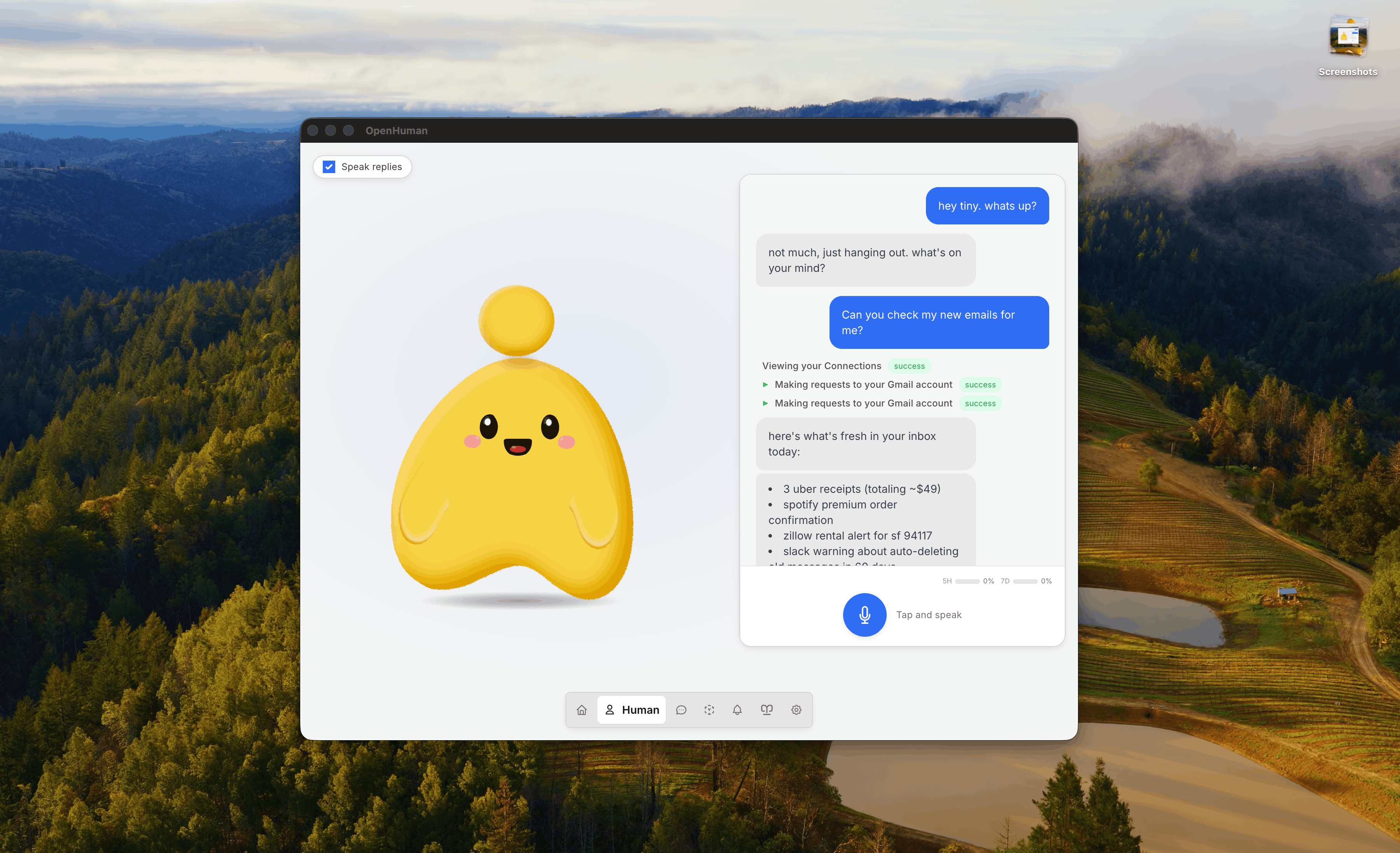
- **단순함, UI 우선 및 인간 중심**: 깔끔한 데스크톱 경험과 짧은 온보딩 경로를 통해 설치 후 몇 번의 클릭만으로 작동하는 에이전트를 만날 수 있습니다. 설정 우선 방식이나 터미널이 필요하지 않습니다. 에이전트는 [얼굴](https://tinyhumans.gitbook.io/openhuman/features/mascot)을 가지고 있습니다. 말을 하고, 주변 환경에 반응하며, 실제 참가자로 [Google Meet에 참여](https://tinyhumans.gitbook.io/openhuman/features/mascot/meeting-agents)하고, 몇 주 동안 당신을 기억하며, 타이핑을 멈춘 후에도 백그라운드에서 계속 생각하는 데스크톱 마스코트입니다.
- **[118개 이상의 서드파티 통합](https://tinyhumans.gitbook.io/openhuman/features/integrations) 및 [자동 가져오기(auto-fetch)](https://tinyhumans.gitbook.io/openhuman/features/obsidian-wiki/auto-fetch)**: Gmail, Notion, GitHub, Slack, Stripe, Calendar, Drive, Linear, Jira 등 당신의 스택을 **원클릭 OAuth**로 연결하세요. 모든 연결은 유형이 지정된 도구로 에이전트에게 노출되며, 코어는 20분마다 각 활성 연결을 탐색하여 신선한 데이터를 [메모리 트리](https://tinyhumans.gitbook.io/openhuman/features/integrations/auto-fetch)로 가져옵니다. 프롬프트나 직접 작성해야 하는 폴링 루프가 필요 없으므로, 에이전트는 오늘 아침에 이미 내일의 컨텍스트를 가지고 있습니다.
- **[메모리 트리(Memory Tree)](https://tinyhumans.gitbook.io/openhuman/features/memory-tree) + [Obsidian 위키](https://tinyhumans.gitbook.io/openhuman/features/obsidian-wiki)**: 당신의 데이터와 활동을 바탕으로 구축된 로컬 우선 지식 베이스입니다. 연결된 모든 것은 3k 토큰 이하의 Markdown 청크로 규격화되고 점수가 매겨지며, **당신의 머신에 있는 SQLite**에 저장되는 계층적 요약 트리로 접힙니다. 동일한 청크는 당신이 열고, 탐색하고, 편집할 수 있는 Obsidian 호환 볼트에 `.md` 파일로 저장됩니다. 이는 Karpathy의 [obsidian-wiki 워크플로우](https://x.com/karpathy/status/2039805659525644595)에서 영감을 받았습니다.
- **모든 것이 포함됨(Batteries included)**: 웹 검색, 웹 가져오기 [스크레이퍼](https://tinyhumans.gitbook.io/openhuman/features/native-tools), 전체 코더 툴셋(파일 시스템, git, lint, test, grep), 그리고 [네이티브 음성](https://tinyhumans.gitbook.io/openhuman/features/voice)(STT 입력, ElevenLabs TTS 출력, 마스코트 립싱크, 라이브 Google Meet 에이전트)이 기본적으로 연결되어 있습니다. [모델 라우팅](https://tinyhumans.gitbook.io/openhuman/features/model-routing)은 단일 구독 하에 각 작업을 적절한 LLM(추론, 고속 또는 비전)으로 보냅니다. "파일을 읽기 위해 플러그인 설치"와 같은 번거로움이 없습니다. 온디바이스 워크로드를 위해 [Ollama를 통한 선택적 로컬 AI](https://tinyhumans.gitbook.io/openhuman/features/model-routing/local-ai)를 지원합니다.
- **[스마트 토큰 압축(TokenJuice)](https://tinyhumans.gitbook.io/openhuman/features/token-compression)**: 모든 도구 호출, 스크레이핑 결과, 이메일 본문 및 검색 페이로드는 LLM 모델에 전달되기 전에 토큰 압축 레이어를 거칩니다. HTML은 Markdown으로 변환되고, 긴 URL은 단축되며, 장황한 도구 출력은 구성 가능한 규칙 오버레이 등을 통해 중복 제거 및 요약됩니다. CJK, 이모지 및 기타 멀티바이트 텍스트는 자소(grapheme) 단위로 보존되며 절대 삭제되지 않습니다. 동일한 정보를 훨씬 적은 토큰으로 얻을 수 있어 비용과 지연 시간을 최대 80%까지 줄일 수 있습니다.
- **[메시징 채널](https://tinyhumans.gitbook.io/openhuman/features/integrations#messaging-channels)** 및 **[개인 정보 보호 및 보안](https://tinyhumans.gitbook.io/openhuman/features/privacy-and-security)**: 이미 사용 중인 채널을 통해 메시지를 주고받을 수 있으며, 워크플로우 데이터는 기기에 남아 로컬에서 암호화되어 당신의 것으로 관리됩니다.
## 소스에서 기여하기
새로운 기여자인가요? 포크/PR 워크플로우 및 로컬 검증 명령에 대해서는 [`CONTRIBUTING.md`](./CONTRIBUTING.md)에서 시작하세요. 빠른 경로는 다음과 같습니다.
1. Git, Node.js 24+, pnpm 10.10.0, Rust 1.93.0(`rustfmt` + `clippy`), CMake, Ninja, ripgrep 및 플랫폼 데스크톱 빌드 필수 구성 요소를 설치합니다.
2. 저장소를 포크하고 클론한 다음, `pnpm install` 전에 `git submodule update --init --recursive`를 실행하여 벤더링된 Tauri/CEF 소스가 존재하는지 확인합니다.
3. 웹 전용 UI 작업에는 `pnpm dev`를, 데스크톱 쉘에는 `pnpm --filter openhuman-app dev:app`을 사용하고, PR을 열기 전에 `pnpm typecheck`, `pnpm format:check`, `cargo check -p openhuman --lib`와 같은 집중 점검을 수행합니다.
상세 문서: [아키텍처](https://tinyhumans.gitbook.io/openhuman/developing/architecture) · [설정하기](https://tinyhumans.gitbook.io/openhuman/developing/getting-set-up) · [클라우드 배포](./gitbooks/features/cloud-deploy.md).
## 몇 주가 아닌 몇 분 만에 구축되는 컨텍스트
OpenHuman은 몇 분 만에 당신을 알게 되는 최초의 에이전트 하네스입니다. [Karpathy의 LLM 지식 베이스](https://x.com/karpathy/status/2039805659525644595)에서 영감을 받았습니다. 대부분의 에이전트는 아무런 정보 없이 시작합니다. Hermes는 당신의 작업을 지켜보며 학습하고, OpenClaw는 플러그인이 컨텍스트를 가져오기를 기다립니다. 어느 쪽이든 에이전트가 당신의 스택에 대해 충분히 알고 정말 유용해지기까지는 며칠 또는 몇 주가 걸립니다.
> OpenHuman은 당신의 모든 문서, 이메일 및 채팅을 요약하고 압축합니다. 그리고 에이전트가 당신에 대한 모든 것을 기억할 수 있도록 메모리 그래프를 생성합니다.
OpenHuman은 기다림을 생략합니다. 계정을 연결하고, [자동 가져오기](https://tinyhumans.gitbook.io/openhuman/features/integrations/auto-fetch)가 20분 주기로 데이터를 로컬로 가져오게 한 다음, [메모리 트리](https://tinyhumans.gitbook.io/openhuman/features/memory-tree)가 모든 것을 [Karpathy 스타일의 Obsidian 위키](https://tinyhumans.gitbook.io/openhuman/features/obsidian-wiki)에 지능적으로 저장된 Markdown 파일로 압축하게 하세요.
단 한 번의 동기화 패스만으로 에이전트는 당신의 받은 편지함, 캘린더, 저장소, 문서, 메시지의 전체(압축된) 컨텍스트를 갖게 됩니다. 훈련 기간도, "몇 주를 기다려야 하는" 번거로움도 없습니다. 에이전트는 당신이 되고, 당신에 의해 제어됩니다.
이미 다른 코딩 에이전트에서 [agentmemory](https://github.com/rohitg00/agentmemory)를 자체 호스팅하고 있나요? OpenHuman은 이를 프록시하는 선택적 `Memory` 백엔드를 제공합니다. `config.toml`에서 `memory.backend = "agentmemory"`를 설정하면 동일한 내구성 있는 저장소가 Claude Code, Cursor, Codex, OpenCode와 함께 OpenHuman을 구동합니다. 설정 방법은 [agentmemory 백엔드](https://tinyhumans.gitbook.io/openhuman/features/obsidian-wiki/agentmemory-backend) 페이지를 참조하세요.
## OpenHuman vs 다른 에이전트 하네스
상위 수준 비교(제품은 진화하므로 각 벤더에 확인하세요). OpenHuman은 **벤더 분산화(sprawl)를 최소화**하고, **워크플로우 지식을 기기에 유지**하며, 채팅뿐만 아니라 당신의 데이터에 대한 **지속적인 기억**을 에이전트에게 제공하도록 구축되었습니다.
| | Claude Cowork | OpenClaw | Hermes Agent | OpenHuman |
| ------------------- | ----------------- | ----------------- | ----------------- | ---------------------------------- |
| **오픈 소스** | 🚫 독점 소스 | ✅ MIT | ✅ MIT | ✅ GNU |
| **시작하기 쉬움** | ✅ 데스크톱 + CLI | ⚠️ 터미널 우선 | ⚠️ 터미널 우선 | ✅ 깔끔한 UI, 단 몇 분 |
| **비용** | ⚠️ 구독 + 애드온 | ⚠️ 모델 직접 제공 | ⚠️ 모델 직접 제공 | ✅ 단일 구독 + TokenJuice |
| **메모리** | ✅ 채팅 범위 한정 | ⚠️ 플러그인 의존 | ✅ 자기 학습 | 🚀 메모리 트리 + Obsidian 볼트, 선택적 [agentmemory](https://github.com/rohitg00/agentmemory) 백엔드 |
| **통합** | ⚠️ 적은 커넥터 | ⚠️ 직접 구축 | ⚠️ 직접 구축 | 🚀 OAuth를 통한 118개 이상 |
| **자동 가져오기** | 🚫 없음 | 🚫 없음 | 🚫 없음 | ✅ 20분마다 메모리로 동기화 |
| **API 분산화** | 🚫 추가 키 필요 | 🚫 BYOK | 🚫 멀티 벤더 | ✅ 단일 계정 |
| **모델 라우팅** | 🚫 단일 모델 | ⚠️ 수동 | ⚠️ 수동 | ✅ 내장됨 |
| **네이티브 도구** | ✅ 코드 전용 | ✅ 코드 전용 | ✅ 코드 전용 | ✅ 코드 + 검색 + 스크레이퍼 + 음성 |
# GitHub에서 스타를 눌러주세요
_AGI와 인공 의식을 향해 나아가고 계신가요? 저장소에 스타를 눌러 다른 사람들도 이 길을 찾을 수 있도록 도와주세요._
# 기여자 명예의 전당
기여를 통해 명예의 전당에 이름을 올리세요. 기여자에게는 무료 굿즈와 [Discord](https://discord.tinyhumans.ai/) 특별 권한이 제공됩니다.







.png)