

Note
Go to the end to download the full example code.
Fill rule demo#
By default, patches such as Polygon are filled according to the
non-zero winding fill rule.
Any given point has a winding number, which is the number of times the path
wraps around the point in the clockwise direction. For this fill rule, the
filled regions are where the winding number is non-zero. See
Mmh Donuts!!! for an example of how to leverage
the winding directions in multiple segments of a path under this fill rule.
The other option for fill rule is the
even-odd fill rule,
which is specified by setting the patch's fill_rule property to "evenodd".
For this fill rule, the filled regions are where the winding number is an odd
number. This fill rule allows for the construction of patterns of fill
regions that would otherwise take many more vertices to construct under the
non-zero winding fill rule.
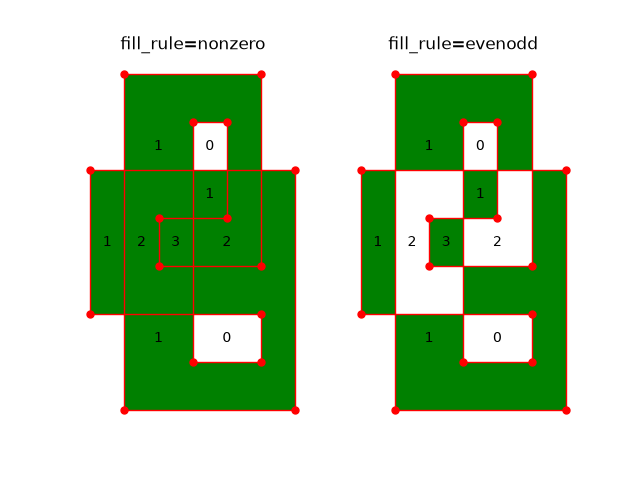
This example demonstrates the difference between the two fill rules for a single
Polygon that intersects itself multiple times. The winding number
for each closed region is labeled.
import matplotlib.pyplot as plt
import numpy as np

from matplotlib.patches import Polygon

fig, axs = plt.subplots(1, 2)

vertices = np.array([[0, 0, 6, 6, 1, 1, 5, 5, 2, 2, 4, 4, 3, 3, 5, 5],
                     [2, 5, 5, 0, 0, 7, 7, 3, 3, 4, 4, 6, 6, 1, 1, 2]]).T

labels = ['1', '0', '1', '2', '3', '2', '1', '1', '0']
label_xys = np.array([[2.0, 4.0, 0.5, 1.5, 2.5, 4.0, 3.5, 2.0, 3.5],
                      [1.5, 1.5, 3.5, 3.5, 3.5, 3.5, 4.5, 5.5, 5.5]]).T

for ax, fill_rule in zip(axs, ['nonzero', 'evenodd']):
    polygon = Polygon(vertices, facecolor='green', edgecolor='red',
                      fill_rule=fill_rule)
    ax.add_patch(polygon)

    ax.plot(*vertices.T, '.', markersize=10, color='red')

    for label, label_xy in zip(labels, label_xys):
        ax.text(*label_xy, label, ha='center', va='center')

    ax.set_axis_off()
    ax.set_title(f'fill_rule={fill_rule}')

plt.show()
References
The use of the following functions, methods, classes and modules is shown in this example: