
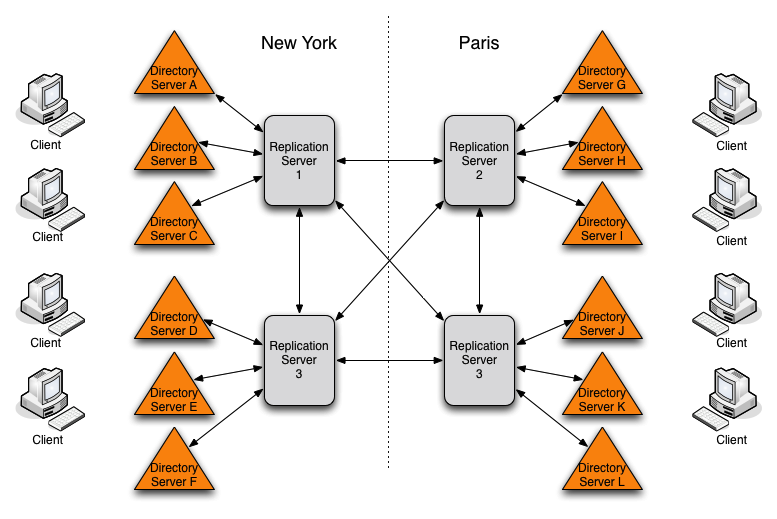
Replication in OpenDJ is designed to be both easy to implement in environments with a few servers, and also scalable in environments with many servers. You can enable the replication service on each OpenDJ directory server in your deployment, for example, to limit the number of servers you deploy. Yet in a large deployment, you can use stand-alone replication servers — OpenDJ servers that do nothing but relay replication messages — to configure (and troubleshoot) the replication service separately from the directory service. You only need a few stand-alone replication servers publishing changes to serve many directory servers subscribed to the changes. Furthermore, replication is designed such that you need only connect a directory server to the nearest replication server for the directory server to replicate with all others in your topology. Yet only the stand-alone replication servers participate in fully-meshed replication.
All replication servers in a topology are connected to all other replication servers. Directory servers are connected only to one replication server at a time, and their connections should be to replication servers on the same LAN. Therefore the total number of replication connections, Totalconn is expressed as follows.
Here, NRS is the number of replication servers, and NDS is the number of stand-alone directory servers. In other words, if you have only 3 servers, then Totalconn is 3 with no stand-alone servers. However, if you have two data centers, and need 12 directory servers, then with no stand-alone directory servers Totalconn is (12 * 11)/2 or 66. Yet, with 4 stand-alone replication servers, and 12 stand-alone directory servers, Totalconn is (4 * 3)/2 + 12, or 18, with only four of those connections needing to go over the WAN. (By running four directory servers that also run replication servers and eight stand-alone directory servers, you reduce the number of replication connections to 14 for 12 replicas.)
![[Tip]](common/images/admon/tip.png) |
Tip |
|---|---|
|
If you set up OpenDJ directory server to replicate by using the Quick Setup wizard, then the wizard activated the replication service for that server. You can turn off the replication service on OpenDJ directory server, and then configure the server to work with a separate, stand-alone replication server instead. Start by using the dsreplication disable --disableReplicationServer command to turn off the replication service on the server. |
Procedure 9.6. To Set Up a Stand-alone Replication Server
This example sets up a stand-alone replication server to handle the replication traffic between two directory servers that do not handle replication themselves.
Here the replication server is rs.example.com. The
directory servers are opendj.example.com and
opendj2.example.com.
In a real deployment, you would have more replication servers to avoid a single point of failure.
-
Setup the replication server as a directory server that has no database.
-
Setup the directory servers as stand-alone directory servers.
-
Enable replication with the appropriate
--noReplicationServerand--onlyReplicationServeroptions.$ dsreplication enable --adminUID admin --adminPassword password --baseDN dc=example,dc=com --host1 opendj.example.com --port1 4444 --bindDN1 "cn=Directory Manager" --bindPassword1 password --noReplicationServer1 --host2 rs.example.com --port2 4444 --bindDN2 "cn=Directory Manager" --bindPassword2 password --replicationPort2 8989 --onlyReplicationServer2 --trustAll --no-prompt Establishing connections ..... Done. Only one replication server will be defined for the following base DN's: dc=example,dc=com It is recommended to have at least two replication servers (two changelogs) to avoid a single point of failure in the replication topology. Checking registration information ..... Done. Configuring Replication port on server rs.example.com:4444 ..... Done. Updating replication configuration for baseDN dc=example,dc=com on server opendj.example.com:4444 ..... Done. Updating registration configuration on server opendj.example.com:4444 ..... Done. Updating registration configuration on server rs.example.com:4444 ..... Done. Updating replication configuration for baseDN cn=schema on server opendj.example.com:4444 ..... Done. Initializing registration information on server rs.example.com:4444 with the contents of server opendj.example.com:4444 ..... Done. Replication has been successfully enabled. Note that for replication to work you must initialize the contents of the base DN's that are being replicated (use dsreplication initialize to do so). See /var/.../opends-replication-1720959352638609971.log for a detailed log of this operation. $ dsreplication enable --adminUID admin --adminPassword password --baseDN dc=example,dc=com --host1 opendj2.example.com --port1 4444 --bindDN1 "cn=Directory Manager" --bindPassword1 password --noReplicationServer1 --host2 rs.example.com --port2 4444 --bindDN2 "cn=Directory Manager" --bindPassword2 password --replicationPort2 8989 --onlyReplicationServer2 --trustAll --no-prompt Establishing connections ..... Done. Only one replication server will be defined for the following base DN's: dc=example,dc=com It is recommended to have at least two replication servers (two changelogs) to avoid a single point of failure in the replication topology. Checking registration information ..... Done. Updating remote references on server rs.example.com:4444 ..... Done. Updating replication configuration for baseDN dc=example,dc=com on server opendj2.example.com:4444 ..... Done. Updating replication configuration for baseDN dc=example,dc=com on server opendj.example.com:4444 ..... Done. Updating registration configuration on server opendj2.example.com:4444 ..... Done. Updating registration configuration on server rs.example.com:4444 ..... Done. Updating registration configuration on server opendj.example.com:4444 ..... Done. Updating replication configuration for baseDN cn=schema on server opendj2.example.com:4444 ..... Done. Updating replication configuration for baseDN cn=schema on server opendj.example.com:4444 ..... Done. Initializing registration information on server opendj2.example.com:4444 with the contents of server rs.example.com:4444 ..... Done. Replication has been successfully enabled. Note that for replication to work you must initialize the contents of the base DN's that are being replicated (use dsreplication initialize to do so). See /var/folders/.../opends-replication-5893037538856033562.log for a detailed log of this operation.
-
Initialize replication from one of the directory servers.
$ dsreplication
 initialize-all
 --adminUID admin
 --adminPassword password
 --baseDN dc=example,dc=com
 --hostname opendj.example.com
 --port 4444
 --trustAll
 --no-prompt

Initializing base DN dc=example,dc=com with the contents from
 opendj.example.com:4444: 160 entries processed (100 % complete).
Base DN initialized successfully.

See
/var/.../opends-replication-7677303986403997574.log
for a detailed log of this operation.
