
OpenDJ directory server is designed to permit updating the list of directory schema definitions while the server is running. As a result you can add support for new applications that require new attributes or new kinds of entries without interrupting the directory service. OpenDJ also replicates schema definitions, so the schema you add on one replica are propagated to other replicas without you having to intervene manually.
As it is easy to introduce typos into schema definitions, the best way to start defining your own schema is with the OpenDJ Control Panel. Open the Control Panel > Schema > Manage Schema window to get started creating your custom object classes and attribute types.
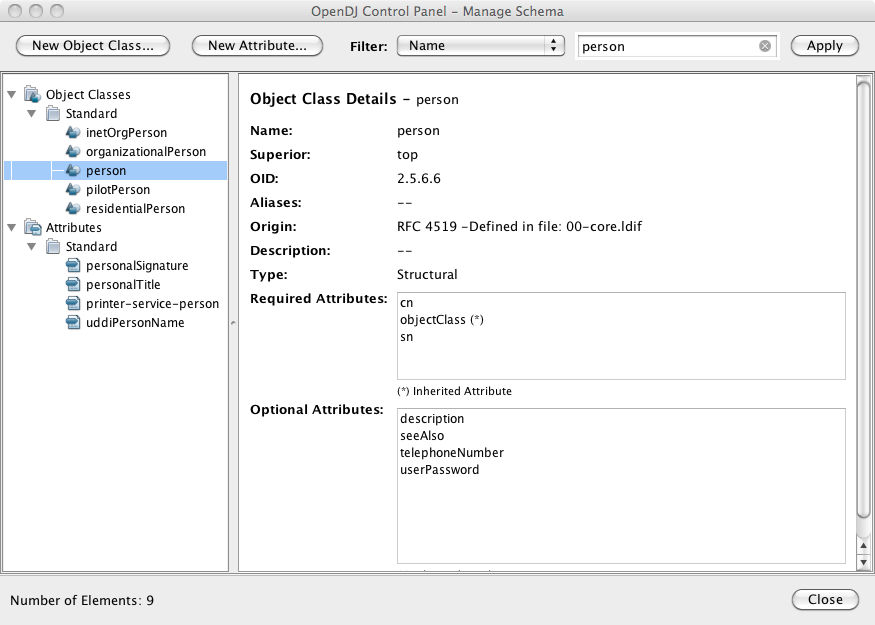
As object classes reference attribute types, you first create custom attribute types, and then create the object class that references the attribute types.
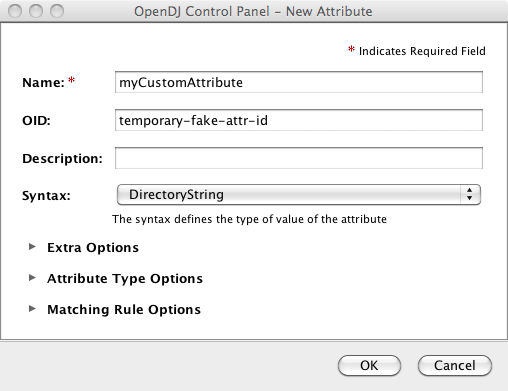
Create a custom attribute type through the New Attribute window.
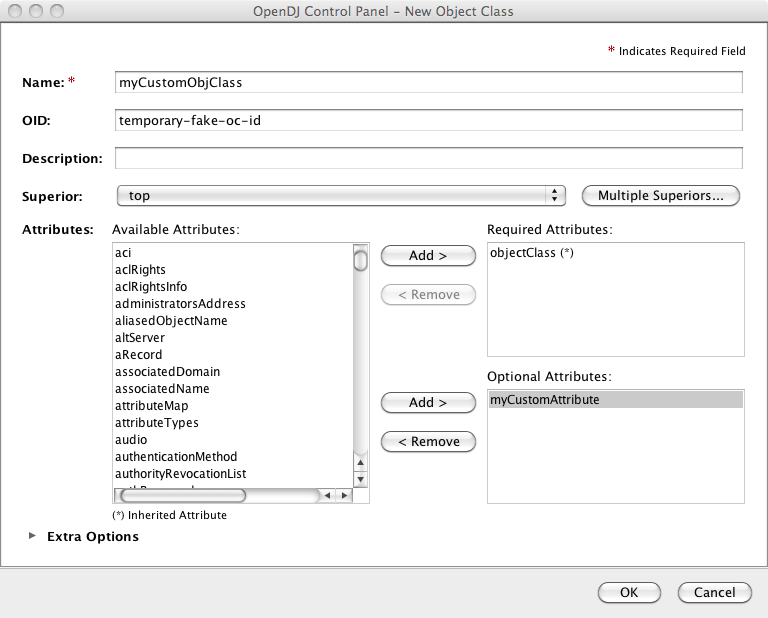
Using the New Object Class window, create an auxiliary object class that allows your new custom attribute type. You set the type to Auxiliary under Extra Options.
When you finish, the schema changes show up by default in the file
config/schema/99-user.ldif. Notice that the file name
starts with a number, 99. This number is larger than the numbers prefixing
other schema file names. In fact, OpenDJ reads the schema files in sorted
order, reading schema definitions as they occur. If OpenDJ reads a schema
definition for an object class before it has read the definitions of the
attribute types mentioned in the object class definition, then it displays
an error. Therefore, when naming your schema file, make sure the name appears
in the sorted list of file names after all the schema
files containing definitions that your schema definitions depends on. The
default file name for your schema, 99-user.ldif, ensures
that your definitions load only after all of the schema files installed by
default.
You can create this file in the lab using the Control Panel, and then apply the definitions in production by adapting the content for use with the ldapmodify command, for example.
$ cat config/schema/99-user.ldif
dn: cn=schema
objectClass: top
objectClass: ldapSubentry
objectClass: subschema
cn: schema
attributeTypes: ( temporary-fake-attr-id NAME 'myCustomAttribute' EQUALITY case
 IgnoreMatch ORDERING caseIgnoreOrderingMatch SUBSTR caseIgnoreSubstrings
 Match SYNTAX 1.3.6.1.4.1.1466.115.121.1.15 USAGE userApplications )
objectClasses: ( temporary-fake-oc-id NAME 'myCustomObjClass
 ' SUP top AUXILIARY MAY myCustomAttribute )
modifiersName: cn=Directory Manager,cn=Root DNs,cn=config
modifyTimestamp: 20110620095948Z
To test your schema definition, add the object class and attribute to an entry.
$ cat custom-attr.ldif
dn: uid=bjensen,ou=People,dc=example,dc=com
changetype: modify
add: objectClass
objectClass: myCustomObjClass
-
add: myCustomAttribute
myCustomAttribute: Testing 1, 2, 3...

$ ldapmodify
 --port 1389
 --bindDN "cn=Directory Manager"
 --bindPassword password
 --filename custom-attr.ldif
Processing MODIFY request for uid=bjensen,ou=People,dc=example,dc=com
MODIFY operation successful for DN uid=bjensen,ou=People,dc=example,dc=com
$ ldapsearch
 --port 1389
 --baseDN dc=example,dc=com
 uid=bjensen
 myCustomAttribute
dn: uid=bjensen,ou=People,dc=example,dc=com
myCustomAttribute: Testing 1, 2, 3...
In addition to supporting the standard schema definitions that are described in RFC 4512, section 4.1, OpenDJ also supports the following extensions that you can use when adding your own definitions.
Extensions for All Schema Definitions
X-ORIGIN-
Used to specify the origin of a schema element. Examples include
X-ORIGIN 'RFC 4519',X-ORIGIN 'draft-ietf-ldup-subentry', andX-ORIGIN 'OpenDJ Directory Server'. X-SCHEMA-FILE-
Used to specify the relative path to the schema file containing the schema element such as
X-SCHEMA-FILE '00-core.ldif'. Schema definitions are located by default in/path/to/opendj/config/schema/*.ldiffiles.
Extensions for Attribute Syntax Descriptions
X-ENUM-
Used to define a syntax that is an enumeration of values. The following attribute syntax description defines a syntax allowing four possible attribute values for example.
ldapSyntaxes: ( security-label-syntax-oid DESC 'Security Label'
 X-ENUM ( 'top-secret' 'secret' 'confidential' 'unclassified' ) )
X-PATTERN-
Used to define a syntax based on a regular expression pattern, where valid regular expressions are those defined for
java.util.regex.Pattern. The following attribute syntax description defines a simple, lenient SIP phone URI syntax check.ldapSyntaxes: ( simple-sip-uri-syntax-oid DESC 'Lenient SIP URI Syntax' X-PATTERN '^sip:[a-zA-Z0-9.]+@[a-zA-Z0-9.]+(:[0-9]+)?$' )
X-SUBST-
Used as a fallback to substitute a defined syntax for one that OpenDJ does not implement. The following example substitutes Directory String syntax, which has OID 1.3.6.1.4.1.1466.115.121.1.15, for a syntax that OpenDJ does not implement.
ldapSyntaxes: ( non-implemented-syntax-oid DESC 'Not Implemented in OpenDJ'
 X-SUBST '1.3.6.1.4.1.1466.115.121.1.15' )
Extension for Attribute Type Descriptions
X-APPROX-
X-APPROXis used to specify the approximate matching rule to use for a given attribute type when not using the default, which is the double metaphone approximate match.
