आपका कोडिंग एजेंट सब कुछ याद रखता है। अब दोबारा समझाने की ज़रूरत नहीं।
iii engine पर बना।
Claude Code, GitHub Copilot CLI, Cursor, Gemini CLI, Codex CLI, Hermes, OpenClaw, pi, OpenCode, और किसी भी MCP क्लाइंट के लिए स्थायी मेमोरी।
यह gist Karpathy के LLM Wiki पैटर्न को confidence scoring, lifecycle, knowledge graphs, और hybrid search के साथ विस्तार देता है: agentmemory इसका implementation है।
---
## इंस्टॉल
आवश्यकताएं:
- npm और npx के साथ Node.js 20 या नया (`node -v`, `npm -v`, और `npx -v`)।
- macOS/Linux पर automatic iii-engine installation के लिए `curl`, एक POSIX `sh`, और `tar` भी ज़रूरी हैं। `node:20-slim` जैसी minimal images में ये शामिल नहीं हो सकते।
- Native Windows पर pinned iii-engine v0.22.1 का `iii.exe` manually install करना ज़रूरी है। WSL2 या Docker Desktop अन्य समर्थित रास्ते हैं।
मानक fresh-install कमांड:
```bash
npx -y @agentmemory/agentmemory@latest
```
पहली रन एक interactive setup है: जोड़ने के लिए एजेंट चुनें (Claude Code, Cursor, Codex, Gemini CLI, OpenCode, ...), एक LLM provider चुनें या keyless रहें, और यह config seed करता है, memory server और उसका pinned iii engine शुरू करता है, और globally install करने का प्रस्ताव देता है ताकि बेयर `agentmemory` कमांड बाद में हर जगह काम करे। `-y`, npx के package prompt को accept करता है और `@latest` किसी पुराने cached release से बचाता है। एक provider LLM features उपलब्ध कराता है, लेकिन LLM-written observation compression केवल तब शुरू होता है जब `AGENTMEMORY_AUTO_COMPRESS=true` भी set हो।
Keyless mode vector embeddings को disable करता है। `memory_recall` (`mem::search` path) BM25 का उपयोग करता है, जबकि `memory_smart_search` graph data पहले से मौजूद होने पर structural graph matches को भी fuse कर सकता है। free on-device semantic recall के लिए, `~/.agentmemory/.env` में `EMBEDDING_PROVIDER=local` set करें और restart करें। पहला embedding request `Xenova/all-MiniLM-L6-v2` डाउनलोड करता है; उस शुरुआती model download के बाद inference locally चलता है।
Local runtime चार ports का उपयोग करता है: REST/MCP HTTP के लिए `3111`, iii streams के लिए `3112`, viewer के लिए `3113`, और iii worker WebSocket के लिए `49134`। Persistent iii state macOS पर `~/Library/Application Support/agentmemory` में, Linux पर `$XDG_DATA_HOME/agentmemory` या `~/.local/share/agentmemory` में, और Windows पर `%APPDATA%\agentmemory` में रहता है। इसे override करने के लिए `--data-dir ` या `AGENTMEMORY_DATA_DIR` का उपयोग करें, और हर restart पर वही value फिर से उपयोग करें। backward compatibility के लिए, instance 0 के लिए मौजूदा `./data/state_store.db` या `./data/iii-config.yaml`, platform default से आगे आता है; एक explicit flag या environment override फिर भी जीतता है।
फिर साबित करें कि recall काम करता है और अपने एजेंट को उसकी skills दें:
```bash
npx -y @agentmemory/agentmemory@latest demo # seed sample sessions + exercise recall
npx skills add rohitg00/agentmemory -y # 17 native skills so your agent knows when to reach for memory
```
default keyless mode में keyword searches को BM25 के माध्यम से hit करना चाहिए। demo की `database performance optimization` query जानबूझकर semantic है और embedding provider configure होने तक zero return कर सकती है।
चाहते हैं कि एक coding एजेंट पूरा काम खुद कर दे? उसे यह एक instruction दें:
> https://raw.githubusercontent.com/rohitg00/agentmemory/main/INSTALL_FOR_AGENTS.md पर मौजूद instructions प्राप्त करें और उनका पालन करें।
किसी भी समय `agentmemory connect ` से और एजेंट जोड़ें — 20 adapters [हर एजेंट के साथ काम करता है](#works-with-every-agent) में सूचीबद्ध हैं। पूरा command reference [क्विक स्टार्ट](#quick-start) में है।
Windows
सबसे तेज़ रास्ता WSL2 है। Native Windows engine setup के लिए pinned v0.22.1 ZIP को डाउनलोड करना और `iii.exe` को manually extract करना ज़रूरी है; CLI इसे auto-extract नहीं करता। Docker Desktop भी समर्थित है। Step-by-step के लिए [Windows नोट्स](#windows) देखें।
Global install / EACCES
```bash
npm install -g @agentmemory/agentmemory@latest
```
ऊपर दिया गया npx कमांड मानक fresh-install रास्ता बना रहता है और global-prefix permission issues से बचाता है।
npx कोई पुराना version serve कर रहा है
npx प्रति-version cache करता है। `npx -y @agentmemory/agentmemory@latest` से latest को force करें, या एक बार `rm -rf ~/.npm/_npx` से cache साफ़ करें (macOS/Linux; Windows पर `%LOCALAPPDATA%\npm-cache\_npx` हटाएँ)।
पहले से अपना iii engine चला रहे हैं
agentmemory iii-engine v0.22.1 को pin करता है और किसी अलग version से attach नहीं होगा (worker किसी दूसरे engine का protocol नहीं बोल सकता)। दूसरे engine को रोकें, फिर `npx -y @agentmemory/agentmemory@latest` चलाएँ। यह pinned v0.22.1 को `~/.agentmemory/bin` में install और run करता है, आपके अपने `iii` को बिना छुए छोड़ते हुए।
---
agentmemory किसी भी ऐसे एजेंट के साथ काम करता है जो hooks, MCP, या REST API support करता है। सभी एजेंट एक ही memory server साझा करते हैं।
Claude Code native plugin + 12 hooks + MCP
Codex CLI native plugin + 6 hooks + MCP
GitHub Copilot CLI MCP + plugin hooks/skills
Cursor native plugin + 7 hooks + MCP
OpenCode capture plugin + MCP
Devin 6 hooks + skills + MCP
OpenClaw native plugin + MCP
Hermes native plugin + MCP
pi native plugin + MCP
OpenHuman native Memory trait बैकएंड
Gemini CLI MCP सर्वर
Antigravity MCP + hooks
Claude Desktop MCP सर्वर
Warp connect + MCP + skills
Zed MCP सर्वर
Cline MCP सर्वर
Continue MCP सर्वर
Droid MCP सर्वर
Kiro MCP सर्वर
Qwen Code MCP सर्वर
DeepSeek Harness MCP सर्वर
Roo Code MCP सर्वर
Kilo Code MCP सर्वर
Goose MCP सर्वर
Aider REST API
MCP या HTTP बोलने वाले किसी भी एजेंट के साथ काम करता है। एक सर्वर, सभी के बीच साझा मेमोरीज़।
---
आप हर session में वही architecture समझाते हैं। आप वही bugs फिर से खोजते हैं। आप वही preferences फिर से सिखाते हैं। Built-in memory (CLAUDE.md, .cursorrules) 200 लाइनों पर सीमित है और पुरानी हो जाती है। agentmemory इसे ठीक करता है। यह चुपचाप आपके एजेंट की गतिविधियाँ capture करता है, उन्हें searchable memory में compress करता है, और अगला session शुरू होने पर सही context inject करता है। एक कमांड। सभी एजेंट्स के साथ काम करता है।
**क्या बदलता है:** Session 1 में आप JWT auth setup करते हैं। Session 2 में आप rate limiting माँगते हैं। एजेंट को पहले से पता है कि आपका auth `src/middleware/auth.ts` में jose middleware का उपयोग करता है, आपके tests token validation को cover करते हैं, और आपने Edge compatibility के लिए jsonwebtoken के बजाय jose चुना, बिना फिर से समझाए और बिना copy-paste किए।
```bash
npx -y @agentmemory/agentmemory@latest
```
By default, agentmemory इस repository के बाहर iii-engine state स्टोर करता है जहाँ से आप इसे शुरू करते हैं: macOS पर `~/Library/Application Support/agentmemory`, Linux पर `$XDG_DATA_HOME/agentmemory` या `~/.local/share/agentmemory`, और Windows पर `%APPDATA%\agentmemory`। एक मौजूदा legacy `./data/state_store.db` या `./data/iii-config.yaml` उस platform default से पहले instance 0 के लिए reuse होता है। किसी location को explicitly चुनने के लिए, `--data-dir ` पास करें या `AGENTMEMORY_DATA_DIR` set करें; दोनों में से कोई भी explicit setting legacy discovery से पहले आती है:
```bash
npx -y @agentmemory/agentmemory@latest --data-dir ~/.agentmemory-projects/main
AGENTMEMORY_DATA_DIR=~/.agentmemory-projects/main npx -y @agentmemory/agentmemory@latest
```
Native और Docker launches इस्तेमाल वही resolved host directory करते हैं; Docker इसे `/data` पर bind-mount करता है। `--instance 1`, resolved directory में `instance-1` जोड़ता है और अलग default port quartet `3211/3212/3213/49234` चुनता है।
नवीनतम release notes: [CHANGELOG.md](../CHANGELOG.md)।
---
### Retrieval सटीकता
**coding-agent-life-v1** (in-house corpus, sandbox-reproducible)
| Adapter | P@5 | R@5 | Top-5 hit rate | p50 latency |
|---|---|---|---|---|
| **agentmemory hybrid** | **0.240** | **1.000** | **15 / 15** | 14 ms |
| grep baseline | 0.227 | 0.967 | 15 / 15 | 0 ms |
इस corpus के लिए **P@5 math ceiling** (0.240, scorecard देखें) पर 100% top-5 hit rate। Hybrid हर gold session retrieve करता है; grep multi-session temporal query पर 2 में से 1 gold miss करता है। Lift **recall + temporal** है, aggregate precision नहीं। यह benchmark छोटा और gold-sparse है; नीचे का बड़ा LongMemEval-S बेहतर differentiate करता है। पूरी per-type breakdown + correction नोट: [`docs/benchmarks/2026-05-20-coding-agent-life-v1.md`](../docs/benchmarks/2026-05-20-coding-agent-life-v1.md)।
**LongMemEval-S** (ICLR 2025, 500 questions)
| System | R@5 | R@10 | MRR |
|---|---|---|---|
| **agentmemory** | **95.2%** | **98.6%** | **88.2%** |
| BM25-only fallback | 86.2% | 94.6% | 71.5% |
> Embedding model: `all-MiniLM-L6-v2` (local, free, कोई API key नहीं)। पूरी रिपोर्ट्स: [`benchmark/LONGMEMEVAL.md`](../benchmark/LONGMEMEVAL.md), [`benchmark/QUALITY.md`](../benchmark/QUALITY.md), [`benchmark/SCALE.md`](../benchmark/SCALE.md)। प्रतिस्पर्धी तुलना: [`benchmark/COMPARISON.md`](../benchmark/COMPARISON.md), जो agentmemory बनाम mem0, Letta, Khoj, supermemory, TencentDB Agent Memory, MemPalace, Zep/Graphiti, Cognee, Hippo को cover करती है।
**स्थानीय रूप से reproduce करें:** [`eval/README.md`](../eval/README.md), LongMemEval `_s` (public 500-Q) + `coding-agent-life-v1` (in-house 15-session corpus) के लिए एक adapter-pluggable harness। Grep / vector / agentmemory adapters साथ-साथ score होते हैं, NDJSON output, published scorecards [`docs/benchmarks/`](../docs/benchmarks/) में जाते हैं।
**[codegraph](https://github.com/colbymchenry/codegraph), [Understand Anything](https://github.com/Lum1104/Understand-Anything), और [Graphify](https://github.com/safishamsi/graphify) के साथ जोड़ता है।** Code-graph indexing, multi-agent build pipelines, और docs / PDFs / images / videos में व्यापक knowledge graphs। agentmemory काम याद रखता है; ये तीन projects context layer के बाकी हिस्से को रोशन करते हैं। Recipes + question-routing table: [`docs/recipes/pairings.md`](../docs/recipes/pairings.md)।
---
agentmemory
mem0 (63K ⭐)
Letta / MemGPT (24K ⭐)
Khoj (36K ⭐)
supermemory (29K ⭐)
TencentDB Agent Memory (22K ⭐)
MemPalace (54K ⭐)
oracleagentmemory
Hippo
बिल्ट-इन (CLAUDE.md)
प्रकार
Memory engine + MCP सर्वर
Memory layer API
पूर्ण agent runtime
Personal AI
Memory API + app
Team memory hub (LLM proxy)
Vector memory (OSS)
Memory engine (Oracle DB)
Memory system
Static फाइल
Retrieval R@5
95.2%
68.5% (LoCoMo)
83.2% (LoCoMo)
N/A
Self-reported
PersonaMem 76% (self-reported)
~96.6% (self-reported)
94.4% (self-reported)
N/A
N/A (grep)
स्वचालित capture
12 hooks (शून्य मैनुअल प्रयास)
मैनुअल add() कॉल
एजेंट self-edits
मैनुअल
API-side extraction
Proxy interception (base-URL swap)
मैनुअल
API extraction
मैनुअल
मैनुअल editing
खोज
BM25 + Vector + Graph (RRF fusion)
Vector + Graph
Vector (archival)
Semantic
Vector + RAG
4 asset types (Chat / Skill / Wiki / CodeGraph)
केवल-vector
Vector + semantic
Decay-weighted
सब कुछ context में load करता है
Multi-agent
MCP + REST + leases + signals
API (कोई coordination नहीं)
केवल Letta runtime में
नहीं
नहीं
Team roles + shared assets
नहीं
केवल scoped
Multi-agent shared
प्रति-एजेंट फाइलें
Framework lock-in
कोई नहीं (कोई भी MCP क्लाइंट)
कोई नहीं
उच्च (Letta का उपयोग आवश्यक)
Standalone
कोई नहीं
Proxy हर model call के सामने रहता है
कोई नहीं
Oracle Database
कोई नहीं
प्रति-एजेंट format
बाहरी निर्भरताएँ
कोई नहीं (SQLite + iii-engine)
Qdrant / pgvector
Postgres + vector DB
कई
Managed cloud
Docker stack (Core + Hub + Proxy)
Vector store
Oracle AI Database
कोई नहीं
कोई नहीं
Memory lifecycle
4-tier consolidation + decay + auto-forget
Passive extraction
Agent-managed
मैनुअल
Auto-forget
मैनुअल review; auto-routing प्रगति पर
कोई नहीं
बताया नहीं गया
Decay + consolidation
मैनुअल pruning
Token दक्षता
~1,900 tokens/session ($10/yr)
integration पर निर्भर
Core memory context में
भिन्न
Cloud pricing
बताया नहीं गया
कोई token budget नहीं
LLM-backed (भिन्न)
भिन्न
240 observations पर 22K+ tokens
Real-time व्यूअर
हाँ (port 3113)
Cloud dashboard
Cloud dashboard
Web UI
Cloud dashboard
Hub web UI
नहीं
नहीं
नहीं
नहीं
Self-hosted
हाँ (default)
Optional
Optional
हाँ
नहीं (केवल-cloud)
हाँ (Docker)
हाँ
हाँ (Oracle DB)
हाँ
हाँ
Benchmark नोट: केवल agentmemory का R@5 हमारा अपना measured result है (LongMemEval-S, benchmark/COMPARISON.md से reproducible)। mem0 और Letta के आँकड़े उनके published LoCoMo numbers हैं (एक अलग dataset); MemPalace, supermemory, TencentDB (PersonaMem), और oracleagentmemory के आँकड़े vendor self-reported दावे हैं जिन्हें हमने स्वतंत्र रूप से reproduce नहीं किया है (oracleagentmemory की run ने Oracle AI Database के विरुद्ध GPT-5.5 का उपयोग किया)। केवल ballpark के लिए साथ-साथ दिखाए गए हैं, समान data पर head-to-head तुलना नहीं। Star counts अनुमानित हैं और समय के साथ बदलते रहते हैं।
**नए प्रवेशक** जिन्हें जानना उपयोगी है, [`benchmark/COMPARISON.md`](../benchmark/COMPARISON.md) में गहराई से compare किए गए:
| System | ⭐ | Angle |
|--------|---|-------|
| Zep / Graphiti | 30K | Temporal knowledge graph; सबसे मज़बूत published temporal-query results (LongMemEval 63.8%), लेकिन graph asynchronously build होता है इसलिए ताज़ा facts पिछड़ सकते हैं |
| Cognee | 30K | Document-to-knowledge-graph ingestion, केवल-Python, session capture के बजाय structured entity extraction के लिए बना |
इनमें से कोई भी coding-agent hooks से auto-capture नहीं करता, local-first viewer ship नहीं करता, या keyless नहीं चलता — वही combination जिसके इर्द-गिर्द agentmemory बना है।
---
संगतता: यह release `iii-sdk` 0.22.1 को target करता है और iii-engine को v0.22.1 पर pin करता है।
### 30 सेकंड में आज़माएँ
```bash
# Terminal 1: start the server
npx -y @agentmemory/agentmemory@latest
# Terminal 2: seed sample data and see recall in action
npx -y @agentmemory/agentmemory@latest demo
```
`demo` 3 realistic sessions सीड करता है (JWT auth, N+1 query fix, rate limiting) और उन पर searches चलाता है। Keyless installs vectors को disable करते हैं, इसलिए `mem::search` keyword queries को BM25 के माध्यम से hit करना चाहिए जबकि `database performance optimization` zero return कर सकती है। `smart-search` graph data मौजूद होने पर अतिरिक्त रूप से structural graph matches भी return कर सकता है। semantic query से vectors के माध्यम से N+1 fix ढूँढ़ने के लिए, `EMBEDDING_PROVIDER=local` set करें, restart करें, और पहले model download को पूरा होने दें।
memory को लाइव बनते हुए देखने के लिए `http://localhost:3113` खोलें।
### एक fresh install और restart persistence को validate करें
server चलते हुए, REST, health, viewer, और iii-backed runtime status को validate करें:
```bash
curl -fsS http://localhost:3111/agentmemory/livez
curl -fsS http://localhost:3111/agentmemory/health
curl -fsS -o /dev/null http://localhost:3113/
npx -y @agentmemory/agentmemory@latest status
```
startup ready panel सभी चार ports के लिए हिसाब रखता है: 3111 पर REST/MCP HTTP, 3112 पर iii streams, 3113 पर viewer, और 49134 पर iii worker WebSocket। `status`, agentmemory health और active provider/embedding mode की पुष्टि करता है। एक probe save करें और पुष्टि करें कि वह searchable है:
```bash
curl -fsS -X POST http://localhost:3111/agentmemory/remember \
-H 'Content-Type: application/json' \
-d '{"content":"agentmemory restart persistence probe","concepts":["install-check"]}'
curl -fsS -X POST http://localhost:3111/agentmemory/smart-search \
-H 'Content-Type: application/json' \
-d '{"query":"restart persistence probe","limit":5}'
```
फिर `npx -y @agentmemory/agentmemory@latest stop` चलाएँ, Terminal 1 में मानक कमांड फिर से शुरू करें, `/agentmemory/livez` के लिए wait करें, और search दोहराएँ। probe अभी भी return होना चाहिए। अगर आपने कोई custom `--data-dir` चुना था, तो restart पर वही directory पास करें।
### रोज़मर्रा की कमांड्स
Install और setup ऊपर [इंस्टॉल](#install) में हैं (पहली रन आपको इसके माध्यम से ले जाती है)। दिन-प्रतिदिन:
```bash
agentmemory # start the server
agentmemory stop # stop it cleanly
agentmemory connect # wire another agent
agentmemory doctor # interactive diagnostics + fix prompts
agentmemory remove # uninstall everything we created
```
### Session Replay
agentmemory द्वारा record किया गया हर session replayable है। viewer खोलें, **Replay** tab चुनें, और timeline scrub करें: prompts, tool calls, tool results, और responses अलग events के रूप में render होते हैं, play/pause, speed control (0.5x से 4x), और keyboard shortcuts (space toggle के लिए, arrows step के लिए) के साथ।
पुरानी Claude Code JSONL transcripts लाने के लिए:
```bash
# Import everything under the default ~/.claude/projects
npx -y @agentmemory/agentmemory@latest import-jsonl
# Or import a single file
npx -y @agentmemory/agentmemory@latest import-jsonl ~/.claude/projects/-my-project/abc123.jsonl
```
Imported sessions native ones के साथ Replay picker में दिखते हैं। हुड के नीचे हर entry `mem::replay::load`, `mem::replay::sessions`, और `mem::replay::import-jsonl` iii functions के माध्यम से route होती है, बिना किसी side-channel servers के। हर imported transcript search के लिए indexed होती है, origin channel `import` से stamped होती है, और एक session crystal और lessons के लिए mined होती है।
> **ध्यान दें अगर आप `import-jsonl` को अपने प्राथमिक capture path के रूप में उपयोग करते हैं:** Claude Code का `cleanupPeriodDays` (`~/.claude/settings.json` में, default **30**) उस window से पुराने JSONL transcripts को `~/.claude/projects/` से auto-delete कर देता है। अगर आप agentmemory को महीनों पुरानी Claude Code history पर fresh install करते हैं, तो 30 दिनों से पुराना सब कुछ पहले import से पहले ही चला जाता है। या तो `import-jsonl` को cron पर चलाएँ, `cleanupPeriodDays` को ज़्यादा बढ़ाएँ, या auto-capture hooks wire करें (default plugin install path) ताकि session के live रहते हुए हर turn agentmemory में पहुँचे और JSONL cleanup मायने रखना बंद कर दे।
### Upgrade / Maintenance
जब आप जानबूझकर अपने local runtime को update करना चाहते हैं तो maintenance command का उपयोग करें:
```bash
npx -y @agentmemory/agentmemory@latest upgrade
```
चेतावनी: यह कमांड current workspace/runtime को mutate करता है। यह JavaScript dependencies update कर सकता है और pinned `iiidev/iii:0.22.1` Docker image को pull कर सकता है। यह कभी भी unpinned या नया iii engine install नहीं करता।
Implementation विवरण `src/cli.ts` में हैं (`src/cli.ts:544-595` region के आसपास `runUpgrade` देखें)।
### Claude Code (एक block, paste करें)
```text
Install agentmemory: run `npx -y @agentmemory/agentmemory@latest` in a separate terminal to start the memory server and its pinned iii engine. Then run `/plugin marketplace add rohitg00/agentmemory` and `/plugin install agentmemory` — the plugin registers all 12 hooks, 17 skills, AND auto-wires the `@agentmemory/mcp` stdio server via its `.mcp.json`, so you get 54 MCP tools (memory_smart_search, memory_save, memory_sessions, memory_governance_delete, etc.) without any extra config step. Verify with `curl http://localhost:3111/agentmemory/health`. The real-time viewer is at http://localhost:3113. Keyless mode disables vectors: `memory_recall` uses BM25, and `memory_smart_search` can also use existing structural graph data. Set `EMBEDDING_PROVIDER=local` in `~/.agentmemory/.env` and restart to opt into on-device semantic recall.
```
#### Plugin install के बिना Claude Code (MCP-standalone path)
अगर आप `/plugin install` का उपयोग करने के बजाय `~/.claude.json` के माध्यम से सीधे agentmemory का MCP server connect करते हैं, तो Claude Code कभी भी `${CLAUDE_PLUGIN_ROOT}` resolve नहीं करता और आपको hook scripts को `~/.claude/settings.json` में absolute paths पर point करना पड़ता है। ये paths आमतौर पर agentmemory version को embed करते हैं (जैसे `~/.codex/plugins/cache/agentmemory/agentmemory/0.9.22/scripts/…`), इसलिए अगला upgrade चुपचाप हर hook को तोड़ देता है।
Workaround:
```bash
agentmemory connect claude-code --with-hooks
```
यह वही hook commands को `~/.claude/settings.json` में merge करता है, current installed `@agentmemory/agentmemory` package की bundled `plugin/` directory पर resolve किए गए absolute paths के साथ। agentmemory upgrade करने के बाद paths refresh करने के लिए command फिर से चलाएँ। उसी file में user entries preserved रहती हैं; केवल पिछली agentmemory entries replace होती हैं। `/plugin install` path अनुशंसित approach बनी रहती है।
Remote या protected deployments के लिए, Claude Code को `AGENTMEMORY_URL` और `AGENTMEMORY_SECRET` set के साथ launch करें। Plugin दोनों values को अपने bundled MCP server के माध्यम से pass करता है; जब `AGENTMEMORY_URL` खाली होता है, तो MCP shim `http://localhost:3111` का उपयोग करता है।
### Codex CLI (Codex plugin platform)
```bash
# 1. start the memory server in a separate terminal
npx -y @agentmemory/agentmemory@latest
# 2. register the agentmemory marketplace and install the plugin
codex plugin marketplace add rohitg00/agentmemory
codex plugin add agentmemory@agentmemory
```
Codex plugin उसी `plugin/` directory से ship होता है जिससे Claude Code plugin। यह register करता है:
- चल रहे daemon के लिए एक bundled stdio MCP bridge, बिना किसी npm download या fallback store के। किसी unreleased build को test करने के लिए [local Codex guide](../docs/plugins/codex-local.md) देखें।
- 6 lifecycle hooks: `SessionStart`, `UserPromptSubmit`, `PreToolUse`, `PostToolUse`, `PreCompact`, `Stop`
- 9 invocable skills: `/recall`, `/remember`, `/session-history`, `/forget`, `/recap`, `/handoff`, `/lesson`, `/commit-context`, `/commit-history`, साथ ही 8 reference skills जिन्हें agent on demand load करता है (memory discipline, MCP tools, REST API, config, agents, hooks, architecture, और skill-authoring guide)
Codex का hook engine hook subprocesses में `CLAUDE_PLUGIN_ROOT` inject करता है ([`codex-rs/hooks/src/engine/discovery.rs`](https://github.com/openai/codex/blob/main/codex-rs/hooks/src/engine/discovery.rs) के अनुसार), इसलिए वही hook scripts duplication के बिना दोनों hosts में काम करते हैं। Subagent / SessionEnd / Notification / TaskCompleted / PostToolUseFailure events केवल Claude-Code-only हैं और Codex के लिए register नहीं होते।
#### Codex hook trust और compatibility
Native plugin hook dispatch Codex CLI 0.150.1 के साथ verified है। capture की उम्मीद करने से पहले plugin hooks को trust करें। Desktop behavior उसके bundled runtime पर depend करता है; कोई workaround enable करने से पहले `/hooks` check करें और एक captured event confirm करें।
अगर आपके host को global hooks चाहिए, तो commands को `~/.codex/hooks.json` में mirror करें। जब MCP पहले से wired है, तो current connector को hook installation तक पहुँचने के लिए `--force` चाहिए:
```bash
agentmemory connect codex --with-hooks --force
```
यह global hooks को merge करता है और agentmemory MCP entry को rewrite करता है, unrelated entries को preserve करते हुए। `--force` उपयोग करने से पहले अपनी custom agentmemory endpoint settings review करें। upgrade के बाद script paths refresh करने के लिए फिर से run करें। duplicate capture से बचने के लिए native plugin hooks या global copies में से कोई एक enable करें।
### GitHub Copilot CLI
VS Code agent mode के लिए, [Copilot MCP और automatic-capture guide](../docs/plugins/copilot.md#vs-code-copilot-local-agent-sessions) का उपयोग करें। CLI connector VS Code को configure नहीं करता।
```bash
# MCP-only wiring
agentmemory connect copilot-cli
# वैकल्पिक रूप से, GitHub subdir से full hooks/skills plugin
copilot plugin install rohitg00/agentmemory:plugin
```
`agentmemory connect copilot-cli`, `~/.copilot/mcp-config.json` (या `COPILOT_HOME` set होने पर `$COPILOT_HOME/mcp-config.json`) में `mcpServers.agentmemory` merge करता है और existing servers को preserve करता है। Native Windows पर यह एकमात्र automated `connect` adapter है; हर दूसरे native Windows agent को manually configure करें। WSL `connect` तभी समर्थित है जब target agent उसी WSL environment में installed हो। Copilot अगली launch पर या `/mcp` के बाद MCP server को pick कर लेता है। पूरे hook/skill experience के लिए plugin भी install करें।
OpenClaw (यह prompt paste करें)
```text
Install agentmemory for OpenClaw. Run `npx -y @agentmemory/agentmemory@latest` in a separate terminal to start the memory server on localhost:3111. Then add this to my OpenClaw MCP config so agentmemory is available with all 54 memory tools:
{
"mcpServers": {
"agentmemory": {
"command": "npx",
"args": ["-y", "@agentmemory/mcp"],
"env": {
"AGENTMEMORY_URL": "http://localhost:3111"
}
}
}
}
Restart OpenClaw. Verify with `curl http://localhost:3111/agentmemory/health`. Open http://localhost:3113 for the real-time viewer. For deeper memory-slot integration, copy `integrations/openclaw` to `~/.openclaw/extensions/agentmemory` and enable `plugins.slots.memory = "agentmemory"` in `~/.openclaw/openclaw.json`.
```
पूर्ण गाइड: [`integrations/openclaw/`](../integrations/openclaw/)
Hermes Agent (यह prompt paste करें)
```text
Install agentmemory for Hermes. Run `npx -y @agentmemory/agentmemory@latest` in a separate terminal to start the memory server on localhost:3111. Then add this to ~/.hermes/config.yaml so Hermes can use agentmemory as an MCP server with all 54 memory tools:
mcp_servers:
agentmemory:
command: npx
args: ["-y", "@agentmemory/mcp"]
memory:
provider: agentmemory
Verify with `curl http://localhost:3111/agentmemory/health`. Open http://localhost:3113 for the real-time viewer. For deeper 6-hook memory provider integration (pre-LLM context injection, turn capture, MEMORY.md mirroring, system prompt block), copy integrations/hermes from the agentmemory repo to ~/.hermes/plugins/agentmemory.
```
पूर्ण गाइड: [`integrations/hermes/`](../integrations/hermes/)
### अन्य एजेंट्स
memory server शुरू करें: `npx -y @agentmemory/agentmemory@latest`
#### `npx skills add` के माध्यम से Native skills (50+ agents)
agentmemory Claude-Code-style `/SKILL.md` format में 17 skills ship करता है: 9 invocable action skills (`remember`, `recall`, `recap`, `handoff`, `forget`, `lesson`, `commit-context`, `commit-history`, `session-history`) और 8 reference skills जिन्हें agent on demand load करता है (`memory-discipline`, `agentmemory-mcp-tools`, `agentmemory-rest-api`, `agentmemory-config`, `agentmemory-agents`, `agentmemory-hooks`, `agentmemory-architecture`, `write-agentmemory-skill`)। Reference skills में source से generated data tables होती हैं, इसलिए वे कभी drift नहीं करती। vercel-labs की [`skills`](https://npmjs.com/package/skills) CLI इन्हें calling agent की native skill directory में 50+ agents (Claude Code, Cursor, Cline, Continue, Droid, Warp, Codex, Antigravity, Kiro, OpenCode, Goose, Roo, Trae, Windsurf, और अधिक) में auto-install करती है:
```bash
npx skills add rohitg00/agentmemory -y # auto-detects the calling agent
npx skills add rohitg00/agentmemory -y -a warp # explicit agent
npx skills add rohitg00/agentmemory -y -a '*' # install to every installed agent
```
यह `agentmemory connect ` के लिए **complementary** है:
- `agentmemory connect ` MCP server config लिखता है ताकि tools उपलब्ध हों।
- `npx skills add rohitg00/agentmemory` skills install करता है ताकि agent को पता चले कि उन्हें कब call करना है।
जिन कुछ agents को skills CLI अभी cover नहीं करती (Zed v1.3.x और उससे नीचे), उनके लिए 17 SKILL.md files को agent की native skill directory में खुद drop करें; वही format हर जगह काम करता है।
#### Standard MCP block
agentmemory entry, `mcpServers` shape का उपयोग करने वाले हर host में (Cursor, Claude Desktop, Cline, Roo Code, Gemini CLI, OpenClaw) **वही MCP server block** है:
```json
"agentmemory": {
"command": "npx",
"args": ["-y", "@agentmemory/mcp"],
"env": {
"AGENTMEMORY_URL": "${AGENTMEMORY_URL}",
"AGENTMEMORY_SECRET": "${AGENTMEMORY_SECRET}"
}
}
```
**इस entry को host की मौजूदा `mcpServers` object में merge करें**; file को replace न करें। अगर file में पहले से अन्य servers हैं, तो `mcpServers` के अंदर एक और key के रूप में `agentmemory` को उनके बगल में जोड़ें। अगर `mcpServers` पूरी तरह missing है, तो block को `{ "mcpServers": { ... } }` के अंदर paste करें। `${VAR}` placeholders, MCP-server launch पर shell से `AGENTMEMORY_URL` / `AGENTMEMORY_SECRET` inherit करते हैं; unset variables empty strings pass करते हैं और shim `http://localhost:3111` पर fallback होता है। एक wired entry local और remote (k8s / reverse-proxied) दोनों deployments को cover करती है।
| एजेंट | Config फाइल | नोट्स |
|---|---|---|
| **Cursor (केवल MCP)** | `~/.cursor/mcp.json` | `mcpServers` में merge करें, या `agentmemory connect cursor`। Website पर one-click deeplink भी उपलब्ध है। |
| **Cursor (पूर्ण plugin)** | `.cursor-plugin/` | Cursor Marketplace listing (submission review में है) या Cursor Settings → Plugins → local checkout। 7 auto-capture hooks (sessionStart, beforeSubmitPrompt, preToolUse, postToolUse, postToolUseFailure, stop, sessionEnd) + 17 skills + MCP server register करता है, `AGENTMEMORY_URL` / `AGENTMEMORY_SECRET` Cursor के plugin dashboard में managed होते हैं। Cursor IDE और `cursor-agent` CLI में काम करता है; CLI print-mode prompts session transcript से session end पर backfilled होते हैं। |
| **Claude Desktop** | `claude_desktop_config.json` (Application Support) | `mcpServers` में merge करें। Edit के बाद Claude Desktop restart करें। |
| **Cline / Roo Code / Kilo Code** | Cline MCP settings (Settings UI → MCP Servers → Edit) | वही `mcpServers` block। |
| **Devin CLI (MCP + hooks)** | `~/.config/devin/config.json` | `agentmemory connect devin` MCP entry merge करता है; `--with-hooks` छह native auto-capture hooks (SessionStart, UserPromptSubmit, PreToolUse, PostToolUse, Stop, SessionEnd) जोड़ता है, Devin के lowercase tool matchers के साथ। `devin mcp list` और devin के अंदर `/hooks` से verify करें। |
| **Devin CLI (पूर्ण plugin)** | `plugin/.devin-plugin/` | किसी checkout से `devin plugins install ./plugin`, सभी 17 skills को `/agentmemory:` slash commands के रूप में plus MCP server register करता है। Devin plugin hooks `SessionStart`/`SessionEnd` fire नहीं कर सकते, इसलिए पूरे session capture के लिए इसे `connect devin --with-hooks` के साथ pair करें। |
| **Devin (cloud)** | Settings → Connections → MCP servers | एक custom MCP (STDIO) जोड़ें: command `npx`, args `-y @agentmemory/mcp@latest`, env `AGENTMEMORY_URL` किसी network-reachable agentmemory deployment पर plus `AGENTMEMORY_SECRET` (cloud sessions localhost तक नहीं पहुँच सकते — देखें [`deploy/`](../deploy/))। secret को Devin Secrets में store करें, फिर यह verify करने के लिए कि सभी 54 tools दिखते हैं "Test listing tools" का उपयोग करें। |
| **Gemini CLI** | `~/.gemini/settings.json` | `gemini mcp add agentmemory npx -y @agentmemory/mcp --scope user` (auto-merges)। |
| **GitHub Copilot CLI (केवल MCP)** | `~/.copilot/mcp-config.json` | `agentmemory connect copilot-cli` `mcpServers.agentmemory` merge करता है; Copilot इसे अगली launch या `/mcp` पर pick कर लेता है। |
| **GitHub Copilot CLI (पूर्ण plugin)** | Copilot plugin install | GitHub subdir से plugin के लिए `copilot plugin install rohitg00/agentmemory:plugin`। |
| **OpenClaw** | OpenClaw MCP config | वही `mcpServers` block। गहराई से: `openclaw plugins install ./integrations/openclaw` OpenClaw का memory slot claim कर लेता है (`memory-core` से auto-switch करता है); `plugins.entries.agentmemory.hooks.allowConversationAccess=true` set करें, वरना turn capture चुपचाप block हो जाता है। [`integrations/openclaw`](../integrations/openclaw/) देखें। |
| **Codex CLI (केवल MCP)** | `.codex/config.toml` | TOML shape: `codex mcp add agentmemory -- npx -y @agentmemory/mcp`, या manually `[mcp_servers.agentmemory]` जोड़ें। |
| **Codex CLI (पूर्ण plugin)** | Codex plugin marketplace | `codex plugin marketplace add rohitg00/agentmemory` फिर `codex plugin add agentmemory@agentmemory`। MCP + 6 lifecycle hooks + 17 skills register करता है। अपने host में hooks को trust करें और capture verify करें; देखें [Codex setup और validation](../docs/plugins/codex-local.md)। |
| **OpenCode (केवल MCP)** | `opencode.json` | अलग shape: top-level `mcp` key, command array के रूप में: `{"mcp": {"agentmemory": {"type": "local", "command": ["npx", "-y", "@agentmemory/mcp"], "enabled": true}}}`। |
| **OpenCode (पूर्ण plugin)** | `plugin/opencode/` | Session lifecycle, messages, tools, errors को cover करने वाले 22 auto-capture hooks। Project attribution प्रति-session है, इसलिए कई repositories में फैली एक OpenCode process हर session को उसके अपने project के अंतर्गत file करती है। दो slash commands (`/recall`, `/remember`)। `plugin/opencode/` को अपने OpenCode workspace में copy करें और plugin entry को `opencode.json` में जोड़ें। पूरी hook table + gap analysis के लिए [`plugin/opencode/README.md`](../plugin/opencode/README.md) देखें। |
| **pi** | `~/.pi/agent/extensions/agentmemory` | `agentmemory connect pi` bundled extension को pi की auto-discovery directory में install करता है (agent start पर recall, agent end पर capture, `memory_search` / `memory_save` / `memory_health` tools, `/agentmemory-status`)। चल रहे pi में `/reload` इसे pick कर लेता है। [`integrations/pi`](../integrations/pi/) एक pi package भी है (checkout से `pi install ./integrations/pi`)। |
| **Hermes Agent** | `~/.hermes/config.yaml` | `cp -r integrations/hermes ~/.hermes/plugins/agentmemory` + `memory.provider: agentmemory` 6-hook memory provider (prefetch, turn capture, session end, pre-compress, MEMORY.md mirroring, system prompt block) को enable कर देता है। `hermes plugins doctor` और `hermes memory status` से validate करें। [`integrations/hermes`](../integrations/hermes/) देखें। |
| **Qwen Code** | `~/.qwen/settings.json` | `agentmemory connect qwen` standard `mcpServers` block लिखता है। Hook payload Claude Code के साथ field-compatible है, इसलिए मौजूदा 12-hook scripts modification के बिना काम करते हैं; उन्हें उसी `settings.json` के `hooks` section के माध्यम से जोड़ें। |
| **Antigravity IDE / 2.0** | `~/.gemini/config/mcp_config.json` | `agentmemory connect antigravity --with-hooks` shared customization directory में MCP और capture hooks install करता है। देखें [Antigravity setup और limits](../docs/plugins/antigravity.md)। |
| **Antigravity CLI** (`agy`) | `~/.gemini/config/mcp_config.json` | `agentmemory connect antigravity-cli --with-hooks` current IDE versions जैसा ही MCP और hook configuration उपयोग करता है। मौजूदा installations को `--force` से refresh करना चाहिए; देखें [upgrade notes](../docs/plugins/antigravity.md)। |
| **Kiro** | `~/.kiro/settings/mcp.json` | `agentmemory connect kiro` user-level config लिखता है। Workspace overrides आपके code के बगल में `.kiro/settings/mcp.json` में जाते हैं। |
| **Warp** | `~/.warp/.mcp.json` | `agentmemory connect warp` standard `mcpServers` block लिखता है। Warp `.claude/skills/` से skills भी auto-discover करता है; Claude Code plugin install होने के बाद 8 agentmemory skills (`remember`, `recall`, `recap`, `handoff`, `forget`, `commit-context`, `commit-history`, `session-history`) Warp की slash-command palette में natively दिखती हैं। |
| **Cline (CLI)** | `~/.cline/mcp.json` | `agentmemory connect cline` standard `mcpServers` block लिखता है। VS Code extension users: वही block Cline Settings → MCP Servers → Edit JSON के माध्यम से paste करें। |
| **Continue.dev** | `~/.continue/config.yaml` (preferred) या `config.json` (legacy) | जब दोनों में से कोई मौजूद नहीं होती तो `agentmemory connect continue` `config.yaml` शुरू से बनाता है, या मौजूदा `config.json` को modify करता है। **अगर आपके पास पहले से `config.yaml` है** तो adapter `mcpServers:` के अंतर्गत paste करने के लिए exact block print करता है; यह आपकी yaml को चुपचाप rewrite नहीं करेगा क्योंकि comments और anchors को safely preserve करने के लिए एक YAML parser चाहिए जो package ship नहीं करता। Continue `mcpServers` के लिए array form (object नहीं) का उपयोग करता है। |
| **Zed** | `~/.config/zed/settings.json` | `agentmemory connect zed` `context_servers` (Zed की key, `mcpServers` नहीं) के अंतर्गत लिखता है। Remote MCP servers इसके बजाय `{"url": "..."}` के माध्यम से wired हो सकते हैं। |
| **Droid (Factory.ai)** | `~/.factory/mcp.json` | `agentmemory connect droid` standard `mcpServers` block लिखता है। Project-scoped overrides `/.factory/mcp.json` में जाते हैं। Native auto-capture के लिए `--with-hooks` pass करें। |
| **DeepSeek Harness** | `$DSH_HOME/cordis.patch.yml` | `agentmemory connect dsh` उस home-level patch layer में एक `@deepseek-ai/dsh-mcp-client` row append करता है जिसे हर Harness profile load करती है; tools `mcp__agentmemory__*` के रूप में register होते हैं। Auto-capture भी wire करने के लिए `--with-hooks` pass करें: bundled Claude Code hook scripts Harness के first-party `@deepseek-ai/dsh-hooks-claude-code` bridge (SessionStart, UserPromptSubmit, PreToolUse, PostToolUse, Stop) के माध्यम से चलते हैं, `$DSH_HOME/agentmemory.hooks.json` में लिखे गए एक manifest के ज़रिए। `DSH_HOME` unset होने पर default `~/.dsh` है। |
| **Goose** | Goose MCP settings UI | वही `mcpServers` block; `goose configure` → Add Extension → MCP का उपयोग करें। `~/.config/goose/config.yaml` पर direct YAML edit supported है लेकिन schema `extensions:` + `cmd` का उपयोग करता है (`mcpServers:` + `command` नहीं)। |
| **Aider** | n/a | REST API से सीधे बात करें: `curl -X POST http://localhost:3111/agentmemory/smart-search -d '{"query": "auth"}'`। |
| **कोई भी एजेंट (32+)** | n/a | `npx skillkit install agentmemory` host को auto-detect करता है और merge करता है। |
**Sandboxed MCP क्लाइंट्स** (Flatpak / Snap / प्रतिबंधात्मक containers) जो host के `localhost` तक नहीं पहुँच सकते: `env` block में `"AGENTMEMORY_FORCE_PROXY": "1"` भी set करें, और `AGENTMEMORY_URL` को एक ऐसे route पर point करें जिस तक sandbox वास्तव में पहुँच सकता है (जैसे आपका LAN IP)।
### Programmatic access (Python / Rust / Node)
agentmemory अपने core operations को iii functions के रूप में register करता है (`mem::remember`, `mem::observe`, `mem::context`, `mem::smart-search`, `mem::forget`)। iii SDK वाली कोई भी भाषा उन्हें `ws://localhost:49134` पर सीधे call कर सकती है, प्रति भाषा अलग REST client के बिना।
```bash
pip install iii-sdk # Python
cargo add iii-sdk # Rust
npm install iii-sdk # Node
```
```python
from iii import register_worker
iii = register_worker("ws://localhost:49134")
iii.connect()
iii.trigger({
"function_id": "mem::smart-search",
"payload": {"project": "demo", "query": "how do tokens refresh"},
})
```
कार्यशील उदाहरण: [`examples/python/`](../examples/python/) (quickstart + observation/recall flow)। iii runtime के बिना hosts के लिए REST `:3111` पर उपलब्ध रहता है।
### Source से
```bash
git clone https://github.com/rohitg00/agentmemory.git && cd agentmemory
npm install && npm run build && npm start
```
यह agentmemory को local `iii-engine` के साथ शुरू करता है अगर pinned binary पहले से installed है, या चुने जाने पर Docker Compose का उपयोग करता है। REST, streams, और viewer default रूप से `127.0.0.1` से bind करते हैं। Automatic macOS/Linux binary path के लिए `curl`, एक POSIX `sh`, और `tar` ज़रूरी हैं।
`iii-engine` मैनुअली install करें। **agentmemory वर्तमान में `iii-engine` को `v0.22.1` पर pin करता है**, जो इसकी `iii-sdk` dependency वाला ही release है; worker उसी engine का wire protocol बोलता है, और 0.20.0 ने SDK surface को reorganize किया, इसलिए दोनों agentmemory releases में साथ बढ़ते हैं। यदि आप अपना engine चलाते हैं और जानते हैं कि वह मेल खाता है तो `AGENTMEMORY_III_VERSION=` से override करें।
- **macOS arm64:** `mkdir -p ~/.local/bin && curl -fsSLo iii.tar.gz https://github.com/iii-hq/iii/releases/download/iii/v0.22.1/iii-aarch64-apple-darwin.tar.gz && echo "2b309019b909a896cae874dc947e2cdf877b4f3c51dd026b79850af858517fa4 iii.tar.gz" | shasum -a 256 -c - && tar -xzf iii.tar.gz -C ~/.local/bin && chmod +x ~/.local/bin/iii`
- **macOS x64:** `aarch64-apple-darwin` को `x86_64-apple-darwin` के साथ बदलें
- **Linux x64:** `x86_64-unknown-linux-gnu` के साथ बदलें
- **Linux arm64:** `aarch64-unknown-linux-gnu` के साथ बदलें
- **Windows:** [iii-hq/iii releases v0.22.1](https://github.com/iii-hq/iii/releases/tag/iii%2Fv0.22.1) से `iii-x86_64-pc-windows-msvc.zip` download करें और `iii.exe` को `%USERPROFILE%\.agentmemory\bin\iii.exe` में extract करें
हर archive के release page पर एक matching `.sha256` file होती है; जब आप platform बदलते हैं, तो ऊपर दिए check में उस file के hash का उपयोग करें (Windows पर: `Get-FileHash`)। `npx @agentmemory/agentmemory` में automatic installer इन hashes को pin करता है और ऐसे किसी archive को reject करता है जो मेल नहीं खाता।
या Docker का उपयोग करें (bundled `docker-compose.yml` `iiidev/iii:0.22.1` खींचता है)। पूर्ण docs: [iii.dev/docs](https://iii.dev/docs)।
### Windows
agentmemory Windows 10/11 पर चलता है, लेकिन केवल Node.js package पर्याप्त नहीं है; आपको एक background process के रूप में pinned iii-engine v0.22.1 runtime भी चाहिए। CLI Windows ZIP को auto-extract नहीं करता, इसलिए native Windows users को `iii.exe` manually install करना होगा, या WSL2, या Docker Desktop चुनना होगा।
Native Windows automated MCP wiring केवल `agentmemory connect copilot-cli` को support करता है। Claude Code, Codex, Cursor, और हर दूसरे native Windows agent के लिए, [अन्य एजेंट्स](#other-agents) से manual MCP block को उस agent की Windows config में copy करें। WSL में `connect` चलाना तभी उचित है जब target agent भी उसी WSL environment में installed हो; यह किसी Windows-host agent की configuration edit नहीं करता।
**विकल्प A: prebuilt Windows binary (अनुशंसित)**
```powershell
# 1. Open https://github.com/iii-hq/iii/releases/tag/iii%2Fv0.22.1 in your browser
# (agentmemory pins the engine to the same release as its iii-sdk;
# v0.22.1 is the current pair)
# 2. Download iii-x86_64-pc-windows-msvc.zip
# (or iii-aarch64-pc-windows-msvc.zip if you're on an ARM machine)
# 3. Extract iii.exe to agentmemory's private engine directory:
New-Item -ItemType Directory -Force "$HOME\.agentmemory\bin"
# Copy iii.exe to $HOME\.agentmemory\bin\iii.exe
# 4. Verify:
& "$HOME\.agentmemory\bin\iii.exe" --version
# Should print: 0.22.1
# 5. Then run agentmemory as usual:
npx -y @agentmemory/agentmemory@latest
```
**विकल्प B: Docker Desktop**
```powershell
# 1. Install Docker Desktop for Windows
# 2. Start Docker Desktop and make sure the engine is running
# 3. Select Docker explicitly and run agentmemory:
$env:AGENTMEMORY_USE_DOCKER = "1"
npx -y @agentmemory/agentmemory@latest
```
**विकल्प C: केवल standalone MCP (कोई engine नहीं)।** अगर आपको केवल अपने agent के लिए MCP tools चाहिए और REST API, viewer, या cron jobs की ज़रूरत नहीं है, तो engine को पूरी तरह से skip करें:
```powershell
npx -y @agentmemory/agentmemory@latest mcp
# or via the shim package:
npx -y @agentmemory/mcp
```
**Windows के लिए diagnostics:** अगर `npx -y @agentmemory/agentmemory@latest` fail करता है, तो वास्तविक engine stderr देखने के लिए `--verbose` के साथ फिर से चलाएँ। सामान्य failure modes:
| लक्षण | समाधान |
|---|---|
| `The engine process started but the REST API never responded.` | पुष्टि करें कि सभी चार derived ports free हैं, verify करें कि pinned `iii.exe` alive रहा, फिर `--verbose` के साथ फिर से चलाएँ और captured engine stderr देखें |
| `Could not start iii-engine` | न तो `iii.exe` न ही Docker installed है। ऊपर विकल्प A या B देखें |
| Port conflict | `netstat -ano \| findstr :3111` से देखें कि क्या bind है, फिर उसे kill करें या `--port ` का उपयोग करें |
| Docker installed होने पर भी Docker fallback skip हो रहा है | सुनिश्चित करें कि Docker Desktop वास्तव में चल रहा है (system tray icon) |
> नोट: iii **engine** एक prebuilt binary है, cargo crate नहीं, इसलिए इसे `cargo install` से install करने की कोशिश न करें। (iii **SDKs** crates.io, npm, और PyPI पर publish हैं, लेकिन agentmemory को उनकी ज़रूरत नहीं है।) समर्थित engine install methods, सभी v0.22.1 पर pinned: ऊपर वाला prebuilt binary, agentmemory का macOS/Linux auto-install path (`curl`, POSIX `sh`, और `tar` ज़रूरी), और Docker image `iiidev/iii:0.22.1`। एक bare upstream `install.sh | sh` latest engine install करता है, जिसे agentmemory support नहीं करता। `npx -y @agentmemory/agentmemory@latest` का उपयोग करें; macOS/Linux पर यह pinned engine को `~/.agentmemory/bin` में ला देता है।
---
डिप्लॉय
Managed hosts के लिए one-click templates। प्रत्येक एक self-contained
Dockerfile ship करता है जो npm से `@agentmemory/agentmemory` खींचता है
और आधिकारिक `iiidev/iii` Docker Hub image से iii engine binary को
copy करता है; किसी pre-built agentmemory image की आवश्यकता नहीं। Persistent
storage `/data` पर mount होती है; first-boot entrypoint npm-bundled
iii config (जो `127.0.0.1` से bind करती है) को एक deploy-tuned config
से overwrite करता है जो `0.0.0.0` से bind करती है और absolute `/data`
paths का उपयोग करती है, HMAC secret generate करती है, फिर agentmemory
CLI को exec करने से पहले `gosu` के माध्यम से privileges को `root` से
`node` पर drop करती है।
Render का one-click deploy button repository root पर `render.yaml` की आवश्यकता रखता है,
जिसे हम जानबूझकर साफ़ रखते हैं। In-repo blueprint पर manually point करने के लिए
[`deploy/render/`](.././deploy/render/README.md) में documented Render Blueprint flow का उपयोग करें।
पूर्ण setup विवरण (HMAC capture, viewer SSH tunnel,
rotation, backup, cost floors) [`deploy/`](.././deploy/README.md) में रहते हैं:
- [`deploy/fly`](.././deploy/fly/README.md): `auto_stop_machines = "stop"` के साथ
single machine; सबसे सस्ता idle।
- [`deploy/railway`](.././deploy/railway/README.md): Hobby plan flat fee,
dashboard में volume।
- [`deploy/render`](.././deploy/render/README.md): Blueprint flow,
paid plans पर automatic disk snapshots।
- [`deploy/coolify`](.././deploy/coolify/README.md): अपने स्वयं के VPS पर
[Coolify](https://coolify.io/self-hosted) के माध्यम से self-hosted; वही Docker
Compose stack, आप host और data के मालिक हैं।
केवल port `3111` publish किया जाता है। `3113` पर viewer container के अंदर
loopback से bound रहता है; हर template का README उस तक पहुँचने के लिए
SSH-tunnel pattern को document करता है।
---
हर coding agent session समाप्त होने पर सब कुछ भूल जाता है, और हर नया session आपके अपने stack को फिर से समझाने से शुरू होता है। agentmemory पृष्ठभूमि में चलता है और उस step को हटा देता है।
```text
Session 1: "Add auth to the API"
Agent writes code, runs tests, fixes bugs
agentmemory silently captures every tool use
Session ends -> observations compressed into structured memory
Session 2: "Now add rate limiting"
Agent already knows:
- Auth uses JWT middleware in src/middleware/auth.ts
- Tests in test/auth.test.ts cover token validation
- You chose jose over jsonwebtoken for Edge compatibility
Zero re-explaining. Starts working immediately.
```
### बिल्ट-इन agent memory से तुलना
हर AI coding agent बिल्ट-इन memory के साथ ship होता है: Claude Code में `MEMORY.md` है, Cursor में notepads हैं, Cline में memory bank है। ये sticky notes की तरह काम करते हैं। agentmemory उन sticky notes के पीछे का searchable database है।
| | बिल्ट-इन (CLAUDE.md) | agentmemory |
|---|---|---|
| Scale | 200-line cap | असीमित |
| खोज | सब कुछ context में load करता है | BM25 + vector + graph (केवल top-K) |
| Token cost | 240 observations पर 22K+ | ~1,900 tokens (92% कम) |
| Cross-agent | प्रति-agent फाइलें | MCP + REST (कोई भी agent) |
| Coordination | कोई नहीं | Leases, signals, actions, routines |
| Observability | फाइलें मैनुअल पढ़ें | :3113 पर real-time viewer |
---
### Memory Pipeline
```text
PostToolUse hook fires
-> SHA-256 dedup (5min window)
-> Privacy filter (strip secrets, API keys)
-> Store raw observation
-> Synthetic compression by default
(LLM-written compression only with a provider + AGENTMEMORY_AUTO_COMPRESS=true)
-> Vector embedding when an embedding provider is active
-> Index in BM25, plus vectors when enabled
Stop / SessionEnd hook fires
-> Summarize session
-> Knowledge graph extraction (if GRAPH_EXTRACTION_ENABLED=true)
-> Slot reflection (if SLOT_REFLECT_ENABLED=true)
SessionStart hook fires
-> Load project profile (top concepts, files, patterns)
-> Hybrid search (BM25 + vector + graph)
-> Token budget (default: 2000 tokens)
-> Inject into conversation
```
### 4-Tier Memory Consolidation
मानव मस्तिष्क memory को कैसे process करता है उस पर modeled, sleep consolidation सहित।
| Tier | क्या | Analogy |
|------|------|---------|
| **Working** | Tool use से raw observations | Short-term memory |
| **Episodic** | संकुचित session summaries | "क्या हुआ" |
| **Semantic** | निकाले गए facts और patterns | "मैं क्या जानता हूँ" |
| **Procedural** | Workflows और decision patterns | "कैसे करें" |
Memories समय के साथ decay होती हैं (Ebbinghaus curve)। बार-बार access की जाने वाली memories मज़बूत होती हैं। पुरानी memories auto-evict होती हैं। Contradictions detect और resolve होती हैं।
### क्या Capture होता है
| Hook | Captures |
|------|----------|
| `SessionStart` | Project path, session ID |
| `UserPromptSubmit` | User prompts (privacy-filtered) |
| `PreToolUse` | File access patterns + enriched context |
| `PostToolUse` | Tool name, input, output |
| `PostToolUseFailure` | Error context |
| `PreCompact` | Compaction से पहले memory को re-inject करता है |
| `SubagentStart/Stop` | Sub-agent lifecycle |
| `Stop` | End-of-session summary |
| `SessionEnd` | Session complete marker |
### मुख्य क्षमताएँ
| क्षमता | विवरण |
|---|---|
| **Automatic capture** | हर tool use hooks के माध्यम से record होता है, कोई manual effort नहीं |
| **Semantic search** | RRF fusion के साथ BM25 + vector + knowledge graph |
| **Memory evolution** | Versioning, supersession, relationship graphs |
| **Recall hygiene** | Superseded memory versions search indexes से निकल जाते हैं; KV में version chain पूरा history रखती है |
| **Near-duplicate hints** | जब नया content किसी मौजूदा memory से काफ़ी मिलता-जुलता होता है तो saves एक advisory `similarTo` match report करती हैं |
| **Per-agent scoping** | `agentId` REST, MCP, और search index में save और recall के माध्यम से thread होता है, shared या isolated mode में |
| **Write-time provenance** | हर observation और memory एक immutable origin channel (user, agent, tool, import, या shared) carry करती है जो capture, save, और import पर stamped होता है |
| **Auto-forgetting** | TTL expiry, contradiction detection, importance eviction |
| **Privacy first** | API keys, secrets, `` tags storage से पहले strip होते हैं |
| **Self-healing** | Circuit breaker, provider fallback chain, health monitoring |
| **Claude bridge** | MEMORY.md के साथ bi-directional sync |
| **Knowledge graph** | Entity extraction + BFS traversal |
| **Team memory** | Team members के बीच namespaced shared + private |
| **Citation provenance** | किसी भी memory को source observations तक trace करें |
| **Git snapshots** | Memory state को version, rollback, और diff करें |
---
तीन signals को combine करने वाला triple-stream retrieval:
| Stream | यह क्या करता है | कब |
|---|---|---|
| **BM25** | Synonym expansion के साथ stemmed keyword matching | हमेशा on |
| **Vector** | Dense embeddings पर cosine similarity | Embedding provider configured |
| **Graph** | Entity matching के माध्यम से knowledge graph traversal | Query में entities detected |
Reciprocal Rank Fusion (RRF, k=60) के साथ fuse होता है और session-diversified होता है (प्रति session max 3 results)।
जब vector index populated होता है, तो `mem::search` (`memory_recall` के पीछे) hybrid BM25 + vector ranker का उपयोग करता है। Embeddings के बिना यह BM25 का उपयोग करता है। Graph data मौजूद होने पर `smart-search` अतिरिक्त रूप से structural graph matches को भी fuse कर सकता है, keyless mode में भी। Lesson recall हर query पर पूरे corpus को scan करने के बजाय एक dedicated in-memory BM25 index पर चलती है। Superseded memory versions हर recall path से excluded हैं; version chain उनका history रखती है।
Vectors किसी crash या force-kill से बच जाते हैं। Vector index को कम से कम हर `AGENTMEMORY_INDEX_SAVE_INTERVAL_MS` (10 मिनट) पर buckets में save किया जाता है। इसके बीच जोड़ा या हटाया गया हर vector भी state store में एक छोटे pending log में तुरंत लिखा जाता है, और अगला start embedding provider को call किए बिना उसे replay करता है। हर successful save उस log को खाली कर देता है। जिन documents के पास replay के बाद भी कोई vector नहीं है उन्हें background में `AGENTMEMORY_VECTOR_BACKFILL_MAX` (500) के batches में तब तक re-embed किया जाता है जब तक कोई बाकी न रहे, और रुका हुआ backfill अगले start पर जारी रहता है। `/agentmemory/status` और viewer pending log का size और backfill state दिखाते हैं। Keyless installs कुछ नहीं लिखते।
BM25 box से बाहर ही Greek, Cyrillic, Hebrew, Arabic, और accented Latin को tokenize करता है। Chinese / Japanese / Korean memories के लिए, CJK runs को word-level tokens में split करने के लिए optional segmenters install करें (`npm install @node-rs/jieba tiny-segmenter`); उनके बिना, agentmemory soft-fall back होकर whole-run tokenization पर जाता है और stderr पर एक-बार hint print करता है।
### Embedding providers
Keyless installs vector embeddings को disable करते हैं: `mem::search` BM25 का उपयोग करता है, जबकि `smart-search` मौजूदा structural graph data का भी उपयोग कर सकता है। free on-device semantic embeddings opt in करने के लिए, इसे `~/.agentmemory/.env` में जोड़ें और agentmemory restart करें:
```env
EMBEDDING_PROVIDER=local
```
Normal npm install में optional `@huggingface/transformers` runtime शामिल है। पहला embedding request `Xenova/all-MiniLM-L6-v2` डाउनलोड करता है, इसलिए इसे network access चाहिए और इसमें अधिक समय लग सकता है; उसके बाद inference on-device चलता है। Remote providers उनकी keys से auto-detect होते हैं जब तक `EMBEDDING_PROVIDER` उन्हें override न करे।
| Provider | Model | Cost | नोट्स |
|---|---|---|---|
| **Local (अनुशंसित opt-in)** | `all-MiniLM-L6-v2` | Free | पहले model download के बाद on-device, BM25-only पर +8pp recall |
| Gemini | `gemini-embedding-001` | Free tier | 100+ भाषाएँ, 768/1536/3072 dims (MRL), 2048-token input। `text-embedding-004` को replace करता है ([deprecated, 14 जनवरी 2026 को shutdown](https://ai.google.dev/gemini-api/docs/deprecations)) |
| OpenAI | `text-embedding-3-small` | $0.02/1M | उच्चतम quality |
| Voyage AI | `voyage-code-3` | Paid | Code के लिए optimized |
| Cohere | `embed-english-v3.0` | Free trial | General purpose |
| OpenRouter | कोई भी model | भिन्न | Multi-model proxy |
---
54 tools, 6 resources, 3 prompts, और 17 skills।
> **MCP shim बनाम full server:** published `@agentmemory/mcp` package एक thin shim है। यह full 54-tool surface को **केवल तभी expose करता है जब यह `AGENTMEMORY_URL` के माध्यम से चल रहे agentmemory server तक पहुँच सके** (proxy mode)। कोई पहुँच योग्य server न होने पर, shim 7-tool local set (`memory_save`, `memory_recall`, `memory_smart_search`, `memory_sessions`, `memory_export`, `memory_audit`, `memory_governance_delete`) पर fallback करता है। `AGENTMEMORY_TOOLS=core|all` env var एक *server-side* flag है; shim के `env` block में set करने का कोई असर नहीं। अगर आप Cursor / OpenCode / Gemini CLI में केवल 7 tools देखते हैं, तो `npx -y @agentmemory/agentmemory@latest` (या Docker stack) शुरू करें और `AGENTMEMORY_URL=http://localhost:3111` set करें।
### 54 Tools
तीन tool surfaces, सबसे छोटे से सबसे बड़े तक: `AGENTMEMORY_TOOLS=core` visibility को 8 essentials (`memory_save`, `memory_recall`, `memory_consolidate`, `memory_smart_search`, `memory_sessions`, `memory_diagnose`, `memory_lesson_save`, `memory_reflect`) तक trim करता है; नीचे का base set registry के 14 foundational tools हैं; default (`AGENTMEMORY_TOOLS=all`) सभी 54 expose करता है।
Base tools (14)
| Tool | विवरण |
|------|-------------|
| `memory_recall` | पिछले observations खोजें |
| `memory_compress_file` | Structure preserve करते हुए markdown files compress करें |
| `memory_save` | एक insight, decision, या pattern save करें |
| `memory_file_history` | विशिष्ट files के बारे में पिछले observations |
| `memory_patterns` | Recurring patterns detect करें |
| `memory_sessions` | Recent sessions list करें |
| `memory_smart_search` | Hybrid semantic + keyword search |
| `memory_vision_search` | Image observations खोजें |
| `memory_timeline` | Chronological observations |
| `memory_profile` | Project profile (concepts, files, patterns) |
| `memory_export` | सभी memory data export करें |
| `memory_relations` | Relationship graph query करें |
| `memory_commit_lookup` | एक git commit के पीछे के sessions |
| `memory_commits` | एक session के लिए recorded commits |
Extended tools (कुल 54, default surface)
| Tool | विवरण |
|------|-------------|
| `memory_patterns` | Recurring patterns detect करें |
| `memory_timeline` | Chronological observations |
| `memory_relations` | Relationship graph query करें |
| `memory_graph_query` | Knowledge graph traversal |
| `memory_consolidate` | 4-tier consolidation चलाएँ |
| `memory_claude_bridge_sync` | MEMORY.md के साथ sync करें |
| `memory_team_share` | Team members के साथ share करें |
| `memory_team_feed` | हाल ही में shared items |
| `memory_audit` | Operations का audit trail |
| `memory_governance_delete` | Audit trail के साथ delete करें |
| `memory_snapshot_create` | Git-versioned snapshot |
| `memory_action_create` | Dependencies के साथ work items create करें |
| `memory_action_update` | Action status update करें |
| `memory_frontier` | Priority द्वारा ranked unblocked actions |
| `memory_next` | Single most important next action |
| `memory_lease` | Exclusive action leases (multi-agent) |
| `memory_routine_run` | Workflow routines instantiate करें |
| `memory_signal_send` | Inter-agent messaging |
| `memory_signal_read` | Receipts के साथ messages पढ़ें |
| `memory_checkpoint` | External condition gates |
| `memory_mesh_sync` | Instances के बीच P2P sync |
| `memory_sentinel_create` | Event-driven watchers |
| `memory_sentinel_trigger` | Sentinels externally fire करें |
| `memory_sketch_create` | Ephemeral action graphs |
| `memory_sketch_promote` | Permanent पर promote करें |
| `memory_crystallize` | Action chains compact करें |
| `memory_diagnose` | Health checks |
| `memory_heal` | Stuck state को auto-fix करें |
| `memory_facet_tag` | Dimension:value tags |
| `memory_facet_query` | Facet tags द्वारा query करें |
| `memory_verify` | Provenance trace करें |
### 6 Resources · 3 Prompts · 17 Skills
| प्रकार | नाम | विवरण |
|------|------|-------------|
| Resource | `agentmemory://status` | Health, session count, memory count |
| Resource | `agentmemory://project/{name}/profile` | Per-project intelligence |
| Resource | `agentmemory://project/{name}/recent` | एक project के लिए recent observations |
| Resource | `agentmemory://memories/latest` | नवीनतम 10 active memories |
| Resource | `agentmemory://graph/stats` | Knowledge graph statistics |
| Resource | `agentmemory://team/{id}/profile` | Shared team profile |
| Prompt | `recall_context` | Search + context messages return करें |
| Prompt | `session_handoff` | Agents के बीच handoff data |
| Prompt | `detect_patterns` | Recurring patterns analyze करें |
| Skill | `/recall` | Memory खोजें |
| Skill | `/remember` | Long-term memory में save करें |
| Skill | `/session-history` | हाल के session summaries |
| Skill | `/forget` | Observations/sessions delete करें |
यह table चार core skills दिखाती है। पूरा set 9 invocable skills और 8 reference skills है; ऊपर Native skills section देखें।
### Standalone MCP
Full server के बिना चलाएँ, किसी भी MCP client के लिए। इनमें से कोई भी काम करता है:
```bash
npx -y @agentmemory/agentmemory@latest mcp # canonical (always available)
npx -y @agentmemory/mcp # shim package alias
```
या अपने agent की MCP config में जोड़ें:
अधिकांश agents (Cursor, Claude Desktop, Cline, Roo Code, Gemini CLI):
```json
{
"mcpServers": {
"agentmemory": {
"command": "npx",
"args": ["-y", "@agentmemory/mcp"],
"env": {
"AGENTMEMORY_URL": "http://localhost:3111"
}
}
}
}
```
`agentmemory` entry को file को replace करने के बजाय अपने host के मौजूदा `mcpServers` object में merge करें। host के `localhost` तक नहीं पहुँच सकने वाले sandboxed clients के लिए, env block में `"AGENTMEMORY_FORCE_PROXY": "1"` जोड़ें और `AGENTMEMORY_URL` को एक ऐसे route पर set करें जिस तक sandbox पहुँच सकता है।
OpenCode (`opencode.json`):
```json
{
"mcp": {
"agentmemory": {
"type": "local",
"command": ["npx", "-y", "@agentmemory/mcp"],
"enabled": true
}
},
"plugin": ["./plugins/agentmemory-capture.ts"]
}
```
Plugin file को repo से copy करें:
```bash
mkdir -p ~/.config/opencode/plugins
cp plugin/opencode/agentmemory-capture.ts ~/.config/opencode/plugins/
cp plugin/opencode/commands/*.md ~/.config/opencode/commands/
```
---
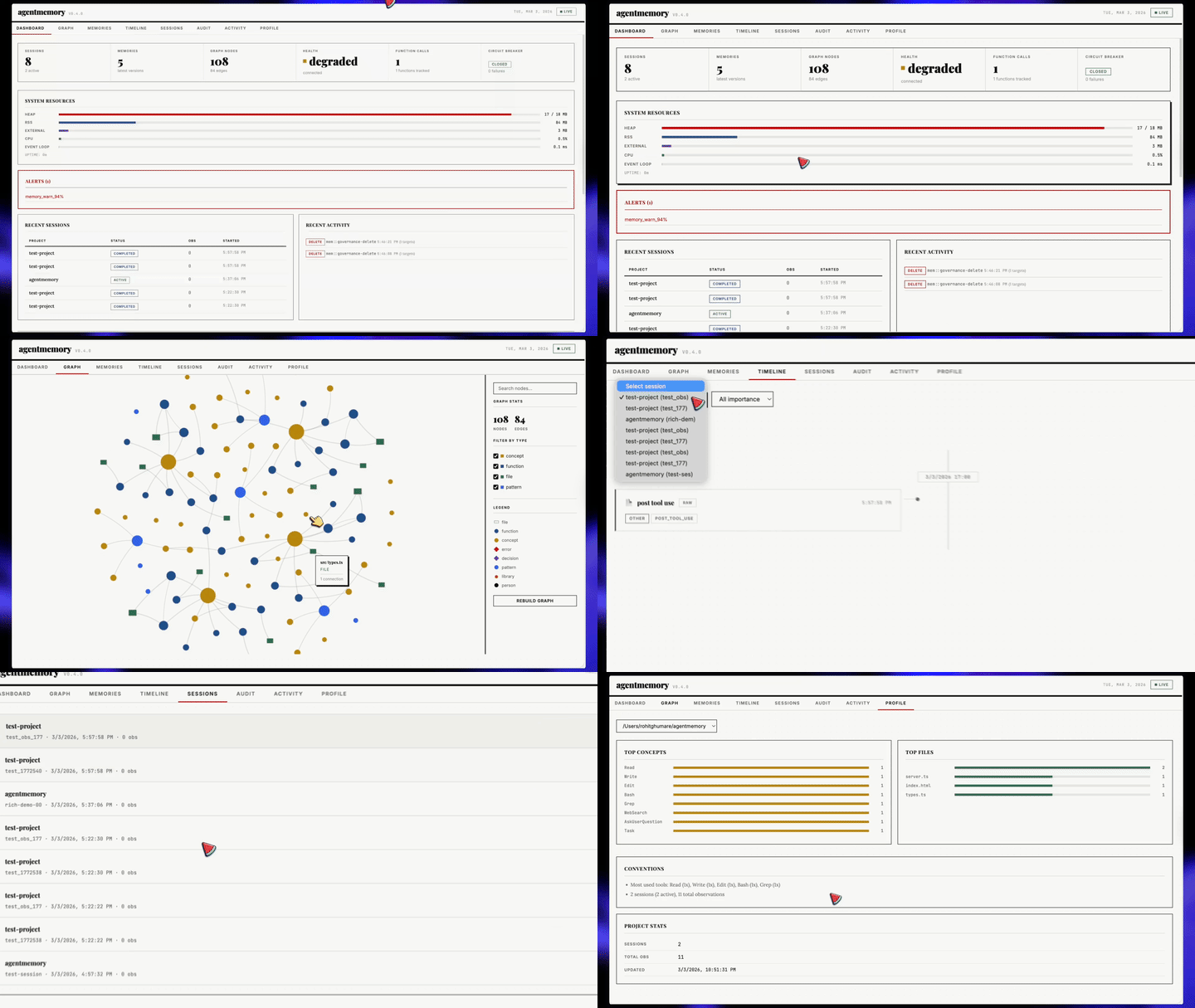
Port `3113` पर auto-start होता है। Viewer connect होने पर एक snapshot load करता है (`GET /agentmemory/viewer/snapshot`) और फिर live stream events apply करता है: नई memories, lessons, observations, audit entries, graph changes और health updates बिना polling या page reloads के दिखाई देती हैं। अन्य केवल वे requests हैं जो आप click करते हैं — actions, "load more" pages, और searches। जब stream drop होता है, viewer दिखाता है कि उसके numbers कितने पुराने हैं, backoff के साथ reconnect करता है, और एक snapshot से resync करता है।
- **चार groups में 12 tabs**, live counts, deep links (`#memories/`, `#sessions/?obs=`, `#graph/`, `#health/consolidation`), keyboard shortcuts, और एक mobile menu के साथ।
- **Memories:** server-side search, project, agent, और type के अनुसार filters, version chain और word diff वाला एक detail panel, provenance links, id/MCP call/curl command के लिए copy buttons, edit (एक नई version), confirmation के साथ forget, bulk forget, और JSON export।
- **Sessions:** readable tool input और output वाली एक inline observation timeline, filters और paging, और हर session से produced memories और lessons।
- **Graph:** search, relations और sources वाला node detail, एक legend जो केवल colour पर निर्भर नहीं करता, और zoom controls।
- **Health:** `GET /agentmemory/status` का live version। हर problem अपने fix के साथ आती है, साथ ही state backend, index save state, graph provenance compaction progress, और असली thresholds वाला एक consolidation explainer।
- **Audit, Activity, Profile, Replay, Lessons, Actions, और Crystals** pages, हर एक में एक empty state जो बताता है कि section क्या है, वह खाली क्यों है, और कौन सा command उसे भरता है, साथ ही हर term और number पर एक `?` glossary tooltip।
```bash
open http://localhost:3113
```
Viewer server default रूप से `127.0.0.1` से bind होता है और REST API को requests forward करते समय server secret attach करता है, इसलिए इसे किसी setup की ज़रूरत नहीं। REST-served `/agentmemory/viewer` endpoint सामान्य bearer-token नियमों का पालन करता है और token के बिना browsers को viewer port पर redirect करता है। CSP headers per-response script nonce का उपयोग करते हैं और inline handler attributes को disable करते हैं (`script-src-attr 'none'`)।
---
`:3113` पर viewer दिखाता है कि आपके agent ने क्या **याद रखा**। [iii console](https://iii.dev/docs/console) दिखाता है कि आपके agent ने क्या **किया**: हर memory op एक OpenTelemetry trace के रूप में, हर KV entry editable, हर function invocable, हर stream tappable। एक ही memory पर दो windows: एक product-shaped, एक engine-shaped।
`memory_smart_search` को fire होते देखें और BM25 scan → embedding lookup → RRF fusion → reranker को waterfall के रूप में देखें। KV browser में stuck consolidation timer को edit करें। `PostToolUse` hook को tweaked payload के साथ replay करें। WebSocket stream को pin करें और observations को live land होते देखें।
agentmemory इसे free में ship करता है क्योंकि हर function call और trigger iii के माध्यम से fire होता है; कुछ भी custom नहीं, instrument करने के लिए कुछ नहीं।
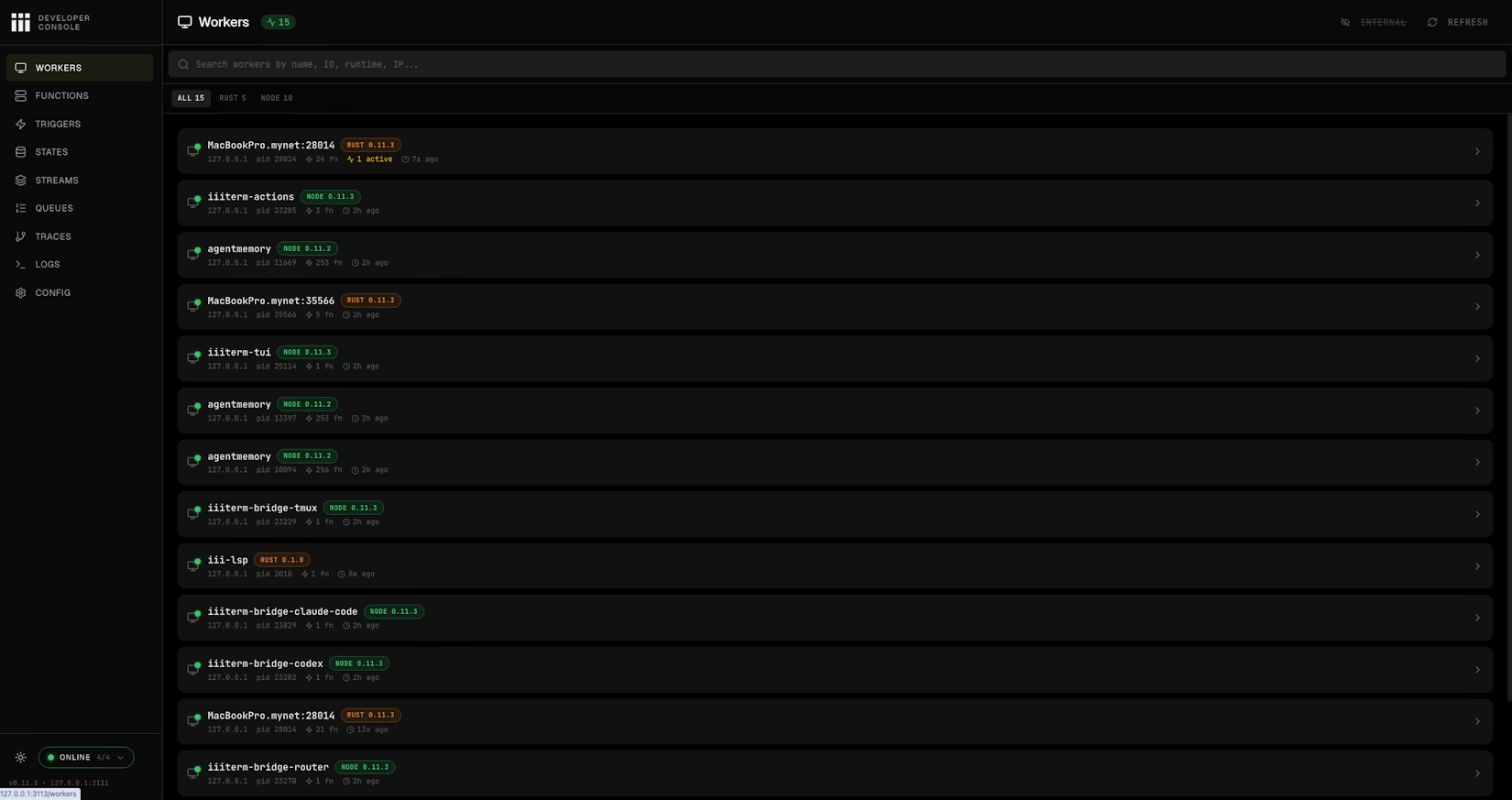
Workers page: हर connected worker, agentmemory स्वयं सहित, PID, function count, runtime, और last-seen के साथ।
**पहले से installed।** Console pinned `iii` engine (0.22+) के साथ ship होता है; कोई अलग installer नहीं। पहली launch console binary को engine के बगल में download करती है।
**agentmemory के साथ launch करें:**
```bash
agentmemory console
```
यह pinned engine का `iii console` उन ports के विरुद्ध चलाता है जो agentmemory ने resolve किए (REST, streams, bridge) और इसे viewer से एक port ऊपर serve करता है, default रूप से `http://localhost:3114`। `--console-port N` कोई और port चुनता है; `--port` और `--instance` उसी तरह agentmemory instance चुनते हैं जैसे वे `stop` के लिए करते हैं; कोई भी अन्य flag pass through होती है, जैसे experimental architecture-graph page के लिए `--enable-flow`।
वही चीज़ हाथ से, तब उपयोगी जब `agentmemory` PATH पर न हो:
```bash
~/.agentmemory/bin/iii console --port 3114 \
--engine-port 3111 \
--ws-port 3112 \
--bridge-port 49134
```
**Console से आप क्या कर सकते हैं:**
| Page | इसके लिए उपयोग करें |
|------|-----------|
| **Workers** | हर connected worker और उसके live metrics देखें, agentmemory worker सहित। |
| **Functions** | agentmemory के किसी भी function को सीधे JSON payload के साथ invoke करें; client जोड़े बिना `memory.recall`, `memory.consolidate`, `graph.query` test करने के लिए उपयोगी। |
| **Triggers** | HTTP, cron, event, और state triggers replay करें: consolidation cron को manually fire करें, HTTP route retry करें, एक state change emit करें। |
| **States** | Sessions, memory slots, lifecycle timers, और embeddings index पर full CRUD वाला KV browser; values को in place edit करें। |
| **Streams** | Memory writes, hook events, और observation updates के लिए live WebSocket monitor क्योंकि वे iii streams से बहते हैं। |
| **Queues** | Durable queue topics + dead-letter management। Failed embedding / compression jobs को replay या drop करें। |
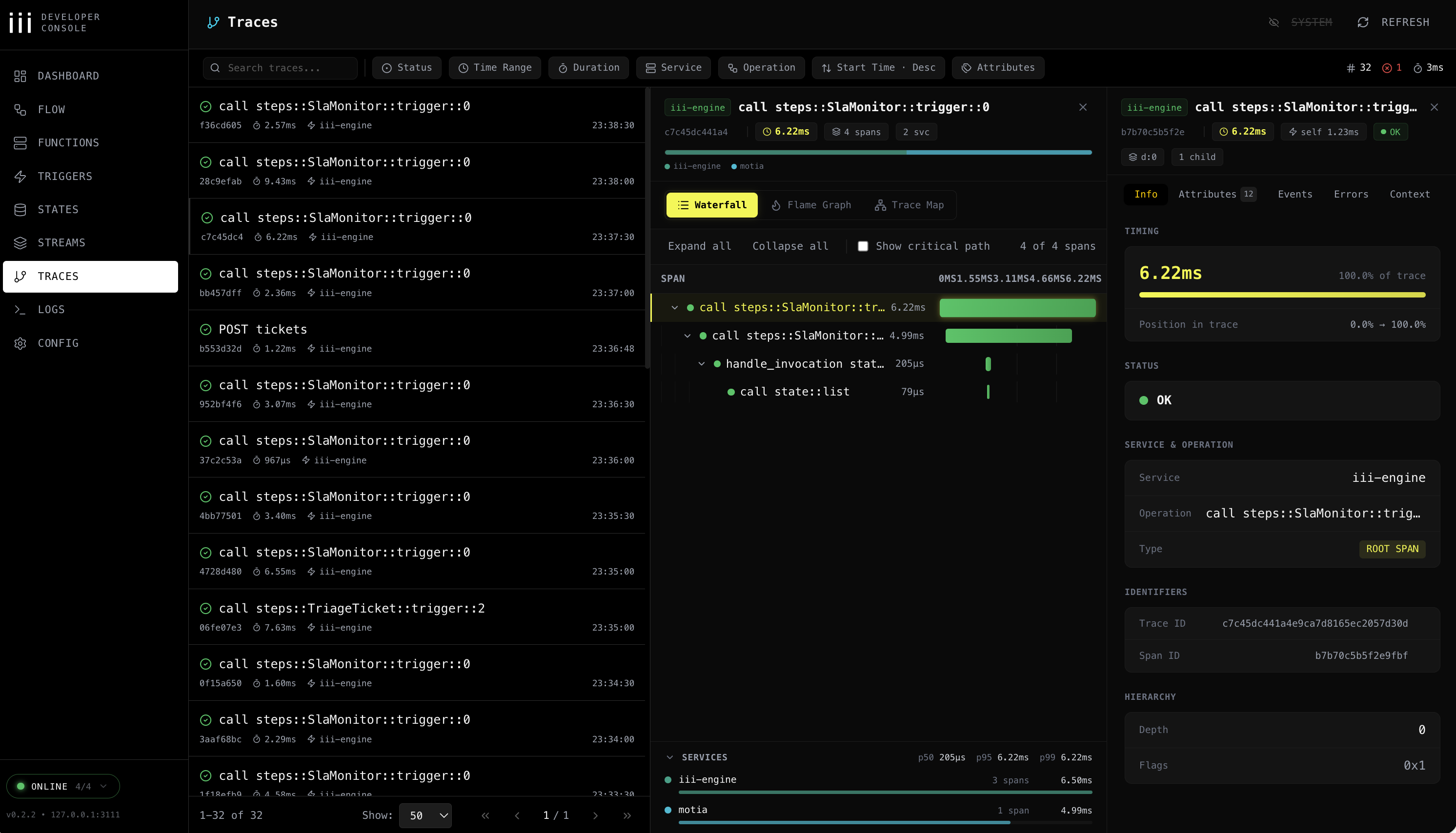
| **Traces** | OpenTelemetry waterfall / flame / service-breakdown views। `trace_id` से filter करें ताकि देख सकें कि एक `memory.search` ने वास्तव में कौन से functions, DB calls, और embedding requests produce किए। |
| **Logs** | Trace/span IDs से correlated और filtered structured OTEL logs। |
| **Config** | Runtime configuration: देखें कि आपका engine किन workers, providers, और ports के साथ चल रहा है। |
| **Flow** | (Optional, `--enable-flow`) हर worker, trigger, और stream का interactive architecture graph। |
Traces: हर memory operation के लिए waterfall / flame / service breakdown।
**Traces पहले से on हैं:**
`iii-config.yaml` `iii-observability` worker enabled (`exporter: memory`, `sampling_ratio: 0.1`, metrics + logs) के साथ ship होता है। कोई extra config की ज़रूरत नहीं; जैसे ही agentmemory शुरू होता है, हर memory operation एक structured log emit करता है जिसे console पढ़ सकता है, और उनमें से हर दसवाँ (`sampling_ratio: 0.1`) एक trace span भी emit करता है।
अगर आप इसके बजाय Jaeger/Honeycomb/Grafana Tempo पर export करना चाहते हैं, तो `exporter: memory` को `exporter: otlp` में बदलें और iii के observability docs के अनुसार collector endpoint set करें।
> **ध्यान दें:** console पर कोई auth enforce नहीं है; इसे `127.0.0.1` (default) से bound रखें और इसे कभी publicly expose न करें।
---
agentmemory **पहले से एक चल रहा [iii](https://iii.dev) instance है**। तीन primitives (worker, function, trigger) runtime compose करते हैं; KV state, streams, और OTEL traces iii के साथ ship होने वाले iii-state, iii-stream, और iii-observability workers से आते हैं। आपने Postgres, Redis, Express, pm2, या Prometheus install नहीं किया, क्योंकि iii उन्हें replace करता है।
इसका मतलब है कि एक और command agentmemory को एक पूरी नई capability के साथ extend करता है।
### agentmemory को और workers के साथ extend करें
जो builtins agentmemory को चाहिए वे पहले से `iii-config.yaml` में हैं और उसके साथ boot होते हैं: `iii-state` (KV), `iii-queue` (event subscribers के लिए durable retries), `iii-pubsub`, `iii-cron`, `iii-stream`, और `iii-observability` (हर function पर OTEL traces, metrics और logs)। [iii worker registry](https://workers.iii.dev) से कुछ भी और उसी engine में plug हो जाता है: `iii-config.yaml` को `~/.agentmemory/iii-config.yaml` में copy करें (CLI bundled file की जगह उस file को prefer करता है और फिर भी उसमें ports और data paths render करता है), entry जोड़ें, `~/.agentmemory/bin/iii update worker` से worker runtime को एक बार install करें, और agentmemory restart करें।
```yaml
workers:
# ...the bundled entries...
- name: database # SQL-backed state adapter when you outgrow the KV defaults
- name: iii-sandbox # run code that came out of memory_recall inside a throwaway VM
- name: mcp # extra MCP servers next to agentmemory's, same engine
```
| Worker | agentmemory के ऊपर आपको क्या मिलता है |
|---|---|
| [`database`](https://workers.iii.dev/workers/database) | जब आप in-memory KV defaults से बाहर निकलते हैं तो एक SQL-backed state adapter |
| [`iii-sandbox`](https://workers.iii.dev/workers/iii-sandbox) | `memory_recall` से निकला code आपके shell में नहीं, एक throwaway VM के अंदर चलता है |
| [`mcp`](https://workers.iii.dev/workers/mcp) | agentmemory के साथ-साथ extra MCP servers खड़े करें, वही engine share करें |
Engine 0.22.x पर ऊपर दिए builtins के लिए `iii-` prefixed names रखें; unprefixed `http`, `state`, `queue`, `pubsub`, और `cron` entries standalone registry workers हैं जिन पर agentmemory 0.23 migration के साथ move होगा।
Full registry: [workers.iii.dev](https://workers.iii.dev)। वहाँ हर worker उन्हीं primitives के माध्यम से compose करता है जिनका agentmemory उपयोग करता है, और आपके पास पहले से जो agentmemory है, वह उनमें से एक है।
### Engine config और bind address
`agentmemory start` पहली मौजूद file से engine config पढ़ता है: `AGENTMEMORY_III_CONFIG`, current directory में `./iii-config.yaml`, `~/.agentmemory/iii-config.yaml`, फिर bundled `iii-config.yaml`। हर start पर यह उस file (data paths, ports, state backend) को `~/.agentmemory/data/iii-config.runtime.yaml` में render करता है और engine को rendered copy के साथ launch करता है, इसलिए source file को edit करें, rendered वाली को नहीं। Source file की `host:` values वैसी ही रखी जाती हैं जैसी लिखी गई थीं।
Bundled `iii-config.yaml` जानबूझकर `127.0.0.1` से bind करता है, और यह default container के अंदर भी लागू होता है। Container में शुरू हुआ CLI container के loopback को सुनता है, इसलिए published ports कहीं नहीं पहुँचते। Published ports के माध्यम से एक containerized CLI serve करने के लिए, `AGENTMEMORY_III_CONFIG` को ऐसी config पर set करें जो `0.0.0.0` से bind करती है। Packaged `iii-config.docker.yaml` ऐसी ही एक config है: यह `iii-http`, `iii-stream`, और engine port को `0.0.0.0` से bind करती है और state को `/data` के अंतर्गत store करती है, इसलिए वहाँ एक writable volume mount करें। `AGENTMEMORY_SECRET` set रखें, और केवल वे ports publish करें जिनकी ज़रूरत है, `127.0.0.1` पर या किसी trusted proxy के पीछे।
इस repo की `docker-compose.yml` CLI के config lookup से नहीं गुज़रती: यह `iii-config.docker.yaml` को `/app/config.yaml` पर mount करती है, और `iii-engine` container `--config /app/config.yaml` के साथ शुरू होता है। One-click [deploy templates](../deploy/) अपने entrypoints में अपनी स्वयं की `0.0.0.0` config लिखते हैं।
### Storage backend: file (default) बनाम redis
`iii-state` और `iii-stream` डिफ़ॉल्ट रूप से iii-engine के bundled file-based KV store का उपयोग करते हैं: प्रति scope एक JSON file, जो engine process की memory में रहती है और एक timer पर disk पर rewrite होती है। Single-user local install के लिए यही सही default है; कई concurrent writers वाला एक shared daemon इसके बजाय Redis से real per-key writes पाता है, प्रति operation एक network round trip की कीमत पर (हर `state::*` call अभी भी एक Redis connection पर serialize होती है, इसलिए यह file store के lock को एक socket से बदलता है, parallelism से नहीं)।
दोनों workers को iii-engine के built-in `redis` adapter पर switch करने के लिए `AGENTMEMORY_STATE_BACKEND=redis` (plus `AGENTMEMORY_REDIS_URL`) set करें, जो हर write पर पूरे scope को rewrite करने के बजाय हर key को एक Redis hash field (`HSET`) के रूप में store करता है:
```env
# ~/.agentmemory/.env
AGENTMEMORY_STATE_BACKEND=redis
AGENTMEMORY_REDIS_URL=redis://localhost:6379
```
`AGENTMEMORY_STATE_BACKEND` डिफ़ॉल्ट रूप से `file` है; इसे unset छोड़ने पर आज का behavior अपरिवर्तित रहता है, और कोई unrecognized value (`file` या `redis` के अलावा कुछ भी) एक silent fallback के बजाय एक startup error है। `/agentmemory/status` और viewer का Health page (State store row) report करते हैं कि कौन-सा backend active है और क्या वह answer कर रहा है, URL कभी नहीं।
**केवल plain `redis://`।** Pinned engine (0.22.1) अपने Redis client को TLS support के बिना build करता है, इसलिए एक `rediss://` URL (ज़्यादातर managed Redis offerings, जैसे Upstash, Redis Cloud, और in-transit encryption वाला ElastiCache, डिफ़ॉल्ट रूप से TLS-only हैं) connect करने में fail होता है। Connection unencrypted है, इसलिए Redis password और हर stored memory wire पर clear text में जाती है: किसी local Redis या किसी trusted private network पर वाले Redis को point करें। किसी भी अन्य Redis के लिए, agentmemory host पर एक encrypted tunnel (stunnel, SSH, या एक VPN) चलाएँ, ताकि plain `redis://` hop उस host पर ही रहे और tunnel का upstream connection encrypted और authenticated हो। अगर किसी Redis password में single quote है, तो उसे percent-encode करें (`%27`); engine URL को parse करने से पहले उसे अपनी YAML config में expand करता है।
**प्रति `--instance` एक Redis server।** Engine के Redis key prefixes (`state:`, `stream::`) fixed हैं, इसलिए एक ही database पर point की गई दो agentmemory instances (`--instance 1`, `--instance 2`, ...) एक-दूसरे का data overwrite कर देती हैं। एक अलग database index (`redis://localhost:6379/1`) stored data को अलग रखता है, लेकिन engine live viewer events को एक Redis pub/sub channel (`stream::events`) पर relay करता है, और Redis pub/sub database index को ignore करता है, इसलिए हर instance का viewer फिर भी दूसरी instance के live events दिखाएगा। एक से ज़्यादा instance चलाते समय हर instance को उसका अपना Redis server (या port) दें।
**क्या वैसा ही रहता है, और क्या अलग होता है।** Redis पर agentmemory का हर feature काम करता है: sessions, observations, memories (remember, supersede, evolve, forget), search और index buckets, lessons, graph, audit log और उसके monthly scopes, export और import, governance deletes, consolidation status, viewer snapshot और उसकी live stream, और health monitor। Engine हर scope को एक Redis hash (`HSET`/`HGET`/`HGETALL`) के रूप में store करता है और file store जैसे ही state triggers fire करता है। तीन engine differences agentmemory के अंदर handle होते हैं:
- Redis किसी scope के records बिना किसी fixed order के return करता है। agentmemory उन्हें सबसे पुराने पहले sort करता है (record id में creation time से, फिर उसके timestamp से) ताकि lists, paging, और export chunks उसी order में आएँ जैसे file store पर।
- Engine Redis पर partial updates को एक Lua script में apply करता है जो empty arrays को empty objects में बदल देता है। agentmemory Redis पर वे updates खुद apply करता है (per-key lock के अंतर्गत read, change, write), इसलिए `tags: []` जैसे fields arrays बने रहते हैं।
- Legacy audit log check, disk पर file store की file ढूँढ़ने के बजाय, old scope को Redis से पढ़ता है।
एक difference को आपकी ज़रूरत है: **Redis restart होने के बाद, engine viewer को live events relay करना बंद कर देता है** जब तक agentmemory restart न हो। Data अभी भी normally save और read होता है। Health monitor हर 30 seconds में Redis के माध्यम से एक test event भेजता है; जब वह वापस नहीं आता, तो `/agentmemory/status` और viewer का Health page fix के साथ "Live updates are not reaching the viewer" दिखाते हैं: agentmemory restart करें। अगर Redis down है, तो status report "The state store is not answering" दिखाती है और उसे check करने का तरीका (`redis-cli -u "$AGENTMEMORY_REDIS_URL" ping`)। एक बहुत बड़े scope को list करना पूरी hash को एक `HGETALL` में पढ़ता है, वही cost जो file store के memory में रखने पर है।
**अनुशंसित Redis settings।** Default `save 3600 1 300 100 60 10000` snapshot policy किसी crash पर मिनटों के writes खो सकती है, जो file store की 5s flush window से भी बुरा है। जो भी खोना आपको बुरा लगे उसके लिए `appendonly yes` set करें। `maxmemory-policy noeviction` set करें; `allkeys-lru` या इसी तरह की कोई चीज़ Redis के memory limit तक पहुँचने पर memories को silently drop कर देती है।
एक native (non-Docker) start, और हर one-click [deploy template](../deploy/) (वे bundled `iii-config.yaml` को overwrite करते हैं और natively start होते हैं), `AGENTMEMORY_STATE_BACKEND`/`AGENTMEMORY_REDIS_URL` पढ़ते हैं और उन्हें launched `iii-config` में render करते हैं। URL खुद उस rendered file में कभी नहीं लिखा जाता, केवल एक `${AGENTMEMORY_REDIS_URL}` reference जिसे engine process boot पर अपने environment से expand करती है। केवल इस repo का अपना Docker Compose path (`AGENTMEMORY_USE_DOCKER=1`, या उस तरह शुरू किए गए engine को resume करना) `iii-config.docker.yaml` को read-only mount करता है और कभी render नहीं करता; `agentmemory start` उस combination को detect करने पर warn करता है। उस file को हाथ से बदलें, [iii-state](https://workers.iii.dev/workers/iii-state) और [iii-stream](https://workers.iii.dev/workers/iii-stream) worker docs में दिखाए गए वही `name: redis` / `config: redis_url: ...` shape का पालन करते हुए, और `redis_url` को container से पहुँच योग्य किसी Redis पर point करें। `docker-compose.yml` `AGENTMEMORY_REDIS_URL` को engine container में pass करता है, इसलिए `redis_url: '${AGENTMEMORY_REDIS_URL}'` वहाँ काम करता है और URL को mounted file से बाहर रखता है।
Rendered config URL को `~/.agentmemory/data/iii-config.runtime.yaml` से बाहर रखती है, लेकिन engine का अपना configuration worker boot होने पर भी *expanded* value को `~/.agentmemory/config/iii-state.yaml` और `iii-stream.yaml` में persist करता है (iii-engine का `${VAR}` expansion उस worker के अपना seed store करने से पहले होता है, और यह resolved value store करता है, reference नहीं)। उस directory को एक credential रखने वाली मानें: किसी shared host पर `chmod 700 ~/.agentmemory` करें, और database की admin credentials के बजाय agentmemory की ज़रूरत तक scoped किसी Redis ACL user को prefer करें।
**Migration automatic नहीं है।** `AGENTMEMORY_STATE_BACKEND` बदलना दोनों तरफ़ एक empty store से शुरू होता है; कुछ भी मौजूदा data को file से Redis में या वापस copy नहीं करता। जिस backend को आप छोड़ रहे हैं उससे export करें और जिस पर जा रहे हैं उसमें import करें। यह bash और zsh दोनों के अंतर्गत समान रूप से चलता है (`bash -u` सहित)। `AUTH=(${AGENTMEMORY_SECRET:+-H "Authorization: Bearer $AGENTMEMORY_SECRET"})` जैसा एक array नहीं चलता: zsh header को एक malformed word के रूप में रखता है जहाँ bash इसे दो में split करता है, इसलिए जब भी `AGENTMEMORY_SECRET` set है दोनों requests 401 होती हैं:
```bash
# 0. Use the generated secret when none is exported:
AGENTMEMORY_SECRET="${AGENTMEMORY_SECRET:-$(cat ~/.agentmemory/secret 2>/dev/null)}"
# 1. On the old backend, while agentmemory is still running on it:
if [ -n "${AGENTMEMORY_SECRET:-}" ]; then
curl -fsS -H "Authorization: Bearer $AGENTMEMORY_SECRET" http://localhost:3111/agentmemory/export > backup.json
else
curl -fsS http://localhost:3111/agentmemory/export > backup.json
fi
# 2. Confirm backup.json is a usable export before switching backends:
jq -e '.version and .exportedAt' backup.json > /dev/null || {
echo "backup.json is not a valid export; do not switch backends" >&2
exit 1
}
# 3. Switch AGENTMEMORY_STATE_BACKEND (and AGENTMEMORY_REDIS_URL if needed),
# restart agentmemory against the new backend, then:
if [ -n "${AGENTMEMORY_SECRET:-}" ]; then
jq -n --slurpfile d backup.json '{exportData: $d[0], strategy: "merge"}' | \
curl -fsS -H "Authorization: Bearer $AGENTMEMORY_SECRET" -X POST http://localhost:3111/agentmemory/import \
-H 'Content-Type: application/json' -d @-
else
jq -n --slurpfile d backup.json '{exportData: $d[0], strategy: "merge"}' | \
curl -fsS -X POST http://localhost:3111/agentmemory/import \
-H 'Content-Type: application/json' -d @-
fi
```
`/agentmemory/export` एक बड़े corpus को कई calls में chunk करने के लिए `?maxSessions=` और `?offset=` भी accept करता है; import पर `strategy` `merge` (default-safe), `replace`, या `skip` होती है।
### iii क्या replace करता है
| Traditional stack | agentmemory उपयोग करता है |
|---|---|
| Express.js / Fastify | iii HTTP Triggers |
| SQLite / Postgres + pgvector | iii KV State + in-memory vector index |
| SSE / Socket.io | iii Streams (WebSocket) |
| pm2 / systemd | iii engine worker supervision |
| Prometheus / Grafana | iii OTEL + health monitor |
| Custom plugin systems | `iii worker add ` |
**219 source files · ~52,000 LOC · 2,500+ tests · 311 functions · 60 KV scopes**, सब कुछ तीन primitives पर। कोई `agentmemory plugin install` नहीं। Plugin system iii स्वयं है।
---
### LLM Providers
agentmemory आपके environment से providers को auto-detect करता है। एक provider LLM-backed operations को उपलब्ध कराता है, लेकिन केवल provider configuration LLM-written observation compression को enable नहीं करता। उस path के लिए provider और `AGENTMEMORY_AUTO_COMPRESS=true` दोनों चाहिए।
| Provider | Config | नोट्स |
|----------|--------|-------|
| **No-op (default)** | कोई config की ज़रूरत नहीं | LLM-backed compress/summarize disabled है। Synthetic compression और BM25 recall अभी भी काम करते हैं। अगर आप पहले Claude-subscription fallback पर निर्भर थे तो नीचे `AGENTMEMORY_ALLOW_AGENT_SDK` देखें। |
| Anthropic API | `ANTHROPIC_API_KEY` | Per-token billing |
| MiniMax | `MINIMAX_API_KEY` | Anthropic-compatible |
| Gemini | `GEMINI_API_KEY` | Embeddings भी enable करता है |
| OpenRouter | `OPENROUTER_API_KEY` | कोई भी model |
| OpenAI API | `OPENAI_API_KEY` | Default `gpt-5.6-luna`, `OPENAI_MODEL` से override करें |
| **Local (Ollama / LM Studio / vLLM / llama.cpp)** | `OPENAI_API_KEY=local` + `OPENAI_BASE_URL=http://localhost:11434/v1` (Ollama) या `http://localhost:1234/v1` (LM Studio) + `OPENAI_MODEL=` | कुछ भी OpenAI-API-compatible। Zero cost, आपके hardware पर चलता है। नीचे [Local models](#local-models-ollama--lm-studio--vllm) देखें। |
| Claude subscription fallback | `AGENTMEMORY_ALLOW_AGENT_SDK=true` | केवल opt-in। `@anthropic-ai/claude-agent-sdk` sessions spawn करता है; यह पहले unbounded Stop-hook recursion का कारण बनता था, इसलिए यह अब default नहीं है। |
### Local models (Ollama / LM Studio / vLLM)
agentmemory किसी भी OpenAI-API-compatible server से बात करता है, इसलिए `/v1/chat/completions` expose करने वाली कोई भी चीज़ code changes के बिना काम करती है। कोई paid keys नहीं, कोई cloud नहीं, कोई rate limits नहीं; पूरी तरह आपके hardware पर चलता है।
**Ollama** (default port `11434`):
```bash
ollama pull qwen3:8b # or qwen3:4b, gpt-oss:20b, qwen3-coder:30b, etc.
ollama serve
```
```env
# ~/.agentmemory/.env
OPENAI_API_KEY=ollama # any non-empty string; Ollama ignores it
OPENAI_BASE_URL=http://localhost:11434/v1
OPENAI_MODEL=qwen3:8b
```
**LM Studio** (default port `1234`):
LM Studio खोलें → Local Server टैब → Start Server। Picker से कोई भी chat model चुनें (Qwen 3, gpt-oss, DeepSeek R1, आदि)।
```env
# ~/.agentmemory/.env
OPENAI_API_KEY=lmstudio # any non-empty string; LM Studio ignores it
OPENAI_BASE_URL=http://localhost:1234/v1
OPENAI_MODEL=qwen3-8b # match the model name from LM Studio
```
**vLLM / llama.cpp / Text Generation Inference**: वही shape। `OPENAI_BASE_URL` को उस URL पर point करें जिसे आपका server expose करता है और `OPENAI_MODEL` को एक ऐसे नाम पर set करें जिसे आपका server स्वीकार करेगा।
**Memory work के लिए model picks**: compression और summarization छोटे tasks हैं (<2K tokens in, <500 tokens out) जिनके लिए एक 7B instruct model पर्याप्त है। सिफ़ारिशें:
| Model | Size | क्यों |
|-------|------|-----|
| `qwen3:8b` | ~5.2 GB | 16 GB machine पर balanced default; extraction और tool-shaped text में मज़बूत |
| `qwen3:4b` | ~2.6 GB | सबसे छोटा sane विकल्प; compression के लिए ठीक, graph extraction के लिए कमज़ोर |
| `qwen3-coder:30b` | ~19 GB | 24-32 GB hardware पर code-shaped sessions के लिए सर्वश्रेष्ठ local pick (30B MoE, 3.3B active) |
| `gpt-oss:20b` | ~14 GB | 16 GB RAM में fit होने वाला मज़बूत general model |
| `deepseek-r1:8b` | ~5.2 GB | Reasoning distill; धीमा लेकिन साफ़ extractions |
Qwen 3 models default रूप से think करते हैं और किसी भी output से पहले पूरा token budget reasoning पर खर्च कर सकते हैं। Graph-extraction prompts में `/no_think` append करने के लिए `AGENTMEMORY_LLM_NOTHINK=1` set करें, और अगर extractions खाली आती हैं तो `MAX_TOKENS` बढ़ाएँ (16384 काम करता है)।
Reasoning-class models (`` blocks वाले `o1`-style) खाली `content` के साथ एक `reasoning` field return कर सकते हैं जिसे आपका local server शायद surface न करे। अगर extractions blank आती हैं, तो पहले एक non-reasoning model पर switch करें। `OPENAI_REASONING_EFFORT=none` env उन Ollama Cloud thinking models पर भी thinking disable कर सकता है जो OpenAI reasoning schema को mirror करते हैं।
Local embeddings एक optional dependency के रूप में ship होती हैं लेकिन default रूप से enabled नहीं हैं। `Xenova/all-MiniLM-L6-v2` (384-dim) में opt in करने के लिए `EMBEDDING_PROVIDER=local` set करें। पहला embedding request model को download करता है; उसके बाद inference on-device चलता है। उस setting या किसी remote embedding key के बिना, vectors disabled रहते हैं, `mem::search` BM25 का उपयोग करता है, और `smart-search` फिर भी मौजूदा graph matches जोड़ सकता है।
### Cost-aware model selection
जब LLM-written background compression एक provider और `AGENTMEMORY_AUTO_COMPRESS=true` दोनों के साथ enabled होता है, तो यह हर observation पर चलता है, इसलिए model choice monthly spend को meaningfully बदलता है। Captured workload data: 635 requests / 888K tokens / 35 hours of active use, 2026-05-23 pricing पर तीन OpenRouter models पर चलाया गया।
| Tier | Model | Input / 1M | Output / 1M | Captured 35h के लिए cost | नोट्स |
|------|-------|------------|-------------|---------------------------|-------|
| अनुशंसित | `deepseek/deepseek-v4-flash-0731` | $0.07 | $0.14 | ~$0.07 (est.) | नवीनतम DeepSeek; compression workloads के लिए सबसे सस्ता अनुशंसित pick। |
| अनुशंसित | `deepseek/deepseek-v4-pro` | $0.435 | $0.87 | ~$0.46 | Sonnet से ~10× कम cost पर solid compression + summarization quality। |
| अनुशंसित | `qwen/qwen3-coder` | $0.45 | $1.80 | ~$0.55 | अगर आपके sessions भारी रूप से code-shaped हैं तो strong code reasoning। |
| Premium | `anthropic/claude-sonnet-5` | $3.00 | $15.00 | ~$5.02 (est.) | Measured Sonnet 4.6 run के समान list price; 2026-08-31 तक $2/$10 intro pricing। |
| Premium | `openai/gpt-5.6-sol` | $5.00 | $30.00 | ~$9 (est.) | Flagship tier; always-on background work के लिए महंगा। |
| बचें | `anthropic/claude-opus-5` | $5.00 | $25.00 | ~$8.40 (est.) | Flagship-class model; compression के लिए overspend। |
Measured rows captured run से आती हैं; (est.) rows उसी token mix को हर model की list price से scale करती हैं।
जब `OPENROUTER_MODEL` premium-tier pattern से match करता है तो agentmemory एक runtime warning print करता है। जब आप informed choice कर लें तो silence करने के लिए `AGENTMEMORY_SUPPRESS_COST_WARNING=1` set करें।
Memory work के लिए quality बनाम cost tradeoff: compression एक summarization task है जिसमें अपेक्षाकृत loose quality bars हैं (agent summary को re-read करता है, user नहीं)। DeepSeek V4 Flash / V4 Pro / Qwen3-Coder इस task पर Sonnet से rounding error के भीतर land होते हैं जबकि 10-70× कम cost में। Premium-tier models को उन queries के लिए save करें जिन्हें आप सीधे पढ़ते हैं।
Sources: [Claude Sonnet 5 के लिए OpenRouter pricing](https://openrouter.ai/anthropic/claude-sonnet-5), [DeepSeek V4 Flash](https://openrouter.ai/deepseek/deepseek-v4-flash-0731), [DeepSeek pricing नोट्स](https://api-docs.deepseek.com/quick_start/pricing/)।
### Multi-agent memory (`AGENT_ID` + `AGENTMEMORY_AGENT_SCOPE`)
Multi-agent setups में जहाँ कई roles एक agentmemory server share करते हैं (architect / developer / reviewer / researcher / support-agent), `AGENT_ID` हर write को उस role से tag करता है जिसने इसे किया। `AGENTMEMORY_AGENT_SCOPE` यह control करता है कि recall उस tag के द्वारा filter करता है या नहीं।
```env
TEAM_ID=company
USER_ID=engineering-team
AGENT_ID=architect
AGENTMEMORY_AGENT_SCOPE=isolated # optional; default "shared"
```
दो modes:
| Mode | Writes को tag करें | Recall filter करें | कब उपयोग करें |
|------|------------|---------------|-------------|
| `shared` (default) | हाँ | नहीं | Audit trail के साथ cross-agent context। Architect देख सकता है कि developer ने क्या note किया, लेकिन हर row record करती है कि किसने कहा। |
| `isolated` | हाँ | हाँ | सख्त separation। Architect कभी developer के observations / memories / sessions नहीं देखता। |
जब `AGENT_ID` set होता है तो क्या tagged होता है: `Session.agentId`, `RawObservation.agentId`, `CompressedObservation.agentId`, `Memory.agentId`। Role `api::session::start` → `mem::observe` → `mem::compress` → KV से flow करता है।
Isolated mode में क्या filter होता है: `mem::smart-search`, `/agentmemory/memories`, `/agentmemory/observations`, `/agentmemory/sessions`। प्रत्येक endpoint per-request override के लिए `?agentId=` और env scope से पूरी तरह से opt out करने के लिए `?agentId=*` accept करता है। `/memories` AGENT_ID से पहले के memories को surface करने के लिए `?includeOrphans=true` भी accept करता है जिनकी `agentId` undefined है।
SDK / REST layer पर per-call override: हर mutating endpoint (`/session/start`, `/remember`) request body में एक `agentId` field accept करता है जो env से जीतता है। एक server process के माध्यम से कई roles को route करने वाले runtimes के लिए उपयोगी। MCP `memory_save` tool वही `agentId` field expose करता है, standalone stdio server `agentId` और `project` दोनों forward करता है, और saved memories `agentId` को search index में carry करती हैं, इसलिए agent-scoped search observations के साथ-साथ memories को भी cover करती है।
जब `AGENT_ID` unset होता है, तो memory unscoped रहती है (legacy behavior, कोई tags नहीं, कोई filters नहीं)।
### Ports
agentmemory + iii-engine default रूप से चार ports पर bind होते हैं। अगर एक restart `port in use` के साथ fail होता है, तो यह table बताती है कि किस process को देखना है।
| Port | Process | उद्देश्य | Env override |
|------|---------|---------|--------------|
| `3111` | agentmemory | REST API + MCP HTTP + `/agentmemory/health` + `/agentmemory/livez` | `III_REST_PORT` |
| `3112` | iii-engine | Internal streams worker (agentmemory + viewer द्वारा consumed) | `III_STREAM_PORT` (preferred) या legacy `III_STREAMS_PORT` |
| `3113` | agentmemory | Real-time viewer (`http://localhost:3113`) | reported URL के लिए `III_VIEWER_PORT` या `AGENTMEMORY_VIEWER_URL` |
| `49134` | iii-engine | WebSocket; workers यहाँ register होते हैं, OTel telemetry इसी पर flow होती है | `III_ENGINE_PORT` या `III_ENGINE_URL` |
`--port ` REST anchor बदलता है और streams `N+1`, viewer `N+2`, और engine WebSocket `N+46023` derive करता है, लेकिन केवल तब जब ऊपर दिया matching explicit port या URL unset हो। यह कोई isolated lifecycle namespace नहीं बनाता। दूसरे daemon के लिए `--instance 1` का उपयोग करें; यह anchor 3211 उपयोग करता है, डिफ़ॉल्ट रूप से `3211/3212/3213/49234`, और एक अलग `instance-1` data और lifecycle directory पाता है। Instances 1 से 50 तक वही pattern follow करते हैं।
Pinned engine `--no-update-check` के साथ शुरू होता है (boot पर GitHub के विरुद्ध कोई update या security-advisory lookup नहीं) और iii के anonymous usage telemetry को off के साथ: agentmemory अपने spawn किए engine के लिए `III_TELEMETRY_ENABLED=false` set करता है जब तक आप स्वयं वह variable export न करें, और bundled compose file भी वही करती है।
Crashed run के बाद ports bound रहने पर stale-process cleanup:
```bash
# macOS / Linux — find whatever is on each port and kill it
lsof -i :3111,3112,3113,49134
pkill -f agentmemory || true
pkill -f 'iii ' || true
# Windows
netstat -ano | findstr ":3111 :3112 :3113 :49134"
taskkill /F /PID
```
`agentmemory stop` graceful native shutdown पर worker और engine pidfile दोनों को साफ़ रूप से reap करता है। Docker mode में यह native worker को flush करता है, exact validated engine container को stop करता है, और एक lossless restart के लिए container और उसके `/data` mount दोनों को preserve करता है; अगला start उसी container को validate और resume करता है। Docker-backed uninstall के लिए `agentmemory remove --keep-data` चाहिए: यह shared agentmemory-managed files को हटाता है जबकि validated container, उसका data mount, और उन्हें recover करने के लिए ज़रूरी lifecycle record preserve करता है। Destructive Docker data deletion जानबूझकर backup के बाद operator पर छोड़ा गया है। CLI Docker या VM port holders (Docker backend, vpnkit, colima) को native engine के रूप में adopt या signal करने से भी मना करता है जब तक `--force` pass न किया जाए। ऊपर का manual cleanup केवल post-crash case के लिए है जहाँ कोई भी pidfile पीछे नहीं छोड़ी गई।
### Config File
हर shell में variables export करने के बजाय agentmemory runtime configuration को `~/.agentmemory/.env` में रखें। अगर viewer `export ANTHROPIC_API_KEY=...` जैसा setup hint दिखाता है, तो इसे `export` prefix के बिना इस file में `ANTHROPIC_API_KEY=...` के रूप में copy करें, फिर agentmemory restart करें।
Process environment variables अभी भी काम करते हैं और file में values पर precedence लेते हैं।
Windows पर, वही file `%USERPROFILE%\.agentmemory\.env` पर रहती है:
```powershell
New-Item -ItemType Directory -Force $HOME\.agentmemory
notepad $HOME\.agentmemory\.env
```
API key के बजाय Claude Code Pro/Max subscription के साथ test करने के लिए, explicitly opt in करें:
```env
AGENTMEMORY_ALLOW_AGENT_SDK=true
AGENTMEMORY_AUTO_COMPRESS=true
```
LLM-written observation compression के लिए दोनों lines चाहिए: एक LLM provider तक access (इस explicit subscription fallback सहित) और `AGENTMEMORY_AUTO_COMPRESS=true`। सिर्फ़ एक provider default synthetic compression path को ही जगह पर छोड़ देता है।
Consolidation (graph nodes, lessons, crystals) जब भी कोई LLM provider configured होता है तो default रूप से on रहता है। अगर आप LLM-free operation चाहते हैं तो `CONSOLIDATION_ENABLED=false` के साथ explicitly opt out करें। Graph extraction एक अलग flag है:
```env
GRAPH_EXTRACTION_ENABLED=true
# CONSOLIDATION_ENABLED=false # opt out of auto-consolidation
```
### Environment Variables
`~/.agentmemory/.env` बनाएँ:
```env
# LLM provider (pick one — default is the no-op provider: no LLM calls)
# ANTHROPIC_API_KEY=sk-ant-...
# ANTHROPIC_BASE_URL=... # Optional: Anthropic-compatible proxy / Azure
# GEMINI_API_KEY=...
# OPENROUTER_API_KEY=...
# MINIMAX_API_KEY=...
# OPENAI_API_KEY=*** # NOTE: this same key auto-activates BOTH the
# # OpenAI LLM provider (here) AND the OpenAI
# # embedding provider (further below). Set
# # OPENAI_API_KEY_FOR_LLM=false to scope it
# # to embeddings only.
# OPENAI_BASE_URL=https://api.openai.com # Optional: override for Azure / vLLM / LM Studio / proxies
# # Azure: https://.openai.azure.com/openai/deployments/
# # Auto-detected from `.openai.azure.com` hostname; uses
# # api-key header + api-version query param.
# OPENAI_API_VERSION=2024-08-01-preview # Optional: Azure api-version query param
# OPENAI_MODEL=gpt-5.6-luna # Optional: default model
# OPENAI_TIMEOUT_MS=60000 # Optional: OpenAI-scoped alias for the outbound fetch
# # timeout. Takes precedence over AGENTMEMORY_LLM_TIMEOUT_MS
# # for back-compat with v0.9.17. New configs should
# # prefer the global AGENTMEMORY_LLM_TIMEOUT_MS below.
# OPENAI_REASONING_EFFORT=none # Optional: "low" | "medium" | "high" | "none"
# # Honored only by OpenAI's reasoning models (o1, o3,
# # gpt-*-reasoning) and providers that mirror that
# # schema (Ollama Cloud thinking models). Standard
# # chat models reject this field with 400. Set to
# # "none" for thinking models that return reasoning
# # but no content.
# OPENAI_API_KEY_FOR_LLM=false # Optional: set to false to skip OpenAI auto-detection
# # for LLM (useful if you only want OpenAI for embeddings)
# Opt-in Claude-subscription fallback (spawns @anthropic-ai/claude-agent-sdk);
# leave OFF unless you understand the Stop-hook recursion risk:
# AGENTMEMORY_ALLOW_AGENT_SDK=true
# Embedding provider (BM25-only when unset; local is an explicit opt-in)
# EMBEDDING_PROVIDER=local
# VOYAGE_API_KEY=...
# OPENAI_API_KEY=sk-...
# OPENAI_BASE_URL=https://api.openai.com # Override for Azure / vLLM / LM Studio / proxies
# OPENAI_EMBEDDING_MODEL=text-embedding-3-small
# OPENAI_EMBEDDING_DIMENSIONS=1536 # Required when the model is not in the known-models table
# OPENAI_EMBEDDING_BASE_URL=https://... # Embeddings only; falls back to OPENAI_BASE_URL
# OPENAI_EMBEDDING_API_KEY=sk-... # Embeddings only; wins over OPENAI_API_KEY when set
# Outbound LLM / embedding timeout
# AGENTMEMORY_LLM_TIMEOUT_MS=60000 # Default: 60 000 ms (60 s). Applies to every
# raw-fetch provider (Gemini, OpenRouter, MiniMax,
# OpenAI LLM, OpenAI/Cohere/Voyage/OpenRouter
# embedding). For the OpenAI LLM path, the
# OpenAI-scoped OPENAI_TIMEOUT_MS alias (above)
# takes precedence when set, for back-compat
# with v0.9.17.
# Increase for slow networks or large batch calls;
# decrease to fail-fast on rate-limit holds.
# Search tuning
# BM25_WEIGHT=0.4
# VECTOR_WEIGHT=0.6
# TOKEN_BUDGET=2000
# Auth (generated into ~/.agentmemory/secret on first start when unset)
# AGENTMEMORY_SECRET=your-secret
# VIEWER_ALLOWED_ORIGINS=https://memory.example.com
# AGENTMEMORY_IMPORT_ROOT=~/projects
# Ports (defaults: 3111 API, 3113 viewer)
# III_REST_PORT=3111
# Engine usage telemetry (iii). Off unless you set it; true opts in.
# III_TELEMETRY_ENABLED=false
# Features
# AGENTMEMORY_AUTO_COMPRESS=false # OFF by default. Requires an LLM
# provider as well. When both are on,
# every PostToolUse hook calls your
# LLM provider to compress the
# observation — expect significant
# token spend on active sessions.
# AGENTMEMORY_SLOTS=false # OFF by default. Editable pinned
# memory slots — persona,
# user_preferences, tool_guidelines,
# project_context, guidance,
# pending_items, session_patterns,
# self_notes. Size-limited; agent
# edits via memory_slot_* tools.
# Pinned slots addressable for
# SessionStart injection.
# AGENTMEMORY_REFLECT=false # OFF by default. Requires SLOTS=on.
# Stop hook fires mem::slot-reflect:
# scans recent observations, auto-
# appends TODOs to pending_items,
# counts patterns in
# session_patterns, records touched
# files in project_context. Fire-
# and-forget; does not block.
# AGENTMEMORY_INJECT_CONTEXT=false # OFF by default. When on:
# - SessionStart may inject ~1-2K
# chars of project context into
# the first turn of each session
# (this is what actually reaches
# the model — Claude Code treats
# SessionStart stdout as context)
# - PreToolUse fires /agentmemory/enrich
# on every file-touching tool call
# (resource cleanup, not a token
# fix — PreToolUse stdout is debug
# log only per Claude Code docs)
# Observations are still captured via
# PostToolUse regardless of this flag.
# GRAPH_EXTRACTION_ENABLED=false
# AGENTMEMORY_LLM_NOTHINK=1 # Local reasoning models only: ask the
# model to skip its hidden thinking pass
# during graph extraction. Faster runs;
# relation quality can drop slightly.
# CONSOLIDATION_ENABLED=false # on by default when an LLM provider is configured
# LESSON_DECAY_ENABLED=true
# OBSIDIAN_AUTO_EXPORT=false
# AGENTMEMORY_EXPORT_ROOT=~/.agentmemory
# CLAUDE_MEMORY_BRIDGE=false
# SNAPSHOT_ENABLED=false
# Storage and durability
# AGENTMEMORY_STATE_BACKEND=file # file (default) or redis; see "Storage backend" below
# AGENTMEMORY_REDIS_URL=redis://localhost:6379 # Required with redis, plain redis:// only
# AGENTMEMORY_STATE_SAVE_INTERVAL_MS=2000 # How often the engine writes file state to disk.
# A hard kill loses at most this window.
# AGENTMEMORY_INDEX_SAVE_INTERVAL_MS=600000 # Minimum time between search index saves;
# shutdown and deletes still save at once.
# AGENTMEMORY_GRAPH_COMPACT_ON_BOOT=true # One-time background trim of oversized graph
# provenance; false skips it
# Sessions
# AGENTMEMORY_SESSION_SWEEP_ENABLED=true # Hourly sweep marks sessions left active past
# the threshold as abandoned. Deletes nothing;
# new activity makes the session active again.
# AGENTMEMORY_SESSION_SWEEP_STALE_HOURS=24
# Capture filters (hooks)
# AGENTMEMORY_CAPTURE_ALLOW= # Comma or space list of tool names or globs;
# when set, only these tools are captured
# AGENTMEMORY_CAPTURE_DENY= # Extra names or globs to skip, added to the
# defaults: memory_*, toolsearch,
# listmcpresources, fetchmcpresource
# AGENTMEMORY_CAPTURE_OUTPUT_MAX=8000 # Max characters of tool output per observation
# AGENTMEMORY_PRE_COMPACT_BUDGET=1500 # Token budget for PreCompact context; 0 disables
# Audit log
# AGENTMEMORY_AUDIT_RETENTION_MONTHS=0 # Drop month scopes older than N months; 0 keeps all
# AGENTMEMORY_AUDIT_INDEX_PERSIST=false # 1 or true records index migration and cleanup
# rows (debugging only)
# Team
# TEAM_ID=
# USER_ID=
# TEAM_MODE=private
# Tool visibility: "all" (54 tools, default) or "core" (8 tools, lean)
# AGENTMEMORY_TOOLS=core
```
---
Port `3111` पर 138 endpoints। REST API default रूप से `127.0.0.1` से bind होता है। Protected endpoints `Authorization: Bearer ` की आवश्यकता रखते हैं, और mesh sync endpoints दोनों peers पर एक explicitly set `AGENTMEMORY_SECRET` की आवश्यकता रखते हैं।
**Authentication डिफ़ॉल्ट रूप से on है।** जब `AGENTMEMORY_SECRET` set नहीं है (shell में या `~/.agentmemory/.env` में), server पहले start पर एक random secret generate करता है और इसे mode `0600` के साथ `~/.agentmemory/secret` में store करता है। हर bundled client किसी local server से बात करते समय इसे वहाँ से पढ़ता है: CLI, viewer, `plugin/scripts` के अंतर्गत hooks, MCP server और `@agentmemory/mcp` shim, `agentmemory connect` द्वारा लिखी गई configs, और bundled OpenCode, Pi, OpenClaw, Hermes, और filesystem-watcher integrations। Stored secret केवल loopback URLs (`localhost`, `127.0.0.0/8`, `::1`) पर भेजा जाता है। एक explicit `AGENTMEMORY_SECRET` हमेशा जीतता है, और remote clients को फिर भी इसे set करना होता है। Docker और `deploy/` entrypoints पहले से अपना स्वयं का secret generate और export करते हैं। API को हाथ से call करने के लिए:
```bash
curl -H "Authorization: Bearer $(cat ~/.agentmemory/secret)" http://localhost:3111/agentmemory/health
```
**Writes के लिए request rules।** REST API और viewer को `POST`, `PUT`, `PATCH`, और `DELETE` requests, जब भी उनके पास एक body हो, `Content-Type: application/json` भेजनी चाहिए (एक `charset` parameter ठीक है), और एक `Origin` header, जब मौजूद हो, configured REST या viewer port के लिए एक loopback origin होना चाहिए या `VIEWER_ALLOWED_ORIGINS` (comma-separated, जैसे `https://memory.example.com`) में सूचीबद्ध होना चाहिए। बिना `Origin` header भेजने वाले clients (CLI, hooks, MCP, curl, server-to-server) प्रभावित नहीं होते। Viewer अपना स्वयं का origin भी accept करता है।
**File paths।** Files पढ़ने या लिखने वाले endpoints (`/compress-file`, `/replay/import-jsonl`, `/graph/import-graphify`) केवल `~/.agentmemory`, instance data directory, या `AGENTMEMORY_IMPORT_ROOT` में सूचीबद्ध किसी directory के अंतर्गत paths accept करते हैं (कई को `:` से अलग करें, Windows पर `;` से)। `/replay/import-jsonl` अपने default `~/.claude/projects` को भी accept करता है। `/obsidian/export` `AGENTMEMORY_EXPORT_ROOT` के अंदर और `/migrate` `~/.agentmemory` के अंदर रहता है। Symlinks हर check से पहले resolve किए जाते हैं।
**Secret scrubbing।** API keys, bearer tokens, PEM private key blocks, और URLs में embedded credentials (`scheme://user:password@host`) को text store होने से पहले हर write path पर redact किया जाता है: observations, remember, evolve, slots, lessons, actions, sketches, signals, checkpoints, imports, jsonl replay, mesh sync, team shares, compression और summary output, crystals, और graph nodes।
मुख्य endpoints
| Method | Path | विवरण |
|--------|------|-------------|
| `GET` | `/agentmemory/health` | Health check (हमेशा public) |
| `GET` | `/agentmemory/status` | क्या गलत है और उसे कैसे ठीक करें (browsers के लिए HTML, अन्यथा JSON) |
| `GET` | `/agentmemory/viewer/snapshot` | viewer जो कुछ भी दिखाता है, एक response में |
| `POST` | `/agentmemory/session/start` | Session शुरू करें + context प्राप्त करें |
| `POST` | `/agentmemory/session/end` | Session समाप्त करें |
| `POST` | `/agentmemory/observe` | Observation capture करें (नीचे capture delivery देखें) |
| `GET` | `/agentmemory/capture` | Capture inbox, dead letters, और offline spool |
| `POST` | `/agentmemory/capture/retry` | Dead-letter captures को retry करें |
| `POST` | `/agentmemory/capture/drain` | Local offline spool अभी भेजें |
| `POST` | `/agentmemory/smart-search` | Hybrid search |
| `POST` | `/agentmemory/context` | Context generate करें |
| `POST` | `/agentmemory/remember` | Long-term memory में save करें |
| `POST` | `/agentmemory/forget` | Observations delete करें |
| `POST` | `/agentmemory/enrich` | File context + memories + bugs |
| `GET` | `/agentmemory/profile` | Project profile |
| `GET` | `/agentmemory/export` | सभी data export करें |
| `POST` | `/agentmemory/import` | JSON से import करें |
| `POST` | `/agentmemory/graph/query` | Knowledge graph query |
| `POST` | `/agentmemory/graph/compact` | Oversized graph provenance को trim करें |
| `POST` | `/agentmemory/team/share` | Team के साथ share करें |
| `GET` | `/agentmemory/audit` | Audit trail |
Full endpoint list: [`src/triggers/api.ts`](../src/triggers/api.ts)
**Capture delivery।** Hooks हर observation को एक `eventId` के साथ `POST /agentmemory/observe` पर एक बार भेजते हैं। जब payload के पास अपना एक id होता है (उदाहरण के लिए Claude Code का `tool_use_id`) तो यह call के लिए host की अपनी id होती है, अन्यथा session, hook type, tool name, input, output, और host timestamp का एक hash। Server event को state store में एक capture inbox में लिखता है, observation को store करता है, फिर inbox entry को हटा देता है। Status code बताता है कि क्या हुआ:
| Status | `status` field | अर्थ |
|---|---|---|
| `201` | `accepted` | Stored। `observationId` नई observation है। |
| `202` | `accepted` (`state: "retrying"`) | Accepted, लेकिन storing fail हो गया। Server इसे retry करता है, एक restart के बाद भी। |
| `200` | `duplicate` | यह `eventId` पहले ही accepted था। `observationId` मौजूदा observation है; कुछ भी नया store नहीं होता। |
| `400` / `422` | `rejected` | Invalid payload, या storing हमेशा के लिए fail हो गया (event को एक dead letter के रूप में रखा जाता है)। |
| `503` | `rejected` (`retryable: true`) | Inbox full है (`AGENTMEMORY_CAPTURE_INBOX_MAX`)। Hooks event को spool करते हैं और बाद में भेजते हैं। |
Failed events को हर `AGENTMEMORY_CAPTURE_RETRY_INTERVAL_MS` (10 s) पर doubling backoff के साथ retry किया जाता है, `AGENTMEMORY_CAPTURE_MAX_ATTEMPTS` (5) तक। जो events फिर भी fail होते रहते हैं वे dead letters के रूप में inbox में रहते हैं, `/agentmemory/status` और viewer के Health page पर list होते हैं, और `POST /agentmemory/capture/retry` (`{"eventId": "..."}` या `{"all": true}`) से retry किए जा सकते हैं। Accepted event ids को `AGENTMEMORY_CAPTURE_DEDUP_HOURS` (168 hours, अधिकतम `AGENTMEMORY_CAPTURE_EVENTS_MAX` ids) तक याद रखा जाता है, इसलिए किसी timeout या restart के बाद replayed हुआ एक hook एक बार store होता है, जबकि अपनी-अपनी host ids वाली दो अलग tool calls दो बार store होती हैं भले ही उनका content identical हो। जब एक observation delete होती है (forget, session delete, eviction, auto-forget, या store को replace करने वाला कोई import), उसका event observation हटने से पहले deleted mark होता है, इसलिए उसी window के अंदर उस event का replay एक duplicate के रूप में answer होता है और कुछ भी store नहीं करता। State store हर 2 seconds में disk पर लिखता है, इसलिए एक answered event अभी भी एक पल के लिए केवल memory में हो सकता है। इसे cover करने के लिए, हर `2xx` answer server का `bootId` (हर start पर नया), `acceptedAt`, और `durableAfterMs` (file store पर save interval plus 1.5 s, redis पर 1.5 s, जहाँ persistence operator की setting है) भी carry करता है। Hooks event को local spool में तब तक रखते हैं जब तक वह window गुज़र न जाए और बिना किसी और request के किसी बाद वाली call पर इसे delete कर देते हैं। अगर तब तक `bootId` बदल गया है, तो server restart हो गया था, इसलिए hook उसी `eventId` के साथ event फिर भेजता है; जो event disk तक पहुँच गया था वह दो बार store नहीं होता। Server खुद भी ऐसे events को start पर और हर retry interval पर भेजता है, इसलिए एक restart कुछ नहीं खोता भले ही बाद में कोई hook न चले। पुराने hooks extra fields को ignore करते हैं, और एक पुराने server के विरुद्ध नए hooks event को `2xx` पर पहले की तरह discard कर देते हैं।
जब server down हो, समय पर answer न दे, या एक 5xx return करे, तो hook observation को एक local spool file में append करता है, `/capture-spool/-.jsonl` (folder को `AGENTMEMORY_CAPTURE_SPOOL_DIR` से override करें)। File आपके user के लिए private है (mode 600), secrets उसी तरह redact होते हैं जैसे server उन्हें redact करता है, यह अधिकतम `AGENTMEMORY_CAPTURE_SPOOL_MAX_BYTES` (5 MiB) रखती है और `AGENTMEMORY_CAPTURE_SPOOL_MAX_AGE_HOURS` (168) से पुरानी entries drop कर देती है। जब यह full होती है, नई entries drop होकर count होती हैं, और `/agentmemory/status` इसे report करता है। जब server healthy है तब hook अभी भी अपनी time limit के अंदर 0 exit करता है और कोई request नहीं जोड़ता। Spool अगले start पर और server तक फिर से पहुँचने वाले पहले hook द्वारा, एक background process में भेजा जाता है ताकि agent को wait न करना पड़े। Event ids इसे safe बनाती हैं: एक timeout से पहले पहुँची observation दो बार store नहीं होती। `npx @agentmemory/agentmemory capture` spool और server inbox दिखाता है, `--drain` अभी spool भेजता है, और `GET /agentmemory/capture` वही JSON के रूप में return करता है। Spool को बंद करने के लिए `AGENTMEMORY_CAPTURE_SPOOL=false` set करें।
**Graph provenance को compact करना।** हर knowledge graph node और edge उन नवीनतम 32 observations की ids रखता है जिनसे वह आया। उस cap से पहले लिखे गए stores प्रति hot node हज़ारों ids रख सकते हैं, जो graph search और viewer को धीमा कर देता है या worker को drop कर देता है। agentmemory इसे खुद ठीक करता है: upgrade के बाद पहली start पर यह हर node, edge, superseded edge (temporal graph history), और cached snapshot को background में cap तक trim करता है, छोटे slices में उनके बीच एक pause के साथ, ताकि search, capture, और viewer काम करते रहें। यह अपनी progress save करता है, एक restart के बाद resume होता है, और finish होने के बाद फिर कभी नहीं चलता। `/agentmemory/status` और viewer का Health page इसे pending, running (current scope और position के साथ), done, या failed के रूप में दिखाते हैं। इसे बंद करने के लिए `AGENTMEMORY_GRAPH_COMPACT_ON_BOOT=false` set करें।
इसे हाथ से चलाने के लिए, `POST /agentmemory/graph/compact` call करें। यह हर node और edge list करने के बजाय name और edge-key indexes को walk करता है, और इसे फिर से चलाना safe है। जब यह ids trim करता है तो यह एक `graph_compact` audit entry लिखता है।
```bash
curl -X POST http://localhost:3111/agentmemory/graph/compact -H "Content-Type: application/json" -d '{}'
```
एक बड़े store पर, या जब call 504 return करे, तो इसे slices में चलाएँ। `scope` (`nodes`, `edges`, या `history`), `offset`, और `limit` भेजें, फिर returned `nextOffset` के साथ फिर से call करें जब तक वह `null` न हो जाए। यह `nodes`, `edges`, और `history` के लिए करें, और एक `{"scope":"snapshot"}` call के साथ ख़त्म करें, क्योंकि एक sliced run cached snapshot को नहीं छूता।
```bash
curl -X POST http://localhost:3111/agentmemory/graph/compact -H "Content-Type: application/json" -d '{"scope":"nodes","offset":0,"limit":200}'
curl -X POST http://localhost:3111/agentmemory/graph/compact -H "Content-Type: application/json" -d '{"scope":"snapshot"}'
```
---
```bash
npm run dev # Hot reload
npm run build # Production build
npm test # 2,500+ tests
npm run test:integration # API tests (requires running services)
```
**आवश्यकताएँ:** npm/npx के साथ Node.js >= 20; [iii-engine](https://iii.dev/docs) v0.22.1 या Docker। macOS/Linux automatic engine install के लिए `curl`, एक POSIX `sh`, और `tar` भी ज़रूरी हैं; native Windows manual pinned `iii.exe`, WSL2, या Docker Desktop का उपयोग करता है।